Zavedení
Děkuji za nákupasing the Marantz CD5005 CD Player. This manual provides detailed instructions for the proper setup, operation, and maintenance of your new audio component. The CD5005 is designed to deliver high-quality audio playback from various disc formats, including CD, CD-R, CD-RW, MP3, and WMA files. It features high-quality audio components such as the CS4398 DAC and Marantz HDAM SA2, ensuring exceptional sound reproduction. Please read this manual thoroughly before using the unit to ensure optimal performance and longevity.
Bezpečnostní pokyny
Always follow these basic safety precautions when operating the CD5005 CD Player:
- Zdroj napájení: Zapojte přístroj pouze do síťové zásuvky danéhotage specifikováno na zadním panelu.
- Větrání: Ensure adequate ventilation. Do not block ventilation openings. Avoid installing in confined spaces.
- Voda a vlhkost: Nevystavujte jednotku dešti, vlhkosti ani nadměrné vlhkosti. Nepokládejte na jednotku předměty naplněné tekutinami.
- Teplo: Udržujte jednotku mimo dosah zdrojů tepla, jako jsou radiátory, topná tělesa, kamna nebo jiná zařízení produkující teplo.
- Čištění: Před čištěním odpojte přístroj ze zásuvky. Používejte pouze suchý hadřík.
- Servis: Nepokoušejte se o opravu jednotky sami. Veškerý servis svěřte kvalifikovanému servisnímu personálu.
- Manipulace s disky: Disky držte za hrany. Nedotýkejte se lesklého povrchu. Udržujte disky čisté a bez škrábanců.
Obsah balení
Ověřte, zda váš balíček obsahuje následující položky:
- Marantz CD5005 CD Player
- Odnímatelný napájecí kabel
- Audio Cables (L/R Analog)
- Digital Audio Cable (Coaxial)
- Jednotka dálkového ovládání
- AA Batteries for Remote Control (x2)
- Quick Setup Guide (Printed)
- Interactive CD-ROM Manual (except Japan)
Konec produktuview
Přední panel

Obrázek 1: Přední strana view of the Marantz CD5005 CD Player. This image shows the disc tray, display, control buttons, and headphone jack on the front panel.
The front panel of the CD5005 features the disc tray, a clear dual-line display, essential playback control buttons (Play, Pause, Stop, Skip), and a headphone output with a dedicated volume control. The power button is located on the left side.
Zadní panel

Obrázek 2: Zadní view of the Marantz CD5005 CD Player. This image displays the various input and output terminals, including analog audio outputs, digital coaxial and optical outputs, and the AC power inlet.
The rear panel provides connectivity options including gold-plated analog audio outputs, digital coaxial output, and digital optical output for connecting to an amplifier or receiver. A remote control input/output terminal is also present for system integration, along with the detachable AC power inlet.
Dálkové ovládání
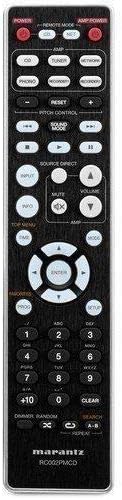
Figure 3: The remote control unit for the Marantz CD5005 CD Player. This remote allows for comprehensive control of the CD player's functions, including playback, track selection, pitch control, and display dimmer.
The included remote control unit provides full functionality for the CD5005, including features not available on the front panel such as pitch control, display dimmer, track randomization, and various repeat functions. It also allows for control of other compatible Marantz components.
Nastavení
1. Umístění
Place the CD5005 on a stable, level surface away from direct sunlight, heat sources, and excessive vibration. Ensure there is adequate space around the unit for proper ventilation.
2. Připojení audio kabelů
Choose one of the following methods to connect the CD5005 to your ampzáchranář nebo přijímač:
- Analogové připojení: Use the supplied L/R analog audio cables to connect the AUDIO OUT jacks on the CD5005 to the corresponding CD input jacks on your amplifier. Ensure red plugs connect to red jacks (right channel) and white plugs to white jacks (left channel).
- Digitální koaxiální připojení: Use the supplied digital coaxial cable to connect the COAXIAL DIGITAL AUDIO OUT jack on the CD5005 to a digital coaxial input on your ampzvlhčovač nebo přijímač.
- Digitální optické připojení: Use an optical digital audio cable (not supplied) to connect the OPTICAL DIGITAL AUDIO OUT jack on the CD5005 to a digital optical input on your ampzvlhčovač nebo přijímač.
Poznámka: Do not connect both analog and digital outputs to the same input on your amplifier simultaneously, as this may cause interference or unexpected behavior. Select the appropriate input on your amplifier after connecting.
3. Připojení napájecího kabelu
Connect the detachable power cord to the AC inlet on the rear panel of the CD5005, then plug the other end into a suitable AC wall outlet.
4. Instalace baterií dálkového ovládání
Open the battery compartment on the back of the remote control unit. Insert two AA batteries, ensuring correct polarity (+/-) as indicated inside the compartment. Close the cover securely.
Návod k obsluze
Basic CD Playback
- Stiskněte tlačítko MOC tlačítko na předním panelu nebo na dálkovém ovladači pro zapnutí jednotky.
- Stiskněte tlačítko OTEVŘÍT/ZAVŘÍT tlačítko pro otevření zásuvky na disk.
- Place a CD, CD-R, CD-RW, MP3, or WMA disc onto the disc tray with the label side facing up.
- Stiskněte tlačítko OTEVŘÍT/ZAVŘÍT znovu stiskněte tlačítko pro zavření přihrádky na disk. Přístroj načte disk.
- Stiskněte tlačítko HRÁT tlačítko pro spuštění přehrávání.
- Chcete-li přehrávání pozastavit, stiskněte tlačítko PAUZA tlačítko. Stiskněte znovu pro obnovení.
- Přehrávání zastavíte stisknutím tlačítka ZASTÁVKA tlačítko.
- Použijte PŘESKOČIT tlačítka pro navigaci mezi skladbami.
Advanced Features (Remote Control)
- Ovládání výšky: Použijte OVLÁDÁNÍ PITCH buttons on the remote to adjust the playback speed and pitch.
- Zobrazení textu CD: If a disc supports CD Text, the display will show track and artist information. Use the ZOBRAZIT button on the remote to cycle through display modes.
- Opakované přehrávání: Stiskněte tlačítko OPAKOVAT button on the remote to select repeat modes (e.g., repeat one track, repeat all tracks, repeat A-B segment).
- Náhodné přehrávání: Stiskněte tlačítko NÁHODNÝ button on the remote to play tracks in a random order.
- Sluchátkový výstup: Connect headphones to the front panel headphone jack. Adjust the ÚROVEŇ knob next to the jack to control headphone volume independently. Note that plugging in headphones does not mute the main analog or digital outputs.
- Ovládání aplikace: The CD5005 supports app control via RC-5 with a compatible Marantz network player. Refer to the network player's manual for details on this integration.
Údržba
Čištění jednotky
Wipe the exterior surfaces of the CD5005 with a soft, dry cloth. Do not use abrasive cleaners, waxes, or solvents, as these can damage the finish. Avoid spraying liquids directly onto the unit.
Disc Handling and Care
- Always hold discs by their edges to prevent fingerprints and scratches on the playing surface.
- If a disc is dirty, wipe it gently from the center outwards with a soft, lint-free cloth. Do not use circular motions.
- Do not use solvents such as benzene, thinner, or commercially available record cleaners, as they may damage the disc.
- Pokud disky nepoužíváte, uchovávejte je v obalech, abyste je chránili před prachem a poškrábáním.
- Avoid exposing discs to direct sunlight or high temperatures for extended periods.
Odstraňování problémů
If you experience issues with your Marantz CD5005, refer to the following common problems and solutions:
| Problém | Možná příčina | Řešení |
|---|---|---|
| Žádná síla | Napájecí kabel není bezpečně připojen. | Zkontrolujte připojení napájecího kabelu k jednotce a do zásuvky. |
| Žádný zvukový výstup | Nesprávné připojení audio kabelu; vybrán nesprávný vstup amplifikátor; amppříliš nízký objem plnicího zařízení. | Zkontrolujte připojení audio kabelu. Vyberte správný vstup na vašem ampzáchranář. Zvýšení ampobjem čističky. |
| Disc does not play / "No Disc" error | Disc inserted incorrectly; disc is dirty or scratched; disc format not supported. | Insert disc with label side up. Clean the disc. Try a different disc. Ensure disc format (CD, CD-R/RW, MP3, WMA) is supported. |
| Skipping or intermittent playback | Disc is dirty or scratched; unit is subject to vibration. | Clean the disc. Place the unit on a stable surface away from vibrations. |
| Dálkové ovládání nefunguje | Batteries are depleted or inserted incorrectly; obstacle between remote and unit; remote sensor blocked. | Replace batteries, ensuring correct polarity. Remove any obstacles. Ensure the remote sensor on the unit is clear. |
Pokud problém přetrvává i po vyzkoušení těchto řešení, kontaktujte zákaznickou podporu Marantz.
Specifikace
| Funkce | Detail |
|---|---|
| Číslo modelu | CD5005 |
| Kompatibilita disků | CD, CD-R/RW, MP3, WMA |
| Digitálně-analogový převodník (DAC) | CS4398 |
| Analog Output Circuit | Marantz HDAM SA2 |
| Výstupy | Analog L/R (Gold-plated), Digital Coaxial, Digital Optical, Headphone |
| Speciální funkce | Pitch Control, CD Text Display, App Control (via RC-5 with Marantz network player), Auto Standby |
| Spotřeba energie (pohotovostní režim) | Nízký |
| Rozměry výrobku (Š x H x V) | 17.3 x 14.6 x 4.1 palce (43.9 x 37.1 x 10.4 cm) |
| Hmotnost položky | 11.02 libry (5.0 kg) |
| Výrobce | Marantz |
| Barva | Černý |
Záruka a podpora
For warranty information and customer support, please refer to the warranty card included with your product or visit the official Marantz webUschovejte si doklad o koupi pro případ reklamace.
Oficiální Marantz Webmísto: www.marantz.com


