Zavedení
This manual provides detailed instructions for the safe and proper installation and operation of your Mounting Dream MD2393-MX Full Motion TV Wall Mount. This mount is designed for most 26-55 inch LED, LCD, OLED, and Plasma flat screen TVs weighing up to 60 lbs, with VESA patterns ranging from 100x100mm to 400x400mm. Please read all instructions carefully before beginning installation.
Důležité bezpečnostní informace
WARNING: Failure to read and follow all instructions can result in personal injury, property damage, or voiding of your warranty.
- Do not install on drywall alone. This mount is designed for single wood stud or concrete/brick walls.
- Ujistěte se, že hmotnost vašeho televizoru nepřesahuje 27.2 kg.
- Verify your TV's VESA pattern is within 100x100mm to 400x400mm.
- Pro přesné nalezení dřevěných trámů vždy používejte detektor trámů.
- For concrete or brick walls, concrete anchors are required and can be requested if not included.
- Check for potential cable blockage by the mount before final installation.
- Pokud máte jakékoli pochybnosti o instalaci, poraďte se s kvalifikovaným odborníkem.
Obsah balení
Please check that all parts are included and undamaged. If any parts are missing or defective, contact customer service.
- Full Motion TV Wall Mount Assembly
- TV Brackets (for attaching to TV back)
- Wall Plate (main wall-mounted component)
- Assorted TV Screws and Spacers
- Lag Bolts for Wall Mounting
- Úroveň bublin
- Cable Ties (3 included)
- Návod k použití
- Concrete Anchors (available upon request for concrete/brick installation)
Specifikace
| Funkce | Detail |
|---|---|
| Číslo modelu | MD2393-MX |
| Kompatibilní velikosti TV | 26-55 palců |
| Maximální hmotnost televizoru | 60 lb (27.2 kg) |
| Kompatibilita VESA | 100x100mm až 400x400mm |
| Typ montáže | Držák na zeď |
| Typ pohybu | Swivel, Tilt, Full Motion, Articulating |
| Úhel náklonu | Nahoru 5°, dolů 15° |
| Úhel otočení | Až ±90° (v závislosti na úhlopříčce televizoru) |
| Prodloužení od zdi | 2.9 palce (zasunuté) až 19 palce (vysunuté) |
| Nastavení vyrovnání | ±5° po instalaci |
| Kompatibilní typy stěn | Single Wood Stud, Concrete/Brick Wall (Do not install on drywall only) |
| Materiál | Kov |
| Barva | Černý |
Nastavení a instalace
Follow these steps for a secure installation. Ensure you have all necessary tools (e.g., drill, stud finder, level, screwdriver, wrench).
Step 1: Prepare the TV and Mount
- Disassemble the Wall Plate: The mount unit may come assembled. Carefully disassemble the wall plate from the TV plate using the provided tools.
- Připevnění držáků k TV: Secure the TV brackets to the back of your television using the appropriate screws and spacers from the hardware kit. Ensure all screws are tightened securely.
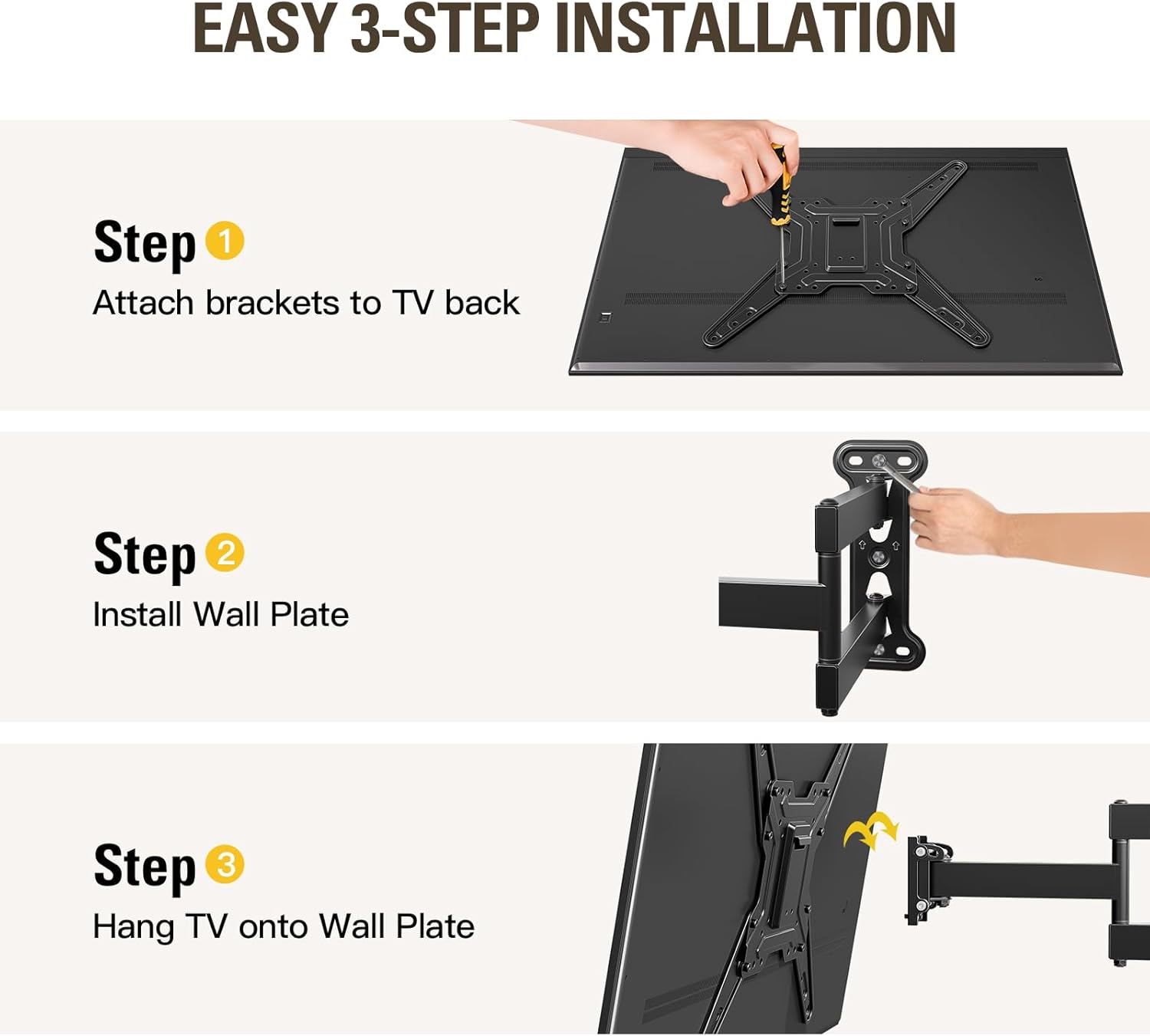
Obrázek 1: Přesview tříkrokového procesu instalace.
Krok 2: Připravte zeď
- Identifikujte typ stěny: This mount is suitable for single wood stud or concrete/brick walls. DO NOT install on drywall only.
- Vyhledání sloupků (pro instalaci dřevěných sloupků): Use a stud finder to accurately locate the center of the wood stud where you intend to mount the TV. Mark the drilling locations.
- Označte montážní otvory: Use the wall plate as a template to mark the precise drilling locations on the wall. Use the included bubble level to ensure the marks are perfectly horizontal.
- Vrtací pilotní otvory: Drill pilot holes at the marked locations. The size of the drill bit will depend on your wall type and the lag bolts provided. For wood studs, ensure the pilot hole is slightly smaller than the lag bolt. For concrete/brick, use a masonry drill bit and insert concrete anchors (if applicable).

Figure 2: Pre-installation checks for TV compatibility and wall type.
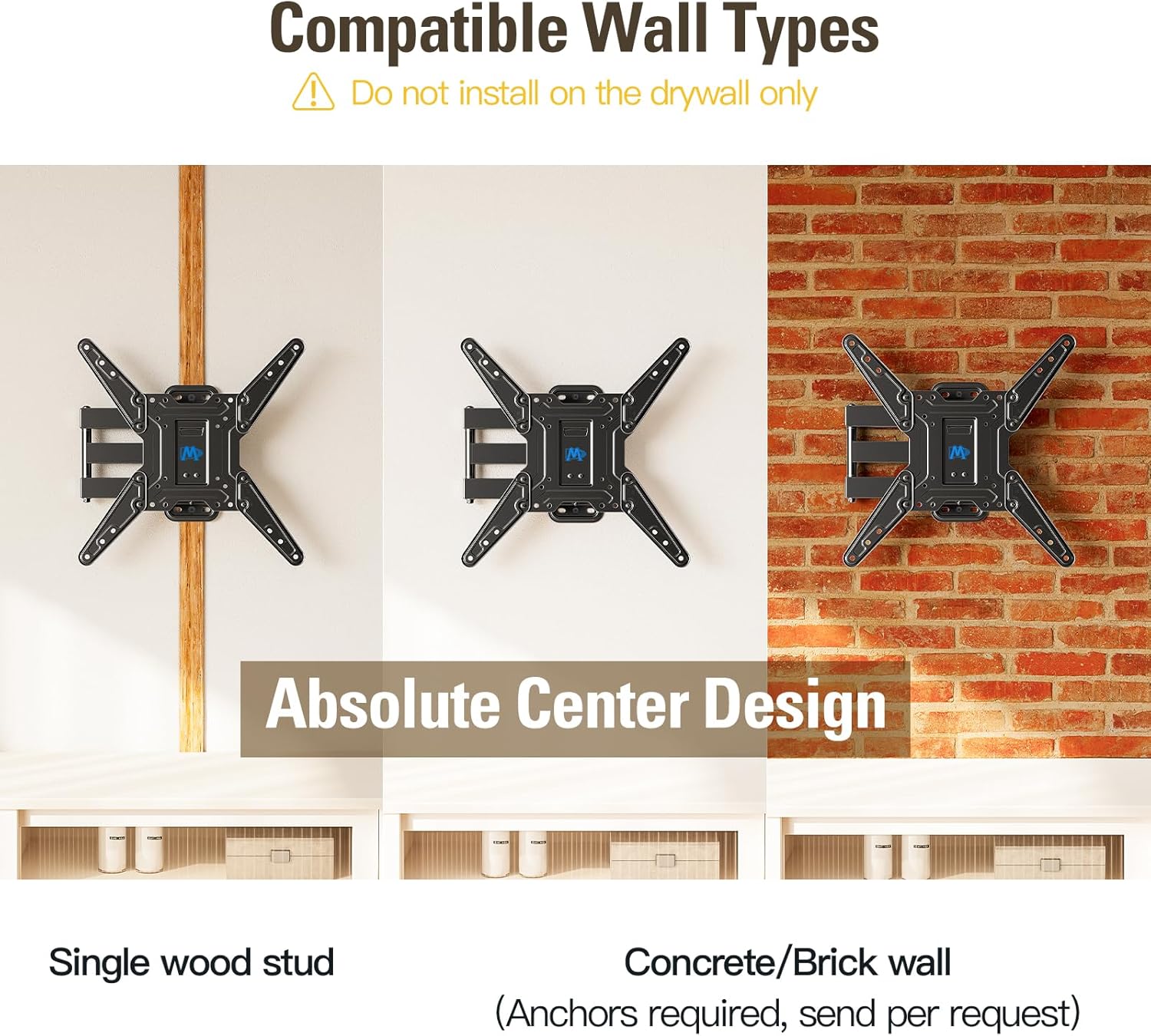
Figure 3: Compatible wall types for installation.
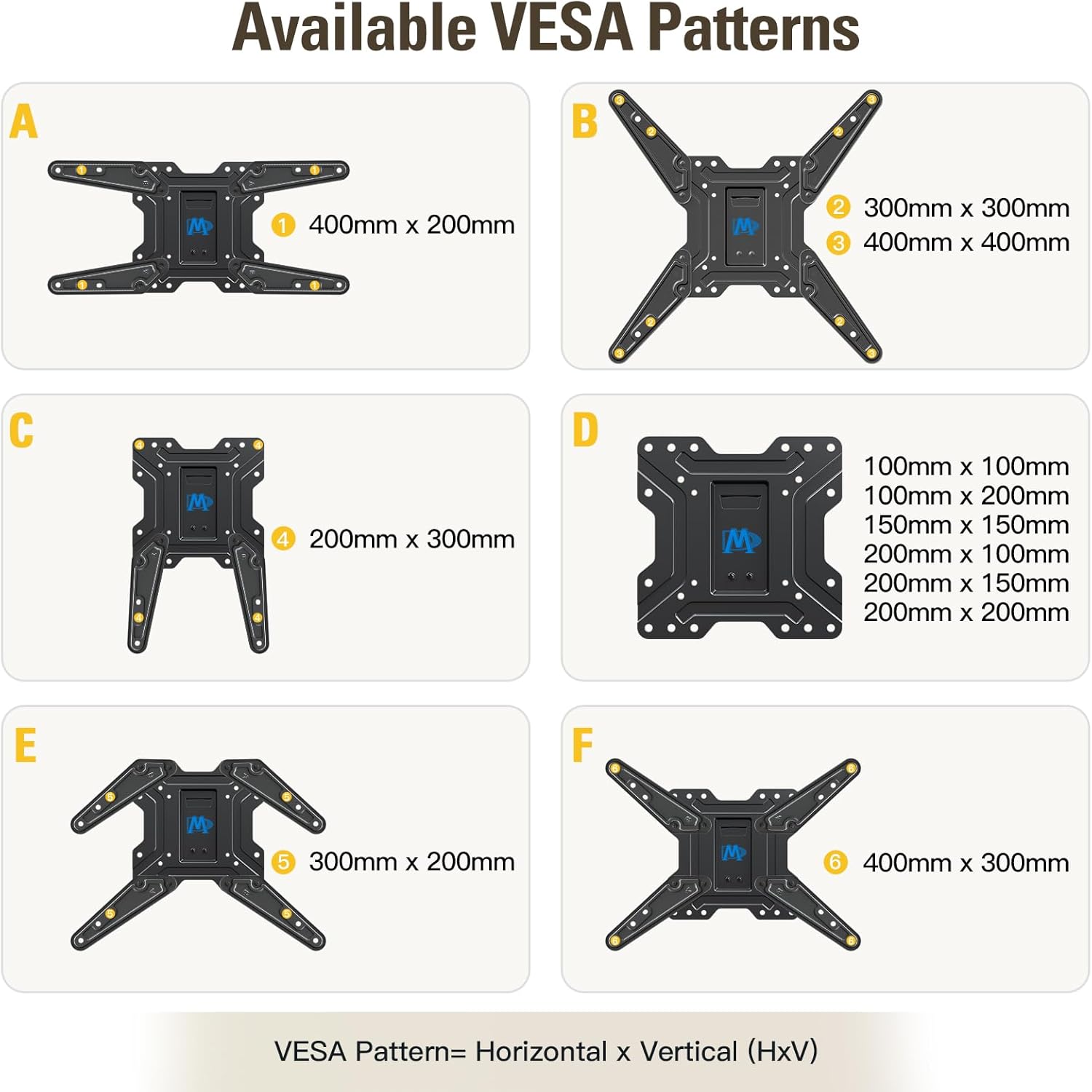
Figure 4: Available VESA patterns and their measurements.
Step 3: Install Wall Plate and Hang TV
- Připevnění nástěnné desky ke zdi: Align the wall plate with the drilled pilot holes. Secure it to the wall using the lag bolts. Tighten them firmly but do not overtighten.
- Zavěšení televizoru na nástěnnou desku: Carefully lift your TV (with brackets attached) and hook it onto the wall plate. Ensure it is seated correctly and securely.
- Připevnění televizoru k nástěnné desce: Tighten the two security screws located on the TV brackets to prevent accidental dislodgement.
Video 1: Mounting Dream TV Wall Mount Installation MD2393-MX. This video demonstrates the step-by-step process of installing the TV wall mount, including preparing the TV, marking the wall, and securing the mount and TV.
Video 2: Full Motion TV Wall Mount MD2393-MX Installation Guide. A comprehensive guide to installing the full motion TV wall mount, covering all essential steps for a secure setup.
Ovládání držáku televizoru
The MD2393-MX mount offers versatile adjustments for optimal viewpohodlí.
Adjusting the TV Position
- Vysunutí a zasunutí: Gently pull the TV forward to extend it up to 19 inches from the wall, or push it back to retract it to a slim 2.9 inches.
- Otočný: The articulating arm allows you to swivel the TV left or right up to ±90°, depending on your TV size, to achieve the best viewing angle from any seat.
- Náklon: Adjust the TV's vertical angle by tilting it up 5° or down 15° to reduce glare and improve viewpohodlí.
- Nastavení nivelace: After installation, you can make a ±5° post-installation leveling adjustment to ensure your TV is perfectly horizontal.

Figure 5: Extend and Retract functionality of the mount.

Figure 6: Swivel capability for best viewúhel.

Figure 7: Tilt function to reduce glare.

Figure 8: Easy post-installation leveling adjustment.
Údržba
Pravidelná údržba zajistí dlouhou životnost a bezpečnost vašeho televizního držáku.
- Pravidelná prohlídka: Pravidelně kontrolujte všechny šrouby a spoje, abyste se ujistili, že jsou pevně utažené a bezpečné.
- Čištění: Otřete držák měkkým, suchým hadříkem, abyste odstranili prach. Nepoužívejte abrazivní čisticí prostředky ani rozpouštědla.
- Mazání: If the articulating arm movement becomes stiff over time, a small amount of silicone-based lubricant can be applied to the pivot points.
Odstraňování problémů
Pokud narazíte na nějaké problémy, podívejte se na následující běžná řešení:
- Televizor není vodorovně umístěn: Use the post-installation leveling adjustment feature (±5°) to correct the tilt. Ensure the wall plate was installed level initially.
- Držák se zdá být uvolněný: Re-check all wall and TV attachment screws. Ensure they are tightened securely. If installed on a wood stud, confirm the lag bolts are firmly seated in the stud. If on concrete/brick, ensure anchors are properly installed.
- Obtíže s pohybem paže: Check for any obstructions. If the joints are stiff, apply a small amount of silicone lubricant.
- Cables are blocked: Before final installation, ensure the mount does not block any TV input ports. If already installed, carefully reroute cables or consider using angled adapters.
If problems persist, contact Mounting Dream customer support.
Záruka a podpora
Mounting Dream products are backed by a 10-letá záruka, což odráží náš závazek ke kvalitě a trvanlivosti.
For any pre-purchase questions, installation assistance, or technical support, our US-based customer service team is ready to help. Please refer to the contact information provided with your product packaging or visit the official Mounting Dream webstránky pro podporu.


