Zavedení
This instruction manual provides essential information for the proper use and care of your FINTIE Protective Case for the Samsung Galaxy Tab 4 10.1. Please read this manual thoroughly before installation and use to ensure optimal performance and longevity of your product.
Kompatibilita
This FINTIE protective case is specifically designed for the Samsung Galaxy Tab 4 10.1-inch models SM-T530 and SM-T535. It is crucial to verify your tablet's model number to ensure proper fit and function.

Popis obrázku: This image displays a compatibility chart. It clearly indicates that the case is compatible with the Samsung Galaxy Tab 4 10.1 (models T530/T535), marked with a green checkmark. It also shows other tablet models, such as Tab A 10.1 S Pen (P580), Tab A 10.1 (T580/T585/T587), and Note 10.1 (2014), marked with red 'X's, indicating they are not compatible with this case. This visual guide helps users confirm their tablet model.
Poznámka: Tento případ je ne compatible with Samsung Galaxy Tab A 10.1 (models T580/T585/T587), Samsung Galaxy Tab A 10.1 S Pen (model P580), or Samsung Galaxy Note 10.1 (2014).
Setup: Installing Your Tablet
- Připravte si případ: Open the FINTIE protective case completely.
- Zarovnejte tablet: Carefully align your Samsung Galaxy Tab 4 10.1 with the case's frame, ensuring that all ports, buttons, and camera cutouts match.
- Vložte tablet: Gently press the tablet into the case, starting with one corner and working your way around. Ensure all edges of the tablet are securely seated within the case's protective frame.
- Ověření vhodnosti: Once installed, check that the tablet is firmly held and that all buttons and ports are accessible and unobstructed.
Návod k obsluze
Funkce automatického spánku/probuzení
The case features an integrated magnetic strip that supports the tablet's automatic sleep/wake function. This conserves battery life by turning the screen off when the cover is closed and turning it on when opened.
- To activate sleep: Close the front cover of the case. The tablet screen will automatically turn off.
- To activate wake: Open the front cover of the case. The tablet screen will automatically turn on.

Popis obrázku: This image illustrates the auto sleep/wake function. On the left, the case is shown open with the tablet screen active, displaying the time. On the right, the case is shown closed, indicating the tablet is in sleep mode. This demonstrates how opening and closing the cover automatically controls the tablet's screen.
Násobek Viewúhly
The case is designed to provide two distinct viewing angles, allowing for comfortable use whether typing, watching videos, or browsing.
- Upright Angle: Fold the front cover back to create a triangular stand for an upright viewing position, ideal for media consumption.
- Lower Angle: Fold the cover into a shallower triangle for a lower, more ergonomic typing or drawing angle.

Popis obrázku: This image shows the FINTIE case supporting a tablet in two different viewing angles. One angle is more upright, suitable for watching videos, while the other is a lower, more reclined angle, suitable for typing or drawing. This highlights the versatility of the case's stand feature.
Easy Response Buttons and Full Screen Display
The case is precisely cut to ensure that all buttons, ports, and the full screen display remain easily accessible and fully functional without obstruction.
- Přístup k tlačítkům: The volume and power buttons are designed to be easily responsive through the case, ensuring a seamless user experience.
- Přístup k portu: All charging ports, headphone jacks, and speaker cutouts are precisely aligned for unhindered access.
- Celá obrazovka View: The case frame does not impede the tablet's screen, allowing for a full and unobstructed display.
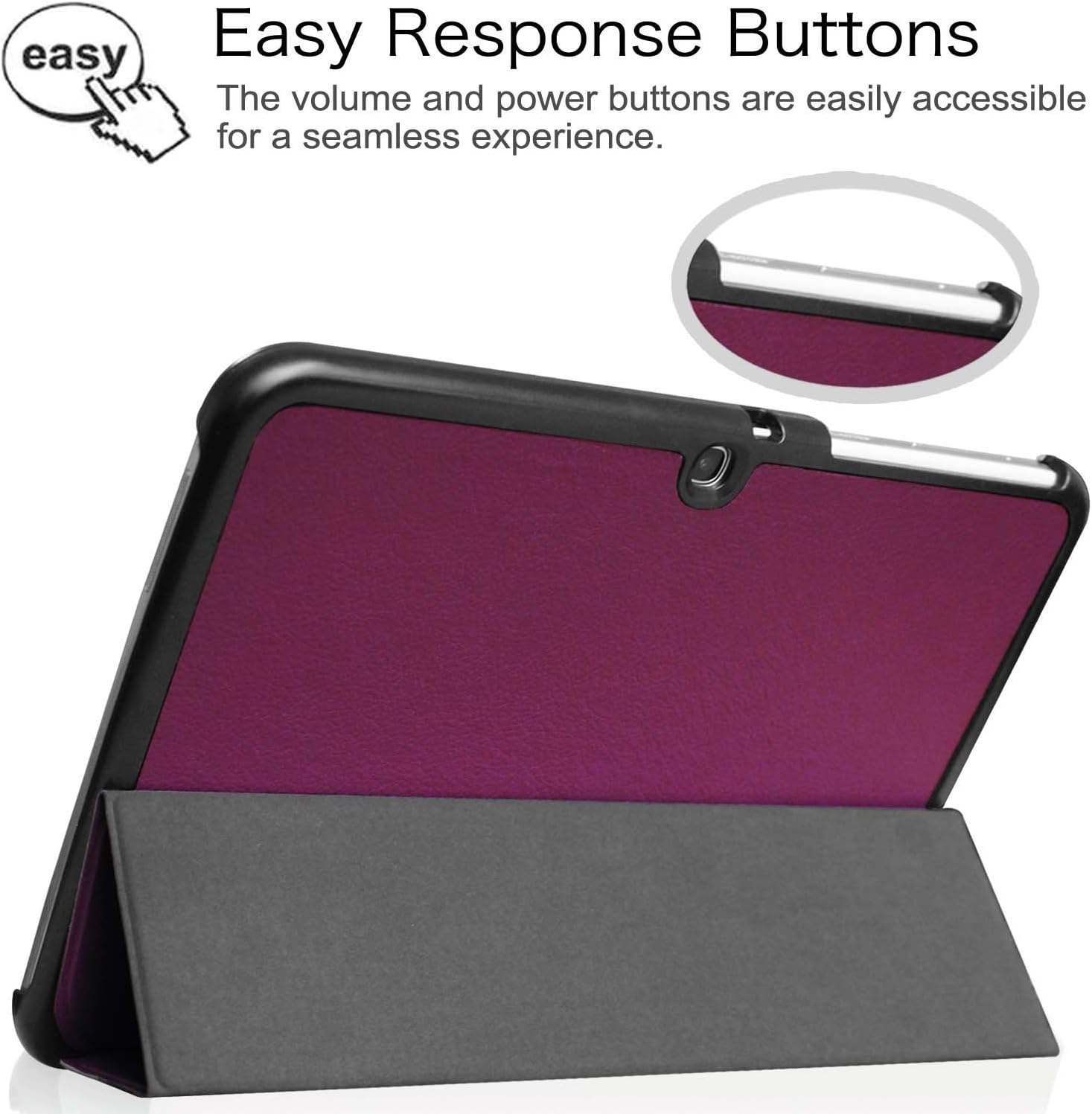
Popis obrázku: This image focuses on the side of the tablet case, highlighting the precise cutouts for the volume and power buttons. A finger icon points to the buttons, indicating their easy accessibility and responsiveness even with the case installed.

Popis obrázku: This image shows a tablet securely fitted within the FINTIE case, with the screen fully visible and unobstructed. Arrows around the screen edges emphasize that the case allows for a complete and hassle-free display experience.
Microfiber Interior
The interior of the case is lined with a soft, scratch-free microfiber material. This provides an additional layer of protection for your tablet's screen and helps keep it clean.

Popis obrázku: This image displays the open FINTIE case, highlighting its soft, gray microfiber interior lining. The texture of the microfiber is visible, emphasizing its protective quality for the tablet's screen.
Údržba
- Čištění exteriéru: Použijte měkký, damp cloth to wipe the exterior PU leather surface. Avoid abrasive cleaners or solvents, as these can damage the material.
- Čištění interiéru: For the microfiber interior, use a dry, lint-free cloth to gently wipe away dust or smudges. Do not use liquid cleaners on the microfiber.
- Vyhněte se extrémním podmínkám: Nevystavujte pouzdro extrémním teplotám, delšímu přímému slunečnímu záření ani nadměrné vlhkosti.
- Zacházejte opatrně: While the case provides protection, avoid dropping the tablet or subjecting it to strong impacts.
Odstraňování problémů
- Pouzdro se nehodí:
Ensure your tablet is a Samsung Galaxy Tab 4 10.1 (models SM-T530 or SM-T535). Refer to the "Compatibility" section. If your model is different, the case will not fit correctly.
- Auto Sleep/Wake Not Working:
Verify that the tablet is correctly seated in the case and that the magnetic strip in the cover aligns with the tablet's sensor. Ensure your tablet's settings allow for the magnetic sleep/wake function (this is usually enabled by default).
- Buttons or Ports Blocked:
Check that the tablet is inserted correctly and fully seated within the case. Minor adjustments may be needed to align the tablet perfectly with the case's cutouts.
Specifikace
| Značka | FINTIE |
| Číslo modelu | ESP0021 |
| Kompatibilní zařízení | Samsung Galaxy Tab 4 10.1 (SM-T530, SM-T535) |
| Materiál | PU Leather (Exterior), Microfiber (Interior) |
| Speciální funkce | Lightweight, Auto Sleep/Wake Function, Multiple Viewúhly |
| Barva | Fialová |
| Form Factor | Věc |
| Typ pouzdra | Tvrdý |
| Max Compatible Device Size | 10.1 palce |
Záruka a podpora
FINTIE products are manufactured with quality and durability in mind. For information regarding warranty coverage, product support, or to contact customer service, please refer to the official FINTIE website or the retailer from whom you purchased the product. Please retain your proof of purchase for any warranty claims.


