1. Úvod
This manual provides detailed instructions for the installation, operation, and maintenance of your ASUS Z97-A ATX DDR3 LGA 1150 Motherboard. Please read this manual thoroughly before proceeding with installation to ensure proper setup and optimal performance.
Klíčové vlastnosti
- 5-Way Optimization by Dual Intelligent Processors 5: Integrated system tuning for performance, efficiency, digital power, fan control, and networking.
- SATA Express & M.2 Support: High-speed data transfer interfaces up to 10Gb/s for modern storage devices.
- Turbo App: Application-specific optimization for enhanced performance.
- Vzdálené GO!: Remote control and media streaming capabilities.
- Krystalový zvuk 2: Enhanced audio solution for clear sound reproduction.
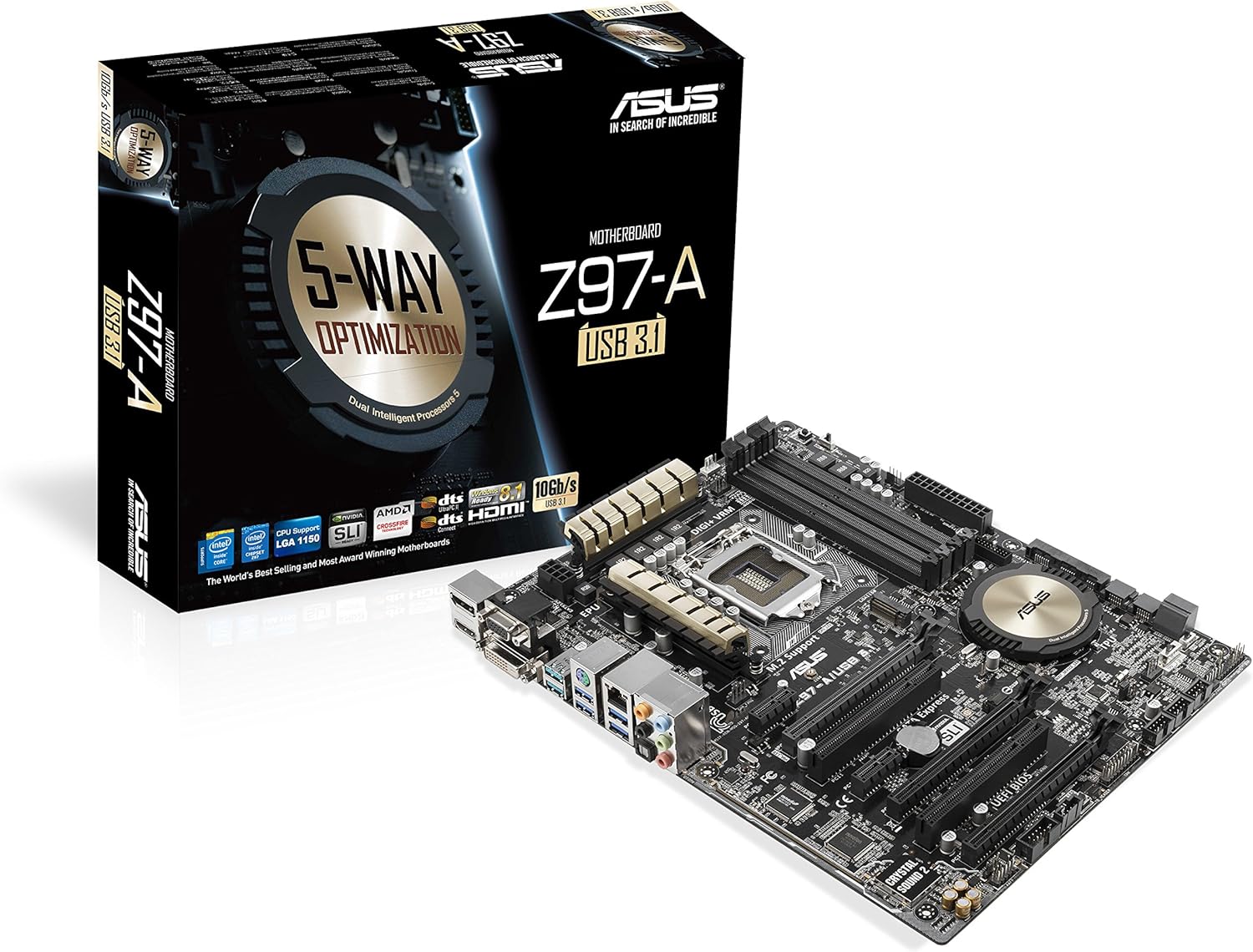
Figure 1: ASUS Z97-A Motherboard and its retail packaging.
2. Nastavení a instalace
2.1 Než začnete
- Bezpečnostní opatření: Před instalací nebo demontáží jakýchkoli součástí vždy odpojte napájení. Používejte antistatický náramek, abyste zabránili poškození elektrostatickým výbojem (ESD).
- Kompatibilita komponent: Ensure all components (CPU, RAM, GPU, power supply) are compatible with the ASUS Z97-A motherboard. Refer to the specifications section for details.
2.2 Kroky instalace komponent
- Nainstalujte procesor: Carefully open the CPU socket lever, align the CPU with the socket (matching the golden triangle on the CPU to the triangle on the socket), gently place the CPU into the socket, and close the lever.
- Instalace chladiče CPU: Attach the CPU cooler according to its manufacturer's instructions. Ensure proper thermal paste application and secure mounting.
- Instalace paměťových modulů (RAM): Open the clips on the DIMM slots. Align the RAM module with the slot key, press down firmly on both ends until the clips snap into place. For dual-channel operation, install modules in matching color slots.
- Instalace úložných zařízení: Connect SATA drives to the SATA 6Gb/s ports using SATA data cables. If using an M.2 SSD, install it into the M.2 slot and secure it with the provided screw.
- Instalace rozšiřujících karet: Insert graphics cards or other PCIe cards into the appropriate PCIe slots. Ensure they are seated firmly and secured with a screw to the chassis.
- Připojte napájecí zdroj: Connect the 24-pin ATX power connector and the 8-pin CPU power connector from your power supply to the motherboard. Connect power to all other components (graphics card, storage drives).
- Montáž základní desky do skříně: Carefully place the motherboard into your PC case, aligning it with the standoffs. Secure the motherboard with screws.
- Připojení kabelů předního panelu: Connect the power button, reset button, HDD LED, power LED, and USB/audio headers from your case to the corresponding pins on the motherboard. Refer to the motherboard layout diagram for exact locations.

Obrázek 2: Shora dolů view of the ASUS Z97-A Motherboard, showing component layout.

Figure 3: Rear I/O panel of the ASUS Z97-A Motherboard, featuring various connectivity options.

Figure 4: Included accessories for the ASUS Z97-A Motherboard, such as the I/O shield and cables.
3. Obsluha systému
3.1 První spuštění a nastavení BIOSu/UEFI
Upon the first power-on, your system will typically enter the BIOS (Basic Input/Output System) or UEFI (Unified Extensible Firmware Interface) setup utility. This interface allows you to configure fundamental system settings.
- Přístup k BIOSu/UEFI: Stiskněte tlačítko DEL klíč nebo F2 key during the Power-On Self-Test (POST) to enter the BIOS/UEFI setup.
- Základní nastavení: Configure boot order, date/time, and enable/disable integrated peripherals. Save changes before exiting.
3.2 Softwarové nástroje
ASUS provides a suite of software tools to enhance your motherboard's functionality and performance. The primary utility is AI Suite 3.
- 5-cestná optimalizace: Automatically tunes your system for optimal performance, energy efficiency, digital power control, fan settings, and network prioritization.
- Fan Xpert 3: Advanced fan control for precise cooling and reduced noise.
- Zvýšení výkonu USB 3.0: Accelerates USB 3.0 transfer speeds.
4. Údržba
4.1 Driver and BIOS Updates
Regularly updating your motherboard's drivers and BIOS/UEFI firmware is crucial for system stability, performance, and compatibility with new hardware or software.
- Ovladače: Download the latest drivers for your chipset, audio, LAN, and other integrated components from the official ASUS support webmísto.
- BIOS/UEFI: Zkontrolujte podporu ASUSu website for the latest BIOS/UEFI versions. Follow the provided instructions carefully for updating to avoid system instability.
4.2 Fyzické čištění
Dust accumulation can lead to overheating and reduced component lifespan. Regular cleaning is recommended.
- Frekvence: Clean your system every 3-6 months, or more frequently in dusty environments.
- Metoda: Use compressed air to remove dust from fans, heatsinks, and other components. Ensure the system is powered off and unplugged before cleaning.
5. Řešení problémů
Tato část se zabývá běžnými problémy, se kterými se můžete setkat během nastavení nebo provozu.
- Bez napájení: Verify all power cables are securely connected to the motherboard and components. Check the power supply unit (PSU) switch.
- Bez displeje: Ensure the monitor is connected to the correct video output (either integrated graphics or a dedicated graphics card). Reseat the graphics card and RAM modules.
- Systém se nepodaří spustit: Check for any diagnostic LEDs or POST codes on the motherboard that might indicate a specific component failure. Reseat CPU, RAM, and expansion cards.
- Součást nebyla detekována: Verify that the component is correctly installed and its drivers are up-to-date. Check BIOS/UEFI settings to ensure the component is enabled.
- Přehřívání: Ensure CPU cooler is properly installed, fans are spinning, and case airflow is adequate. Clean dust from heatsinks and fans.
If issues persist, consult the detailed troubleshooting guide on the ASUS support webwebu nebo kontaktujte technickou podporu.
6. Specifikace
| Funkce | Specifikace |
|---|---|
| Značka | ASUS |
| Série | Z97-A |
| Zásuvka CPU | LGA 1150 |
| Kompatibilní procesory | Intel Core i3-4xxx, Intel Core i5-4xxx, Intel Core i7-4xxx, Intel Core i3-5xxx, Intel Core i5-5xxx, Intel Core i7-5xxx |
| Typ čipové sady | Intel Z97 |
| Technologie paměti RAM | DDR3 SDRAM |
| Rychlost paměti | 1600 MHz (up to 3200 MHz OC) |
| Kapacita paměti (max.) | 32 GB |
| Rozměry produktu (DxŠxV) | 10.4 x 2.7 x 12.9 palce |
| Hmotnost položky | 3.2 unce |
| Porty USB 2.0 | 2 (zadní) + interní headery |
| Porty USB 3.0 | 6 (4 rear, 2 via internal header) |
| Video výstupy | DisplayPort, HDMI, DVI, VGA |
| LAN | Gigabitová síťová karta Intel |
| Zvuk | 8kanálový kodek Realtek ALC892 pro zvuk s vysokým rozlišením |
| Úložná rozhraní | SATA 6Gb/s, SATA Express, M.2 |
7. Záruka a podpora
ASUS products are manufactured to the highest quality standards. For specific warranty terms and conditions applicable to your region, please refer to the warranty card included with your product or visit the official ASUS webmísto.
Pro technickou pomoc, stažení ovladačů, aktualizace systému BIOS a další informace o produktech navštivte oficiální stránky podpory ASUS. webmísto:
8. Další zdroje
Video 1: Overview of the ASUS Z97-A Motherboard, highlighting its features and capabilities.


