Zavedení
The Korg PA300 is a professional arranger keyboard designed to provide a rich musical experience. It incorporates Korg's advanced RX (Real eXperience) technology, delivering high-quality sounds and a wide range of musical styles. This manual provides essential information for setting up, operating, maintaining, and troubleshooting your PA300.
Klíčové vlastnosti:
- Enhanced RX (Real eXperience) sound engine for improved realism and vivid sound.
- Massive internal factory PCM memory, equivalent to the best-selling PA600.
- Elegantly designed and compact cabinet with a pristine ampzvedací systém.
- Over 310 factory styles, each including 3 Intro/Endings, 4 Variations, 4 Fill Ins, Breaks, and more.
- Fully programmable SongBook database with instant recall of any song setting.
Průvodce nastavením
This section guides you through the initial setup of your Korg PA300 keyboard.
1. Vybalení a umístění
Carefully remove the PA300 from its packaging. Place the keyboard on a stable, flat surface, such as a keyboard stand or a sturdy table. Ensure there is adequate space around the instrument for ventilation and access to connections.

Obrázek 1: Přední strana view of the Korg PA300 keyboard.

Figure 2: Korg PA300 set up on a keyboard stand, ready for use.
2. Připojení napájení
Connect the supplied AC adapter to the DC IN jack on the rear panel of the PA300. Plug the other end of the adapter into a standard electrical outlet. Ensure the power switch is in the OFF position before connecting the power.

Obrázek 3: Připojení na zadním panelu, včetně konektoru DC IN.
3. Connecting Audio and Accessories
- Sluchátka: Connect headphones to the 3.5mm Jack on the rear panel for private practice.
- Externí audio systém: Use the audio output jacks to connect the PA300 to an external amplifier, mixer, or powered speakers.
- pedály: If using an optional sustain pedal or other foot controllers, connect them to the appropriate pedal jacks.
Návod k obsluze
This section covers the basic operation of your Korg PA300.
1. Powering On and Initial Screen
Press the power button to turn on the PA300. The instrument will go through a brief startup sequence. Once complete, the main operating screen will appear on the TFT Color TouchView Zobrazit.
2. Navigating the TouchView Zobrazit
The PA300 features a responsive TouchView display for intuitive control. Tap on icons, menus, and parameters directly on the screen to select and adjust settings. Use the physical buttons and data entry dial for additional navigation and fine-tuning.
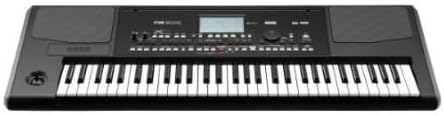
Figure 4: Close-up of the PA300's control panel and TouchView zobrazit.
3. Selecting Sounds and Styles
- zvuky: Access the Sound selection menu via the display to choose from a wide variety of instrument sounds, including pianos, guitars, strings, brass, and more.
- Styly: The PA300 offers over 310 factory styles. Select a style to instantly generate a full backing band. Each style includes multiple intros, endings, variations, and fill-ins to enhance your performance.
4. Using the SongBook Feature
The SongBook is a fully programmable database that allows you to organize and instantly recall settings for your favorite songs. You can store specific styles, sounds, effects, and other parameters for quick access during live performances or practice sessions.
Údržba
Proper care and maintenance will ensure the longevity and optimal performance of your Korg PA300.
- Čištění: Use a soft, dry cloth to wipe down the surface of the keyboard. For stubborn dirt, slightly damphadřík vodou. Nepoužívejte abrazivní čisticí prostředky, rozpouštědla nebo vosky, protože by mohly poškodit povrchovou úpravu.
- Péče o klíče: Keep the keys clean and free of dust. Avoid pressing keys with excessive force.
- Skladování: When not in use for extended periods, store the PA300 in a cool, dry place, away from direct sunlight, extreme temperatures, and high humidity. Consider using a dust cover to protect the instrument.
- Aktualizace softwaru: Pravidelně kontrolujte oficiální Korg website for any available firmware updates. Keeping your instrument's software up-to-date can improve performance and add new features.
Odstraňování problémů
This section provides solutions to common issues you might encounter with your Korg PA300.
Žádný zvukový výstup
- Kontrola hlasitosti: Ensure the master volume knob is turned up and not at its minimum setting.
- Sluchátka: If headphones are connected, sound will typically be routed only to them. Disconnect headphones to hear sound from the internal speakers or external outputs.
- Spojení: Verify that all audio cables are securely connected to the correct input/output jacks on both the PA300 and any external audio equipment.
- Externí systém: Pokud používáte externí amplifier or speakers, ensure they are powered on and their volume is adjusted appropriately.
Display Not Responding or Frozen
- Restartovat: Turn the PA300 off, wait a few seconds, and then turn it back on. This often resolves temporary software glitches.
- Cyklus napájení: Disconnect the power adapter from the wall outlet and the keyboard, wait for a minute, then reconnect and power on.
Klávesy nereagují
- Zkontrolujte nastavení: Ensure that local control is enabled if you are using the internal sounds. Refer to the advanced settings in the on-screen menu.
- Čistota: Ujistěte se, že se pod klávesami nenacházejí žádné nečistoty.
Specifikace
Detailed technical specifications for the Korg PA300.
| Funkce | Detail |
|---|---|
| Název modelu | PA300 |
| Počet klíčů | 61 |
| Hmotnost položky | 26.01 libry (přibližně 11.8 kg) |
| Rozměry produktu | 45.9 x 21.25 x 10.62 palců (přibližně 116.6 x 54 x 27 cm) |
| Operační systém | Proprietární |
| Podporovaný software | General MIDI (GM), Roland General Standard (GS) |
| Typ dokončení | Lesklý |
| Typ konektoru | 3.5mm Jack |
| Technologie připojení | Rozhraní |
| Zdroj napájení | Elektrický kabel |
| Typ nástroje | Synthesizer / Arranger Keyboard |
| Barva | Černý |
| Speciální funkce | Přenosný |
Informace o záruce
Korg products are manufactured to high quality standards. For detailed warranty information, please refer to the warranty card included with your product or visit the official Korg webUschovejte si doklad o koupi pro případ reklamace.
Zákaznická podpora
For further assistance, technical support, or service inquiries, please contact Korg customer support through their official webweb nebo kontaktní informace uvedené v dokumentaci k produktu. Můžete také navštívit KORG Store on Amazon pro další zdroje a informace o produktech.