1. Úvod
The Ematic AT103B Digital TV Converter Box is designed to enable your television without a built-in digital tuner to receive new digital broadcasts. This device enhances your viewing experience by offering features such as an electronic program guide, parental controls, real-time and scheduled recording capabilities, and multimedia playback via a USB connection. This manual provides detailed instructions to help you set up and operate your converter box effectively.
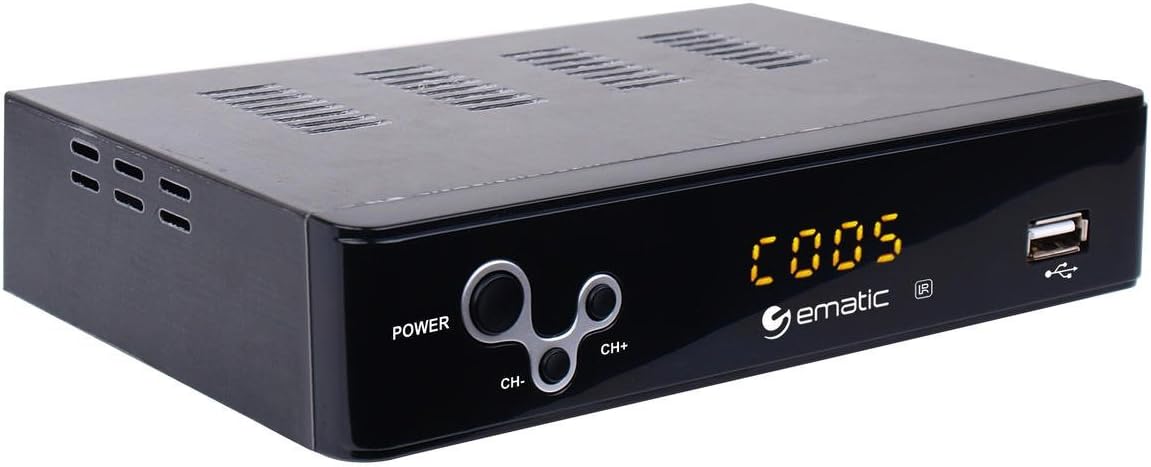
Figure 1: Ematic AT103B Digital TV Converter Box, front view.
2. Co je v krabici
Ověřte prosím, zda jsou ve vašem balení obsaženy všechny níže uvedené položky:
- Ematic AT103B Digital TV Converter Box
- Full Function Remote Control (requires 2 AA batteries, not included)
- HDMI kabel
- AV kabel (RCA)
- Kabel IR přijímače
- USB-C Cable (for power)
- Napájecí adaptér
- Uživatelská příručka (tento dokument)
- Stručný návod k obsluze
- Záruční list

Figure 2: Ematic AT103B Digital TV Converter Box with remote control, HDMI cable, AV cable, IR receiver, USB-C cable, and power adapter.
Rozbalení videa
Video 1: Unboxing of a similar digital converter box, demonstrating typical package contents and initial presentation.
3. Průvodce nastavením
3.1 Connecting the Converter Box
Follow these steps to connect your Ematic AT103B Digital TV Converter Box to your television and antenna:
- Připojení antény: Connect your outdoor or indoor antenna to the 'RF IN' port on the back of the converter box.
- Připojení k televizi:
- HDMI (doporučeno pro HD): Use the provided HDMI cable to connect the 'HDMI' port on the converter box to an available HDMI input on your TV.
- AV (RCA for Standard Definition): Use the provided AV cable (red, white, yellow) to connect the 'L-AUDIO-R' and 'VIDEO' ports on the converter box to the corresponding AV input ports on your TV.
- Connect IR Receiver: Plug the IR receiver cable into the 'IR' port on the converter box. Position the IR receiver in a location where it has a clear line of sight to your remote control.
- Připojte napájení: Connect the USB-C power cable to the converter box and then plug the power adapter into a wall outlet.
- Zapnutí: Turn on your TV and the converter box. Select the correct input source (HDMI or AV) on your TV that corresponds to the connection you made.

Obrázek 3: Zadní view of the converter box with various input/output ports.
3.2 Počáteční skenování kanálů
After connecting your converter box, you need to scan for available digital channels:
- Ensure your TV is on the correct input source for the converter box.
- On the converter box remote, press the MENU tlačítko.
- Navigate to the 'Channel Search' or 'Program' menu using the arrow keys on the remote.
- Select 'Auto Search' or 'Auto Tune' and press OK. The converter box will now scan for all available digital channels in your area. This process may take several minutes.
- Once the scan is complete, the converter box will automatically tune to the first available channel.
Setup and Channel Search Video
Video 2: Demonstrates wiring connections, manual search, and automated search functions for a digital converter box.
4. Návod k obsluze
4.1 Basic TV ViewIng
- Kanál nahoru/dolů: Použijte CH+ a CH- tlačítky na dálkovém ovladači pro přepínání kanálů.
- Ovládání hlasitosti: Použijte VOL+ a VOL- tlačítka pro nastavení hlasitosti.
- Elektronický programový průvodce (EPG): Stiskněte tlačítko EPG tlačítko na view program information for upcoming broadcasts.
- Info: Stiskněte tlačítko INFO tlačítko pro zobrazení aktuálního kanálu a podrobností o programu.

Figure 4: Remote control for the Ematic AT103B Digital TV Converter Box.
4.2 Recording Features (PVR/DVR)
The converter box supports recording TV programs to a USB storage device (not included).
- Nahrávání v reálném čase: Během sledování programu stiskněte tlačítko REC button on the remote to start recording immediately. Press ZASTÁVKA a pak OK pro ukončení a uložení záznamu.
- Plánované nahrávání: Stiskněte tlačítko EPG button, select the program you wish to record, and press OK. Follow the on-screen prompts to set the recording schedule (date, time, repeat options).
- Přehrávání záznamů: Stiskněte tlačítko PVR or USB button on the remote, navigate to the 'PVR' section, and select your desired recording from the list.
4.3 Přehrávání multimédií
Můžete přehrávat různá média filez paměťového zařízení USB:
- Insert a USB flash drive or external hard drive into the USB port on the front of the converter box.
- Stiskněte tlačítko USB tlačítko na dálkovém ovladači.
- Select the media type (Music, Photo, Movie) and navigate to your files. lis OK hrát.
4.4 Rodičovská kontrola
To restrict access to certain channels or programs:
- Stiskněte tlačítko MENU button and navigate to 'Program Edit'.
- Enter the default password (usually '000000' or '888888').
- Select the channel you wish to lock and press the ZÁMEK button (often a colored button on the remote).
4.5 Favorite Channel List
Create a personalized list of your preferred channels:
- Stiskněte tlačítko MENU button and navigate to 'Program Edit'.
- Zadejte heslo.
- Select the channel you want to add to favorites and press the FAV button (often a colored button). Choose a favorite type (e.g., Movie, News, Sport).
- To access your favorite channels, press the FAV button during normal viewing and select your desired category.
4.6 Timeshift Function
The timeshift function allows you to pause live television broadcasts. A USB storage device is required for this feature.
- Během sledování živého vysílání stiskněte tlačítko PAUZA button on the remote. The program will pause and begin recording to the connected USB device.
- Stiskněte HRÁT pokračovat viewing from where you paused.
- Můžete použít ZPĚT a RYCHLE VPŘED tlačítka pro navigaci v obsahu uloženém ve vyrovnávací paměti.

Figure 5: The timeshift function allows pausing live TV.
5. Údržba
- Čištění: Use a soft, dry cloth to clean the exterior of the converter box. Do not use liquid cleaners or aerosols.
- Větrání: Ensure the converter box has adequate ventilation. Do not block any ventilation openings.
- Moc: Pokud zařízení nebudete delší dobu používat, odpojte napájecí adaptér ze zásuvky.
- Aktualizace softwaru: Pravidelně kontrolujte informace od výrobce website for any available firmware updates to ensure optimal performance and access to the latest features.
6. Řešení problémů
| Problém | Možná příčina | Řešení |
|---|---|---|
| Žádný obraz/žádný signál | Incorrect TV input selected; Loose cable connections; Antenna not connected or positioned correctly. | Verify TV input source; Check all cable connections (HDMI/AV, antenna, power); Adjust antenna position and rescan channels. |
| Poor picture quality/Pixelation | Weak antenna signal; Antenna interference. | Reposition antenna for better signal reception; Consider a stronger antenna or signal amplifier; Check for nearby electronic interference. |
| Dálkové ovládání nefunguje | Dead batteries; Obstruction between remote and IR receiver; IR receiver not properly connected. | Replace remote batteries; Ensure clear line of sight to IR receiver; Check IR receiver cable connection. |
| Nelze nahrávat na USB | USB device not formatted correctly; USB device full; USB device not compatible. | Ensure USB device is formatted to FAT32 or NTFS; Delete old recordings to free space; Try a different USB device. |
| Žádný zvuk | TV or converter box volume muted; Incorrect audio settings. | Check volume levels on both TV and converter box; Ensure TV is not muted; Verify audio settings in the converter box menu. |
7. Technické specifikace
| Funkce | Specifikace |
|---|---|
| Číslo modelu | AT103B |
| Značka | Ematic |
| Výstupní rozlišení | Až 1080P |
| Video výstup | HDMI, CVBS (RCA) |
| Zvukový výstup | Stereo L/R (RCA) |
| Podpora USB | USB 2.0 for PVR, multimedia playback (MP3, AAC, AVI, MPG, DAT, VOB, MKV, MJPEG, JPEG, BMP, PNG) |
| Typ tuneru | Digital ATSC |
| Vlastnosti | Electronic Program Guide (EPG), Parental Control, Real-time Recording, Scheduled Recording, Timeshift, Favorite Channel List, Closed Captioning, EAS (Emergency Alert System) |
| Napájení | DC 5V/3A (via USB-C) |
| Rozměry | 16.6 x 16 x 14.4 inches (Product Dimensions, likely packaging) |
| Hmotnost položky | 1.6 unce |
8. Záruka a podpora
The Ematic AT103B Digital TV Converter Box comes with a limited manufacturer's warranty. Please refer to the included Warranty Card in your package for specific terms, conditions, and duration of coverage. For technical support, product registration, or to inquire about replacement parts, please visit the official Ematic webnebo kontaktujte jejich oddělení zákaznických služeb.
Můžete také navštívit Ematic Store on Amazon pro více informací o produktu a zdroje podpory.


