1. Úvod a konecview
The TC Electronic DITTO X2 LOOPER is a highly intuitive looper pedal designed for guitarists, offering a dedicated stop button and versatile loop effects. This manual provides comprehensive instructions for setting up, operating, and maintaining your DITTO X2 LOOPER pedal.
Klíčové vlastnosti:
- Dedicated Start/Stop Button
- Loop Import/Export and Backing tracks
- Looper effects: Stop, Reverse and Half Speed
2. Součásti a ovládací prvky produktu
Familiarize yourself with the layout of your DITTO X2 LOOPER pedal:
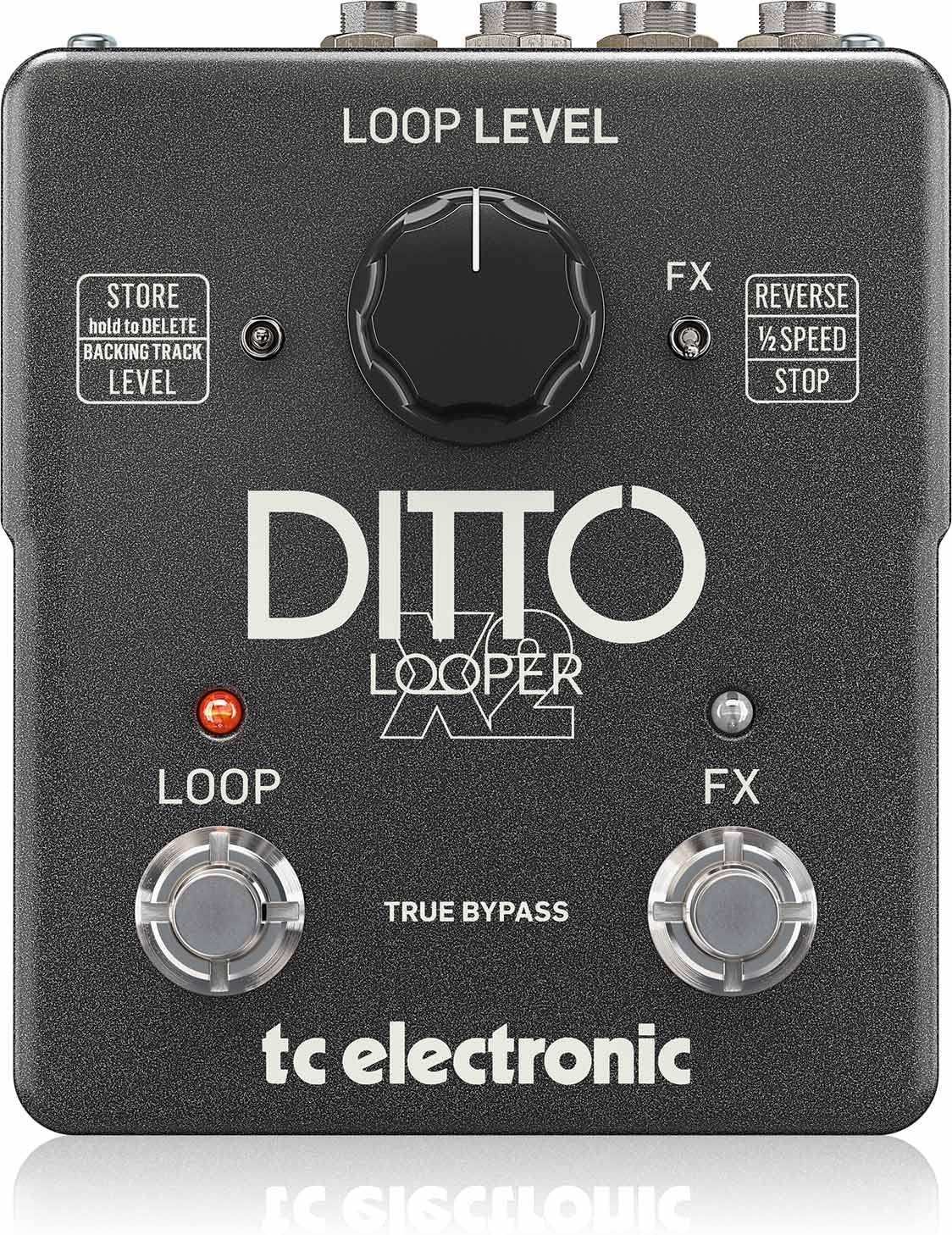
Obrázek: Nahoře view of the DITTO X2 LOOPER pedal, highlighting the Loop Level knob, Loop footswitch, FX footswitch, and FX/Store toggle switches.
- Loop Level Knob: Controls the playback volume of your recorded loops.
- Nožní spínač smyčky: Primary control for recording, playback, overdubbing, and clearing loops.
- FX Footswitch: Activates/deactivates selected loop effects (Reverse, Half Speed, Stop).
- FX Toggle Switch: Selects the function of the FX footswitch: Reverse, Half Speed, or dedicated Stop.
- Store Toggle Switch: Used for storing and deleting backing tracks.
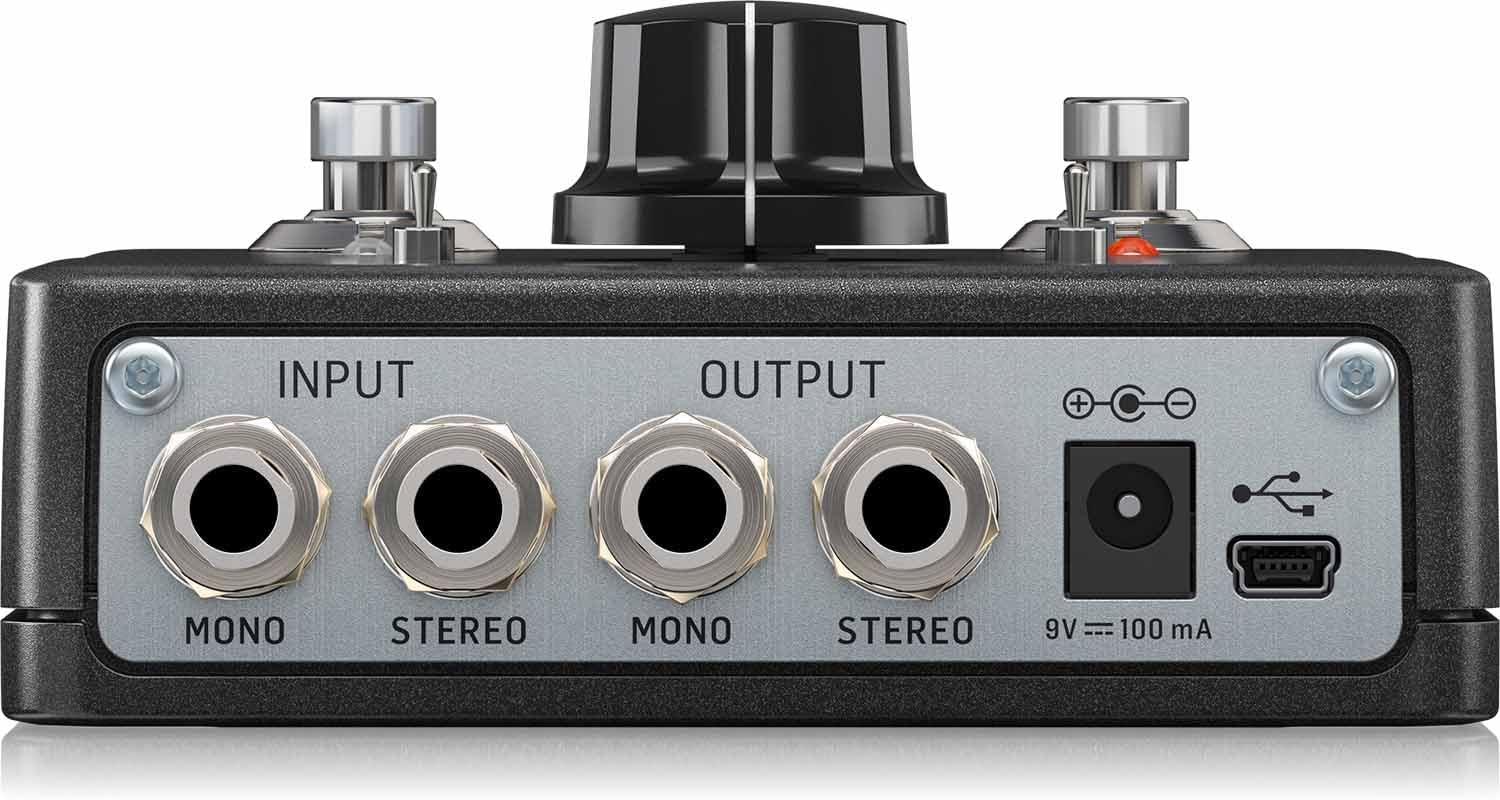
Obrázek: Zadní view of the DITTO X2 LOOPER pedal, showing the Mono/Stereo Input and Output jacks, 9V DC power input, and Mini-USB port.
- Input Jacks (Mono/Stereo): Connect your instrument(s) here.
- Output Jacks (Mono/Stereo): Připojte se k vašemu amplifikátor nebo audio rozhraní.
- Vstup napájení 9V DC: Connect a 9V DC power adapter (100mA minimum, center negative).
- Mini-USB port: Used for connecting to a computer for loop import/export and firmware updates.
3. Nastavení
- Připojení napájení: Connect a 9V DC power adapter (not included) to the 9V DC input jack on the rear of the pedal. The pedal does not support battery operation.
- Audio připojení:
- Connect your instrument (e.g., guitar) to the INPUT jack(s). For mono, use the MONO input. For stereo, use both STEREO inputs.
- Connect the OUTPUT jack(s) to your amplifier or audio interface. For mono, use the MONO output. For stereo, use both STEREO outputs.
- Počáteční nastavení: Set the Loop Level knob to a comfortable starting position (e.g., 12 o'clock).
4. Návod k obsluze
The DITTO X2 LOOPER offers intuitive operation for creating and manipulating loops.
4.1 Základní funkce pro cyklování
- Záznam: Press the LOOP footswitch once. The LED will turn RED, indicating recording has started.
- Přehrávání: Press the LOOP footswitch again to stop recording and start playback. The LED will turn GREEN.
- Overdub: During playback, press the LOOP footswitch once to start overdubbing. The LED will turn RED. Press again to stop overdubbing and return to playback (GREEN LED).
- Undo/Redo Overdub: During playback, hold the LOOP footswitch to undo the last overdub. Hold again to redo it.
- Stop:
- If the FX toggle switch is set to 'STOP', press the FX footswitch once.
- Alternatively, double-tap the LOOP footswitch. The GREEN LED will flash.
- Vymazat smyčku: Double-tap and hold the LOOP footswitch. The loop will be deleted.
4.2 Loop Effects (Reverse, Half Speed, Stop)
The DITTO X2 offers creative effects to enhance your loops:
- Vyberte efekt: Use the FX toggle switch to choose between 'REVERSE', '1/2 SPEED', or 'STOP'.
- Activate/Deactivate Effect: Press the FX footswitch once to activate the selected effect. Press again to deactivate it. The FX LED will indicate activation.
4.3 Backing Tracks
The DITTO X2 allows you to import and export backing tracks for practice or performance:
- Import/Export: Connect the pedal to your computer via the Mini-USB port. The pedal will appear as a removable drive, allowing you to drag and drop audio files (WAV format recommended).
- Store/Delete Backing Track: Use the 'STORE' toggle switch to manage your backing tracks. Refer to the official TC Electronic software for detailed management.
4.4 Videoukázka
Watch this official video for a visual guide on the DITTO X2 LOOPER's functionality:
Video: Official demonstration of the TC Electronic DITTO X2 Looper pedal, showcasinjeho vlastnosti a provoz.
5. Údržba
- Čištění: K čištění pedálu používejte měkký, suchý hadřík. Nepoužívejte abrazivní čisticí prostředky ani rozpouštědla.
- Skladování: Store the pedal in a dry environment away from extreme temperatures.
- Aktualizace firmwaru: Periodically check the TC Electronic website for any available firmware updates for your DITTO X2 LOOPER. Updates can be installed via the Mini-USB port.
6. Řešení problémů
- Žádný zvuk:
- Ujistěte se, že jsou všechny kabely pevně připojeny.
- Check the Loop Level knob is not set to minimum.
- Verify power supply is correctly connected and functional.
- LED dioda nesvítí:
- Confirm the power adapter is working and correctly connected.
- Loop Not Recording/Playing Back:
- Ensure the input signal is present.
- Check that the correct footswitch actions are being performed for record/playback.
7. Specifikace
- Hmotnost položky: 0.635 unce (18 gramů)
- Rozměry produktu: 6 x 7 x 3 palce
- Číslo modelu položky: 000-DE800-00010
- Baterie: 1 9V batteries required (for internal dip switch access, not primary power).
- Hardwarové rozhraní: USB
- Formát signálu: Analogový
- svtage: 9V
- Amperage: 0.1 miliamps (100mA)
- První k dispozici: 16. ledna 2014
8. Co je v krabici
- TC Electronic DITTO X2 LOOPER, Highly Intuitive Looper Pedal with Dedicated Stop Button and Loop Effects
9. Záruka a podpora
This product is covered by the manufacturer's warranty. For detailed warranty information, technical support, or service inquiries, please visit the official TC Electronic webwebu nebo se obraťte přímo na jejich zákaznickou podporu. Uschovejte si doklad o koupi pro případ reklamace.


