Zavedení
This user manual provides comprehensive instructions for the setup, operation, and maintenance of your VTech DECT 6.0 Cordless Answering System. Please read this manual thoroughly before using your new telephone system to ensure proper functionality and to take full advantage jeho vlastností.
The VTech 3-handset DECT 6.0 system offers advanced features such as voice announce caller ID, push-to-talk intercom, and HD audio for clear communication. It includes a digital answering system with 14 minutes of recording time, caller ID/call waiting, and a 50-name/number phonebook directory. The system is expandable and features a blue backlit keypad and display, with trilingual prompts (English, Spanish, French).
Obsah balení
Ověřte, zda váš balíček obsahuje následující položky:
- 1 x Main Base Unit with Digital Answering System
- 3 x bezdrátové sluchátka
- 3 x Handset Chargers
- 3 x dobíjecí baterie
- 1 x telefonní kabel
- 1 x napájecí adaptér pro základní jednotku
- 3 x AC Power Adapters for Handset Chargers
- 1 x držák na zeď
- 1 x Uživatelská příručka (tento dokument)
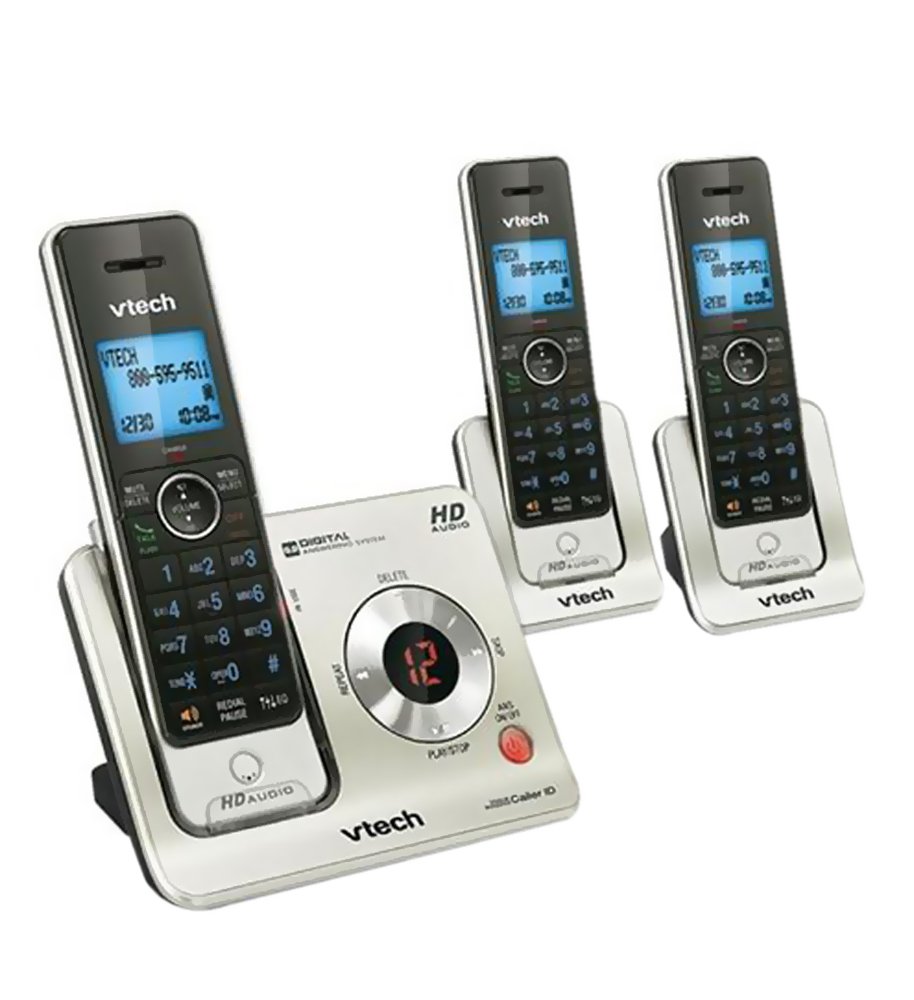
Image: The VTech DECT 6.0 Cordless Answering System, showing the main base unit with one handset docked, and two additional handsets with their respective charging cradles. The base unit features a digital answering system display and controls. All handsets have backlit keypads and displays.
Nastavení
1. Instalace baterie
Each cordless handset requires a rechargeable battery pack. Open the battery compartment cover on the back of the handset. Connect the battery pack connector securely into the jack inside the compartment. Place the battery pack into the compartment and close the cover.
2. Charging the Handsets
Place each handset face forward into its respective charger or the main base unit. The charge indicator light on the handset or base will illuminate. Allow the handsets to charge for at least 16 hours before initial use to ensure optimal battery performance.
3. Připojení základní jednotky
- Připojte jeden konec telefonního kabelu do zdířky TEL LINE na zadní straně základní jednotky.
- Připojte druhý konec telefonního kabelu do telefonní zásuvky ve zdi.
- Connect the small end of the AC power adapter to the POWER jack on the back of the base unit.
- Plug the large end of the AC power adapter into a standard electrical outlet not controlled by a wall switch.
4. Connecting Handset Chargers
For each additional handset charger, connect the small end of its AC power adapter to the POWER jack on the charger and plug the large end into a standard electrical outlet not controlled by a wall switch.
5. Nastavení data a času
After the base unit is powered on, the display will prompt you to set the date and time. Follow the on-screen instructions on any handset to configure these settings. This is important for accurate caller ID and answering system timestamps.
Návod k obsluze
Uskutečňování a přijímání hovorů
- Chcete-li zavolat: Stiskněte HOVOR / FLASH or REPRODUKTORa poté vytočte číslo.
- Chcete-li přijmout hovor: Stiskněte HOVOR / FLASH or REPRODUKTOR když zazvoní telefon.
- Ukončení hovoru: Stiskněte VYPNUTO/VYMAZAT nebo vložte sluchátko zpět do nabíječky.
Digitální záznamník
The base unit features a digital answering system with 14 minutes of recording time. You can access messages from the base unit or any handset.
- Přehrávání zpráv: Stiskněte PLAY/STOP on the base unit or navigate to the Answering System menu on a handset.
- Mazání zpráv: Stiskněte VYMAZAT on the base unit during message playback, or use the handset menu.
- Setting Up Answering System: Access the Answering System menu on a handset to record your outgoing announcement and set the number of rings.
ID volajícího a čekající hovor
The system stores up to 50 caller ID entries. When a call comes in, the handset will audibly announce the caller's name and number (if available and subscribed to caller ID service).
- ReviewZáznam ID volajícího: Stiskněte CID on the handset to scroll through the caller ID list.
- Dialing from Caller ID: Select an entry from the caller ID log and press HOVOR / FLASH vytočit.
Telefonní seznam
Store up to 50 names and numbers in the phonebook directory for quick dialing.
- Přidání záznamu: Stiskněte MENU/SELECT, navigate to Phonebook, then Add New Entry.
- Searching for an Entry: Stiskněte TELEFONNÍ SEZNAM tlačítko na sluchátku.
Funkce interkomu
Use the push-to-talk intercom feature to communicate between handsets.
- Zahájení interkomu: Stiskněte INT on a handset, then select the desired handset or "All" to broadcast.
Údržba
Čištění
Clean the telephone system with a soft, damp cloth. Do not use cleaning sprays or liquid cleaners as they may damage the finish or electrical components.
Péče o baterie
- Only use the supplied rechargeable battery packs.
- Pokud se sluchátko nebude delší dobu používat, vyjměte baterii, abyste zabránili jejímu vytečení.
- Baterie likvidujte správným způsobem v souladu s místními předpisy.
Ohledy na životní prostředí
Avoid placing the telephone system in direct sunlight, near heating appliances, or in areas with excessive moisture or dust. Ensure adequate ventilation around the base unit and chargers.
Odstraňování problémů
| Problém | Řešení |
|---|---|
| Žádný oznamovací tón. |
|
| Handset displays "No Link to Base" or similar. |
|
| Špatná kvalita zvuku nebo statický šum. |
|
| Záznamník nezaznamenává zprávy. |
|
Specifikace
- Model: 1126-VT-LS6425-3
- Technologie: DECT 6.0 Digital
- Počet sluchátek: 3 (expandable up to 12 cordless handsets and 2 cordless headsets)
- Odpovídací systém: Digitální, doba nahrávání 14 minut
- Paměť ID volajícího: 50 hovorů
- Adresář telefonního seznamu: 50 jmen a čísel
- Zobrazit: Modře podsvícený LCD
- Klávesnice: Blue backlit
- Interkom: Push-to-talk between handsets
- Rozměry (základní jednotka): Přibližně 5 cm D x 9 cm Š x 6 cm V
- Hmotnost (položka): 2.8 libry
- Moc: AC power adapters (included)
- Země původu: Čína
Informace o záruce
This VTech product is covered by a 1letá omezená záruka from the date of purchase. This warranty covers defects in material and workmanship under normal use. For full warranty terms and conditions, please refer to the warranty card included in your product packaging or visit the official VTech support webmísto.
Zákaznická podpora
For technical assistance, product registration, or to purchase accessories, please visit the official VTech support website or contact VTech customer service.
- Podpora VTech Webmísto: www.vtechphones.com/support (Napřampodkaz, skutečný odkaz se může lišit)
- Služby zákazníkům: Refer to your product packaging or the VTech webstránky s aktuálními kontaktními čísly.
When contacting support, please have your product model number (1126-VT-LS6425-3) and purchase date available.


