Zavedení
This manual provides essential information for the proper use and care of your Beats Studio Wireless Over-Ear Headphones. Please read these instructions carefully before using your headphones to ensure optimal performance and longevity. The Beats Studio Wireless headphones offer a premium audio experience with wireless connectivity and Adaptive Noise Canceling technology.
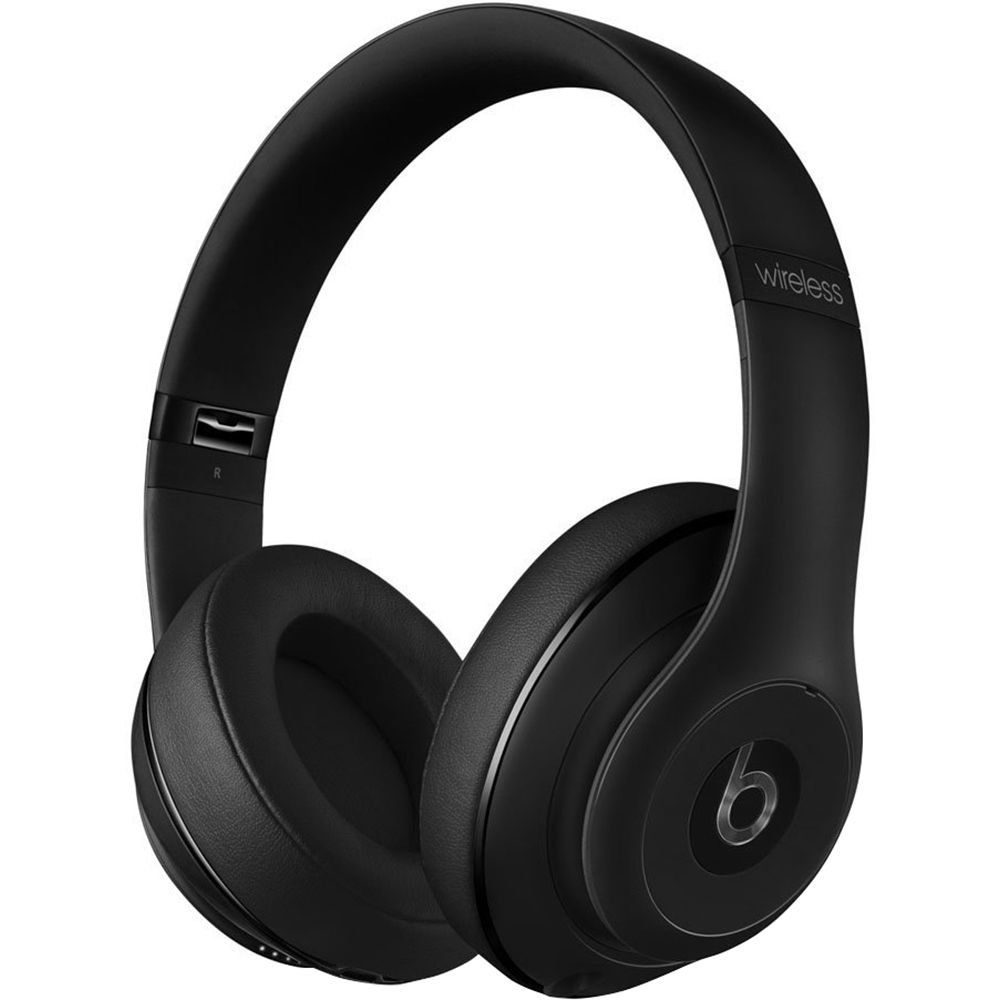
Image: Beats Studio Wireless Over-Ear Headphones in Matte Black, showcasinelegantní design.
Co je v krabici
Ověřte, zda jsou v balení přítomny všechny položky:
- Beats Studio Wireless over-ear headphones
- 3.5mm audio cable with RemoteTalk (for wired connection and controls)
- Standard 3.5 mm audio cable (for wired connection without RemoteTalk features)
- USB 2.0 cable (USB-A to USB Micro-B) for charging
- Hard-shell carrying case with carabiner clip

Image: The Beats Studio Wireless headphones, hard-shell carrying case, and various cables laid out from the packaging.
Nastavení
1. Nabíjení sluchátek
Before first use, fully charge your Beats Studio Wireless headphones. A full charge provides approximately 12 hours of wireless playback or 20 hours of wired playback with Adaptive Noise Canceling enabled.
- Connect the small end of the USB 2.0 cable (USB-A to USB Micro-B) to the Micro-USB port on the right earcup of the headphones.
- Connect the larger end of the USB cable to a USB power adapter (not included) or a powered USB port on a computer.
- The Fuel Gauge LEDs on the right earcup will indicate charging status. When all five LEDs are solid white, the headphones are fully charged.
Poznámka: The headphones cannot be used while charging.
2. Párování Bluetooth
Spárujte sluchátka se zařízením s podporou Bluetooth pro bezdrátový zvuk.
- Ujistěte se, že jsou sluchátka nabitá a vypnutá.
- Press and hold the power button on the right earcup for 3-5 seconds until the Fuel Gauge LEDs begin to pulse. This indicates pairing mode.
- V zařízení přejděte do nastavení Bluetooth a povolte Bluetooth.
- Select "Beats Studio Wireless" from the list of available devices.
- Once paired, the Fuel Gauge LEDs will turn solid white.
The headphones have a Bluetooth range of up to 30 feet (9 meters).
3. Kabelové připojení
For a wired connection, use the provided 3.5mm audio cables.
- Plug one end of the 3.5mm audio cable into the audio input port on the left earcup.
- Druhý konec zapojte do 3.5mm audio výstupního konektoru na vašem zařízení.
The RemoteTalk cable allows for inline control of music and calls when connected to compatible devices.
Návod k obsluze
1. Zapnutí/vypnutí
- Zapnutí: Press and hold the power button on the right earcup until the Fuel Gauge LEDs illuminate.
- Vypnutí: Press and hold the power button until the Fuel Gauge LEDs turn off.
2. Controls (Wireless Mode)
The "b" button on the left earcup and the volume buttons control playback and calls.
- Přehrát/pozastavit: Stiskněte jednou tlačítko „b“.
- Další skladba: Press the "b" button twice quickly.
- Předchozí skladba: Press the "b" button three times quickly.
- Zvýšit hlasitost: Stiskněte horní tlačítko hlasitosti.
- Snížit hlasitost: Stiskněte spodní tlačítko hlasitosti.
- Přijmout/ukončit hovor: Press the "b" button once during an incoming call or active call.
- Odmítnout hovor: Během příchozího hovoru stiskněte a podržte tlačítko „b“ po dobu 2 sekund.
- Aktivovat Voice Assistant: Press and hold the "b" button for 2 seconds (functionality depends on device).
3. Adaptive Noise Canceling (ANC)
The Beats Studio Wireless headphones feature Dual-Mode Adaptive Noise Canceling. ANC is automatically active when the headphones are powered on. There are two modes:
- Full ANC: Engaged when listening to music or media, providing maximum noise reduction.
- ANC Only: When the audio cable is unplugged and the headphones are powered on, ANC will automatically switch to a more aggressive mode to reduce external noise without playing audio.
Údržba
1. Čištění
To maintain the appearance and performance of your headphones:
- Otřete náušníky a hlavový most měkkým, suchým hadříkem, který nepouští vlákna.
- Nepoužívejte abrazivní čisticí prostředky, alkohol ani chemická rozpouštědla.
- Zabraňte vniknutí vlhkosti do jakýchkoli otvorů.
2. Skladování
When not in use, store your headphones in the provided hard-shell carrying case to protect them from damage.
- Fold the headphones carefully to fit into the case.
- Keep headphones away from extreme temperatures and humidity.
3. Péče o baterie
Chcete -li prodloužit životnost baterie:
- Vyhněte se častému úplnému vybíjení baterie.
- Sluchátka pravidelně nabíjejte, i když je delší dobu nepoužíváte.
- Skladujte na chladném a suchém místě.
Odstraňování problémů
If you encounter issues with your Beats Studio Wireless headphones, try the following solutions:
Bez napájení / Nezapíná se
- Ujistěte se, že jsou sluchátka plně nabitá. Připojte je ke zdroji napájení pomocí kabelu USB.
- Zkontrolujte kabel USB a nabíjecí port, zda nejsou poškozeny.
No Sound / Intermittent Audio
- Bezdrátový:
- Ujistěte se, že jsou sluchátka spárována a připojena k vašemu zařízení.
- Zkontrolujte úroveň hlasitosti na sluchátkách i na zařízení.
- Move closer to your device to avoid interference or exceeding Bluetooth range.
- Zkuste zrušit párování sluchátek se zařízením a znovu je spárovat.
- Kabelové:
- Ensure the 3.5mm audio cable is securely plugged into both the headphones and your audio source.
- Try a different 3.5mm audio cable if available.
Problémy s párováním
- Ensure the headphones are in pairing mode (pulsing Fuel Gauge LEDs).
- Vypněte a poté zapněte Bluetooth na vašem zařízení.
- Forget "Beats Studio Wireless" from your device's Bluetooth list and attempt to pair again.
- Ujistěte se, že žádná jiná zařízení Bluetooth neruší proces párování.
Adaptive Noise Canceling (ANC) Not Working
- Ensure the headphones are powered on. ANC requires power.
- Check for any obstructions around the external microphones on the earcups.
Specifikace
Key technical specifications for the Beats Studio Wireless Over-Ear Headphones:
- Název modelu: Studio
- Technologie připojení: Bluetooth (Wireless), 3.5 mm Jack (Wired)
- Technologie bezdrátové komunikace: Bluetooth
- Rozsah Bluetooth: Až 30 stop (9 metrů)
- Kontrola hluku: Active Noise Cancellation (Dual-Mode Adaptive Noise Canceling)
- Životnost baterie: Approximately 12 hours (wireless), 20 hours (wired with ANC)
- Typ baterie: 1 lithium-iontová baterie (dobíjecí)
- Typ ovládání: Media Control (on-earcup "b" button, volume buttons)
- Mikrofon: Vestavěný pro hands-free hovory
- Form Factor: Přes ucho
- Umístění uší: Přes ucho
- Materiál: Plast
- Hmotnost položky: Přibližně 9.2 unce (0.26 kilogramu)
- Rozměry produktu: 9.6 x 7.3 x 4.5 palce
- Výrobce: Beats Electronics, LLC
- Datum první dostupnosti: 1. prosince 2013

Obrázek: Detailní záběr view of the headphone's inner band, displaying the model number B0501.
Záruka a podpora
For warranty information and customer support, please refer to the official Beats webnebo se obraťte přímo na jejich zákaznický servis. Uschovejte si doklad o koupi pro případ reklamace.
Poznámka: This product is an older model. Specific warranty terms may vary based on purchase date and region. Please consult the manufacturer's official resources for the most accurate and up-to-date information.
Pro další pomoc navštivte: Podpora Beats