1. Úvod
This manual provides essential instructions for the safe and efficient use of your Kyocera EBVK-2650 Engine Blower Vacuum. Please read this manual thoroughly before operating the machine and keep it for future reference. The EBVK-2650 is designed for blowing and vacuuming leaves and light debris in outdoor environments.
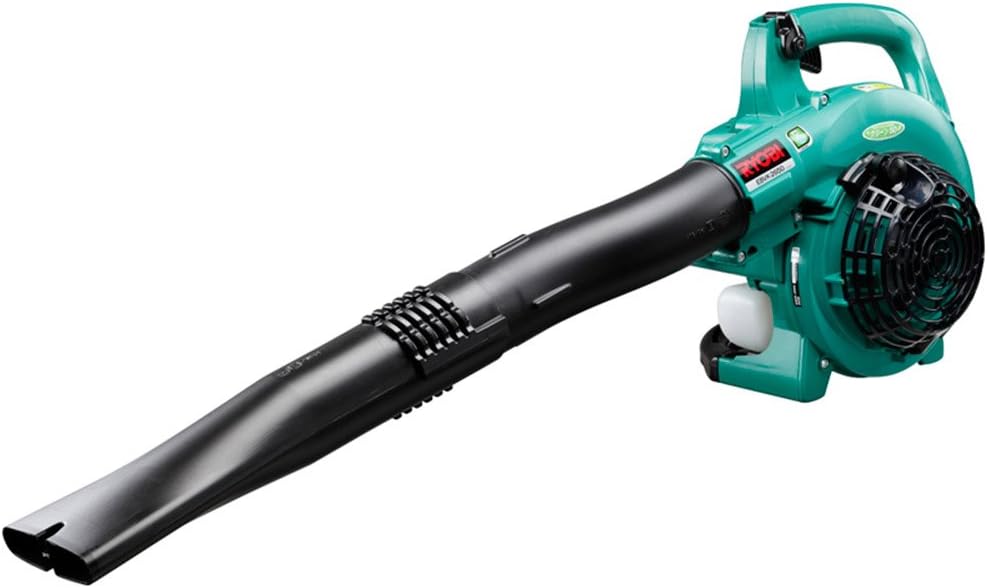
Image 1.1: The Kyocera EBVK-2650 Engine Blower Vacuum in its primary blower configuration. This image shows the main unit with the straight nozzle attached, ready for blowing leaves and debris.
2. Bezpečnostní informace
Při práci s elektrickým nářadím vždy upřednostňujte bezpečnost. Nedodržení těchto pokynů může vést k vážnému zranění nebo poškození majetku.
2.1 Obecná bezpečnostní pravidla
- Před použitím stroje si přečtěte a pochopte všechny pokyny.
- Wear appropriate personal protective equipment (PPE), including eye protection, hearing protection, gloves, and sturdy footwear.
- Do not operate the machine in wet conditions or in the presence of flammable liquids or gases.
- Keep children, bystanders, and pets at a safe distance (at least 15 meters / 50 feet) from the operating area.
- Inspect the machine for loose parts, damage, or wear before each use. Do not operate a damaged machine.
- Ensure proper ventilation when operating the engine, as exhaust fumes contain carbon monoxide.
- Nikdy nemiřte tryskou foukače na lidi ani zvířata.
- Turn off the engine and allow it to cool before refueling, cleaning, or performing maintenance.
- Store the machine in a dry, secure location, out of reach of children.
2.2 Bezpečnost paliva
- Use only the recommended fuel mixture: unleaded gasoline and 2-cycle engine oil at a 50:1 ratio.
- Palivo míchejte v dobře větraném prostoru, mimo dosah jisker nebo otevřeného ohně.
- Do not smoke while mixing or refueling.
- Rozlité palivo okamžitě otřete.
- Palivo skladujte ve schválené nádobě na chladném a suchém místě.
3. Obsah balení a součásti
Po vybalení zkontrolujte, zda jsou všechny součásti přítomny a nepoškozené.
3.1 Dodávané příslušenství
- Main Unit (Engine Blower Vacuum)
- Rovná tryska
- Zakřivená tryska
- Sací potrubí
- Tryska ventilátoru
- Prachový sáček
- Socket Wrench (13x19mm)
- Návod k použití
3.2 Key Components Overview
Familiarize yourself with the main parts of the EBVK-2650.

Image 3.1: The Kyocera EBVK-2650 configured for vacuuming. This view shows the suction pipe and the dust bag attached, ready to collect leaves and debris.
- Motorová jednotka: The core power source.
- Palivová nádrž: For mixed fuel.
- Startovací rukojeť: Pro ruční startování motoru.
- Páka plynu: Ovládá otáčky motoru.
- Vypínač zastavení: To turn off the engine.
- Air Filter Cover: Chrání vzduchový filtr.
- Zapalovací svíčka: For ignition.
- Blower/Vacuum Port: Where nozzles or suction pipe attach.
- Dust Bag Connection: For attaching the collection bag in vacuum mode.
4. Nastavení a montáž
4.1 Assembling for Blower Mode
- Ujistěte se, že je motor vypnutý a vychladlý.
- Attach the desired nozzle (straight or curved) to the blower port. Twist until securely locked.
- Confirm all connections are tight before use.

Obrázek 4.1: Detailní záběr view of the Kyocera EBVK-2650 in operation, demonstrating the blower function. The user is holding the unit, directing the airflow.
4.2 Assembling for Vacuum/Mulching Mode
- Ujistěte se, že je motor vypnutý a vychladlý.
- Remove any blower nozzles from the blower port.
- Attach the suction pipe to the intake port. Secure it firmly.
- Connect the dust bag to the exhaust port. Ensure the bag is properly sealed to prevent debris leakage.
- Confirm all connections are tight before use.

Image 4.2: The Kyocera EBVK-2650 being used in vacuum mode. The suction pipe is directed towards leaves, and the dust bag is visible, collecting the mulched debris.
4.3 Fuel Preparation and Filling
The EBVK-2650 uses a 2-cycle engine. It requires a specific mixture of unleaded gasoline and 2-cycle engine oil.
- Fuel Ratio: Unleaded Gasoline : 2-Cycle Engine Oil = 50:1
- Use high-quality 2-cycle engine oil specifically designed for air-cooled engines.
- Mix the fuel in a separate, approved fuel container. Shake well before filling.
- Open the fuel tank cap slowly to release pressure.
- Fill the fuel tank (capacity 0.47 L) carefully, avoiding overfilling.
- Bezpečně uzavřete víčko palivové nádrže.
5. Návod k obsluze
5.1 Startování motoru
- Umístěte stroj na rovný, stabilní povrch.
- Ensure the stop switch is in the "ON" position.
- Engage the choke lever (if cold start).
- Několikrát stiskněte pumpičku, dokud nebude vidět palivo.
- Pull the starter handle firmly and smoothly until the engine starts. Do not pull the rope to its full extension.
- Once the engine starts, gradually disengage the choke.
- Před přidáním plného plynu nechte motor několik okamžiků zahřát.

Image 5.1: A user demonstrating the engine starting procedure for the Kyocera EBVK-2650. The starter handle is being pulled to ignite the engine.
5.2 Provoz dmychadla
- Hold the machine firmly with both hands.
- Namiřte trysku na nečistoty, které chcete odstranit.
- Gradually increase the throttle to achieve the desired airflow.
- Zametacím pohybem shromažďujte listí a nečistoty do hromad.

Image 5.2: A user operating the Kyocera EBVK-2650 in blower mode, clearing leaves from a path. The machine is held comfortably, directing the airflow.
5.3 Vacuum/Mulching Operation
- Ensure the machine is correctly assembled for vacuum mode with the dust bag attached.
- Hold the machine firmly, guiding the suction pipe over the leaves.
- Move slowly and steadily to allow the machine to pick up and mulch debris.
- Monitor the dust bag and empty it when it becomes full to maintain optimal performance.
- Note: Mulching performance varies based on leaf type, size, and moisture content. Avoid vacuuming wet leaves or large, hard objects.

Image 5.3: A user operating the Kyocera EBVK-2650 in vacuum mode, actively collecting leaves from a paved area. The dust bag is visible, indicating collection.
5.4 Zastavení motoru
- Release the throttle lever to allow the engine to idle.
- Move the stop switch to the "OFF" position.
- Allow the machine to cool down before storage or maintenance.
6. Údržba
Regular maintenance ensures optimal performance and extends the lifespan of your EBVK-2650. Always ensure the engine is off and cool before performing any maintenance.
6.1 Čištění vzduchového filtru
- Odstraňte kryt vzduchového filtru.
- Opatrně vyjměte vložku vzduchového filtru.
- Clean the filter by tapping it gently or using compressed air. If heavily soiled, wash with warm, soapy water, rinse thoroughly, and allow to dry completely before reinstallation.
- Vyměňte kryt vzduchového filtru.
6.2 Kontrola a výměna zapalovací svíčky
- Sejměte víčko zapalovací svíčky.
- Use the provided socket wrench to remove the spark plug (NGK BPM8Y).
- Inspect the spark plug for wear, carbon buildup, or damage. Clean if necessary.
- Check the electrode gap and adjust if needed.
- Replace with a new spark plug of the recommended type if worn or damaged.
- Reinstall the spark plug and cap securely.
6.3 Palivový filtr
The fuel filter is located inside the fuel tank. Inspect it periodically for debris. If clogged, replace it. This procedure may require professional assistance.
6.4 Seřízení karburátoru
Carburetor adjustments should ideally be performed by a qualified service technician. Incorrect adjustments can lead to engine damage or poor performance.
6.5 Skladování
- For long-term storage, drain all fuel from the tank and run the engine until it stops to clear the carburetor.
- Vyčistěte vnější část stroje.
- Store in a dry, dust-free location, away from direct sunlight and extreme temperatures.
7. Řešení problémů
Tato část se zabývá běžnými problémy, se kterými se můžete setkat. V případě problémů, které zde nejsou uvedeny, kontaktujte zákaznickou podporu.
| Problém | Možná příčina | Řešení |
|---|---|---|
| Motor nestartuje |
|
|
| Motor běží, ale nemá výkon |
|
|
| Nadměrné vibrace |
|
|
8. Specifikace
| Funkce | Detail |
|---|---|
| Značka | Kyocera |
| Číslo modelu | EBVK-2650 |
| Typ motoru | Air-cooled 2-cycle single cylinder gasoline engine |
| Přemístění | 25.4 ml |
| Average Air Volume | 8.7 m³/min |
| Maximální objem vzduchu | 67.5 m³/min |
| Metoda zapalování | Electronic ignition (Flywheel magnet) |
| Zapalovací svíčka | NGK BPM8Y |
| Typ karburátoru | Typ membrány |
| Palivo | Mixed fuel (Unleaded gasoline: 2-cycle engine oil = 50:1) |
| Kapacita palivové nádrže | 0.47 l |
| Dimensions (L x W x H, excluding nozzle) | 330 x 270 x 345 mm |
| Weight (excluding nozzle, fuel) | 4.2 kg |
| Příslušenství v ceně | Straight nozzle, Curved nozzle, Suction pipe, Fan nozzle, Dust bag, Socket wrench (13x19mm) |
| Doporučené použití | Dust cleaning, Leaf cleaning |
Note: Product specifications are subject to change without notice for improvement. The listed weight of 8.1 kg in some product descriptions likely includes packaging and all accessories, while 4.2 kg refers to the bare unit.
9. Záruka a podpora
For warranty information, service, or technical support, please refer to the warranty card included with your product or visit the official Kyocera webUschovejte si doklad o koupi pro případ reklamace.
Kyocera Customer Support: Please visit the official Kyocera website or contact your local dealer for assistance.


