Zavedení
This manual provides comprehensive instructions for the setup, operation, and maintenance of your VTech CS6829-2 2-Handset Cordless Phone with Answering System. This system is designed for home use, offering features such as caller ID, a digital answering machine, backlit keypad, and a full duplex speakerphone for enhanced communication.
Co je v krabici
Ověřte, zda je v balení obsaženo vše:
- Základní jednotka
- 2 bezdrátových sluchátek
- Nabíječka
- 2 adaptéry
- 2 sady baterií
- Kabel telefonní linky
- Držák pro montáž na stěnu
- Průvodce rychlým startem
Nastavení
Follow these steps to set up your VTech CS6829-2 phone system:
- Připojení základní jednotky:
Plug one end of the telephone line cord into the TEL LINE jack on the back of the base unit. Plug the other end into a telephone wall jack. Plug the small end of the power adapter into the POWER jack on the back of the base unit. Plug the large end of the power adapter into a wall outlet not controlled by a wall switch.
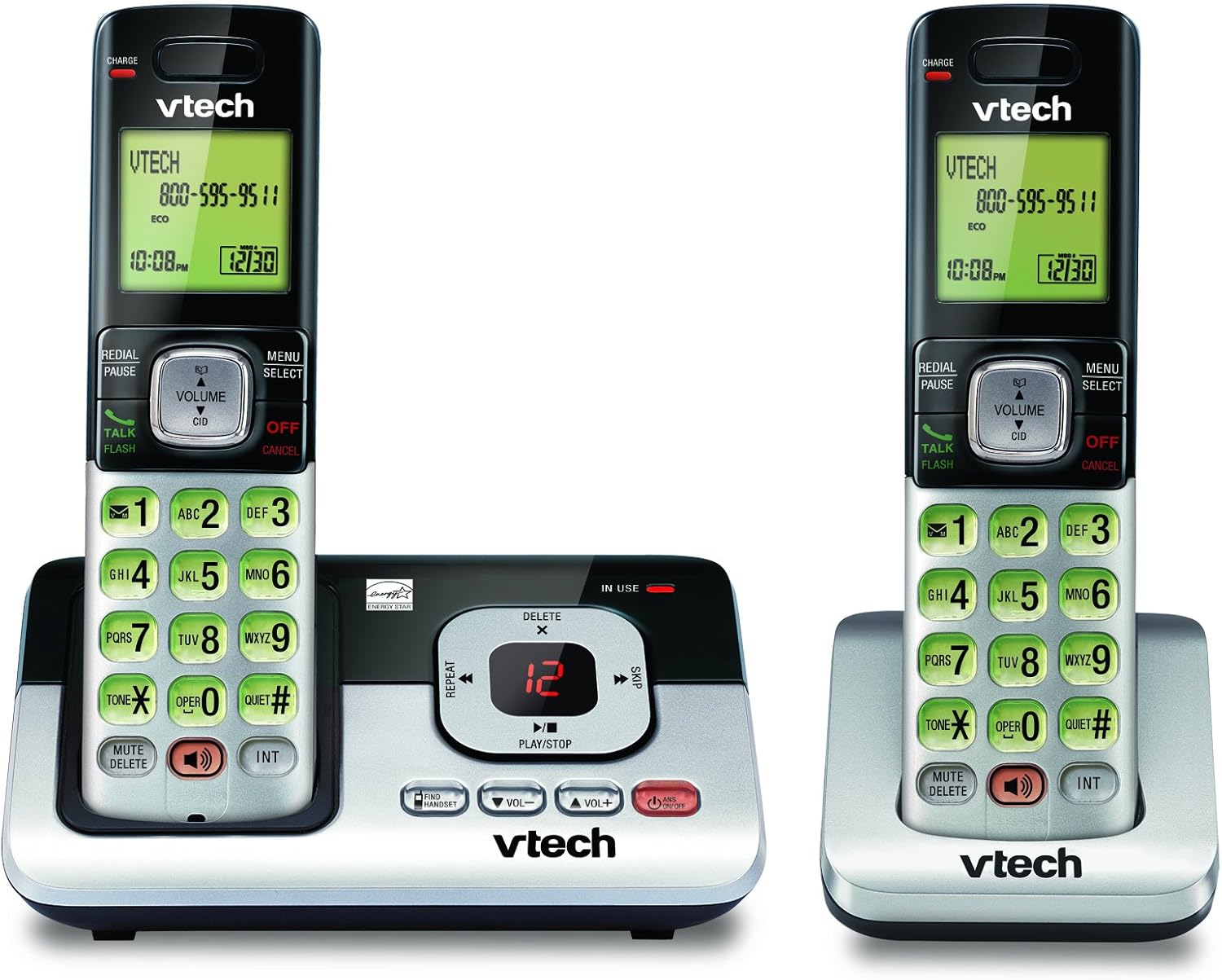
Image: The VTech CS6829-2 base unit with one handset docked, and a second handset with its charging cradle. This illustrates the main components of the phone system.
- Instalace baterií do telefonu:
Open the battery compartment cover on the back of each handset. Connect the battery pack connector securely into the jack inside the compartment. Place the battery pack with the label facing up and tuck the wires inside the compartment. Close the battery compartment cover.
- Nabíjení sluchátek:
Place each handset in the base unit or charger with the display facing up. The CHARGE light on the handset will illuminate, indicating proper charging. Allow the handsets to charge for at least 16 hours before initial use for optimal battery performance.

Obrázek: Úhlové view of the VTech CS6829-2 base unit with one handset docked, and the second handset in its separate charging cradle. This shows how the handsets are placed for charging.
- Nastavit datum a čas:
After the handsets are charged, follow the on-screen prompts or refer to the quick start guide to set the date and time. This is important for accurate caller ID and answering system timestamps.
Návod k obsluze
Uskutečňování a přijímání hovorů
- Chcete-li zavolat: Stiskněte HOVOR / FLASH or any dialing key to get a dial tone, then dial the phone number.
- Chcete-li přijmout hovor: Když telefon zazvoní, stiskněte HOVOR / FLASH nebo jakékoli tlačítko vytáčení.
- Ukončení hovoru: Stiskněte VYP/ZRUŠIT or place the handset back in the base unit/charger.
Digitální záznamník
- Přehrávání zpráv: Na základní jednotce stiskněte PLAY/STOP. On a handset, press MENU/SELECT, scroll to "Answering System", then select "Play Messages".
- Recording an Outgoing Announcement: On the base unit or handset, navigate to the answering system menu and select "Record OGM" (Outgoing Message).
- Mazání zpráv: While a message is playing, press VYMAZAT na základnové jednotce nebo sluchátku.
Funkce hlasitého odposlechu
- To Use Speakerphone: Během hovoru stiskněte REPRODUKTOR button on the handset. Press it again to switch back to the handset earpiece.
Klíčové vlastnosti
- Digital Answering System with LED Indicator and Volume Control: This system records up to 14 minutes of messages, announcements, and memos. An LED indicator notifies you of new messages. Volume control keys on the base allow easy adjustment of message playback volume.
- Caller ID / Call Waiting — Stores up to 50 Calls: Displays the name, number, time, and date of incoming calls, helping you identify callers before answering.
- Plně duplexní hlasitý odposlech: The handset features a full duplex speakerphone, enabling natural two-way conversations where both parties can speak and be heard simultaneously.
- Podsvícená klávesnice a displej: The entire keypad and LCD screen on the handset illuminate, ensuring clear visibility and easy dialing even in low-light conditions.
- ECO Mode Power-Conserving Technology: This technology optimizes power consumption for extended battery performance and energy efficiency.
- Tichý režim: Allows you to silence the ringer on both the handset and base unit immediately or for a set period, providing peace and quiet when needed.
Údržba
- Čištění: Telefon a základnu čistěte měkkým hadříkemamp cloth. Do not use cleaning sprays or liquid cleaners.
- Péče o baterie: Replace batteries when they no longer hold a charge. Use only the specified battery type. Dispose of old batteries responsibly according to local regulations.
- Podmínky prostředí: Avoid placing the phone in direct sunlight, near heat sources, or in areas with excessive moisture.
Odstraňování problémů
If you experience issues with your phone, try the following solutions:
| Problém | Řešení |
|---|---|
| Žádný oznamovací tón. | Ensure the telephone line cord is securely plugged into both the base unit and the wall jack. Check that the power adapter is plugged into a working electrical outlet. |
| Sluchátko se nenabíjí. | Ensure the handset is properly seated in the base unit or charger. Clean the charging contacts on both the handset and base/charger with a dry cloth. Verify the power adapter is connected. |
| Špatná kvalita zvuku / šum. | Move the handset closer to the base unit. Avoid placing the phone near other electronic devices (e.g., microwaves, computers) that may cause interference. Check the telephone line cord for damage. |
| Záznamník nezaznamenává zprávy. | Ensure the answering system is turned ON. Check if the memory is full; delete old messages if necessary. |
Specifikace
| Funkce | Detail |
|---|---|
| Číslo modelu | CS6829-2 |
| Rozměry produktu | 5.77 x 3.41 x 6.77 palce |
| Hmotnost položky | 1.41 libry |
| Baterie | Jsou vyžadovány 2 baterie specifické pro produkt (součástí balení) |
| Typ systému odpovědí | Digitální |
| Paměť ID volajícího | Až 50 hovorů |
| Doba nahrávání záznamníku | Až 14 minut |
| Barva | Černá/Stříbrná |
| Typ telefonu | Bezdrátový |
Záruka a podpora
For warranty information and technical support, please refer to the warranty card included with your product or visit the official VTech webUschovejte si účtenku jako doklad o koupi pro případ reklamace.
Můžete také navštívit Obchod VTech na Amazonu pro další informace o produktu a zdroje podpory.


