Zavedení
This manual provides essential instructions for the proper setup, operation, and maintenance of your Vivitar VX137-BLK 12.1MP Digital Touch Screen Camera. Please read this manual thoroughly before using your camera to ensure optimal performance and longevity.
Konec produktuview
The Vivitar VX137-BLK is a compact 12.1-megapixel digital camera featuring a 2.4-inch touchscreen display. It includes a 4x digital zoom and an anti-shake feature to assist in capturing clear images. This camera is designed for ease of use and portability.

Obrázek 1: Přední strana view of the Vivitar VX137-BLK Digital Camera.
Komponenty fotoaparátu
- Čočka: Captures images.
- Blikat: Poskytuje osvětlení za zhoršených světelných podmínek.
- Vypínač: Zapne nebo vypne fotoaparát.
- Tlačítko spouště: Pořizuje fotografie.
- 2.4palcový dotykový displej: Pro viewing images, navigating menus, and controlling camera functions.
- Tlačítko Domů: Návrat do hlavní nabídky nebo na domovskou obrazovku.
- Přihrádka na baterie: Pojme 3 baterie AAA.
- Slot pro paměťovou kartu: For inserting an SD or compatible memory card.
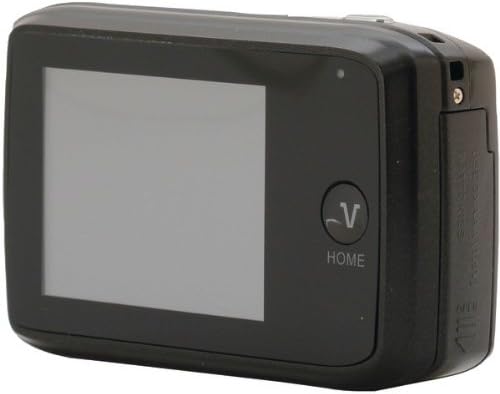
Obrázek 2: Zpět view of the Vivitar VX137-BLK Digital Camera, showing the touchscreen and Home button.
Nastavení
1. Instalace baterie
- Vyhledejte dvířka přihrádky na baterii na boku nebo ve spodní části fotoaparátu.
- Posuňte západku pro otevření přihrádky.
- Vložte tři (3) baterie typu AAA a dbejte na správnou polaritu (+/-) vyznačenou uvnitř přihrádky.
- Close the battery compartment door securely until it latches.
Poznámka: Baterie nejsou součástí balení a je nutné je zakoupit samostatně.
2. Instalace paměťové karty
- Vyhledejte slot pro paměťovou kartu, obvykle poblíž prostoru pro baterii.
- Otevřete kryt slotu paměťové karty.
- Insert a compatible SD or memory card into the slot with the metal contacts facing the correct direction, usually downwards or towards the front of the camera. Push gently until it clicks into place.
- Zavřete kryt slotu paměťové karty.
Note: A memory card is not included and is highly recommended for storing photos and videos.
Obsluha fotoaparátu
1. Zapnutí/vypnutí
- Zapnutí: Stiskněte a podržte tlačítko Tlačítko napájení dokud se obrazovka nerozsvítí.
- Vypnutí: Stiskněte a podržte tlačítko Tlačítko napájení znovu, dokud se obrazovka nevypne.
2. Fotografování
- Turn on the camera. The camera will typically start in photo capture mode.
- Frame your shot using the 2.4-inch touchscreen display.
- To zoom in or out, use the digital zoom controls on the touchscreen.
- Stiskněte tlačítko Tlačítko spouště halfway to focus, then press it fully to capture the image.
- The anti-shake feature will automatically engage to help reduce blur.
3. Nahrávání videa
- From the main screen, tap the video icon on the touchscreen to switch to video recording mode.
- Stiskněte tlačítko Tlačítko spouště to start recording. A timer or indicator will appear on the screen.
- Stiskněte tlačítko Tlačítko spouště znovu pro zastavení nahrávání.
4. Režim přehrávání
- From the main screen, tap the playback icon (usually an arrow in a rectangle) to enter playback mode.
- Swipe left or right on the touchscreen to browse through your captured photos and videos.
- Tap on a photo or video to view to na celé obrazovce.
- To exit playback mode, tap the Tlačítko Domů or the appropriate icon on the screen.
5. Použití dotykové obrazovky
The 2.4-inch touchscreen allows for intuitive navigation. Tap icons to select functions, swipe to scroll through images, and use pinch-to-zoom gestures if supported for reviewfotografie.
Údržba
Čištění fotoaparátu
- Tělo fotoaparátu: Use a soft, dry cloth to wipe the camera body. Do not use liquid cleaners or solvents.
- Čočka: Gently clean the lens with a lens cleaning cloth or a soft brush designed for camera lenses. Avoid touching the lens surface with your fingers.
- Dotyková obrazovka: Use a microfiber cloth specifically designed for screens to gently wipe the display.
Skladování
- When not in use for extended periods, remove the AAA batteries to prevent leakage.
- Fotoaparát skladujte na chladném a suchém místě, mimo dosah přímého slunečního záření, extrémních teplot a vysoké vlhkosti.
- Use a camera case to protect it from dust and scratches.
Odstraňování problémů
| Problém | Možná příčina | Řešení |
|---|---|---|
| Fotoaparát se nezapne. | Vybité nebo nesprávně vložené baterie. | Vyměňte za nové baterie AAA a dbejte na správnou polaritu. |
| Nelze fotografovat. | Paměťová karta je plná nebo není vložena. | Insert a memory card or delete existing files to free up space. Ensure the card is properly inserted. |
| Obrázky jsou rozmazané. | Insufficient light, camera shake, or dirty lens. | Ensure adequate lighting. Hold the camera steady. Clean the lens. The anti-shake feature is automatic, but extreme movement can still cause blur. |
| Dotyková obrazovka nereaguje. | Temporary software glitch or screen dirt. | Turn the camera off and on again. Gently clean the screen with a microfiber cloth. |
| Kamera zamrzne. | Softwarová chyba. | Remove and reinsert the batteries to reset the camera. |
Specifikace
| Funkce | Detail |
|---|---|
| Číslo modelu | VX137-BLK |
| Obrazový snímač | 12.1 megapixelů |
| Zobrazit | 2.4-inch Touch Screen LCD |
| Digitální zoom | 4x |
| Stabilizace obrazu | Optical (Anti-Shake) |
| Zdroj napájení | 3 x AAA baterie (nejsou součástí balení) |
| Podporováno File Formát | JPEG |
| Technologie fotosenzoru | CMOS |
| Poměr stran | 4:3 |
| Hmotnost položky | 4.8 unce |
| Rozměry produktu | 7.09 x 8.94 x 1.69 palce |
Informace o záruce
This product is sold AS-IS. Please refer to the original purchase documentation for any specific warranty details provided at the time of sale. For further inquiries regarding product functionality, please consult the support section.
Podpora
For technical assistance or further questions not covered in this manual, please visit the Vivitar official website or contact their customer support. Keep your purchase receipt and product model number (VX137-BLK) available when seeking support.


