Zavedení
This manual provides essential information for the safe and effective use of your Olympus PEN E-PL6 Mirrorless SLR Camera. Please read it thoroughly before operating the camera and keep it for future reference. The Olympus PEN E-PL6 is designed to deliver superior image quality and performance, featuring a 16 MP Live MOS Sensor and TruePic VI image processing engine.
Konec produktuview
The Olympus PEN E-PL6 offers advanced photographic capabilities in a compact mirrorless body. Key features include:
- 16megapixelový snímač Live MOS: For high-resolution images with rich detail.
- TruePic VI Image Processing Engine: Ensures vibrant colors and fast performance.
- 3osá stabilizace obrazu v těle: Reduces blur from camera shake, especially in low light.
- ISO Range from 100 to 25,600: Excellent low-light performance.
- 8 fps Sequential Shooting: Capture fast-moving subjects with ease.
- Full HD Video 1080i: Nahrávání videí ve vysokém rozlišení.
- 12 Art Filters and Effects: Enhance creativity directly in-camera.
- Customizable Settings (My Set) and Self-Timer: Personalize your shooting experience.
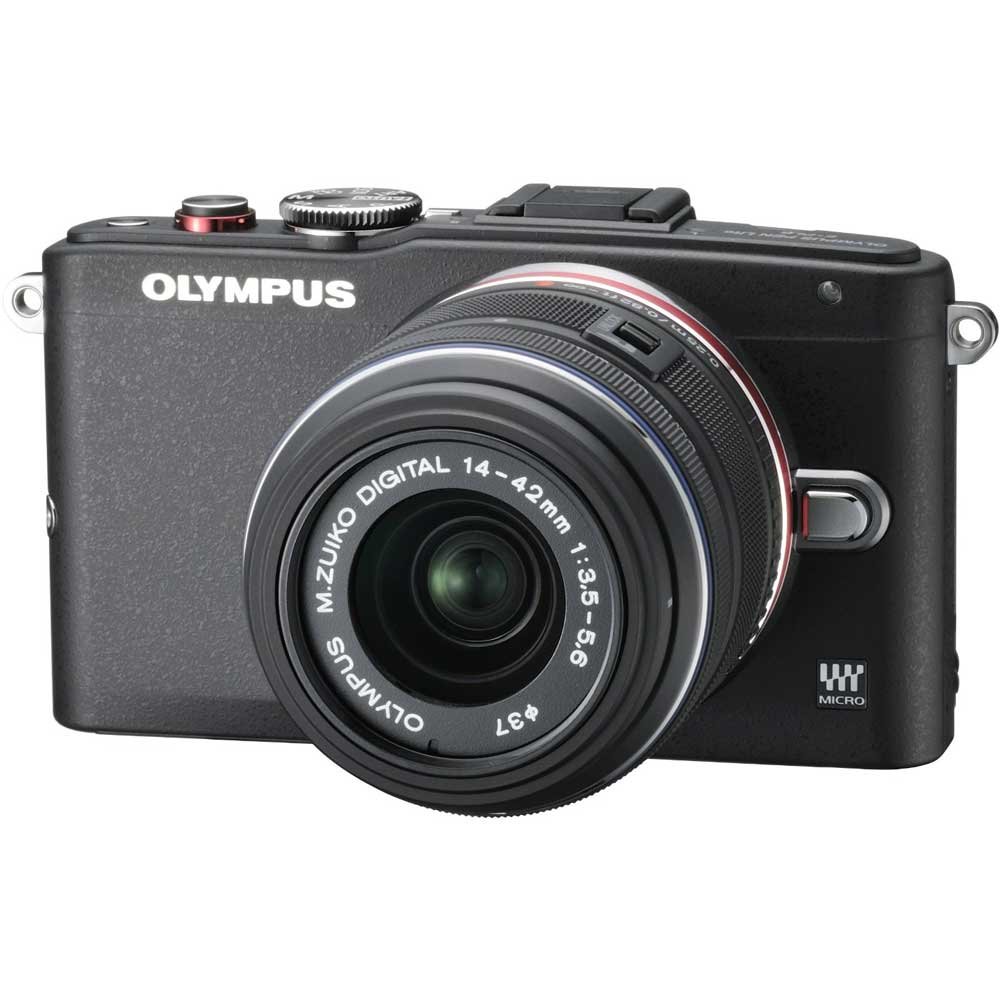
Figure 1: Olympus PEN E-PL6 Mirrorless SLR Camera with M.Zuiko Digital 14-42mm Lens attached.
Nastavení
1. Instalace baterie
- Otevřete kryt přihrádky na baterie, který se nachází ve spodní části fotoaparátu.
- Vložte dodanou lithium-iontovou baterii a dbejte na správnou orientaci.
- Bezpečně zavřete kryt bateriového prostoru.
- Před prvním použitím nabijte baterii pomocí dodané nabíječky.
2. Upevnění objektivu
- Remove the body cap from the camera and the rear lens cap from the M.Zuiko Digital 14-42mm lens.
- Zarovnejte bílou značku na objektivu s bílou značkou na těle fotoaparátu.
- Nasaďte objektiv otáčením ve směru hodinových ručiček, dokud nezacvakne na místo.
3. Vložení paměťové karty
- Otevřete kryt slotu paměťové karty.
- Insert an SD/SDHC/SDXC memory card with the label facing the front of the camera until it clicks.
- Zavřete kryt slotu paměťové karty.
Obsluha fotoaparátu
Základní fotografické režimy
Turn the mode dial to select your desired shooting mode (e.g., Program Auto, Aperture Priority, Shutter Priority, Manual, Art Filter, Scene Mode).
Zaostřování
- Automatické ostření (AF): The camera automatically focuses when the shutter button is pressed halfway.
- Manuální ostření (MF): Rotate the focus ring on the lens to adjust focus manually. Use the magnified view or focus peaking for precision.
Nastavení expozice
- ISO: Adjust sensitivity to light (ISO 100-25600). Higher ISO allows shooting in darker conditions but may introduce noise.
- Otvor: Controls the amount of light entering the lens and the depth of field.
- Rychlost závěrky: Controls the duration the sensor is exposed to light. Faster speeds freeze motion, slower speeds allow for motion blur.
Stabilizace obrazu
The 3-axis in-body image stabilization system helps reduce blur. Activate or deactivate it via the camera's menu settings.
Art Filters and Effects
Explore the 12 built-in Art Filters to add creative effects to your photos and videos. Select 'ART' on the mode dial to access these options.
Nahrávání videa
To record Full HD 1080i video, switch the mode dial to the video recording setting and press the dedicated video record button.
Přizpůsobitelná nastavení
Utilize the 'My Set' feature to save your preferred camera settings for quick recall. The customizable self-timer allows for delayed shooting.
Údržba
Čištění fotoaparátu a objektivu
- K čištění těla fotoaparátu použijte měkký hadřík, který nepouští vlákna.
- For the lens and sensor, use a blower brush to remove dust, followed by a lens cleaning solution and cloth if necessary. Avoid touching the lens surface directly.
Péče o baterie
- Pokud baterie nepoužíváte, skladujte je na chladném a suchém místě.
- Abyste prodloužili životnost baterií, vyhněte se jejich pravidelnému úplnému vybíjení.
Skladování
When storing the camera for extended periods, remove the battery and memory card. Store the camera in a dry, dust-free environment, preferably with a desiccant to prevent mold.
Odstraňování problémů
Fotoaparát se nezapne
- Ujistěte se, že je baterie plně nabitá a správně vložená.
- Zkontrolujte, zda jsou kontakty baterie čisté.
Obrázky jsou rozmazané
- Verify that the lens is properly focused.
- Check shutter speed; use a faster speed or tripod in low light.
- V případě potřeby se ujistěte, že je aktivní stabilizace obrazu.
Chyba paměťové karty
- Znovu vložte paměťovou kartu.
- Try a different memory card to rule out card malfunction.
- Naformátujte paměťovou kartu (poznámka: tím se vymažou všechna data).
Specifikace
| Funkce | Specifikace |
|---|---|
| Číslo modelu | PEN E-PL6 |
| Senzor | 16 Megapixel Live MOS |
| Obrazový procesor | TruePic VI |
| Stabilizace obrazu | 3-Axis In-Body, Sensor-shift |
| Rozsah ISO | 100 to 25,600 (Expanded Minimum 100) |
| Nahrávání videa | Full HD 1080i |
| Podporováno File Formáty | RAW (Olympus ARW), JPEG, MPO (3D still) |
| Kompatibilní montáže | Micro Four Thirds |
| Optical Zoom (with 14-42mm lens) | 3x |
| Maximum Focal Length (with 14-42mm lens) | 42 milimetrů |
| Popis měření | Vícenásobné, se zdůrazněným středem, bodové |
| Rozměry produktu | 4.37 x 1.5 x 2.52 palce |
| Hmotnost položky | 9.8 unce |
| Baterie | 1 lithium-iontová baterie (součástí balení) |
| Výrobce | Olympus |
Záruka a podpora
Your Olympus PEN E-PL6 camera is covered by a manufacturer's warranty. For specific details regarding warranty coverage, duration, and terms, please refer to the warranty card included with your product or visit the official Olympus support website. For technical assistance, troubleshooting, or service inquiries, please contact Olympus customer support.