1. Úvod
Děkuji za nákupasing the Fonestar AS-170RU Hi-Fi Amplifier. This device is designed to provide high-fidelity stereo audio amplification, featuring a built-in USB/MP3 player, AM/FM digital tuner, and multiple audio inputs. This manual provides detailed instructions for safe installation, operation, and maintenance of your ampzáchranář. Před použitím si prosím pečlivě přečtěte tento návod a uschovejte si jej pro budoucí použití.
2. Bezpečnostní pokyny
- Napájení: Zajistěte amplifier is connected to a power supply matching the voltage specified on the unit. Disconnect the power cord from the outlet if the unit will not be used for an extended period.
- Větrání: Neblokujte větrací otvory. Zajistěte dostatečný prostor kolem jednotky pro správné proudění vzduchu, abyste zabránili přehřátí.
- Voda a vlhkost: Nevystavujte jednotku dešti, vlhkosti ani kapajícím/stříkajícím tekutinám. Na jednotku nestavte předměty naplněné tekutinami, například vázy.
- Zdroje tepla: Udržujte jednotku mimo dosah zdrojů tepla, jako jsou radiátory, topná tělesa, sporáky nebo jiná zařízení (včetně amplifikátory), které produkují teplo.
- Čištění: Čistěte pouze suchým hadříkem. Nepoužívejte tekuté čističe nebo aerosolové čističe.
- Servis: Nepokoušejte se tento výrobek opravit sami. Veškerý servis svěřte kvalifikovanému servisnímu personálu.
- Umístění: Umístěte přístroj na stabilní, rovný povrch. Neumísťujte jej na přímé sluneční světlo nebo do blízkosti silných magnetických polí.
3. Obsah balení
Zkontrolujte prosím, zda jsou v balení obsaženy následující položky:
- Fonestar AS-170RU Hi-Fi Ampdoživotní
- Dálkové ovládání
- AM anténa
- FM anténa
- Uživatelská příručka (tento dokument)
4. Konec produktuview
4.1 Přední panel
The front panel provides access to essential controls and the display.
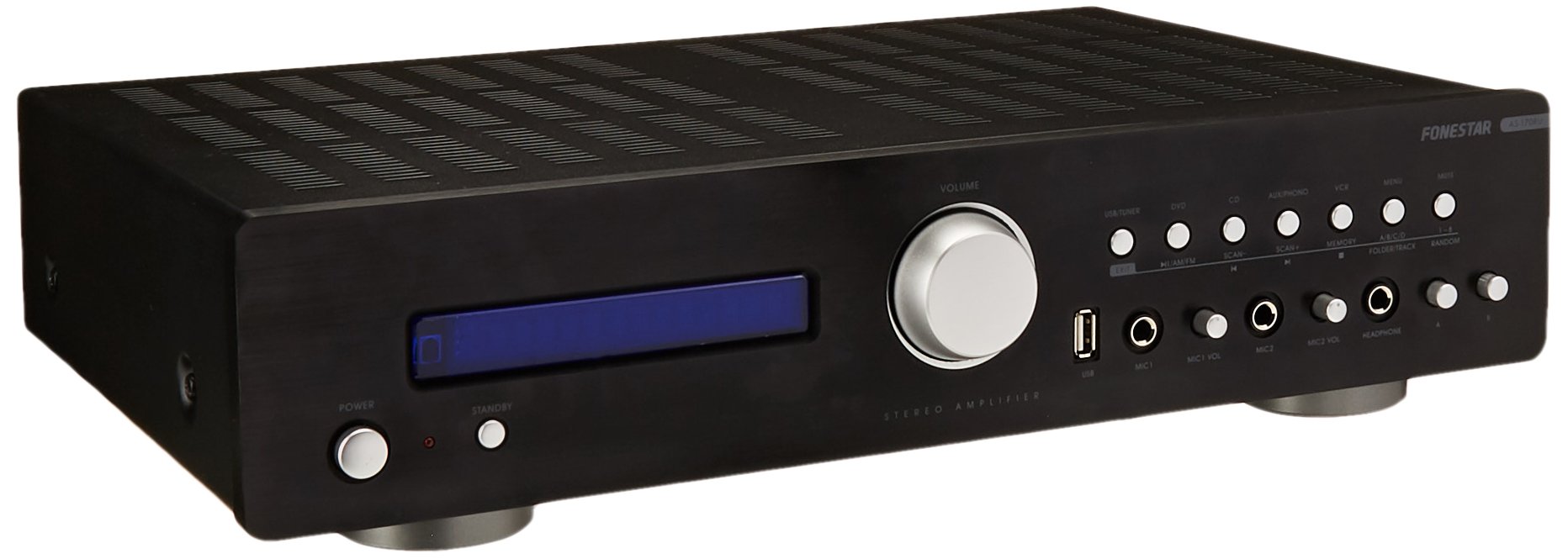
Image: Fonestar AS-170RU Front Panel. Tento obrázek zobrazuje přední část view z amplifier, showing the VFD display, USB port, headphone output, input selectors, volume knob, and other control buttons.
- Vypínač: Otočí ampživější zapnuto nebo vypnuto.
- VFD displej: Shows current input, volume level, tuner information (frequency, RDS), and USB/MP3 track details (ID3 tag).
- USB port: Pro připojení USB paměťových zařízení pro přehrávání MP3 files.
- Sluchátkový výstup: 6.3mm jack pro připojení sluchátek.
- Voliče vstupu: Buttons for choosing audio sources (CD, DVD, VCR, AUX/Phono, USB/Tuner).
- Ovládání hlasitosti: Rotary knob to adjust the master volume level.
- Vstupy mikrofonu: Two 6.3mm microphone jacks with independent volume control.
- Ovládání tónů: Buttons or menu options for adjusting Bass, Treble, and Balance.
4.2 Zadní panel
The rear panel contains all the necessary connections for your audio sources, speakers, and antennas.

Image: Fonestar AS-170RU Rear Panel. This image illustrates the rear connections of the amplifier, including speaker terminals (A/B), various RCA input jacks (CD, DVD, VCR, AUX/Phono), REC OUT, PRE OUT, AMP IN, and antenna connections (FM COAX, AM LOOP ANT).
- Speaker Outputs (A/B): Terminals for connecting two pairs of speakers. Supports 4-16 ohms for A or B, or 8-16 ohms for A+B.
- Audio Inputs (RCA):
- CD vstup: Pro připojení CD přehrávače.
- Vstup DVD: For connecting a DVD player or other audio source.
- VCR Input: For connecting a VCR or other audio source.
- AUX/PHONO Input: For connecting auxiliary devices or a turntable (Phono input may require a pre-amplifier if your turntable does not have one built-in).
- REC OUT: RCA output for connecting to a recording device.
- PŘED OUT: RCA output for connecting to an external power ampživější.
- AMP V: RCA input for connecting an external pre-ampživější.
- Připojení antény:
- FM COAX 75Ω: Pro připojení FM antény.
- AM LOOP ANT: For connecting the supplied AM loop antenna.
4.3 Dálkové ovládání
The included remote control allows convenient operation of the amplifier z dálky.

Image: Fonestar AS-170RU Remote Control. This image shows the remote control unit with various buttons for power, input selection, volume, mute, tuner functions, USB playback controls, and tone adjustments.
- POHOTOVOSTNÍ: Zapnutí/vypnutí.
- Voliče vstupu: Buttons for CD, DVD, VCR, AUX/PHONO, USB/TUNER.
- Zvýšení/snížení hlasitosti (VOL +/-): Upravuje hlavní hlasitost.
- ZTLUMIT: Ztiší zvukový výstup.
- AM/FM: Switches between AM and FM tuner modes.
- SKENOVAT: Scans for radio stations.
- PAMĚŤ: Stores radio station presets.
- USB Playback Controls: Play/Pause, Stop, Skip Track, Folder/Track navigation.
- EQ OFF / BASS / TREBLE: Access tone controls.
- RDS / ID3: Displays RDS information for radio or ID3 tag pro MP3 files.
5. Nastavení
5.1 Připojení reproduktorů
- Zajistěte ampje zářič vypnutý a odpojený od elektrické zásuvky.
- Connect your speakers to the "SPEAKERS OUTPUT" terminals on the rear panel.
- Přizpůsobte kladný (+) pól amplifier (red) to the positive (+) terminal of your speaker, and the negative (-) terminal (black) to the negative (-) terminal.
- The AS-170RU supports two groups of speakers (A and B). You can connect one pair to "SPEAKERS A" and another to "SPEAKERS B".
- Ensure your speakers' impedance matches the amplifier's specifications: 4-16 ohms for A or B, or 8-16 ohms for A+B.
5.2 Připojení zdrojů zvuku
Use RCA cables to connect your audio components to the corresponding input jacks on the rear panel.
- CD přehrávač: Připojte ke vstupu „CD“.
- DVD přehrávač: Connect to the "DVD" input.
- Videorekordér: Connect to the "VCR" input.
- Auxiliary Device (e.g., smartphone, tablet): Connect to the "AUX/PHONO" input.
- točna: Connect to the "AUX/PHONO" input. If your turntable does not have a built-in pre-amplifier, you may need an external phono pre-ampživější.
5.3 Připojení antén
- Anténa FM: Connect the supplied FM wire antenna to the "FM COAX 75Ω" terminal. Extend the wire for optimal reception.
- AM anténa: Connect the supplied AM loop antenna to the "AM LOOP ANT" terminals. Position the loop for best reception.
5.4 Připojení napájení
Jakmile jsou všechna audio a reproduktorová připojení provedena, zapojte amplifier's power cord into a suitable AC power outlet.
6. Návod k obsluze
6.1 Základní obsluha
- Zapnutí/vypnutí: Press the Power button on the front panel or the STANDBY button on the remote control to turn the ampživější zapnuto nebo vypnuto.
- Vyberte zdroj vstupu: Press the desired input selector button on the front panel (CD, DVD, VCR, AUX/PHONO) or the remote control (CD, DVD, VCR, AUX/PHONO, USB/TUNER).
- Upravit hlasitost: Otáčejte knoflíkem hlasitosti na předním panelu nebo použijte tlačítka VOL +/- na dálkovém ovladači pro nastavení hlasitosti.
- Ztlumit: Press the MUTE button on the remote control to temporarily silence the audio. Press it again to restore sound.
6.2 USB/MP3 Playback
- Insert a USB storage device (flash drive) into the USB port on the front panel.
- Select "USB/TUNER" as the input source. The amplifier will automatically detect and begin playing MP3 files.
- Use the playback controls on the remote control (Play/Pause, Stop, Skip Track, Folder/Track) to navigate and control your music.
- The VFD display will show track information, including ID3 tags pokud je k dispozici.
- The amplifier supports up to 65,000 indexable folders and files, with a maximum of 8 folder levels.
6.3 AM/FM Tuner Operation
- Select "USB/TUNER" as the input source, then press the AM/FM button on the remote control to switch between AM and FM bands.
- Automatické skenování: Press the SCAN button on the remote control to automatically search for and store available radio stations.
- Ruční ladění: Use the tuning buttons (usually arrow keys) on the remote control to manually adjust the frequency.
- Přednastavené stanice: The amplifier supports 64 presets. Use the MEMORY button to store and recall your favorite stations.
- Funkce RDS: If available, press the RDS button on the remote control to display Radio Data System information (e.g., station name, program type).
6.4 mikrofonní vstupy
- Connect microphones to the 6.3mm MIC 1 and MIC 2 jacks on the front panel.
- Adjust the independent volume controls for each microphone to achieve the desired level.
6.5 Tone and Balance Control
The amplifier allows adjustment of bass, treble, and balance through its menu system or dedicated buttons on the remote control. Refer to the remote control section for specific buttons like EQ OFF, BASS, TREBLE.
7. Údržba
- Čištění: Disconnect the power before cleaning. Use a soft, dry cloth to wipe the exterior surfaces. Do not use abrasive cleaners, waxes, or solvents.
- Větrání: Pravidelně kontrolujte, zda jsou větrací otvory zbavené prachu a nečistot.
- Skladování: Pokud budete přístroj skladovat delší dobu, odpojte jej ze zásuvky a uložte jej na chladném a suchém místě, mimo dosah přímého slunečního záření a extrémních teplot.
8. Řešení problémů
Pokud narazíte na problémy s vaším ampMožná řešení naleznete v následující tabulce.
| Problém | Možná příčina | Řešení |
|---|---|---|
| Žádná síla | Napájecí kabel není připojen; Vadná zásuvka; Ampčistič v pohotovostním režimu. | Ensure power cord is securely plugged in. Test the outlet with another device. Press the Power/STANDBY button. |
| Žádný zvuk | Vybrán nesprávný vstup; Hlasitost je příliš nízká; Reproduktory nejsou správně připojeny; Funkce ztlumení je aktivní. | Select the correct input source. Increase volume. Check speaker connections. Deactivate MUTE. |
| Špatný příjem rádia | Antenna not connected or poorly positioned; Interference. | Connect and adjust the position of the AM/FM antennas. Move the ampUchovávejte přístroj mimo dosah jiných elektronických zařízení. |
| Přehrávání z USB nefunguje | USB device not inserted correctly; Incompatible file format; USB device faulty. | Ensure USB device is fully inserted. Check if files are MP3 format. Try a different USB device. |
| Amplifier turns off unexpectedly or cycles power | Overheating; Short circuit in speaker wiring; Internal fault. | Ensure adequate ventilation. Check speaker wires for frayed strands causing short circuits. If the problem persists, disconnect power and contact qualified service personnel. |
9. Specifikace
- Model: AS-170RU
- Výkon: 80 + 80 W RMS at 4 Ω
- Impedance reproduktoru: 4-16 Ω (A or B), 8-16 Ω (A+B)
- Ochrana: 3 circuits (short circuits, overload, overvoltage)
- USB přehrávač: MP3 file playback, ID3 tag support. Max 65,000 indexable folders/files, max 8 folder levels.
- Tuner: Digital AM/FM, 64 presets, RDS.
- Vstupy: 2 x Microphone (6.3mm), 4 x RCA (CD, DVD, VCR, AUX/Phono), 1 x RCA (AMP V).
- výstupy: 1 x RCA (REC OUT), 1 x RCA (PRE OUT), Headphone (6.3mm).
- Zobrazit: Blue VFD.
- Tónová kontrola: Bass, Treble, Balance (via menu/remote).
- Rozměry: 40 x 40 x 60 cm (přibližně 15.7 x 15.7 x 23.6 palce)
- Hmotnost: 7.2 kg (cca 15.87 lb)
10. Záruka a podpora
For warranty information and technical support, please refer to the warranty card included with your product or contact your authorized Fonestar dealer. Do not attempt to repair the unit yourself, as this may void your warranty.


