Zavedení
This manual provides detailed instructions for the Denon AVR-E400 7.1 Channel Home Theater Receiver. This receiver is designed to deliver high-performance audio and video for your home entertainment system, supporting HD and 3D content, 4K Ultra HD up-conversion, and network streaming capabilities.

Obrázek 1: Přední strana view of the Denon AVR-E400 Receiver.
Nastavení
Co je v krabici
- AVR-E400 Receiver
- Setup Measuring Microphone with attached cable
- Dálkové ovládání
- FM anténa
- Smyčková anténa AM
- Dvě AAA baterie
- CD-ROM Owner's Manual
- Stručný návod k obsluze
- Color-coded Speaker Label Tags
- Informační list o záruce
Počáteční připojení
The AVR-E400 features an on-screen graphical display and a Setup Assistant to guide you through the connection process. Follow the instructions on your HDTV screen for optimal setup.
Připojení reproduktorů
The rear panel includes color-coded, spring-loaded speaker terminals for easy and accurate speaker cable hookup. Use the supplied color-coded speaker label tags to ensure correct connections.

Figure 2: Rear panel connections for speakers and other devices.
Video and Audio Source Connections
Connect your video and audio sources using the available HDMI inputs. The receiver is equipped with six HDMI inputs, including five on the rear panel and one on the front panel for convenient access. The advanced video circuitry supports up-conversion of 1080p signals to 4K Ultra HD (3840x2160 pixels).
Síťové připojení
Connect the receiver to your home network via an Ethernet cable to access Internet music streaming services like SiriusXM, vTuner, Pandora, and Spotify, as well as Apple's AirPlay technology.
Front Panel USB Input
A built-in USB port on the front panel supports digital music playback and charging from compatible USB devices, including iPod, iPhone, and iPad.
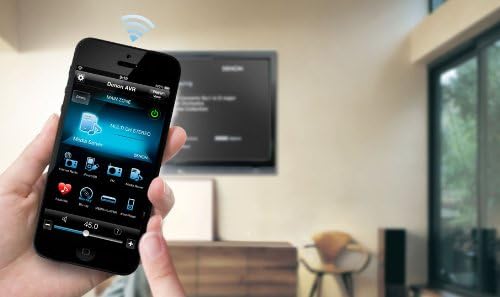
Figure 3: Front panel of the Denon AVR-E400 Receiver.
Provozní
Dálkové ovládání
The included remote control features discrete source selection buttons for direct access to your preferred source components.

Figure 4: Denon AVR-E400 Remote Control.
Korekce místnosti Audyssey
The AVR-E400 incorporates Audyssey Bronze technologies, including Audyssey MultEQ, Audyssey Dynamic Volume, and Audyssey Dynamic EQ. Audyssey MultEQ calibrates the system for up to six different seating positions, optimizing sound quality for your listening space. Audyssey Dynamic Volume automatically adjusts volume levels to reduce differences between loud and soft programming, while Audyssey Dynamic EQ adjusts subwoofer and surround speaker levels for consistent performance at any volume.
Vícezónový zvuk
The receiver can be configured for a full 7.1 channel system or a 5.1 channel system in the main room with stereo sound in a separate second room. This allows for simultaneous enjoyment of different audio sources in two distinct areas.
HDMI Standby Pass-through
Tato funkce vám umožňuje view content from a connected source (e.g., cable or satellite tuner) on your TV without needing to turn the AVR-E400 on.
Ovládání mobilní aplikace
Control the AVR-E400 using the Denon Remote App on your iOS or Android mobile device. The app provides control over various functions, including browsing Internet radio, media server files, creating playlists, adjusting volume, selecting inputs, and navigating menus.

Figure 5: Denon Remote App on a mobile device.
Údržba
To ensure optimal performance and longevity of your Denon AVR-E400 receiver, follow these general maintenance guidelines:
- Čištění: Regularly wipe the exterior of the receiver with a soft, dry cloth. Avoid using abrasive cleaners or solvents.
- Větrání: Ensure adequate ventilation around the unit. Do not block the ventilation openings on the top, sides, or rear of the receiver. Allow sufficient space for airflow.
- Umístění: Place the receiver on a stable, level surface away from direct sunlight, heat sources, and excessive moisture.
- Správa kabelů: Periodically check all cable connections to ensure they are secure and free from damage. Avoid bending cables sharply.
- Aktualizace firmwaru: Check the official Denon website periodically for any available firmware updates. Follow the instructions provided by Denon for safe and proper installation of updates.
Odstraňování problémů
If you encounter issues with your Denon AVR-E400, refer to the following common troubleshooting steps. For more detailed information, consult the full Owner's Manual on the supplied CD-ROM.
- Bez napájení: Ensure the power cord is securely plugged into both the receiver and a working electrical outlet. Check if the power indicator light is on.
- Žádný zvuk: Verify that the correct input source is selected. Check all speaker connections for proper polarity and secure fit. Ensure the volume is not muted or set too low. Run the Audyssey Setup Assistant again to re-calibrate speakers.
- Žádné video: Confirm that the correct HDMI input is selected on the receiver and that the TV is set to the correct HDMI input for the receiver. Check all HDMI cable connections.
- Problémy s připojením k síti: Ensure the Ethernet cable is securely connected. Check your router and internet connection. Restart the receiver and your network equipment.
- Dálkové ovládání nefunguje: Check and replace the batteries in the remote control. Ensure there are no obstructions between the remote and the receiver's IR sensor.
If problems persist after attempting these steps, contact Denon customer support for further assistance.
Specifikace
| Funkce | Detail |
|---|---|
| Rozměry produktu | 13.2 x 17.1 x 6.4 palce |
| Hmotnost položky | 20.1 libry |
| Číslo modelu položky | AVR-E400 |
| Značka | Denon |
| Technologie připojení | HDMI, USB |
| Typ ovladače | Android, iOS |
| Speciální funkce | Ekvalizér, Pandora, Spotify |
| Kompatibilní zařízení | Herní konzole, osobní počítač, chytrý telefon, reproduktor, televize |
| Celkový počet portů HDMI | 5 (rear) + 1 (front) = 6 |
| Režim zvukového výstupu | Surround |
| Konfigurace kanálů prostorového zvuku | 5.1 kanál, 7 kanálů |
| Kódování videa | HEVC Main 10 |
| Maximální výkon na kanál | 185 wattů |
Oficiální video produktu
Video 1: Overview of the Denon E Series Receivers, highlighting key features and benefits.
Záruka a podpora
The Denon AVR-E400 typically comes with a 2-year manufacturer's warranty. Please refer to the Warranty Information Sheet included in your product packaging for specific terms and conditions.
For technical support, service, or additional information, please visit the official Denon webnebo kontaktujte jejich oddělení zákaznických služeb.


