1. Úvod
Děkuji za nákupasing the KLH R5100 Surround Sound Receiver. This receiver is designed to provide high-quality audio and video performance for your home entertainment system. It features multiple audio and video inputs, surround sound processing, and a powerful amplifier to deliver an immersive listening experience. Please read this manual thoroughly before operating the unit to ensure proper setup and optimal performance.
2. Důležité bezpečnostní informace
Abyste snížili riziko úrazu elektrickým proudem, požáru nebo poškození jednotky, dodržujte prosím následující bezpečnostní opatření:
- Zdroj napájení: Připojujte přístroj pouze k napájení střídavým proudem 120 V, 60 Hz.
- Větrání: Ensure adequate ventilation. Do not block ventilation openings. Allow sufficient space around the unit for proper airflow.
- Voda a vlhkost: Do not expose the unit to rain, moisture, or excessive humidity. Do not place objects filled with liquids, such as vases, on the unit.
- Teplo: Udržujte jednotku mimo dosah zdrojů tepla, jako jsou radiátory, topná tělesa, sporáky nebo jiná zařízení (včetně amplifikátory), které produkují teplo.
- Čištění: Před čištěním odpojte přístroj ze zásuvky. K čištění použijte suchý hadřík.
- Servis: Nepokoušejte se opravovat tento přístroj sami. Veškerý servis svěřte kvalifikovanému servisnímu personálu.
- Kabely: Chraňte napájecí kabel před šlapáním nebo přiskřípnutím, zejména u zástrček, zásuvek a v místě, kde vychází z jednotky.
3. Obsah balení
Zkontrolujte prosím, zda váš balíček obsahuje následující položky:
- KLH R5100 Surround Sound Receiver
- Jednotka dálkového ovládání
- Uživatelská příručka
- Audio/video kabely (typ RCA)
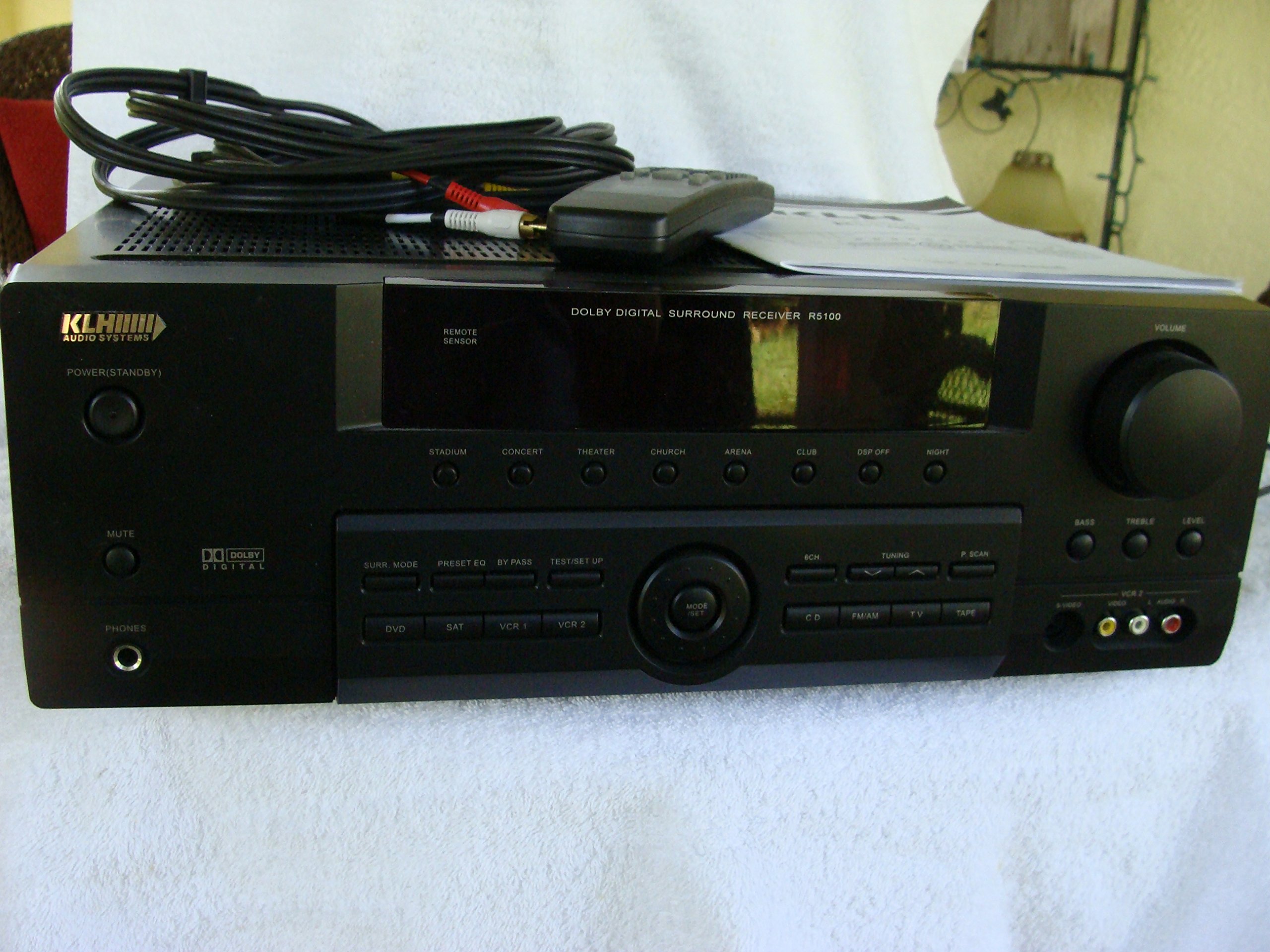
Image: The KLH R5100 receiver, its remote control, user manual, and included audio/video cables.
4. Konec produktuview
4.1 Ovládací prvky na předním panelu
Přední panel poskytuje přístup k základním ovládacím prvkům a indikátorům pro každodenní provoz.

Obrázek: Podrobný view of the receiver's front panel, highlighting the display, volume control, and input selection buttons.
- Vypínač: Zapíná nebo vypíná přijímač.
- Voliče vstupu: Buttons for DVD, SAT, VCR 1, VCR 2, CD, FM/AM, TV, TAPE to choose your audio/video source.
- Knoflík hlasitosti: Upravuje celkovou výstupní hlasitost.
- Surround Mode Buttons: Select various sound fields like Stadium, Concert, Theater, Church, Arena, Club, DSP Off, Night.
- Bass/Treble/Level: Controls for adjusting audio tone and individual channel levels.
- Sluchátkový jack: Pro soukromý poslech.
4.2 Připojení zadního panelu
The rear panel houses all input and output terminals for connecting your audio and video components, as well as speakers.

Image: The full rear panel of the receiver, displaying all connection ports for audio, video, and speakers.
- Koncovky reproduktorů: Connections for Main (Front Left/Right), Center, and Rear (Surround Left/Right) speakers.
- Audio Inputs (RCA): For connecting CD players, tape decks, VCRs, TVs, and other stereo audio sources.
- Video Inputs/Outputs (RCA/S-Video): For connecting video sources like DVD players, VCRs, and TVs.
- Digitální audio vstupy (optický/koaxiální): For connecting digital audio sources like DVD players or set-top boxes.
- 6CH Direct Input: For connecting external multi-channel decoders or players with 5.1 analog outputs.
- Výstup pro subwoofer: RCA výstup pro připojení aktivního subwooferu.
- Anténní terminály: For FM and AM antennas.
4.3 jednotka dálkového ovládání
The remote control provides convenient access to all receiver functions from your listening position.

Obrázek: Detailní záběr view of the remote control unit, detailing its buttons for various functions.
- Zapnutí/vypnutí: Zapíná nebo vypíná přijímač.
- Voliče vstupu: Dedicated buttons for each input source (DVD, CD, TV, etc.).
- Zvýšení/Snížení hlasitosti: Upravuje hlavní hlasitost.
- Ztlumit: Dočasně ztlumí zvukový výstup.
- Prostorový režim: Cycles through available surround sound modes.
- Level/Test: For adjusting individual speaker levels and running a test tone.
- Ovládání tuneru: For FM/AM station tuning and memory functions.
5. Nastavení
5.1 Připojení reproduktorů
Ensure the receiver is unplugged from the power outlet before making any connections.
- Přední reproduktory: Connect your main left and right speakers to the 'MAIN SPEAKERS (8Ω)' terminals. Ensure correct polarity (+ to + and - to -).
- Středový reproduktor: Connect your center channel speaker to the 'CENTER SPEAKER (8Ω)' terminals.
- Zadní reproduktory: Connect your surround left and right speakers to the 'REAR SPEAKERS (8Ω)' terminals.
- subwoofer: Connect an active subwoofer to the 'SUBWOOFER OUT' RCA jack using a single RCA cable.

Obrázek: Podrobný view of the speaker connection terminals on the rear panel.
5.2 Connecting Audio/Video Sources
Use appropriate cables (RCA, Optical, Coaxial) to connect your source components to the receiver.
- DVD přehrávač: Connect the audio output of your DVD player to the 'DVD' audio input jacks (RCA) on the receiver. For digital audio, use either the 'DIGITAL IN OPTICAL' or 'DIGITAL IN COAXIAL' input. Connect the video output to the 'DVD' video input.
- CD přehrávač: Connect the audio output of your CD player to the 'CD' audio input jacks (RCA).
- TV/Cable Box: Connect the audio output of your TV or cable box to the 'TV' audio input jacks (RCA). Connect video output to the 'TV' video input.
- Další zařízení: Use 'SAT', 'VCR 1', 'VCR 2', or 'TAPE' inputs for other audio/video components as needed.

Image: A close-up of the digital audio inputs (Coaxial, Optical) and the 6-channel direct input section on the rear panel.
5.3 Připojení antény
Pro příjem rádia připojte dodané antény FM a AM k příslušným konektorům na zadním panelu.
6. Návod k obsluze
6.1 Základní obsluha
- Zapnutí: Press the Power button on the front panel or remote control.
- Vyberte vstup: Press the desired input selector button (e.g., 'DVD', 'CD') on the front panel or remote control to choose your source.
- Upravit hlasitost: Turn the Volume knob on the front panel or use the Volume Up/Down buttons on the remote control.
6.2 Surround Sound Modes
The R5100 offers various sound modes to enhance your listening experience:
- Stadión: Simulates the acoustics of a large stadium.
- Koncert: Creates a concert hall ambiance.
- Divadlo: Optimized for movie playback, enhancing dialogue and effects.
- Kostel: Replicates the spaciousness of a church.
- Arena: Provides a wide, open sound field.
- Klub: Simulates a lively club environment.
- DSP Off: Disables digital sound processing for a direct stereo signal.
- Noc: Reduces dynamic range for late-night listening without disturbing others.
Press the 'SURR. MODE' button on the remote or front panel to cycle through these modes.
Ovládání 6.3 tónů
Use the BASS and TREBLE controls on the front panel or remote to adjust the low and high frequency response. The LEVEL controls allow for fine-tuning of individual speaker output levels.
6.4 Obsluha tuneru
Pro poslech rádia:
- Press the 'FM/AM' input selector.
- Use the 'TUNING' buttons on the front panel or remote to find stations.
- Press 'MEMORY' to store favorite stations, and 'P.SCAN' to scan through presets.
7. Údržba
To ensure the longevity and optimal performance of your KLH R5100 receiver, follow these maintenance guidelines:
- Čištění: Wipe the exterior surfaces with a soft, dry cloth. Do not use abrasive cleaners, waxes, or solvents as they may damage the finish.
- Větrání: Regularly check that the ventilation openings are not obstructed by dust or debris. Use a soft brush or vacuum cleaner to gently remove any build-up.
- Napájecí kabel: Inspect the power cord periodically for any signs of damage. If damaged, discontinue use and contact qualified service personnel.
- Skladování: Pokud budete přístroj skladovat delší dobu, odpojte jej ze zásuvky a zakryjte jej, abyste jej ochránili před prachem.
8. Řešení problémů
If you encounter problems with your receiver, refer to the following common issues and solutions before seeking professional service.
| Problém | Možná příčina | Řešení |
|---|---|---|
| Žádná síla | Power cord unplugged; Power outlet not active | Ujistěte se, že je napájecí kabel bezpečně zapojený; zkontrolujte zásuvku s jiným zařízením. |
| Žádný zvuk | Incorrect input selected; Speakers not connected properly; Volume too low; Mute function active | Select correct input source; Check speaker connections and polarity; Increase volume; Deactivate Mute |
| Dálkové ovládání nefunguje | Batteries depleted; Obstruction between remote and receiver; Remote sensor blocked | Replace batteries; Remove any obstructions; Ensure remote sensor on receiver is clear |
| Špatný příjem rádia | Anténa není připojena nebo je špatně umístěna | Connect antennas securely; Adjust antenna position for better reception |
| Zkreslený zvuk | Input signal too high; Speaker impedance mismatch; Damaged cables | Reduce source volume; Ensure speakers match 8Ω impedance; Check and replace damaged cables |
9. Specifikace
The following are the technical specifications for the KLH R5100 Surround Sound Receiver:
- Číslo modelu: R5100
- Rozměry produktu: 16.88 x 6.88 x 15.75 palce
- Hmotnost položky: 24.2 libry
- Zdroj napájení: AC 120 V, 60 Hz
- Spotřeba energie: 320W
- Režim výstupu zvuku: Surround
- Konfigurace kanálu prostorového zvuku: 5.1
- Technologie připojení: RCA, 3.5mm Jack, Optical, Coaxial
- Kompatibilní zařízení: Reproduktory
- Typ ovladače: Vzdálený
- Speciální funkce: Advanced Room Calibration (as per product listing, though specific details may vary)
- Barva: Černý
10. Záruka a podpora
For warranty information and customer support, please refer to the documentation included with your purchase or contact KLH customer service directly. Keep your proof of purchase for any warranty claims.


