Zavedení
This manual provides essential information for the safe and efficient operation of your Sony KDL-55W900A 55-Inch 3D Internet LED HDTV. Please read these instructions thoroughly before using the television and retain them for future reference.
The Sony KDL-55W900A features a 55-inch display with 1080p resolution, 240Hz refresh rate, 3D capabilities, and integrated internet connectivity. It incorporates X-Reality PRO for enhanced detail and a TRILUMINOS display for brilliant colors.

Obraz: Přední view of the Sony KDL-55W900A 55-Inch 3D Internet LED HDTV, showcasinjeho elegantní design a displej.
Co je v krabici
Ověřte, zda jsou s vaším televizorem dodány všechny následující položky:
- Television Unit (Sony KDL-55W900A)
- Dálkové ovládání
- TV stojan
- Napájecí kabel
- Active 3D Glasses (quantity may vary, typically 4 pairs)
- AA Batteries (2 for remote control)
- Documentation (Quick Setup Guide, Safety Information)
Nastavení
1. Připevnění televizního stojanu
Place the TV screen face down on a soft, clean surface to prevent damage. Align the stand with the mounting holes on the bottom of the TV and secure it using the provided screws. Ensure the stand is firmly attached before proceeding.

Obraz: Diagram showing the dimensions of the Sony KDL-55W900A TV, including width, height, and depth.

Obraz: Strana view of the Sony KDL-55W900A TV, highlighting its slim profile.
2. Připojení periferií
Connect your external devices such as Blu-ray players, gaming consoles, or cable/satellite boxes to the appropriate input ports (HDMI, USB, etc.) on the rear of the TV.
- HDMI: Pro zvuk a video ve vysokém rozlišení.
- USB: Pro připojení paměťových zařízení USB.
- Ethernet: Pro kabelové připojení k internetu.
- RF: Pro připojení antény nebo kabelu.
3. Připojení napájení
Zapojte napájecí kabel do napájecího vstupu televizoru a poté do zásuvky ve zdi.
4. Průvodce počátečním nastavením
Upon first power-on, the TV will guide you through an initial setup process. This includes language selection, time zone, channel scanning, and network configuration.

Obraz: A person interacting with a tablet displaying a program guide, with the Sony TV visible in the background, demonstrating smart TV control.
Návod k obsluze
1. Základní funkce televizoru
- Moc: Stisknutím tlačítka napájení na dálkovém ovladači nebo televizoru jej zapnete/vypnete.
- Výběr vstupu: Use the "Input" or "Source" button on the remote to switch between connected devices (HDMI 1, HDMI 2, TV, etc.).
- Objem: Adjust using the Volume Up/Down buttons.
- Kanál: Change channels using the Channel Up/Down buttons or number pad.
2. Smart TV Features and Internet Connectivity
Your TV can connect to the internet via Wi-Fi or Ethernet. Access various online services and applications through the Smart TV interface.
- Navigate the Smart TV menu using the remote's directional pad.
- Select apps like Netflix, Hulu, or Amazon Prime Video for streaming content.
- Použijte vestavěný web browser for internet surfing.

Obraz: A family enjoying content on the Sony TV, with a smartphone mirroring its display to the TV, illustrating connectivity features.
3. Nastavení obrazu a zvuku
Access the "Picture" and "Sound" menus to customize your viewzážitek z poslechu a poslechu.
- Obrazové režimy: Choose from Standard, Vivid, Cinema, Game, etc.
- Jas, kontrast, barva: Adjust these settings to your preference.
- X-Reality PRO: This feature enhances detail and texture.
- Displej TRILUMINOS: Provides a wider spectrum of colors.
- Motionflow XR 960: Zlepšuje ostrost pohybu u rychlých scén.

Obraz: A split-screen comparison demonstrating the enhanced detail and clarity provided by X-Reality PRO technology on the Sony TV.
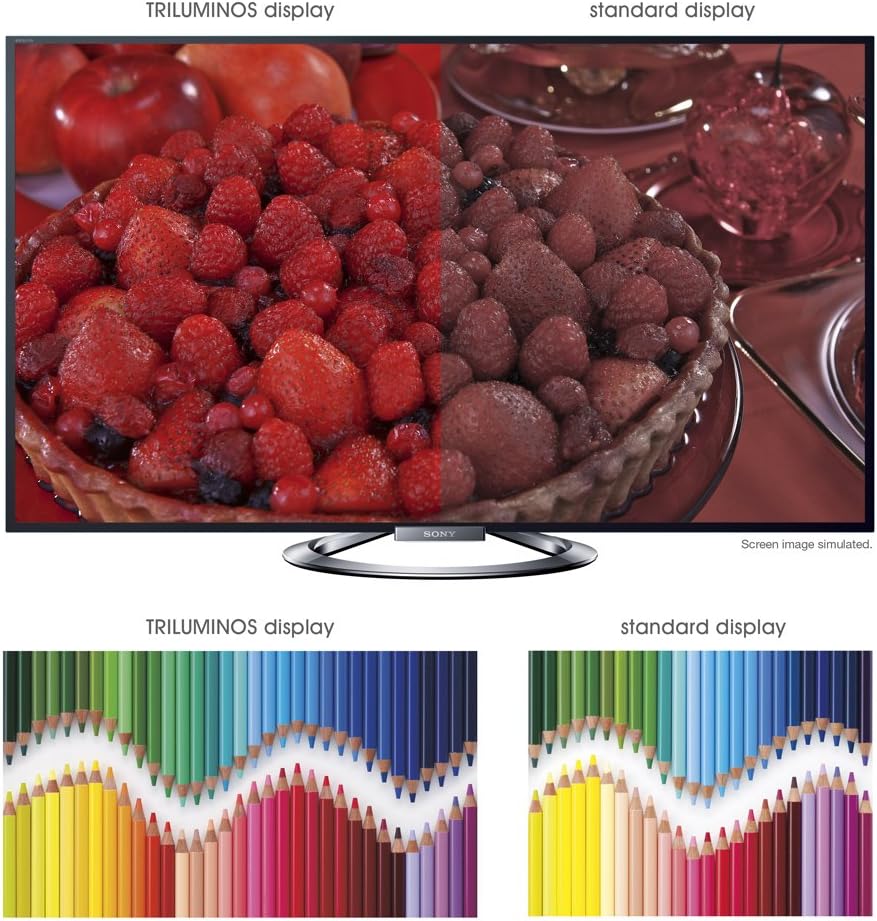
Obraz: A split-screen comparison illustrating the vibrant and expanded color palette of the TRILUMINOS display versus a standard display.
4D ViewIng
To enjoy 3D content, ensure you have active 3D glasses and a 3D-compatible source (e.g., 3D Blu-ray player).
- Put on the active 3D glasses.
- Play 3D content from a connected source. The TV should automatically detect and switch to 3D mode.
- If 3D mode does not activate automatically, check the TV's picture settings for 3D options.
- Ensure 3D glasses are charged or have fresh batteries.
Údržba
1. Čištění televizoru
- Obrazovka: Jemně otřete obrazovku měkkým, suchým hadříkem z mikrovlákna. V případě odolných skvrn lehceampOtřete hadřík vodou nebo specializovaným čističem obrazovek (nestříkejte přímo na obrazovku).
- Skříň: Skříňku televizoru otřete měkkým, suchým hadříkem. Nepoužívejte abrazivní čisticí prostředky, vosky ani rozpouštědla.
- Před čištěním vždy odpojte televizor ze zásuvky.
2. Aktualizace softwaru
Pravidelně kontrolujte aktualizace softwaru, abyste zajistili optimální výkon a přístup k nejnovějším funkcím.
- Navigate to the "Settings" menu on your TV.
- Look for "System Software Update" or similar options.
- Follow the on-screen instructions to download and install updates. Ensure the TV remains powered on during the update process.
3. 3D Glasses Care
- Clean lenses with a soft, dry cloth.
- Store glasses in a protective case when not in use.
- Replace batteries as needed (typically AA batteries).
Odstraňování problémů
| Problém | Možná příčina / řešení |
|---|---|
| Žádná síla |
|
| Žádný obraz / Černá obrazovka |
|
| Žádný zvuk |
|
| Problémy s připojením k síti |
|
| 3D Image is Blurry or Not Working |
|
If the problem persists after attempting these solutions, please refer to the support section for further assistance.
Specifikace
| Funkce | Detail |
|---|---|
| Značka | Sony |
| Číslo modelu | KDL-55W900A |
| Velikost obrazovky | 55 palce |
| Technologie displeje | LED |
| Rezoluce | 1080p |
| Obnovovací frekvence | 240 Hz (Motionflow XR 960) |
| Poměr stran | 16:9 |
| Speciální funkce | Flat, 3D Capable, Internet TV, X-Reality PRO, TRILUMINOS Display, Dynamic Edge LED Backlight |
| Technologie připojení | Ethernet, HDMI, RF, USB, Wi-Fi |
| Rozměry produktu (se stojanem) | 48.9" Š x 29.9" V x 11.8" H |
| Rozměry produktu (bez stojanu) | 48.9" Š x 28.5" V x 2.5" H |
| Hmotnost položky | 48.5 libry |
| Jsou vyžadovány baterie | 2 AA baterie (do dálkového ovladače) |
| Datum první dostupnosti | 7. ledna 2013 |
Informace o záruce
Your Sony KDL-55W900A television is covered by a limited warranty. The specific terms and duration of the warranty may vary by region and purchase date. Please refer to the warranty card included with your product or visit the official Sony support webstránky s podrobnými informacemi o záručním krytí, smluvních podmínkách a ujednáních.
Uschovejte si doklad o koupi (účtenku), bude potřebný pro případné reklamace.
Zákaznická podpora
For further assistance, technical support, or service inquiries regarding your Sony KDL-55W900A, please contact Sony customer support.
- Online podpora: Navštivte oficiální podporu Sony webweb s nejčastějšími dotazy, průvodci řešením problémů, softwarem ke stažení a možnostmi kontaktování.
- Telefonická podpora: Refer to the contact information provided in your product documentation or on the Sony support website for regional telephone numbers.
When contacting support, please have your TV model number (KDL-55W900A) and serial number ready.