1. Úvod
This manual provides essential information for the safe and efficient operation of your Testo 0563 6352 ABS Compact Pro High Precision Thermohygrometer. Please read these instructions carefully before initial use and keep them for future reference. This instrument is designed for precise measurement of air moisture, material equilibrium moisture, and pressure dew point in compressed air systems.
2. Konec produktuview
The Testo 635-2 is a versatile humidity/temperature measuring instrument equipped with readings memory, PC software, and a USB data transmission cable. It allows for comprehensive analysis and documentation of environmental conditions. The device supports up to three temperature or humidity probes, with data transmission capabilities including wireless radio operation.

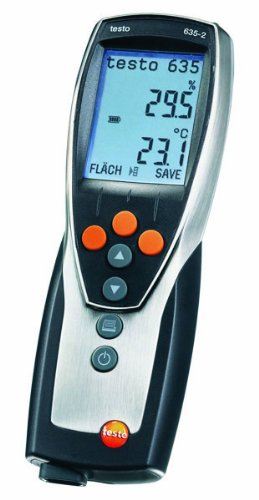
Obrázek 2.1: Přední view of the Testo 0563 6352 Thermohygrometer, showing the display and control buttons. The device is designed for ergonomic handling and clear data presentation.
Klíčové vlastnosti:
- High-precision humidity and temperature measurement.
- Internal memory for up to 10,000 readings.
- PC software for data analysis, filing, and documentation.
- USB data transmission for seamless connectivity.
- Support for external probes, including radio probes for temperature and humidity.
- Selectable user profiles for intuitive operation.
- Direct display of material moisture based on settable characteristic curves.
3. Nastavení
3.1. Instalace baterie
- Vyhledejte kryt přihrádky na baterie na zadní straně přístroje.
- Otevřete kryt.
- Insert the Alkali manganese, mignon, Type AA batteries, ensuring correct polarity.
- Bezpečně zavřete kryt bateriového prostoru.
3.2. Software Installation and USB Connection
- Insert the provided PC software CD into your computer's optical drive or download the latest version from the official Testo webmísto.
- Follow the on-screen instructions to install the ComSoft software.
- Connect the instrument to your computer using the supplied USB data transmission cable.
- The software will detect the device, allowing for data transfer and configuration.
3.3. Připojení sondy
The Testo 635-2 supports various probes for different measurement tasks. Up to three temperature or humidity probes can be connected simultaneously. For wireless operation, ensure radio probes are properly paired according to their individual instructions.
- Wired Probes: Connect probes to the designated ports on the instrument.
- Radio Probes: Ensure radio probes are within range and properly configured for wireless data transmission.
4. Návod k obsluze
4.1. Zapnutí/vypnutí
- Pro zapnutí stiskněte Moc tlačítko (
 ).
). - Chcete-li přístroj vypnout, stiskněte a podržte tlačítko Moc dokud se displej nevypne.
Obrázek 4.1: The Testo 0563 6352 Thermohygrometer in operation, displaying humidity (29.5%) and temperature (23.1°C) readings. The display also shows battery status and measurement mode.
4.2. Režimy měření
The instrument offers various measurement modes accessible via the menu. Use the arrow buttons to navigate and the central button to confirm selections.
- Air Moisture: Standard mode for measuring ambient humidity and temperature.
- Material Equilibrium Moisture: Utilize special probes and pre-stored material characteristics (transferable from ComSoft) to directly display moisture content in various materials.
- Pressure Dew Point: For checking compressed air systems, precision probes up to -76°F Td are available.
- Wall Moisture Analysis: The instrument can immediately display the dew point difference between ambient air and the wall surface, aiding in the analysis of moisture on walls and ceilings.
4.3. Ukládání a načítání dat
The Testo 635-2 features an internal memory for up to 10,000 readings. Measurements can be stored as single readings or as part of a measurement series, organized by location.
- Storing Readings: Stiskněte tlačítko ULOŽIT button (if available on the device or configured via user profile) to store the current reading.
- Retrieving Data: Connect the instrument to a PC via USB and use the ComSoft software to download, analyze, and export stored data.
4.4. Uživatel Profiles
The instrument allows for the creation of selectable user profiles. Tyto profiles enable the allocation of specific function buttons and menu guides to an application, facilitating intuitive operation for different tasks.
5. Údržba
5.1. Čištění
Clean the instrument regularly with a damp cloth. Do not use abrasive cleaners or solvents. Ensure no moisture enters the probe connections or battery compartment.
5.2. Výměna baterie
When the battery indicator on the display shows low power, replace the batteries as described in Section 3.1. Use only Alkali manganese, mignon, Type AA batteries.
5.3. Kalibrace
For continued accuracy, regular calibration of the instrument and its probes is recommended. Refer to the calibration protocol provided with your device for recommended intervals and procedures. Contact Testo customer support or an authorized service center for professional calibration services.
6. Řešení problémů
- Bez displeje: Zkontrolujte instalaci baterie a ujistěte se, že jsou baterie nabité.
- Nepřesná čtení: Ensure probes are clean and properly connected. Consider recalibration if issues persist.
- Problémy s přenosem dat: Verify USB cable connection and ensure ComSoft software is correctly installed and updated.
- Radio Probe Connectivity: Check probe battery levels and ensure they are within range of the main instrument.
If you encounter persistent issues not covered here, please contact Testo customer support.
7. Specifikace
| Funkce | Detail |
|---|---|
| Číslo modelu | 0563 |
| Paměť přístroje | Až 10,000 XNUMX čtení |
| Třída ochrany | IP54 |
| Skladovací teplota | -22 až +158 °F (-30 až +70 °C) |
| Provozní teplota | -4 až +122 °F (-20 až +50 °C) |
| Typ baterie | Alkali manganese, mignon, Type AA |
| Životnost baterie | 200 hours (without radio operation) |
| Material/Housing | ABS/TPE/metal |
| Rozměry (D x Š x V) | 220 × 74 × 27.7 mm (8.66 × 2.91 × 1.09) |
| Výrobce | Testo AG |
8. Informace o záruce
Testo products are manufactured to the highest quality standards. This product is covered by a manufacturer's warranty against defects in materials and workmanship. The specific terms and duration of your warranty may vary by region and purchase date. Please retain your proof of purchase. For detailed warranty information, refer to the documentation included with your product or visit the official Testo webmísto.
9. Podpora
For technical assistance, service, or spare parts, please contact Testo customer support. You can find contact information on the official Testo website or through your local distributor. When contacting support, please have your instrument's model number (0563 6352) and serial number ready.
Online zdroje: www.testo.com


