1. Úvod
This manual provides detailed instructions for the installation, operation, and maintenance of your GIGABYTE GA-H77N-WIFI Mini ITX Motherboard. This motherboard supports 3rd and 2nd generation Intel Core processors with an LGA1155 socket, features Intel H77 chipset, integrated Wi-Fi and Bluetooth 4.0, dual Gigabit LAN, and multiple display outputs including HDMI and DVI.
2. Nastavení a instalace
2.1 Rozložení základní desky
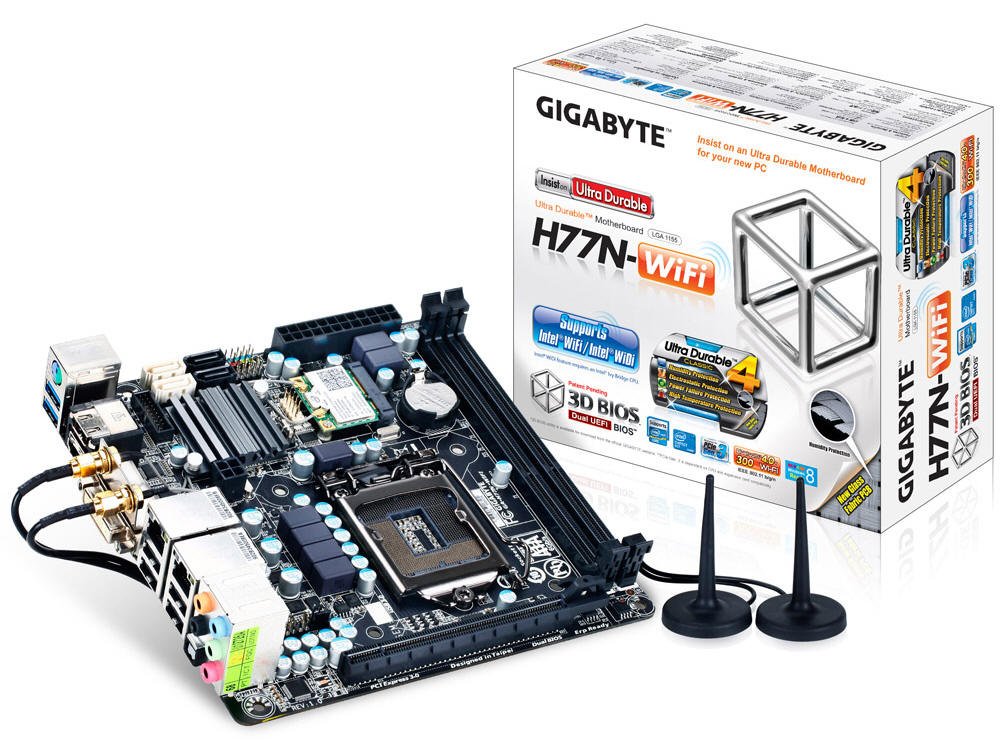
Obrázek 1: Shora dolů view of the GA-H77N-WIFI motherboard, showing CPU socket, DIMM slots, and various connectors.
Familiarize yourself with the layout of the motherboard before proceeding with installation. Refer to Figure 1 for a general overview of component placement.
2.2 Instalace CPU
- Najděte na základní desce patici procesoru LGA1155.
- Jemně zvedněte páčku zátěže a otevřete kryt patice procesoru.
- Zarovnejte trojúhelníkovou značku na procesoru s odpovídající značkou na patici. Opatrně vložte procesor do patice, aniž byste jej museli silou zasunout.
- Zavřete kryt zásuvky a stiskněte páku pro zatížení, dokud nezapadne na místo.
- Nainstalujte chladič CPU podle pokynů výrobce.
2.3 Instalace paměti (RAM)
- Locate the two DDR3 DIMM sockets.
- Otevřete klipsy na obou koncích patice DIMM.
- Align the notch on the DDR3 memory module with the key in the DIMM socket.
- Insert the memory module firmly into the socket until the clips snap into place. Ensure both clips are closed.
2.4 Instalace paměťového zařízení
Connect your SATA 6Gb/s storage devices (HDDs, SSDs) to the SATA ports on the motherboard using SATA data cables. Ensure the power cables from your power supply are also connected to the storage devices.
2.5 Připojení napájení
- Connect the 24-pin ATX main power connector from your power supply to the corresponding socket on the motherboard.
- Connect the 4-pin ATX 12V power connector to its socket, typically located near the CPU.
2.6 Připojení předního panelu a periferních zařízení

Obrázek 2: Úhlové view of the GA-H77N-WIFI motherboard, showing various onboard headers and rear I/O ports.
Connect the front panel headers (power switch, reset switch, HDD LED, power LED, front audio, front USB) from your computer case to the corresponding pins on the motherboard. Refer to the motherboard's printed labels for correct orientation.
2.7 Připojení zadního I/O panelu

Figure 3: Rear I/O panel of the GA-H77N-WIFI motherboard, showing connectivity options.
Connect your peripherals to the rear I/O panel (Figure 3):
- USB porty: Connect USB devices such as keyboard, mouse, and external drives.
- Video výstupy: Connect your monitor(s) to the HDMI or DVI ports.
- LAN porty: Connect Ethernet cables for network access.
- Audio konektory: Připojte reproduktory, sluchátka nebo mikrofony.
- Bezdrátové antény: Screw in the included Wi-Fi antennas to the connectors.
3. Návod k obsluze
3.1 Konfigurace BIOSu/UEFI
Upon initial power-on, press the DEL key during the POST (Power-On Self-Test) to enter the BIOS Setup Utility. The GIGABYTE 3D BIOS (Dual UEFI) provides an intuitive interface for configuring system settings, boot order, and hardware parameters.
3.2 Instalace operačního systému
Insert your operating system installation media (USB drive or DVD) and set the boot priority in the BIOS to boot from the installation media. Follow the on-screen instructions to install your preferred operating system.
3.3 Instalace ovladače
After installing the operating system, install the necessary drivers for the motherboard components. These typically include chipset drivers, graphics drivers (if using integrated graphics), audio drivers, LAN drivers, and Wi-Fi/Bluetooth drivers. Drivers are usually provided on a support CD or can be downloaded from the GIGABYTE webmísto.
3.4 Konfigurace sítě
The motherboard features dual Realtek Gigabit Ethernet LAN for wired network connections and an Intel Wi-Fi module for wireless connectivity. Configure your network settings within your operating system. For Wi-Fi, ensure the antennas are connected and select your network from the available options.
3.5 GIGABYTE On/Off Charge
The GIGABYTE On/Off Charge feature allows for faster charging of USB devices, even when the PC is turned off or in standby mode. Ensure the necessary drivers/utilities are installed for this feature to function.
4. Údržba
4.1 Čištění
Regularly clean the interior of your computer case to prevent dust buildup, which can lead to overheating. Use compressed air to remove dust from components, especially heatsinks and fans. Ensure the system is powered off and unplugged before cleaning.
4.2 Aktualizace BIOSu a ovladačů
Pravidelně kontrolujte GIGABYTE website for updated BIOS versions and drivers. Updating these can improve system stability, performance, and compatibility. Follow the instructions provided by GIGABYTE carefully when performing updates.
5. Řešení problémů
Pokud narazíte na problémy, zvažte následující základní kroky pro řešení problémů:
- Bez napájení: Check all power connections from the power supply to the motherboard and components. Ensure the power supply switch is on.
- Bez displeje: Verify that the monitor is connected correctly to the motherboard's video output (HDMI/DVI) and is powered on. Try reseating the memory modules.
- Nestabilita systému: Ensure all components are properly seated. Check for overheating by monitoring CPU and system temperatures. Update BIOS and drivers.
- Problémy se sítí: Verify Ethernet cables are securely connected. Check Wi-Fi antenna connections. Ensure network drivers are installed and configured correctly.
- Periferní zařízení nebylo detekováno: Ensure USB devices are connected to functional ports. Check device manager for driver issues.
For more advanced troubleshooting or persistent issues, refer to the GIGABYTE support webwebu nebo kontaktujte jejich technickou podporu.
6. Specifikace
| Komponent | Specifikace |
|---|---|
| Zásuvka CPU | LGA 1155 |
| Kompatibilní procesory | Intel Core i7/i5/i3/Pentium/Celeron (3rd and 2nd Gen) |
| Čipová sada | Intel H77 Express |
| Paměťové sloty | 2x patice DDR3 DIMM |
| Maximální kapacita paměti | 16 GB |
| Typ paměti | DDR3 1600/1333/1066/800 MHz |
| LAN | 2 x Realtek GbE LAN (10/100/1000 Mbit) |
| Bezdrátový | Intel Wi-Fi module, Bluetooth 4.0 |
| SATA porty | SATA 6 Gb/s |
| USB porty | USB 3.0, USB 2.0 |
| Video výstupy | HDMI, DVI |
| Rozšiřující sloty | PCI Express Gen 3.0 |
| Form Factor | Mini ITX |
| Rozměry | 17 x 16 x 10 palce (rozměry produktu) |
| Hmotnost | 1.6 libry |
7. Záruka a podpora
For information regarding product warranty, please refer to the warranty card included with your motherboard or visit the official GIGABYTE website. For technical support, driver downloads, and BIOS updates, please visit the GIGABYTE support portal:


