1. Úvod
The A4Tech Pinpoint Optic Wireless G10-810H Multi Mode Series Mouse is designed for smooth and precise cursor control. It features Pinpoint Optic Engine and Zero Delay technology for uninterrupted movement. This mouse offers 5 selectable shortcut modes and advanced software features for customization. It is capable of linking up to 10 different devices.

Obrázek 1.1: A4Tech Pinpoint Optic Wireless G10-810H Mouse. This image displays the top-down view of the black wireless mouse, highlighting its ergonomic shape and button layout.
2. Obsah balení
Prosím, ověřte, zda jsou v balení přítomny všechny položky:
- A4Tech Pinpoint Optic Wireless G10-810H Mouse
- USB Receiver (located inside or alongside the mouse)
- 1 AA Alkaline Battery (pre-installed or included)
3. Průvodce nastavením
- Nainstalujte baterii: If not already installed, open the battery compartment on the underside of the mouse and insert the provided AA battery, ensuring correct polarity.
- Vyhledejte USB přijímač: The USB receiver is typically stored within a compartment on the mouse itself or packaged alongside it. Remove the receiver.
- Připojení přijímače: Plug the USB receiver into an available USB port on your computer (PC or Mac).
- Zapnutí: Zapněte myš pomocí vypínače, který se obvykle nachází na spodní straně.
- Instalace ovladače: Your operating system should automatically detect and install the necessary drivers. For advanced features and customization, install the A4Tech software from the official website or included media (if applicable).
4. Návod k obsluze
Základní funkce
- Levé kliknutí: Primární výběr a aktivace.
- Klikněte pravým tlačítkem myši: Zpřístupňuje kontextové nabídky.
- Rolovací kolečko: Scrolls content vertically. The 4-way wheel also supports horizontal scrolling.
Advanced Features and Buttons
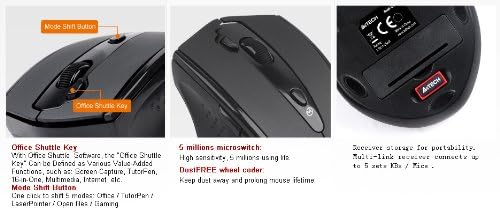
Obrázek 4.1: Button layout and receiver storage. This image illustrates the 'Mode Shift Button' and 'Office Shuttle Key' on the mouse, along with the receiver storage compartment on the underside.
- Office Shuttle Key: This programmable key, when used with the A4Tech Office Shuttle Software, can be assigned various functions such as Screen Capture, TutorPen, 16-in-One commands, Multimedia controls, or Internet shortcuts.
- Mode Shift Button: Use this button to cycle through 5 distinct operating modes: Office, TutorPen, LaserPointer, Open Files, and Gaming. Each mode can be configured for specific tasks or preferences.
- Nastavitelné DPI: The mouse supports adjustable DPI settings (800-1000-1200-1600-2000 DPI) to change cursor sensitivity. This can often be adjusted via software or a dedicated button.
- Adjustable Report Rate: Optimize performance with selectable report rates of 125 / 250 / 500 Hz, suitable for office work, graphic design, or gaming applications.
- 10-Link Management: This feature allows you to link up to 10 different compatible A4Tech G3/G6/G8/G10/G11 series devices to a single receiver.
5. Klíčové vlastnosti

Obrázek 5.1: Nadview of Value-Added Functions. This image details various features including No-lag technology, 4-way wheel, 15m operating range, Screen capture, Power-saving management, RF signal indication, Selectable report rate, Adjustable DPI, Channel-lock setting, 5-color TutorPen, 5 working modes selection, and 10-Link Management.
- Pinpoint Optic Engine & Zero Delay Technology: Ensures smooth and precise cursor movement.
- Innovative Holeless Engine: Designed to prevent dust and liquid from entering the optical sensor, maintaining precision and reducing maintenance.
- Pohodlná rukojeť: Ergonomically designed to provide a comfortable experience during extended use.
- 5 Million Microswitch: Durable switches for reliable click performance.
- DustFREE Wheel Encoder: Extends the lifespan of the scroll wheel by protecting it from dust.
- No-Lag Technology: Provides responsive and smooth cursor motion.
- 15m Operating Range: Offers a wireless range of up to 15 meters, depending on the environment.
- Snímání obrazovky: Software feature to capture any part of your screen.
- Power-Saving Management: Includes sleeping time and wake-up settings, with automatic power-off when the PC is turned off.
- Indikace RF signálu: Helps in finding the optimal location for the receiver.
- Channel-Lock Setting: Allows setting a specific channel to avoid RF interference.
- 5-Color TutorPen: A feature to draw colored lines for marking objects on screen.
6. Údržba
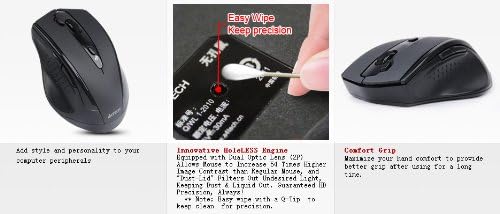
Obrázek 6.1: Holeless Engine and Cleaning. This image shows the underside of the mouse, highlighting the 'Holeless Engine' and suggesting an 'Easy Wipe' method with a Q-tip for maintaining precision.
- Čištění: Due to the Holeless Engine design, maintenance is minimal. For optimal precision, gently wipe the optical sensor area with a Q-tip or a soft, dry cloth. Avoid using harsh chemicals or abrasive materials.
- Výměna baterie: Pokud se výkon myši sníží nebo kontrolka (pokud je součástí) signalizuje nízký stav baterie, vyměňte baterii AA. Před výměnou baterie se ujistěte, že je myš vypnutá.
- Skladování: When not in use, especially during travel, store the USB receiver inside its dedicated compartment on the mouse to prevent loss.
7. Řešení problémů
- Myš nereaguje:
- Ujistěte se, že je myš zapnutá.
- Zkontrolujte stav baterie a v případě potřeby ji vyměňte.
- Ověřte, zda je USB přijímač bezpečně zapojený do funkčního USB portu. Zkuste jiný USB port.
- Přesuňte myš blíže k USB přijímači, abyste vyloučili problémy s dosahem.
- Nepravidelný pohyb kurzoru:
- Clean the optical sensor area on the underside of the mouse.
- Ensure you are using the mouse on a suitable surface. The Holeless Engine allows use on various surfaces, but extreme textures or highly reflective surfaces might affect performance.
- Restart your computer or close and re-open the A4Tech mouse driver software.
- Problémy s připojením:
- If experiencing interference, utilize the Channel-Lock setting via the software to secure a specific channel.
- Re-pair the mouse with its receiver if the connection is lost (refer to software instructions for pairing process).
8. Specifikace

Obrázek 8.1: Product Dimensions and Key Specifications. This image provides a visual representation of the mouse's dimensions and lists technical specifications such as model, color, style, button count, transmission, wireless range, ergonomics, engine type, resolution, report rate, net weight, dimensions, receiver type, and battery requirements.
| Funkce | Detail |
|---|---|
| Model | G10-810H |
| Značka | A4tech |
| Barva | Černý |
| Styl | Bezdrátová myš |
| Počet tlačítek | 7 |
| Přenos | Rádiová frekvence 2.4 G |
| Bezdrátové Dosah | Až 15 metrů |
| Ergonomie | Right-handed design |
| Motor | Holeless Optic |
| Rozlišení (DPI) | Adjustable 800-1000-1200-1600-2000 DPI |
| Nahlásit sazbu | 125/250/500 Hz (via software) |
| Čistá hmotnost | 78 g (přibližně 2.72 unce) |
| Rozměry produktu (DxŠxV) | 4.37 x 1.46 x 3.03 palce (111.4 x 77.4 x 37 mm) |
| Přijímač | Multi-link Nano Receiver |
| Baterie | 1 alkalická baterie AA |
| Kompatibilita operačního systému | Mac, PC, all versions of Windows OS |
9. Záruka a podpora
For warranty information and technical support, please refer to the documentation included with your product or visit the official A4Tech webwebu. Kontaktní údaje zákaznického servisu jsou obvykle k dispozici na stránce podpory výrobce.


