Konec produktuview
The Intermatic EJ600 (White) Digital In-Wall Timer is designed to replace a standard or decorator indoor wall switch. It is suitable for controlling various medium-duty loads, including lights, fans, and pumps. This timer is compatible with incandescent, fluorescent, CFL, and LED lighting types, offering broad application flexibility.
Its flush-mounted design provides a sleek appearance, integrating seamlessly into your home's decor. A built-in rechargeable Lithium-ion battery ensures settings are retained during power outages. The timer supports up to 7 ON/7 OFF settings per day, with flexible programming options for individual days, weekdays, weekends, or the entire week. A random feature enhances security by turning lights ON/OFF at varying times, simulating occupancy. Additionally, it includes automatic daylight saving time adjustment for convenience.
Klíčové vlastnosti:
- Astronomic Feature: Automatically adjusts to local sunrise and sunset times.
- Versatile Programming: Supports 24-hour or 7-day applications with up to 7 ON/7 OFF settings daily.
- Kompatibilita zatížení: Controls incandescent, fluorescent, CFL, and LED lights, as well as fans and pumps.
- Bezpečnostní funkce: Random ON/OFF function to deter intruders.
- Bateriová záloha: Built-in rechargeable Lithium-ion battery preserves settings during power interruptions.
- Letní čas: Automatické přizpůsobení sezónním změnám času.
- Elektrické hodnocení: 12 Amp General Load, 120 VAC, 60 Hz, 4 amp ballast and tungsten.

Obrázek 1: Přední strana view of the Intermatic EJ600 Digital In-Wall Timer installed in a standard white wall plate. The digital display shows "12:00 AM" and "MAN OFF".
Nastavení a instalace
Bezpečnostní opatření:
- VAROVÁNÍ: To avoid fire, shock, or death, turn OFF power at the circuit breaker or fuse box and test that power is OFF before wiring.
- Instalaci by měl provést kvalifikovaný elektrikář nebo by měla být provedena v souladu s místními elektrotechnickými předpisy.
- Do not use with loads exceeding the specified electrical ratings.
Požadavky na instalaci:
- A neutral wire is required for proper operation.
- Compatible with single-pole or 3-way wiring configurations.
- Navrženo pouze pro vnitřní použití.
- Fits standard electrical wall boxes.
Schéma zapojení:
The EJ600 timer features standard wiring connections. Ensure all connections are secure and properly insulated. Refer to the detailed wiring instructions provided in the original product manual for specific color codes and connection points. The timer requires a neutral wire connection for power.
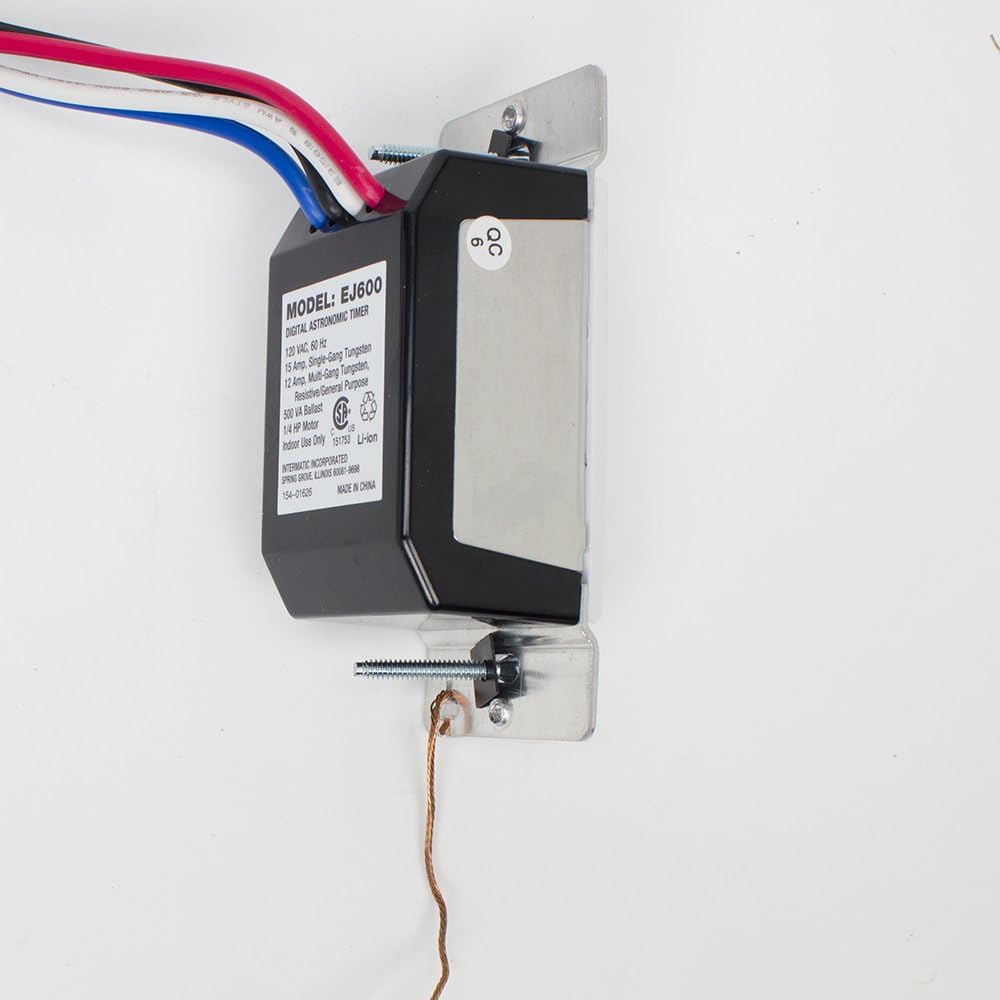
Obrázek 2: Zadní view of the EJ600 timer, illustrating the various wire connections (black, white, red, blue) and the product label with electrical ratings.
Návod k obsluze
Základní provoz:
The timer features a manual override button located on the front panel. Pressing this button will toggle the connected load ON or OFF, regardless of the programmed schedule. The digital display will indicate the current time and the manual status (e.g., "MAN OFF").

Figure 3: Close-up of the EJ600 timer's front face, highlighting the digital display and the manual control button.
Programování časovače:
To access the programming buttons, gently pull down the small cover located below the digital display. This will reveal a set of buttons for setting time, date, and programming schedules.

Figure 4: The EJ600 timer with its lower panel opened, exposing the programming buttons for MODE, NEXT ON/OFF, RESET, DAY/DST, HOUR+/YEAR-, and M+/ZONE+.
The timer allows for up to 7 ON/7 OFF events per day. You can set schedules for:
- Individual days of the week.
- Weekdays (Monday-Friday).
- Weekends (Saturday-Sunday).
- Every day of the week.
The Astronomic feature automatically adjusts ON/OFF times based on sunrise and sunset for your geographical location, providing convenience and energy savings. The Random feature can be activated to vary the ON/OFF times slightly, creating a more natural appearance of occupancy when you are away.
For detailed step-by-step programming instructions, please refer to the comprehensive user manual available for download on the Intermatic website or through the provided PDF link in the product listing.
Údržba
Bateriová záloha:
The EJ600 timer includes a built-in rechargeable Lithium-ion battery. This battery maintains the time and programmed settings during power outages. The battery recharges automatically when the timer is connected to power. If the battery is completely drained, it may take a few minutes of power connection for the display to become active again.
Čištění:
To clean the timer's surface, use a soft, damp hadříkem. Nepoužívejte abrazivní čisticí prostředky, rozpouštědla ani agresivní chemikálie, protože by mohly poškodit povrchovou úpravu nebo vnitřní součásti.
Odstraňování problémů
If you encounter issues with your Intermatic EJ600 timer, consult the table below for common problems and their solutions.
| Problém | Možná příčina | Řešení |
|---|---|---|
| Displej je prázdný nebo tmavý. | No power to the timer; battery backup drained. | Ensure power is supplied to the switch. Allow time for the internal battery to recharge (up to 5 minutes for display to appear). Check circuit breaker. |
| Světla se v naprogramovaných časech nezapínají/nevypínají. | Incorrect programming; manual override active; incorrect wiring. | Review programming steps carefully. Ensure manual override is not active. Verify wiring connections, especially the neutral wire. |
| Obtížné programování. | Complex instructions; small display/buttons. | Refer to the detailed user manual. Use good lighting and consider a magnifying glass if needed for the display. Practice programming steps. |
| Astronomická funkce nefunguje správně. | Incorrect geographical zone or date set. | Verify that the correct geographical zone and current date/year are accurately set in the timer's programming. |
Specifikace
| Atribut | Detail |
|---|---|
| Číslo modelu | EJ600 |
| Barva | Bílý |
| Značka | Intermatic |
| Materiál | Plast |
| Rozměry produktu | 1.63"H x 1.73"Š x 2.75"V |
| Hmotnost položky | 0.96 unce (27.22 g) |
| Počet nastavení | 7x ZAPNUTO/7x VYPNUTO denně |
| UPC | 078275127876 |
| Velikost obrazovky | 2.14 palce |
| svtage | 120 voltů |
| Typ přepínače | Jednopólový nebo třícestný |
| Typ montáže | Držák na zeď |
| Zahrnuté komponenty | EJ600 Timer |
| Typ baterie | Rechargeable Lithium Ion (1 CR2 battery required, included) |
Záruka a podpora
For detailed warranty information, please refer to the manufacturer's description or the official Intermatic website. Intermatic products are designed for reliability and performance.
A comprehensive user manual in PDF format is available for download, providing more in-depth instructions for installation, programming, and troubleshooting. You can typically find this document on the product's support page or via the link provided in the original product listing: Intermatic EJ600 User Manual (PDF).
For technical assistance or further inquiries, please contact Intermatic customer support.


