1. Úvod
This manual provides detailed instructions for the safe and efficient operation of your Vivitek Qumi Q5 Pocket DLP Projector. Please read this manual thoroughly before using the projector and retain it for future reference. The Vivitek Qumi Q5 is a compact, high-definition LED projector designed for portability and versatility, featuring 500 lumens brightness, WXGA resolution, and various connectivity options.
2. Důležité bezpečnostní informace
Dodržujte následující bezpečnostní opatření, abyste zabránili poškození projektoru a zajistili bezpečnost uživatele:
- Neblokujte větrací otvory. Zajistěte dostatečné proudění vzduchu kolem projektoru.
- Nedívejte se přímo do objektivu projektoru, když je zapnutýamp svítí. Jasné světlo může způsobit poškození očí.
- Používejte pouze napájecí adaptér dodaný s projektorem.
- Nevystavujte projektor dešti ani vlhkosti, abyste snížili riziko požáru nebo úrazu elektrickým proudem.
- Umístěte projektor na stabilní, rovný povrch.
- Před čištěním nebo pokud projektor delší dobu nepoužíváte, odpojte jej ze zásuvky.
- Veškeré opravy svěřte kvalifikovanému servisnímu personálu.
3. Obsah balení
Ověřte, zda jsou v balení obsaženy všechny níže uvedené položky:
- Vivitek Qumi Q5 Projector
- Napájecí adaptér
- Universal I/O to VGA Cable
- HDMI kabel
- 3.5mm AV-in Cable
- Pouzdro na přenášení
- Dálkové ovládání
- Rychlý průvodce
- Záruční list
4. Konec produktuview
Familiarize yourself with the various components and features of your Vivitek Qumi Q5 projector.
4.1 Přední View

Obrázek 4.1: Přední view of the Vivitek Qumi Q5 projector, showing the lens and ventilation grilles.
The front of the projector features the projection lens and air vents for cooling. Ensure these vents are not obstructed during operation.
4.2 Nahoru View

Obrázek 4.2: Nahoru view of the Vivitek Qumi Q5 projector, highlighting the touch-sensitive control panel.
The top panel includes touch-sensitive controls for navigation and menu selection. The "Qumi" logo is also visible.
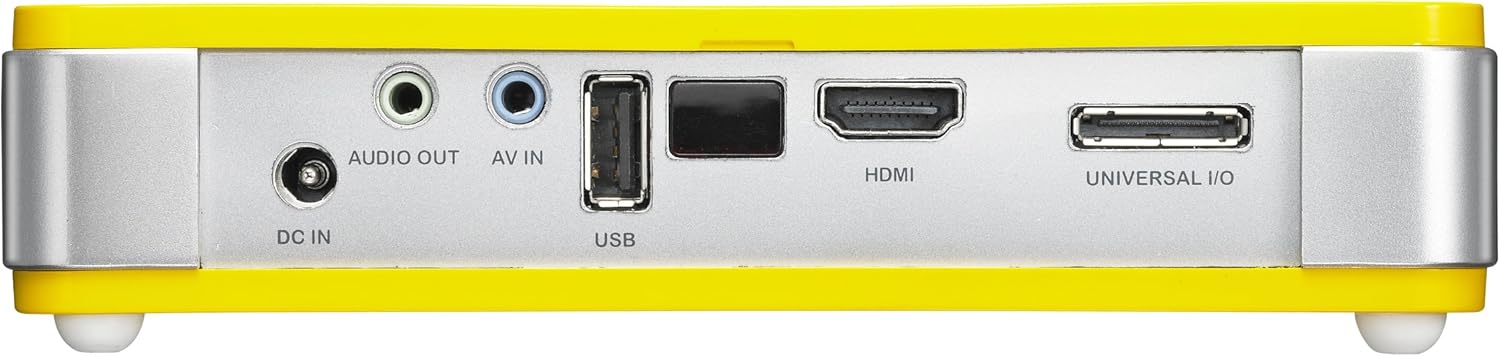
4.3 Zadní View (Connectivity Ports)

Obrázek 4.3: Zadní view of the Vivitek Qumi Q5 projector, displaying all input and output ports.
The rear panel houses all essential connectivity ports:
- DC IN: Pro připojení napájecího adaptéru.
- AUDIO VÝSTUP: 3.5mm jack for external speakers or headphones.
- AV IN: 3.5mm jack for composite video and stereo audio input.
- USB: Pro připojení paměťových zařízení USB.
- HDMI: High-Definition Multimedia Interface for digital video and audio input.
- UNIVERSAL I/O: Multi-purpose port for VGA and other analog inputs via adapter.
5. Nastavení
Follow these steps to set up your Vivitek Qumi Q5 projector.
5.1 Zapnutí projektoru
- Připojte napájecí adaptér k DC IN port na projektoru.
- Zapojte napájecí adaptér do elektrické zásuvky.
- Press the power button on the projector or remote control to turn on the device. The power indicator light will illuminate.
5.2 Připojení vstupních zdrojů
The Qumi Q5 supports various input sources:
- HDMI: Connect an HDMI cable from your source device (e.g., laptop, Blu-ray player) to the HDMI port na projektoru.
- VGA: Use the supplied Universal I/O to VGA cable to connect your computer's VGA output to the UNIVERSAL I/O přístav.
- AV (kompozitní): Use the supplied 3.5mm AV-in cable to connect composite video and stereo audio devices to the AV IN přístav.
- USB: Vložte USB flash disk do USB port to play media files přímo.
- Bezdrátové (volitelné): If using an optional WiFi USB dongle, insert it into the USB port for wireless connectivity. Refer to the dongle's instructions for setup.
5.3 Nastavení zaostření
Locate the focus wheel on the side of the projector. Rotate the wheel until the projected image appears sharp and clear on your screen or wall.
Obrázek 5.3: Strana view of the Vivitek Qumi Q5, indicating the location of the focus adjustment wheel.
6. Ovládání projektoru
6.1 Navigace v nabídce
Use the touch-sensitive buttons on the top panel or the remote control to navigate the projector's on-screen display (OSD) menu. The menu allows you to adjust image settings, input sources, and other system configurations.
6.2 Výběr vstupního zdroje
Press the "Source" button on the remote control or navigate through the OSD menu to select the desired input source (HDMI, VGA, AV, USB, or Wireless).
6.3 Úpravy obrazu
Within the OSD menu, you can adjust various image parameters:
- Jas/kontrast: Upravte pro optimální viditelnost obrazu.
- Barva/Odstín: Jemné doladění reprodukce barev.
- Poměr stran: Select between 4:3, 16:9, or other available ratios to match your content.
- Korekce lichoběžníkového zkreslení: Correct trapezoidal distortion if the projector is not perfectly perpendicular to the screen.
6.4 Playing Media from USB
When a USB drive is inserted, the projector's media player interface will typically launch automatically. You can browse and play supported video, audio, and image filepřímo z USB disku.
6.5 3D funkce
The Qumi Q5 is 3D-ready via DLP Link technology. To view 3D content, you will need compatible 3D source material, a 3D-capable player, and active DLP Link 3D glasses (sold separately).
7. Údržba
Správná údržba zajistí dlouhou životnost a optimální výkon vašeho projektoru.
7.1 Čištění projektoru
- Vnější: Použijte měkký hadřík, který nepouští vlákna dampOmyjte vodou nebo jemným čisticím roztokem. Nepoužívejte abrazivní čisticí prostředky ani rozpouštědla.
- Čočka: Gently wipe the lens with a lens cleaning cloth or lens paper. Avoid touching the lens surface with your fingers.
- Průduchy: Use a soft brush or compressed air to clear dust from the ventilation openings.
7.2 Světelný zdroj LED
The Qumi Q5 utilizes an LED light source with an estimated operational life of up to 30,000 hours, significantly reducing the need for lamp replacement compared to traditional projectors.
7.3 Skladování
When not in use for extended periods, store the projector in its carrying pouch in a cool, dry place, away from direct sunlight and extreme temperatures.
8. Řešení problémů
V této části naleznete řešení běžných problémů, se kterými se můžete setkat.
| Problém | Možná příčina | Řešení |
|---|---|---|
| Není zobrazen žádný obrázek. |
|
|
| Obrázek je rozmazaný. |
|
|
| Žádný zvuk. |
|
|
| Projector overheats or shuts down. |
|
|
9. Specifikace
Key technical specifications for the Vivitek Qumi Q5 projector:
- Model: Qumi Q5
- Technologie displeje: DLP Pico chipset
- Nativní rozlišení: WXGA (1280 x 720)
- Jas: Až 500 světla
- Světelný zdroj: LED (Estimated 30,000 hours operation)
- Konektivita: HDMI, Universal I/O (VGA), AV mini-jack, USB, Audio-out mini-jack, Wireless (via optional USB dongle)
- Vnitřní paměť: 4 GB
- Připraveno pro 3D: Yes, via DLP Link
- Rozměry: 4 x 6.3 x 1.3 palce (10.16 x 16.00 x 3.30 cm)
- Hmotnost: 1.1 libry (0.5 kg)
- Napájení: Externí napájecí adaptér
10. Záruka a podpora
Your Vivitek Qumi Q5 projector is covered by a limited warranty. Please refer to the included Warranty Card for specific terms and conditions, including warranty period and coverage details. For technical support, service, or further inquiries, please visit the official Vivitek webnebo se obraťte na jejich zákaznický servis. Uschovejte si účtenku jako doklad o koupi pro případ reklamace.


