1. Úvod
Thank you for choosing the TFA 30.5027.02 Digital Thermometer/Hygrometer. This device is designed to accurately measure and display indoor temperature and humidity, providing a clear indication of the comfort level in your environment. Its ultra-flat design and high-gloss surface make it a discreet and functional addition to any room. Please read this manual carefully to ensure proper setup and operation.
2. Bezpečnostní informace
- Uschovejte si tento návod pro budoucí použití.
- Toto zařízení je určeno pouze pro vnitřní použití.
- Do not expose the device to extreme temperatures, direct sunlight, moisture, or strong vibrations.
- Neponořujte zařízení do vody nebo jiných kapalin.
- Do not attempt to open or modify the device. This will void the warranty.
- Udržujte baterie mimo dosah dětí. Při požití okamžitě vyhledejte lékařskou pomoc.
- Použité baterie zlikvidujte v souladu s místními předpisy.
- Zařízení čistěte měkkým, damp tkanina. Nepoužívejte abrazivní čisticí prostředky nebo rozpouštědla.
3. Obsah balení
Zkontrolujte prosím, zda jsou všechny součásti přítomny a nepoškozené:
- 1x TFA 30.5027.02 Digital Thermometer/Hygrometer
- 1x CR2 Lithium Battery (pre-installed or separate)
- 1x Návod k obsluze (tento dokument)
4. Konec produktuview
The TFA 30.5027.02 features a clear digital display showing current temperature and humidity. It also includes a comfort level indicator and a maximum/minimum value memory function.

Obrázek 1: Přední view of the TFA 30.5027.02 Digital Thermometer/Hygrometer. The display shows temperature in Celsius and relative humidity percentage, along with a comfort level icon.
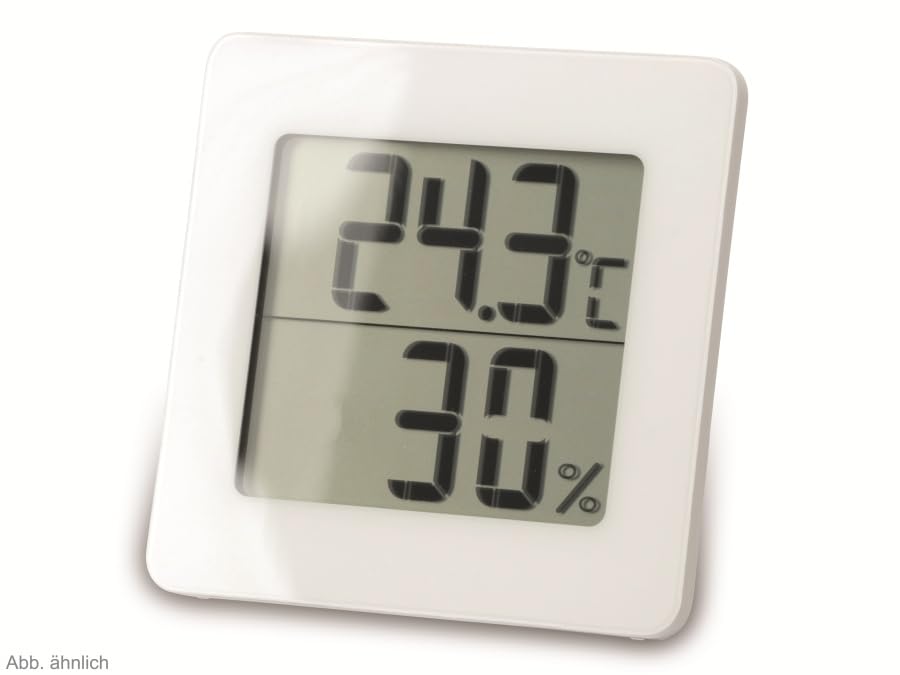
Obrázek 2: Střídat view of the TFA 30.5027.02 showing different temperature and humidity readings, demonstrating the device's clear digital display.
Klíčové vlastnosti:
- Digital display for temperature (°C) and humidity (% RH)
- Ultra-flat design with high-gloss finish
- Comfort level indicator (smiley icon)
- Maximum and minimum value memory function
- Montáž na stěnu
5. Nastavení
5.1 Instalace baterie
- Vyhledejte kryt přihrádky na baterie na zadní straně zařízení.
- Kryt sejměte jeho posunutím nebo jemným vypáčením.
- Insert one CR2 Lithium battery, ensuring the correct polarity (+/-) as indicated inside the compartment.
- Bezpečně nasaďte kryt prostoru pro baterie.
- The device display should activate, showing current temperature and humidity readings.
5.2 Počáteční umístění
For accurate readings, place the thermometer/hygrometer in a location free from direct sunlight, drafts, or heat sources. The device can be placed on a flat surface or mounted on a wall using the integrated mounting hole on the back.
- Montáž na stěnu: Use a small screw (not included) suitable for your wall type. Hang the device securely.
- Umístění na stůl: Ensure the device is stable on a flat, level surface.
6. Návod k obsluze
6.1 Zobrazení nadview
The large digital display shows two main values:
- Horní displej: Current temperature in degrees Celsius (°C).
- Spodní displej: Aktuální relativní vlhkost v procentechtage (% RH).
- Indikátor úrovně pohodlí: A small icon (e.g., a smiley face) indicates the current indoor climate comfort level based on temperature and humidity.
6.2 Funkce Max/Min
The device records the maximum and minimum temperature and humidity values measured since the last reset. To access these values:
- Stiskněte tlačítko MAX/MIN button (if present, typically on the back or side). The display will show the maximum recorded temperature and humidity.
- Stiskněte tlačítko MAX/MIN tlačítko znovu na view minimální zaznamenaná teplota a vlhkost.
- Stiskněte tlačítko MAX/MIN Stiskněte tlačítko potřetí pro návrat k aktuálním údajům.
To reset the MAX/MIN values, press and hold the MAX/MIN button for a few seconds while viewing the MAX or MIN values. The memory will clear, and new maximum and minimum values will begin recording from that point.
6.3 Ukazatel úrovně komfortu
The comfort level indicator provides a quick visual reference for indoor climate conditions:
- Šťastná tvář: Indicates optimal comfort (e.g., 20-25°C and 40-70% RH).
- Neutrální obličej: Indicates acceptable but not optimal conditions.
- Sad Face: Indicates uncomfortable conditions (e.g., too dry, too humid, too hot, or too cold).
Note: Specific ranges for comfort levels may vary slightly by model. Refer to the device's display for the exact icon representation.
7. Údržba
7.1 Čištění
Zařízení čistěte měkkým, mírně damp cloth. Do not use abrasive cleaning agents, solvents, or alcohol, as these can damage the surface and display.
7.2 Výměna baterie
When the battery power is low, a low battery indicator (if available) will appear on the display. Replace the battery as follows:
- Otevřete kryt bateriového prostoru na zadní straně zařízení.
- Remove the old CR2 Lithium battery.
- Insert a new CR2 Lithium battery, observing the correct polarity (+/-).
- Zavřete kryt prostoru pro baterie.
Note: After battery replacement, the device may reset, and MAX/MIN values will be cleared.
8. Řešení problémů
| Problém | Možná příčina | Řešení |
|---|---|---|
| Žádný nebo slabý displej | Baterie je vybitá nebo nesprávně vložená. | Replace the battery with a new CR2 Lithium battery, ensuring correct polarity. |
| Nepřesné údaje | Device is placed in an unsuitable location (e.g., near a window, heat source, or vent). | Relocate the device to a stable indoor environment away from direct influences. Allow 15-30 minutes for readings to stabilize. |
| Comfort indicator always shows the same face | Environmental conditions are consistently outside or within a specific comfort range. | This indicates the device is functioning correctly. Adjust your indoor environment if desired. |
9. Specifikace
- Číslo modelu: 30.5027.02
- Značka: TFA
- Barva: Bílý
- Rozměry produktu (D x Š x V): 10 x 1.2 x 8.2 cm (3.94 x 0.47 x 3.23 palce)
- Hmotnost položky: 70 gramů (2.47 unce)
- Baterie: 1 x lithiová baterie CR2 (součástí balení)
- Typ montáže: Držák na zeď
- Operational Humidity Range: 20 % až 95 % RH
- Upper Rated Temperature: 50 °C (122 °F)
- Přesnost teploty: ±1 °C
- Přesnost čtení teploty: ±1 °C
10. Záruka a podpora
Informace o záruce a zákaznické podpoře naleznete v obchodních podmínkách vašeho prodejce nebo se obraťte přímo na výrobce. Uschovejte si doklad o koupi pro případné reklamace.
Výrobce: TFA Dostmann GmbH & Co. KG
For further assistance, please visit the official TFA webnebo kontaktujte jejich oddělení zákaznických služeb.