Zavedení
This user manual provides comprehensive instructions for the DISH Network 40.0 UHF 2G Remote, designed specifically for use with DISH Hopper and Joey Receivers. This remote offers reliable control over your entertainment system, utilizing a UHF signal for enhanced range and performance.
Nastavení
1. Instalace baterie
The DISH Network 40.0 remote requires two (2) AA batteries for operation. Follow these steps to install them:
- Najděte přihrádku na baterie na zadní straně dálkového ovladače.
- Posuňte kryt baterie dolů a zvedněte jej.
- Vložte dvě baterie typu AA a ujistěte se, že kladný (+) a záporný (-) pól správně směřují k indikátorům uvnitř přihrádky.
- Nasaďte kryt baterie zpět jeho zasunutím zpět na místo, dokud bezpečně nezacvakne.
2. Pairing the Remote with Your Receiver
The 40.0 remote operates using a UHF signal, which requires pairing with your Hopper or Joey receiver. This allows the remote to control the receiver without needing a direct line of sight.
- Ensure your Hopper or Joey receiver is powered on.
- Na dálkovém ovládání stiskněte SYSTÉMOVÁ INFORMACE tlačítko (resp MENU then navigate to Nastavení > Dálkové ovládání > Spárovat dálkový ovladač).
- Follow the on-screen prompts to complete the pairing process. This typically involves pressing a specific button combination on the remote or confirming a code displayed on the screen.
- Once successfully paired, a confirmation message will appear on your TV screen.
For detailed pairing instructions specific to your receiver model, refer to your receiver's user manual or the DISH Network support webmísto.
Návod k obsluze
The DISH Network 40.0 remote provides intuitive control over your Hopper or Joey receiver. Below is an overview klíčových tlačítek a jejich funkcí.
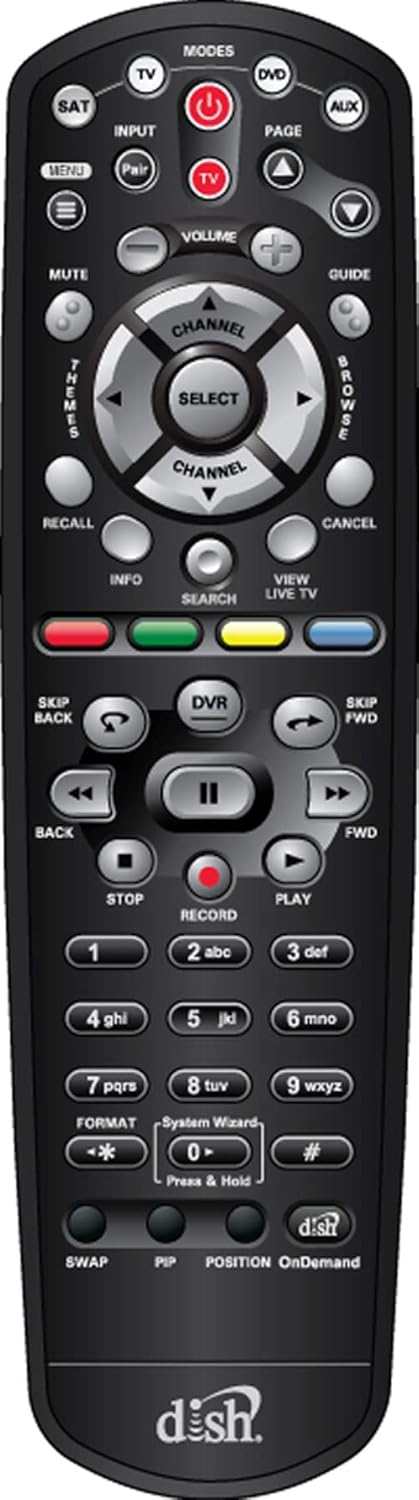
Obrázek 1: Přední strana view of the DISH Network 40.0 UHF 2G Remote, showing all buttons and their layout.
Funkce dálkových tlačítek
| Tlačítko | Funkce |
|---|---|
| MOC | Zapíná/vypíná přijímač a televizor. |
| MODES (TV, DVD, AUX, SAT) | Selects the device the remote controls. Ensure SAT mode is selected for receiver control. |
| VSTUP | Změní vstupní zdroj na vašem televizoru. |
| MENU | Accesses the main menu of the DISH receiver. |
| PRŮVODCE | Zobrazí programového průvodce. |
| OBJEM (+/-) | Nastavuje hlasitost TV. |
| KANÁL (+/-) | Změní kanál. |
| SELECT / Navigation Arrows | Prochází menu a vybírá možnosti. |
| DVR | Accesses your Digital Video Recorder (DVR) recordings. |
| PLAY, PAUSE, STOP, FWD, BACK, SKIP FWD, SKIP BACK | Controls playback of live TV and recorded content. |
| ZÁZNAM | Zahájí nahrávání aktuálního programu. |
| INFO | Zobrazuje informace o programu. |
| VYHLEDÁVÁNÍ | Opens the search function for programs and content. |
| VIEW LIVE TV | Návrat k živému televiznímu vysílání. |
| Barevná tlačítka (červená, zelená, žlutá, modrá) | Functions vary depending on the on-screen menu or application. For Hopper 3, these buttons may offer enhanced features like one-click Closed Captioning (Green button). |
| Numerická klávesnice (0-9) | Přímý vstup do kanálů a textu. |
| SWAP | Přepíná mezi aktuálním a předchozím kanálem. |
| PIP | Picture-in-Picture function (if supported by receiver/TV). |
| OnDemand | Přístup k obsahu na vyžádání. |
For specific programming of the TV, DVD, or AUX modes, refer to the programming instructions provided with your receiver or on the DISH Network support website. The remote may come with a label sheet for custom input programming, as shown in Figure 2.

Figure 2: DISH Network 40.0 UHF 2G Remote shown with an accompanying sheet of input labels, which can be used to customize the remote's functions for various devices.
Údržba
To ensure the longevity and optimal performance of your DISH Network 40.0 remote, follow these maintenance guidelines:
- Čištění: K otření dálkového ovladače použijte měkký, suchý hadřík. V případě odolné nečistoty lehceampen the cloth with water or a mild, non-abrasive cleaner. Avoid excessive moisture and harsh chemicals.
- Výměna baterie: Replace batteries when the remote's response becomes sluggish or if the indicator light (if present) signals low battery. Always replace both batteries at the same time with new ones of the same type (AA).
- Skladování: Dálkový ovladač skladujte na chladném a suchém místě mimo dosah přímého slunečního záření, extrémních teplot a vysoké vlhkosti.
- Vyhněte se kapkám: Chraňte dálkový ovladač před fyzickými nárazy, protože pády mohou poškodit vnitřní součásti.
Odstraňování problémů
If you encounter issues with your DISH Network 40.0 remote, try the following solutions:
| Problém | Možná příčina / řešení |
|---|---|
| Dálkový ovladač nereaguje. |
|
| Remote controls TV but not receiver. |
|
| Remote controls receiver but not TV (e.g., volume, power). |
|
| Tlačítka jsou zaseknutá nebo nereagují. |
|
If these steps do not resolve the issue, contact DISH Network customer support for further assistance.
Specifikace
| Funkce | Detail |
|---|---|
| Číslo modelu | EL-UDON-81457 (DISH Network 40.0) |
| Kompatibilita | DISH Hopper and Joey Receivers only |
| Typ komunikace | UHF (Ultra High Frequency) 2G Signal |
| Zdroj napájení | 2 x AA Batteries (required) |
| Rozměry (D x Š x V) | 8.5 x 1.2 x 4.1 palce (přibližně) |
| Hmotnost položky | 4 g (přibližně, bez baterií) |
| Barva | Černý |
| Maximální počet podporovaných zařízení | 4 (SAT, TV, DVD, AUX) |
Záruka a podpora
Informace o záruce
This product is typically covered by a limited warranty provided by DISH Network or the retailer from whom it was purchased. Warranty terms and conditions may vary. Please retain your proof of purchase for warranty claims.
Note: The provided product information includes a legal disclaimer from a specific seller regarding returns. For official product warranty, please refer to DISH Network's official documentation.
Zákaznická podpora
For further assistance, technical support, or to inquire about replacement parts, please contact DISH Network customer service:
- DISH Network Official Webmísto: www.dish.com/support
- Telefonická podpora: Refer to the DISH Network webstránky s aktuálními kontaktními čísly.
When contacting support, please have your receiver model number and the remote's model number (EL-UDON-81457) readily available.


