Zavedení
Děkuji za nákupasing the Karlsson Mini Flip Clock. This automatic flip clock combines classic design with modern functionality, providing an easy-to-read display of time, day, date, and year. This manual provides essential information for setting up, operating, and maintaining your clock to ensure optimal performance and longevity.
Konec produktuview
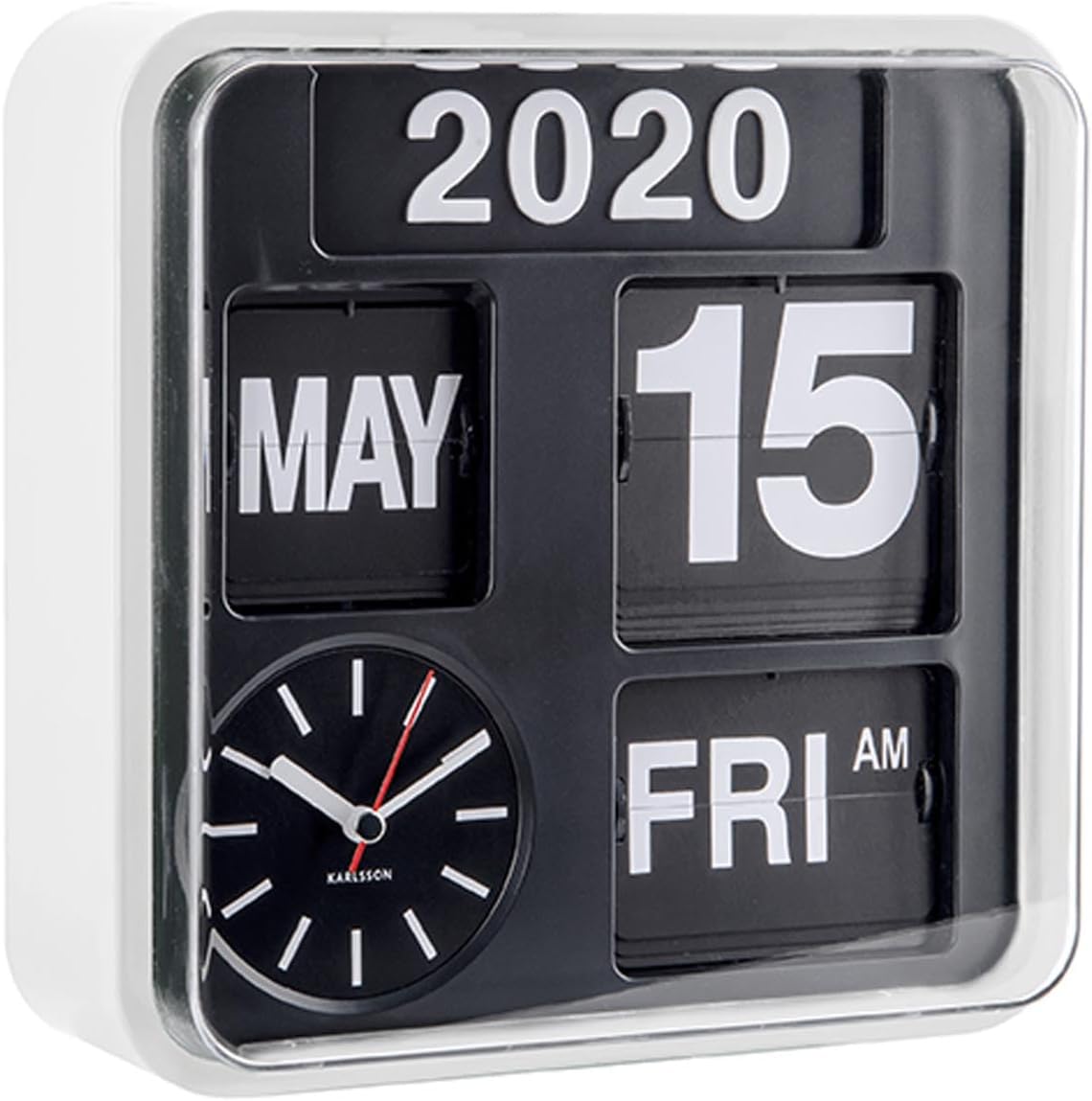
Obrázek 1: Přední strana view of the Karlsson Mini Flip Clock, showing the time, day, date, and year display panels, along with the analog clock face.
The Karlsson Mini Flip Clock features a unique automatic flip mechanism for displaying the calendar information. It includes a traditional analog clock for timekeeping and separate panels for the year, month, date, and day of the week. The clock is designed for both wall mounting and table placement.
- Automatic Flip Mechanism: Displays day, date, and year.
- Analog Time Display: Features a red second hand for precise timekeeping.
- Odolné Casing: Constructed with a white plastic casing.
- Všestranné umístění: Suitable for wall mounting or as a tabletop clock.
Obsah balení
Před zahájením instalace se ujistěte, že jsou k dispozici všechny položky:
- Karlsson Mini Flip Clock (Model: KA5364WH)
- Set of numbers for manual year adjustment
- Uživatelská příručka (tento dokument)
Poznámka: K provozu jsou vyžadovány 5 baterie AA, které nejsou součástí balení.
Nastavení
1. Instalace baterie
- Najděte přihrádku na baterie na zadní straně hodin.
- Otevřete kryt bateriového prostoru.
- Vložte 5 nové baterie typu AA a dbejte na správnou polaritu (+/-) vyznačenou uvnitř přihrádky.
- Bezpečně zavřete kryt bateriového prostoru.
2. Počáteční nastavení času a data
After battery installation, the clock will begin to operate. You will need to set the correct time and calendar details manually.
- Nastavení času:
Locate the time adjustment knob on the side or back of the clock. Rotate the knob to set the correct hour and minute. The analog clock will advance, and the flip mechanism for AM/PM will change accordingly.
- Nastavení data a dne:
The date and day flip automatically. To set them initially, you may need to manually advance the time until the correct date and day are displayed. There is typically a separate mechanism or button to advance the day/date if needed, or it will synchronize as the time is set. Refer to the specific markings on your clock for precise controls.
- Nastavení roku:
The year display is manual. Use the provided year numbers to set the current year. These numbers are typically inserted into slots on the year panel. This adjustment is usually only required once a year.
3. Možnosti montáže

Figure 2: The Karlsson Mini Flip Clock displayed as a wall-mounted unit.
- Montáž na stěnu: Use a suitable screw or hook (not included) in your desired wall location. Align the mounting slot on the back of the clock with the screw/hook and secure it firmly. Ensure the wall can support the clock's weight.
- Stolní deska: Place the clock on any flat, stable surface.
Návod k obsluze
Časoměřič
The analog clock continuously displays the current time. The red second hand provides a visual indication of continuous movement.
Funkce kalendáře
The calendar panels automatically flip to display the correct day, date, and month. The AM/PM indicator also updates automatically with the time.
- Daily Flip: The day and date will flip over at midnight (12:00 AM).
- Monthly Flip: The month will flip over on the 1st of each new month.
- Year Adjustment: The year must be changed manually at the beginning of each new year using the provided year numbers.
Údržba
- Čištění: Wipe the clock's casing and display panels with a soft, dry cloth. Do not use abrasive cleaners or solvents, as they may damage the finish.
- Výměna baterie: Replace all 5 AA batteries when the clock's movement becomes sluggish or stops. It is recommended to replace all batteries at the same time with new, high-quality alkaline batteries.
- Prostředí: Avoid exposing the clock to extreme temperatures, direct sunlight for prolonged periods, or high humidity, as these conditions can affect its performance and lifespan.
Odstraňování problémů
| Problém | Možná příčina | Řešení |
|---|---|---|
| Hodiny neběží nebo běží pomalu. | Slabé nebo vybité baterie. Nesprávná instalace baterií. | Replace all 5 AA batteries with new ones. Ensure batteries are inserted with correct polarity. |
| Date/Day display is incorrect. | Not set correctly during initial setup. | Manually advance the time until the correct date and day are displayed. Ensure the time is set accurately to allow for proper automatic flipping. |
| Year display is incorrect. | Year not manually updated. | Manually change the year numbers on the display panel to the current year. |
| Flip mechanism is stuck or not flipping smoothly. | Dust accumulation. Low battery power. | Gently clean the flip mechanism area with a soft brush or compressed air. Replace batteries if they are low. |
Specifikace
| Funkce | Detail |
|---|---|
| Značka | Karlsson |
| Číslo modelu | KA5364WH |
| Barva | Bílý |
| Typ zobrazení | Digital (Flip) and Analog |
| Speciální funkce | Calendar Display (Day, Date, Month, Year, AM/PM) |
| Rozměry (Š x V x H) | 24.5 x 24.5 x 10 cm (9.65"W x 9.65"H) |
| Zdroj napájení | Napájení z baterií (vyžadují se 5 baterie AA) |
| Materiál | Plast |
| Typ montáže | Nástěnný / stolní držák |
| Hmotnost položky | 1.18 kg (2.6 lb) |
| Sledujte pohyb | Automatický |
Záruka a podpora
Karlsson products are designed for quality and durability. For warranty information and support, please refer to the documentation provided with your purchase or visit the official Karlsson webUschovejte si doklad o koupi pro případné reklamace.
For further assistance, you may contact Karlsson customer support through their official channels. Please have your model number (KA5364WH) ready when contacting support.
Poznámka: Záruční podmínky se mohou lišit v závislosti na regionu a prodejci.


