Zavedení
The Intermatic ET9250 is a 4-circuit relay module designed for use with the Intermatic ET90000 series controllers. This module serves as a replacement part or an upgrade component, allowing for the expansion of the controller's circuit capacity. Each ET9250 module includes four SPDT (Single Pole Double Throw) 30 amp relays, facilitating robust control over various electrical loads.
Důležité bezpečnostní informace
Please read and understand all instructions before installing or operating this device. Failure to follow these instructions could result in property damage, personal injury, or death.
- Odpojit napájení: Always disconnect power at the circuit breaker or fuse box before installing or servicing this module.
- Kvalifikovaný personál: Installation and servicing should only be performed by qualified electrical personnel.
- Místní kódy: Veškeré zapojení musí splňovat národní a místní elektrotechnické předpisy.
- Správné použití: Do not use this module for purposes other than those specified in this manual.
- Podmínky prostředí: Ensure the module is installed in an environment free from excessive moisture, dust, and extreme temperatures.
Konec produktuview
The ET9250 module is a compact circuit board designed to integrate seamlessly with compatible Intermatic ET90000 series controllers. It provides additional switching capabilities for your system.
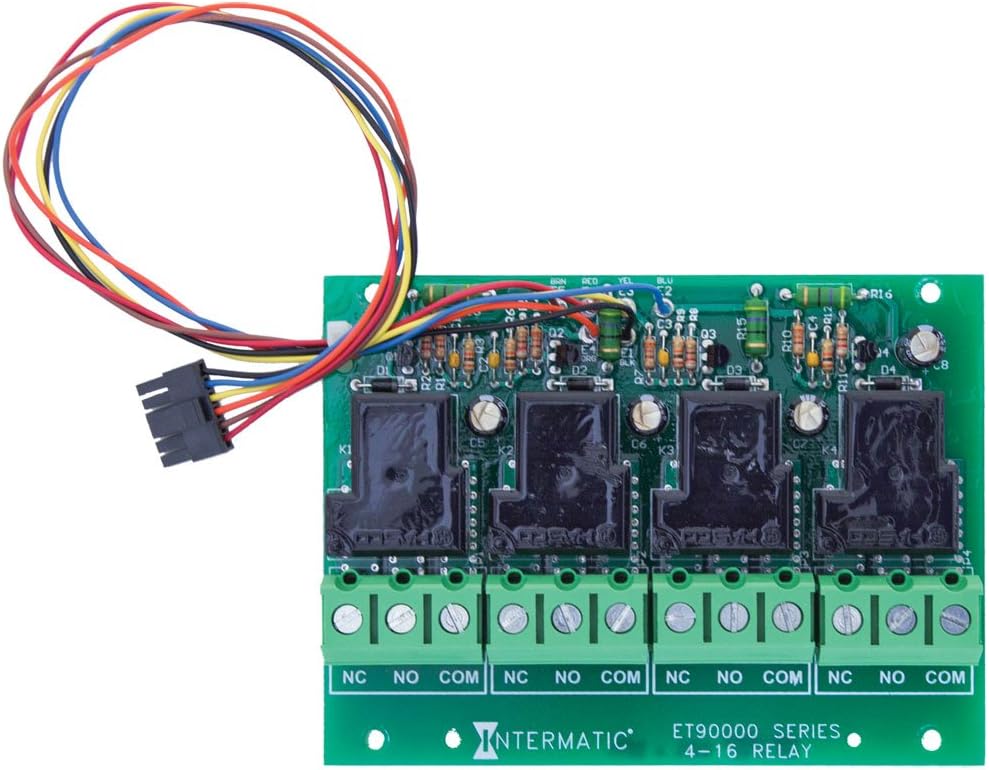
Mezi klíčové komponenty patří:
- Four SPDT 30 Amp Relé: These relays (K1-K4) are the primary switching components, capable of handling loads up to 30 amps.
- Svorkovnice: Screw terminals for connecting external loads, clearly marked NC, NO, and COM for each circuit.
- Kabelový svazek: A multi-colored wire harness for connecting the module to the main ET90000 series controller.
Instalace a nastavení
The ET9250 relay module is designed for integration with specific Intermatic ET90000 series controllers, including models such as ET90415CR, ET98015CR, ET91215CR, and ET91615CR. It comes in 4-circuit packs, allowing for system expansion up to a maximum of 16 circuits.
Kroky instalace:
- Odpojení napájení: Ensure all power to the ET90000 series controller is disconnected at the main circuit breaker before beginning installation.
- Řídicí jednotka přístupu: Open the ET90000 series controller enclosure to access the internal components.
- Umístění modulu: Carefully align the ET9250 module with the designated expansion slot or mounting points within the controller.
- Připojení kabelového svazku: Connect the multi-colored wire harness from the ET9250 module to the corresponding connector on the main controller board. Ensure a secure and correct connection.
- Zabezpečený modul: Secure the module in place using any provided fasteners or clips.
- Wiring Loads: Connect the electrical loads to the NC, NO, and COM terminals on the ET9250 module as required by your application. Refer to the specific wiring diagram for your ET90000 series controller for detailed instructions.
- Zavřít přílohu: Once all connections are made and verified, close the controller enclosure.
- Obnovit napájení: Restore power to the controller at the main circuit breaker.
- Konfigurace systému: Follow the instructions in your ET90000 series controller manual to configure the newly added circuits.
Operace
The ET9250 relay module operates under the control of the main ET90000 series controller. Each of the four SPDT 30 amp relays can be programmed and controlled independently by the timer or automation functions of the primary unit. When the controller sends a signal, the corresponding relay will switch, opening or closing the circuit to which it is connected. This allows for automated control of various electrical devices or systems.
Údržba
The Intermatic ET9250 relay module is designed for reliable, long-term operation with minimal maintenance. However, periodic inspection can help ensure continued performance.
- Vizuální kontrola: Annually inspect the module and its connections for any signs of damage, corrosion, or loose wiring.
- Čistota: Keep the controller enclosure clean and free of dust and debris, which can impede proper operation and heat dissipation.
- Ochrana životního prostředí: Ensure the module remains protected from moisture and extreme temperatures as per its operating specifications.
- Odpojení napájení: Před prováděním jakékoli kontroly nebo čištění vždy odpojte napájení.
Odstraňování problémů
If you experience issues with your ET9250 relay module, consider the following troubleshooting steps:
- Žádné napájení k načtení: Verify that the main controller is receiving power and is programmed correctly. Check the wiring connections to the ET9250 module and the load for looseness or damage.
- Incorrect Switching: Ensure the programming in the main ET90000 series controller is correct for the desired switching action. Check for any error codes or indicators on the main controller.
- Modul nebyl rozpoznán: If the main controller does not recognize the newly installed module, ensure the wire harness is securely connected and that the module is properly seated. Refer to the main controller's manual for module detection procedures.
- Přetížení: If a relay is not switching or appears damaged, check the connected load to ensure it does not exceed the 30 amp rating of the relay.
- Odborná pomoc: For persistent issues or if you are unsure about any troubleshooting steps, contact a qualified electrician or Intermatic customer support.
Technické specifikace
| Specifikace | Detail |
|---|---|
| Číslo modelu | ET9250 |
| Značka | Intermatic |
| Typ kontaktu | SPDT (jednopólový dvoupolohový) |
| Aktuální hodnocení | 30 Amps |
| Maximální spínací proud | 30 Amps |
| Počet obvodů | 4 |
| Typ montáže | Surface Mount (within controller) |
| Provozní režim | Automatic (controlled by main unit) |
| Rozměry produktu | 5 x 3.75 x 1.25 palce |
| Hmotnost položky | 4.8 unce |
| UPC | 078275127746 |
Informace o záruce
For detailed warranty information regarding the Intermatic ET9250 4-Circuit Relay Module, please refer to the manufacturer's official warranty description provided with your product or visit the Intermatic webZáruční podmínky se mohou lišit.
Zákaznická podpora
If you require further assistance, have questions about installation, operation, or troubleshooting that are not covered in this manual, please contact Intermatic customer support. You can typically find contact information on the Intermatic website or within the documentation provided with your ET90000 series controller.


