Zavedení
This manual provides detailed instructions for the operation and maintenance of your Eton Grundig G2 AM/FM/Shortwave Radio Recorder. Please read this manual thoroughly before using the device to ensure proper function and longevity.
Obsah balení
Ověřte, zda jsou v balení přítomny všechny položky:
- Eton Grundig G2 Radio Recorder
- Napájecí kabel
- Nabíjecí baterie
- Uživatelská příručka (tento dokument)
Konec produktuview
Familiarize yourself with the various components and controls of your Grundig G2 radio.

Figure 1: Front Panel Controls and Display. This image shows the front of the Eton Grundig G2 radio, highlighting the LCD display, dual speakers, numeric keypad, and various function buttons for power, volume, tuning, and mode selection.

Figure 2: Portable Use Example. The radio is shown being held by two hands, demonstrating its compact and portable design suitable for use in various environments, such as outdoor events.

Figure 3: Rear Panel and Battery Compartment. This image displays the back of the radio, including the battery cover, product information, and ventilation grilles.

Figure 4: Top Panel with Micro SD Slot. A close-up of the top edge of the radio, showing the Micro SD card slot for media playback and recording storage.
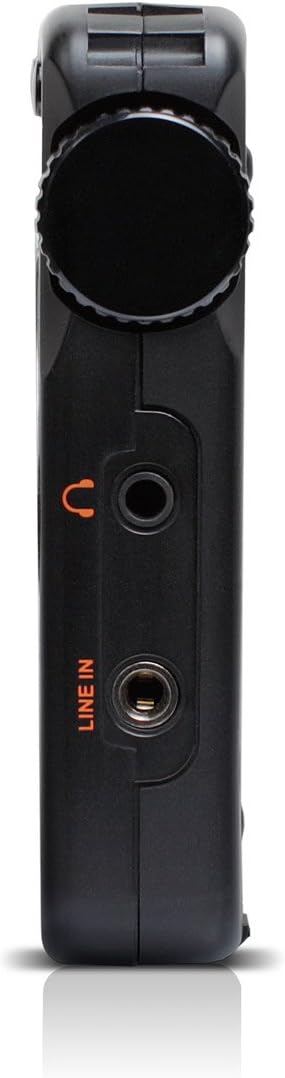
Figure 5: Left Side Panel. Tento view highlights the headphone jack and line-in audio input on the left side of the device.

Figure 6: Right Side Panel. This image shows the USB port, microphone input, and power switch located on the right side of the radio.
Nastavení
1. Instalace a nabíjení baterie
- Locate the battery compartment on the rear of the radio (refer to Figure 3).
- Open the compartment cover and insert the provided rechargeable battery, ensuring correct polarity.
- Bezpečně zavřete kryt bateriového prostoru.
- Connect the power cord to the radio's power input and a suitable power outlet. The radio will begin charging. Allow approximately four hours for a full charge during initial use.
2. Počáteční zapnutí
- Ensure the battery is installed or the power cord is connected.
- Stiskněte tlačítko Moc button (usually located on the top left of the front panel) to turn on the radio.
- The LCD display will illuminate.
Návod k obsluze
Zapnutí/vypnutí
Stiskněte tlačítko Moc tlačítko pro zapnutí nebo vypnutí jednotky.
Nastavení hlasitosti
Použijte V- a V+ buttons to decrease or increase the volume level.
Ladění rádia (AM/FM/SW)
The Grundig G2 offers five tuning methods:
- Výběr kapely: Stiskněte tlačítko FM, MW (AM), or SW buttons to select the desired frequency band.
- Jog Tuning: Rotate the tuning knob (often labeled MENU/ENTER or similar) to manually scan frequencies.
- Ruční ladění: Použijte Šipka nahoru/dolů tlačítky pro postupné nastavování frekvence.
- Automatické ladění: Stiskněte a podržte Šipka nahoru/dolů tlačítka pro automatické vyhledání další dostupné stanice.
- ATS (Automatické ladění – ukládání): Stiskněte a podržte SOUBOR button to automatically scan and store strong stations in the current band.
- Memory Tuning: Use the numeric keypad (0-9) to directly enter a stored station number or frequency.
Station Memory Storage
Chcete-li uložit stanici:
- Nalaďte požadovanou stanici.
- Stiskněte tlačítko SOUBOR button. The memory location number will flash on the display.
- Use the numeric keypad or tuning knob to select a memory location.
- Stiskněte SOUBOR again to confirm. The station is now stored.
The radio supports up to 248 station memory storage locations.
MP3 and WMA Playback
The Grundig G2 can play MP3 and WMA audio filez karty Micro SD.
- Insert a Micro SD card containing MP3/WMA files into the Micro SD slot (refer to Figure 4).
- Stiskněte tlačítko RADIO/MP3 button to switch to MP3 mode.
- Použijte Přehrát/Pozastavit, Další/Předchozí stopa tlačítka pro ovládání přehrávání.
Funkce nahrávání
The radio supports recording of radio broadcasts and external audio via the microphone or line-in input.
- Ensure a Micro SD card is inserted.
- To record radio: Tune to the desired station. Press the REC button (if available, or a combination like MENU/ENTER then select record).
- To record via microphone: Ensure the radio is in recording mode. Speak into the built-in microphone.
- To record via line-in: Connect an external audio source to the LINE IN jack (refer to Figure 5). Ensure the radio is in recording mode.
- Stiskněte tlačítko ZASTÁVKA button to end recording. Recordings are saved to the Micro SD card.
Nastavení jazyka
The radio supports multiple display languages. To change the language:
- Stiskněte tlačítko MENU/ENTER tlačítko.
- Navigate through the menu options using the tuning knob or arrow buttons until you find "Language" or a similar setting.
- Select the desired language and confirm.
Údržba
- Čištění: Use a soft, dry cloth to clean the radio's exterior. Do not use liquid cleaners or abrasive materials.
- Skladování: When not in use for extended periods, store the radio in a cool, dry place. Remove the battery if storing for several months.
- Péče o baterie: Recharge the battery regularly to maintain its lifespan. Avoid fully discharging the battery frequently.
- Anténa: Handle the telescopic antenna with care to prevent damage.
Odstraňování problémů
| Problém | Možná příčina | Řešení |
|---|---|---|
| Rádio se nezapne. | Battery is discharged or not installed correctly. Power cord is not connected. | Ensure battery is charged and correctly inserted. Connect the power cord. |
| Špatný příjem rádia. | Weak signal. Antenna not extended. Interference from other electronics. | Extend the telescopic antenna fully. Reposition the radio. Move away from interfering devices. |
| MP3/WMA filenehraje se. | Micro SD card not inserted or corrupted. Incorrect file formát. | Ensure Micro SD card is properly inserted. Verify files are MP3 or WMA format. Try a different Micro SD card. |
| Nahrávání nefunguje. | No Micro SD card inserted. Card full. | Vložte kartu Micro SD. Smažte staré files pro uvolnění místa. |
| Displej zobrazuje nesprávný čas. | Time not set or ATS not used. | Manually set the time or use the ATS function on an FM station that broadcasts RDS time data. |
Specifikace
| Číslo modelu | NG2B |
| Rozměry (D x Š x V) | 7.5 x 3.5 x 0.8 palce |
| Hmotnost | 9.6 unce |
| Podporovaná rádiová pásma | AM, FM, krátké vlny (SW) |
| Metody ladění | Jog, Manual, Auto, Memory, ATS |
| Předvolby paměti | 248 stanice |
| Přehrávání zvuku | MP3, WMA (via Micro SD card) |
| Záznam | Radio broadcasts, Microphone, Line-in |
| Konektivita | USB |
| Zdroj napájení | Rechargeable Battery, Corded Electric |
| Zahrnuté komponenty | Power Cord, Battery |
Záruka a podpora
For warranty information and technical support, please refer to the official Eton or Grundig webnebo se obraťte na jejich zákaznický servis. Uschovejte si doklad o koupi pro případ reklamace.
Poznámka: Konkrétní záruční podmínky se mohou lišit v závislosti na regionu a prodejci.


