1. Úvod
Thank you for choosing the CONTEC C-9WN Wireless Bike Computer. This device is designed to provide essential cycling data, enhancing your riding experience. Please read this manual thoroughly before installation and operation to ensure correct usage and optimal performance.

Image 1: CONTEC C-9WN Wireless Bike Computer. This image displays the front view of the CONTEC C-9WN bike computer, showing its digital display with speed and odometer readings, along with the CONTEC 9WN branding and a single control button at the bottom.
2. Bezpečnostní informace
- Always prioritize road safety. Do not attempt to operate or adjust the computer while cycling in traffic.
- Ensure all components are securely mounted to prevent detachment during rides.
- Keep batteries out of reach of children. Dispose of batteries responsibly according to local regulations.
- Nevystavujte zařízení po delší dobu extrémním teplotám nebo přímému slunečnímu záření.
3. Obsah balení
Zkontrolujte prosím, zda jsou ve vašem balení obsaženy všechny následující položky:
- CONTEC C-9WN Bike Computer Unit
- Bezdrátový snímač rychlosti
- Magnet na kolo
- Držák na řídítka/představec
- Mounting Ties/Bands
- Batteries (typically CR2032 for computer and sensor)
- Návod k použití (tento dokument)
4. Nastavení a instalace
4.1. Instalace baterie
- Computer Unit: Open the battery cover on the back of the computer unit. Insert the CR2032 battery with the positive (+) side facing up. Close the cover securely.
- Snímač rychlosti: Open the battery compartment on the wireless speed sensor. Insert the CR2032 battery with the positive (+) side facing up. Close the compartment firmly to ensure water resistance.
4.2. Montáž počítačové jednotky
- Attach the handlebar/stem mount to your desired location using the provided ties or bands. Ensure it is secure and does not obstruct your view nebo ovládací prvky.
- Slide the CONTEC C-9WN computer unit onto the mount until it clicks into place.
4.3. Installing the Speed Sensor and Magnet
- Snímač rychlosti: Mount the wireless speed sensor on the front fork, facing the wheel spokes. Use the provided ties to secure it firmly.
- Wheel Magnet: Attach the magnet to a spoke on the front wheel. Position it so that it aligns with the sensor when the wheel rotates.
- Zarovnání: Ensure the distance between the sensor and the magnet is approximately 3-5 mm (maximum 5 mm) when they pass each other. Adjust their positions as needed for optimal signal detection.
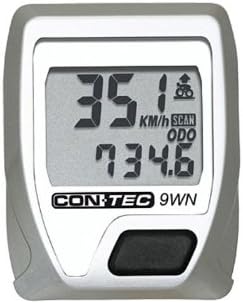
Image 2: CONTEC C-9WN Display in operation. This image shows a close-up of the CONTEC C-9WN bike computer's display, indicating a current speed of 35.1 km/h and an odometer reading of 734.6 km. The display also shows 'SCAN' and 'ODO' indicators.
5. Počáteční konfigurace
After battery installation, the computer will power on. You may need to press the main button to activate it. Follow these steps for initial setup:
5.1. Wheel Circumference Setting
- The computer requires your wheel's circumference for accurate speed and distance calculations.
- Refer to your bicycle tire's sidewall for the ETRTO size (e.g., 23-622 for 700x23C) or measure the wheel circumference manually.
- To measure: Mark a spot on your tire and the ground. Roll the wheel one full rotation and mark the ground again. Measure the distance between the two marks in millimeters.
- Enter this value into the computer using the main button to cycle through digits and confirm.
5.2. Unit Setting (km/h or mph)
- Select your preferred unit of speed and distance (kilometers per hour or miles per hour).
- Use the main button to toggle between options and confirm your selection.
5.3. Time Setting (12/24 Hour)
- Set the current time and choose between 12-hour or 24-hour display format.
- Adjust the hours and minutes using the main button.
6. Operating the Bike Computer
The CONTEC C-9WN features 9 functions, accessible via its single control button. Pressing the button cycles through the available display modes.
6.1. Dostupné funkce
- Aktuální rychlost: Zobrazuje vaši rychlost jízdy na kole v reálném čase.
- Průměrná rychlost: Zobrazuje průměrnou rychlost vaší aktuální jízdy.
- Speed Deviation: Zobrazuje, zda je vaše aktuální rychlost vyšší nebo nižší než vaše průměrná rychlost.
- Maximální rychlost: Records the highest speed achieved during your current ride.
- Doba jízdy: Sleduje dobu trvání vaší aktuální jízdy.
- Mileage (Trip Distance): Měří vzdálenost ujetou během vaší aktuální jízdy.
- Kilometer Counter (Odometer): Displays the total accumulated distance across all rides.
- Whole Run Time (Total Time): Shows the total accumulated riding time across all rides.
- 12/24 Hours Display: Zobrazení aktuálního času.
6.2. Použití tlačítka
- Krátký tisk: Cycles through the various display functions (e.g., Current Speed, Average Speed, Trip Distance, Odometer).
- Dlouhé stisknutí: Typically used to reset trip-specific data (e.g., Trip Distance, Driving Time, Average Speed, Max Speed) or to enter/exit settings mode. Refer to the on-screen prompts for specific actions.
7. Údržba
7.1. Výměna baterie
When the display becomes dim or erratic, it is time to replace the batteries. Both the computer unit and the sensor use CR2032 batteries.
- Follow the instructions in Section 4.1 for battery installation.
- Ensure the battery covers are securely closed to maintain water resistance.
7.2. Čištění
- Otřete počítač a senzor měkkým hadříkemamp tkanina.
- Do not use abrasive cleaners or solvents, as these can damage the display or casing.
- Vyvarujte se ponoření zařízení do vody.
7.3. Skladování
If storing the bike computer for an extended period, it is recommended to remove the batteries from both the computer unit and the sensor to prevent leakage and damage.
8. Řešení problémů
- No Speed Display / Erratic Readings:
- Check battery levels in both the computer and sensor. Replace if necessary.
- Verify the alignment and distance (3-5 mm) between the speed sensor and the wheel magnet.
- Ensure the sensor and computer are within effective wireless range (typically within 60-70 cm).
- Incorrect Distance/Speed:
- Re-check the wheel circumference setting in the computer's configuration.
- Displej je tmavý nebo prázdný:
- Replace the computer unit battery.
- Zajistěte, aby zařízení nebylo vystaveno extrémnímu chladu, který by mohl ovlivnit výkon LCD displeje.
- Computer Not Responding:
- Remove and reinsert the computer battery to perform a soft reset. Note that this may clear some settings.
9. Specifikace
| Funkce | Popis |
|---|---|
| Model | CONTEC C-9WN |
| Funkce | 9 (Current Speed, Average Speed, Speed Deviation, Max Speed, Driving Time, Mileage, Kilometer Counter, Whole Run Time, 12/24 Hours Display) |
| Konektivita | Bezdrátový |
| Zdroj napájení | CR2032 Battery (Computer & Sensor) |
| Typ snímače | Snímač rychlosti |
| Typ montáže | Držák na řídítka/představec |
| Uživatelské rozhraní | Tlačítka |
10. Záruka a podpora
CONTEC products are manufactured to high-quality standards. For warranty information, please refer to the terms and conditions provided at the point of purchase or contact your local CONTEC dealer or customer support. Keep your proof of purchase for any warranty claims.
For further assistance or technical support, please visit the official CONTEC webnebo kontaktujte jejich oddělení zákaznických služeb.


