1. Úvod
The Owon SDS8202-V is a high-performance 200 MHz, two-channel digital storage oscilloscope designed for precise electrical signal analysis. It features a maximum real-time sample rate of 1 GS/s per channel (2 GS/s interleaved) and a deep record length of 10 Mpts per channel, enabling detailed waveform capture and display. This instrument is suitable for various electronics applications, including product design, debugging, repair, servicing, and educational purposes in electrical engineering. Its advanced triggering capabilities, mathematical functions (including FFT), automatic measurements, auto-scale function, pass/fail testing, VGA port, and USB connectivity provide comprehensive tools for waveform analysis.
2. Bezpečnostní informace
To prevent electric shock or personal injury, and to avoid damage to the oscilloscope or connected equipment, observe the following safety precautions:
- Zdroj napájení: Use only the power cord specified for this instrument. Ensure the power source voltage is within the specified range (100 to 240VAC, 50/60Hz).
- Základy: The oscilloscope must be properly grounded. The power cord supplied has a three-prong plug for grounding. Do not defeat the purpose of the grounding-type plug.
- Bezpečnost sondy: Connect and disconnect probes correctly. Ensure probes are rated for the voltage being measured. Do not touch exposed connections or components when power is applied.
- Podmínky prostředí: Operate the oscilloscope in a well-ventilated area. Avoid operating in wet or damp conditions, or in explosive atmospheres.
- Údržba: Refer all servicing to qualified service personnel. Do not attempt to service the instrument yourself unless qualified to do so.
- Čištění: Před čištěním odpojte napájení. Použijte měkký, suchý hadřík. Nepoužívejte tekuté ani aerosolové čisticí prostředky.
3. Obsah balení
Ověřte, zda jsou všechny níže uvedené položky součástí balení. Pokud některé položky chybí nebo jsou poškozené, kontaktujte svého dodavatele.
- Owon SDS8202-V Digital Oscilloscope
- (2) Passive Voltage Sondy
- CD-ROM PC Software
- Kabel rozhraní USB
- Power Cord (100 to 240VAC, 50/60Hz, CAT II)
- Pokyny (tato příručka)
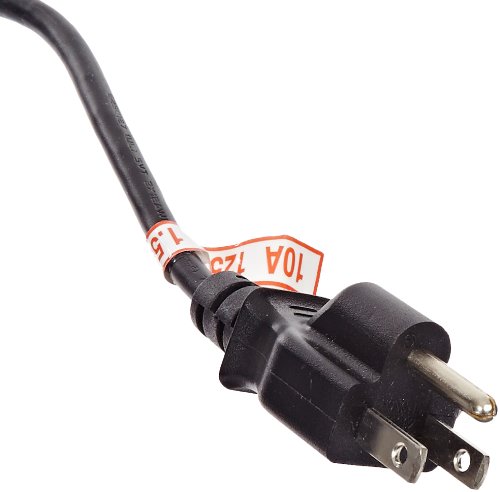
Image: Standard power cord for the Owon SDS8202-V oscilloscope, rated 10A 125V.
4. Konec produktuview
The Owon SDS8202-V is a versatile digital storage oscilloscope designed for a wide range of electrical measurement tasks. Its intuitive interface and robust feature set make it an essential tool for engineers and technicians.
4.1 Klíčové vlastnosti
- 200 MHz bandwidth, two-channel digital oscilloscope.
- Maximální s v reálném časeample rate of 1 GS/s per channel (2 GS/s interleaved).
- Record length of 10 Mpts per channel for extensive waveform capture.
- Advanced triggering options: Edge, Pulse Width, Slope, Video, Alternate, and Trigger Hold-off.
- Three math functions (Add, Subtract, Multiply) plus Fast Fourier Transform (FFT).
- 20 automatic measurements for comprehensive waveform analysis.
- Auto-scale function for optimal waveform display.
- Pass/fail mask testing for signal compliance verification.
- 8-inch color TFT-LCD with 800 x 600 pixel resolution.
- VGA port for external monitor connection.
- USB host port for data storage on flash drives.
- USB device and LAN ports for PC connectivity and remote operation.
4.2 Přední panel a displej
The front panel features the 8-inch color TFT-LCD display, which provides a clear and detailed view of waveforms. Various control knobs and buttons are arranged logically for easy access to settings and functions. The display shows waveform traces, measurement results, and menu options.

Obrázek: Přední strana view of the Owon SDS8202-V Digital Storage Oscilloscope, showing the display and control panel.
4.3 Připojení zadního panelu
The rear panel includes essential connectivity options:
- Příkon: Pro připojení napájecího kabelu.
- VGA port: Pro připojení externího monitoru.
- Hostitelský port USB: For connecting USB flash drives to save data.
- Port USB zařízení: For connecting to a PC for data transfer and remote control.
- LAN port: For network connectivity and remote control via a local area network.
5. Nastavení
5.1 Připojení napájení
- Ujistěte se, že je vypínač osciloskopu v poloze VYPNUTO.
- Connect the provided power cord to the power input on the rear panel of the oscilloscope.
- Plug the other end of the power cord into a grounded AC power outlet (100-240VAC, 50/60Hz).
- If using the optional rechargeable lithium-ion battery (sold separately), ensure it is properly installed and charged.
5.2 Připojení sondy
- Connect the BNC connector of a passive voltage probe to one of the input channels (CH1 or CH2) on the front panel.
- Attach the ground clip of the probe to the circuit's ground point.
- Connect the probe tip to the test point of the circuit you wish to measure.
- For accurate measurements, ensure the probe compensation is correctly adjusted. Connect the probe to the probe compensation output (usually a square wave signal) and adjust the probe until a flat-top square wave is displayed.
5.3 První zapnutí
Press the power switch on the front panel to turn on the oscilloscope. The device will perform a self-test and then display the main waveform interface.
5.4 Připojení k externím zařízením
- VGA Monitor: Connect a standard VGA cable from the oscilloscope's VGA port to an external monitor. This allows for a larger display of waveforms.
- PC Connection (USB/LAN):
- Install the provided PC software from the CD-ROM onto your computer.
- Connect the oscilloscope to your PC using the USB interface cable (USB device port) or an Ethernet cable (LAN port).
- Launch the PC software to establish communication for data transfer and remote control.
- USB flash disk: Insert a USB flash drive into the USB host port on the rear panel to save waveform data, screenshots, or settings.
6. Návod k obsluze
6.1 Základní zobrazení křivky
- Vertikální ovládací prvky: Use the vertical position and scale knobs for each channel (CH1, CH2) to adjust the vertical position and voltage per division of the waveform.
- Horizontální ovládací prvky: Use the horizontal position and scale knobs to adjust the horizontal position and time per division of the waveform.
- Auto-Scale: Stiskněte tlačítko AUTO button to automatically adjust the vertical and horizontal settings for an optimal display of the input signal. This function can be disabled for manual control.
6.2 Spouštění
Triggering stabilizes repetitive waveforms and captures single-shot events. The SDS8202-V offers various trigger types:
- Edge Trigger: Triggers on the rising or falling edge of a signal.
- Pulse Width Trigger: Triggers on pulses of a specified width.
- Slope Trigger: Triggers on signals with a specific rise or fall time.
- Video Trigger: Triggers on standard video signals.
- Alternate Trigger: Allows simultaneous observation of two unrelated signals.
- Trigger Hold-off: Stabilizes triggering on complex waveforms by ignoring subsequent trigger events for a specified time.
Adjust trigger level and mode using the dedicated trigger controls on the front panel.
6.3 Měření a analýza
- Automatická měření: The oscilloscope can perform 20 automatic measurements, including period, frequency, peak-to-peak voltage, RMS, and more. Access these through the measurement menu.
- Matematické funkce: Perform waveform calculations such as Add, Subtract, and Multiply.
- FFT (Fast Fourier Transform): Analyze the frequency components of a signal.
- Pass/Fail Testing: Set up user-defined masks to automatically determine if a signal falls within acceptable parameters.
6.4 úložiště dat
Waveforms, settings, and screenshots can be saved to a USB flash drive inserted into the USB host port. The internal memory can store up to 15 waveforms.
7. Údržba
7.1 Čištění
To clean the oscilloscope, disconnect it from all power sources and test circuits. Use a soft cloth dampened with a mild detergent solution. Do not use abrasive cleaners or solvents that could damage the instrument's casing or display. Ensure no moisture enters the device.
7.2 Kalibrace
The oscilloscope is factory calibrated. For continued accuracy, periodic calibration by qualified personnel is recommended, especially in professional or critical applications.
7.3 Skladování
When not in use, store the oscilloscope in a clean, dry environment, away from direct sunlight and extreme temperatures. Use the original packaging or a suitable carrying case for protection during transport.
8. Řešení problémů
This section provides solutions to common issues you might encounter with your Owon SDS8202-V oscilloscope.
- Bez napájení:
- Check if the power cord is securely connected to both the oscilloscope and the AC outlet.
- Verify that the AC outlet is functional.
- Ujistěte se, že je vypínač v poloze ON.
- Bez zobrazení průběhů:
- Ensure the probe is correctly connected to the channel input and the circuit under test.
- Check the probe's ground connection.
- Adjust the vertical scale (Volts/Div) and horizontal scale (Time/Div) settings.
- Stiskněte tlačítko AUTO button to attempt automatic waveform display.
- Verify the trigger settings. If the trigger level is set incorrectly, the waveform may not be stable or visible.
- Nestabilní tvar vlny:
- Adjust the trigger level and trigger mode.
- Ensure the trigger source is correctly selected.
- Check for proper probe compensation.
- PC Software Issues:
- Ensure the USB or LAN connection is secure.
- Verify that the correct drivers are installed.
- Restart both the oscilloscope and the PC.
- If experiencing crashes with remote control functions, ensure you have the latest software version from the manufacturer's webmísto.
- Noisy/Wavy VGA Output:
- Ujistěte se, že je kabel VGA bezpečně připojen.
- Test with a different VGA cable or external monitor to rule out cable/monitor issues.
- While the main display is typically crisp, some external VGA outputs may exhibit minor noise. This might be an inherent characteristic or could be improved by ensuring proper grounding of all connected equipment.
9. Specifikace
| Funkce | Specifikace |
|---|---|
| Zobrazit | 8" color TFT-LCD, 800 x 600 pixels |
| Šířka pásma | 200 MHz |
| Kanály | Two analog channels + one external trigger channel |
| Max. S v reálném časeample Rate | 1 GS/s per channel (2 GS/s interleaved) |
| Délka záznamu | 10 Mpts per channel |
| Čas vzestupu | 1.7 ns |
| Zdroj napájení | 100 to 240VAC, 50/60 Hz, CAT II (or optional rechargeable lithium ion battery) |
| Rozměry (V x Š x H) | 155 x 340 x 70 mm (6.1 x 13.4 x 2.8 palce) |
| Hmotnost | 1.8 kg (3.97 lb) |
| Konektivita | VGA, USB Host, USB Device, LAN |
| Certifikace | CE (Evropská shoda) |
10. Záruka a podpora
For warranty information and technical support, please refer to the documentation provided with your purchase or visit the official Owon website. Fujian Lilliput Optoelectronics Technology, the manufacturer of Owon products, provides support for their instruments.
It is recommended to register your product upon purchase to facilitate any future support or warranty claims.