Zavedení
This manual provides essential information for the safe and effective use of your Sony Cyber-shot DSC-WX50 digital camera. Please read it thoroughly before operating the camera and retain it for future reference. The DSC-WX50 is a compact digital camera featuring a 16.2 MP Exmor R CMOS sensor, 5x optical zoom, and Full HD 1080/60i video recording capabilities.
Co je v krabici
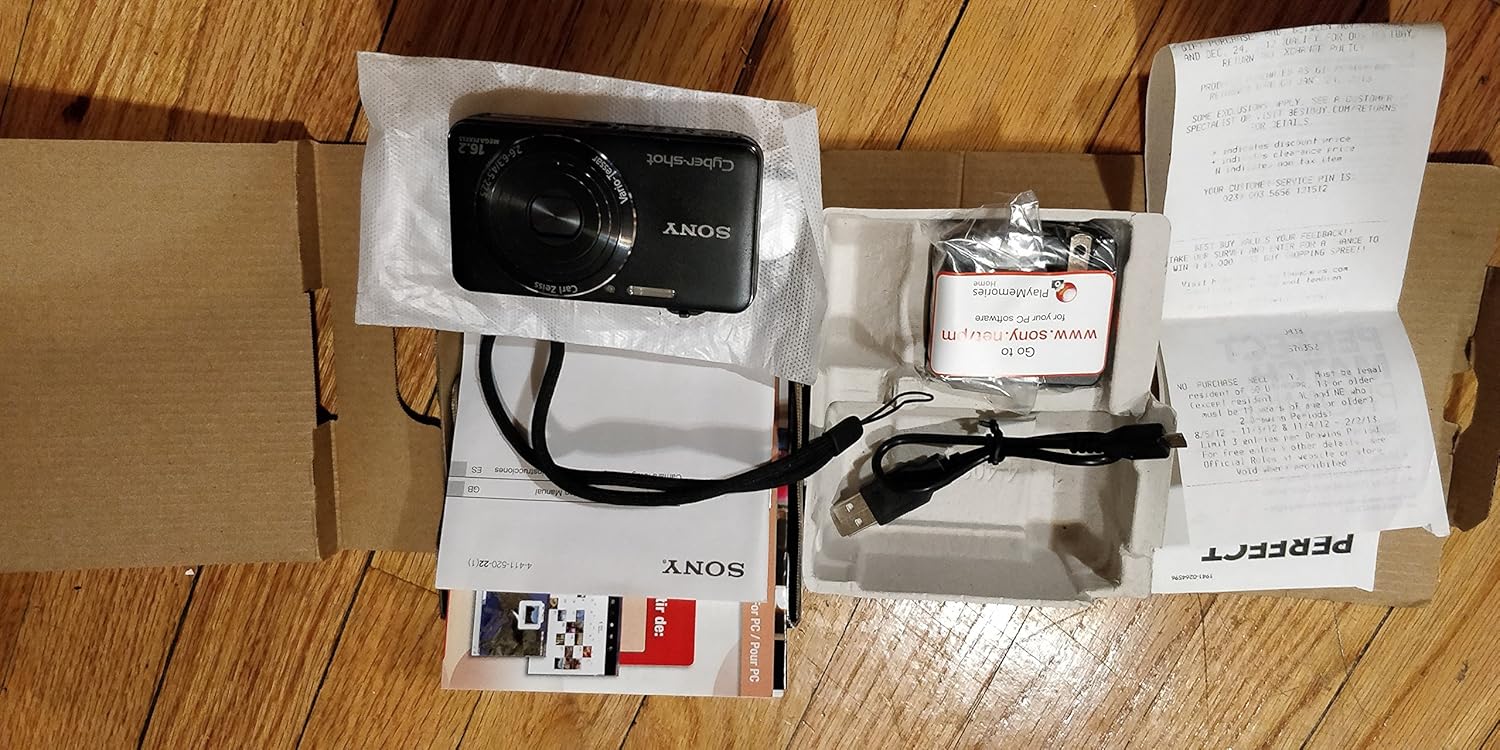
Carefully unpack your camera and ensure all items are present. The standard package contents include:
- Sony Cyber-shot DSC-WX50 Digital Camera
- Dobíjecí baterie
- AC adaptér
- USB propojovací kabel
- Řemínek na zápěstí
- Instruction Manuals and Documentation
- HDMI Cable (Built-in Media)

Image: All contents of the Sony Cyber-shot DSC-WX50 package, including the camera, cables, and documentation, laid out.

Obrázek: Zavírací view of the included accessories, such as the charger and USB cable, within their packaging.
Nastavení
1. Nabíjení baterie
Before first use, fully charge the supplied battery pack. Connect the camera to the AC adaptor using the USB cable, then plug the AC adaptor into a wall outlet. The charge lamp se během nabíjení rozsvítí a po dokončení zhasne.
2. Vložení baterie a paměťové karty
Open the battery/memory card cover on the bottom of the camera. Insert the charged battery pack firmly until it locks into place. Insert a compatible memory card (SD/SDHC/SDXC or Memory Stick Duo/Pro Duo/Pro-HG Duo) into the memory card slot until it clicks. Close the cover securely.

Obrázek: Přední strana view of the Sony Cyber-shot DSC-WX50 camera, showing the lens and flash.
3. Počáteční nastavení
When you turn on the camera for the first time, you will be prompted to set the date, time, and time zone. Follow the on-screen instructions to complete these settings.
Obsluha fotoaparátu
Zapnutí/vypnutí
Stiskněte tlačítko MOC tlačítko pro zapnutí nebo vypnutí fotoaparátu. Objektiv se po zapnutí vysune.
Basic Still Image Shooting (Intelligent Auto Mode)
- Zapněte fotoaparát.
- Nastavte volič režimů na Inteligentní Auto (zelená ikona fotoaparátu).
- Frame your subject on the 2.7-inch LCD screen.
- Stiskněte tlačítko spouště do poloviny pro zaostření. Po dosažení zaostření se indikátor zaostření rozsvítí zeleně.
- Stiskněte tlačítko spouště až na doraz pro pořízení snímku.
Obrázek: Zadní view of the Sony Cyber-shot DSC-WX50, highlighting the 2.7-inch LCD screen and control buttons.
Funkce zvětšení
Use the zoom lever around the shutter button to adjust the focal length. The camera features 5x optical zoom and Clear Image Zoom for enhanced magnification without significant quality loss.
Video Recording (Full HD 1080/60i)
To record movies, press the dedicated FILM button. Press it again to stop recording. The camera supports Full HD 1080/60i video in AVCHD format, allowing for high-quality video capture with Optical SteadyShot Active Mode for reduced blur.
Special Shooting Modes and Features
- Superior Auto Mode: Automatically detects 33 scenes and optimizes settings for dynamic pictures with reduced noise and improved clarity.
- Intelligent Sweep Panorama HR: Capture wide panoramic images by sweeping the camera. The camera stitches multiple frames automatically.
- 3D Still Image & 3D Sweep Panorama: Create 3D images for viewing on compatible 3D displays.
- Obrazový efekt: Apply creative filters to your photos, such as Toy Camera, Pop Color, Partial Color, and more.
- Background Defocus: Blurs the background to emphasize your subject, similar to DSLR effects.
- Režim jemné pleti: Enhances portraits by reducing the appearance of blemishes and wrinkles.
- Face Detection & Smile Shutter: Automatically detects faces and can trigger the shutter when a smile is detected.
- Funkce proti mrknutí: Helps prevent photos with subjects blinking by capturing multiple shots.
- Přirozený blesk: Corrects colors for more lifelike images when using flash.
- Detekce pohybu: Adjusts ISO and shutter speed to reduce blur in moving subjects.
- Sweep Multi Angle Mode: Captures 15 images at different angles to create a 3D-like view on the camera's LCD when tilted.
Údržba
Čištění fotoaparátu
- Tělo fotoaparátu: Otřete měkkým, suchým hadříkem. Na odolnou špínu použijte hadřík lehceampomyjte vodou nebo jemným čisticím prostředkem a poté otřete dosucha.
- Čočka: K odstranění prachu použijte kartáč na objektivy a poté jemně otřete hadříkem na čištění objektivů. Nedotýkejte se povrchu objektivu prsty.
- LCD obrazovka: Jemně otřete měkkým, suchým hadříkem. Netlačte na obrazovku silně.
Péče o baterie
To prolong battery life, avoid exposing it to extreme temperatures. Store the battery in a cool, dry place when not in use. If the camera will not be used for an extended period, remove the battery.
Péče o paměťové karty
Always format new memory cards in the camera before first use. Avoid removing the memory card while the camera is writing data (indicated by a flashing access lamp) to prevent data corruption.
Odstraňování problémů
Pokud narazíte na problémy s fotoaparátem, podívejte se na následující běžná řešení:
| Problém | Řešení |
|---|---|
| Fotoaparát se nezapne. |
|
| "Writing to Memory card was incomplete" error. |
|
| Obrázky jsou rozmazané. |
|
| Blesk se nespouští. |
|
For further assistance, please contact Sony customer support.
Specifikace
| Funkce | Detail |
|---|---|
| Efektivní rozlišení | 16.2 MP |
| Technologie fotosenzoru | BSI CMOS |
| Optický zoom | 5x |
| Digitální zoom | 20x |
| Velikost obrazovky | 2.7 palce |
| Typ zobrazení | LCD |
| Stabilizace obrazu | Optický stabilizátor SteadyShot |
| Rozlišení videa | Full HD 1080p (1080/60i AVCHD) |
| Podporováno File Formát | JPEG (Exif 2.3), 3D: MPF, Video: MPEG-4, AVCHD |
| Kompatibilita paměťových karet | SD/SDHC/SDXC, Memory Stick Duo/Pro Duo/Pro-HG Duo |
| Konektivita | HDMI, USB |
| Minimální ohnisková vzdálenost | 25 milimetrů |
| Maximální ohnisková vzdálenost | 125 milimetrů |
| Maximální clona | f/6.3 |
| Minimální rychlost závěrky | 4 sekund |
| Maximální rychlost závěrky | 1/1600 sekundy |
| Hmotnost položky | 0.26 libry |
Záruka a podpora
Informace o záruce a zákaznické podpoře naleznete v dokumentaci dodané s produktem nebo navštivte oficiální stránky podpory Sony. webUschovejte si doklad o koupi pro případ reklamace.
Official Sony Support: www.sony.com/electronics/support


