1. Úvod
This manual provides essential information for the safe and efficient operation of your Datalogic PowerScan M8300-AR910RB Handheld Laser Bar Code Reader. Please read this manual thoroughly before using the device to ensure proper setup, operation, and maintenance. Keep this manual for future reference.
2. Bezpečnostní informace
Vždy dodržujte následující bezpečnostní opatření, abyste předešli zranění nebo poškození zařízení:
- Bezpečnost laseru: This device emits a laser beam. Do not stare directly into the laser beam or point it at others. Avoid direct eye exposure.
- Bezpečnost baterie: Use only Datalogic-approved batteries and charging accessories. Do not expose batteries to extreme temperatures, puncture, or disassemble them. Dispose of batteries according to local regulations.
- Podmínky prostředí: Do not operate the device in explosive atmospheres or near flammable materials. Keep the device dry and away from extreme temperatures.
- Údržba: Refer all servicing to qualified service personnel. Do not attempt to open or modify the device.
3. Obsah balení
Ověřte, zda jsou v balení přítomny všechny položky:
- Datalogic PowerScan M8300-AR910RB Handheld Laser Bar Code Reader
- Vyjímatelná baterie
- Charging/Communication Cradle (may be sold separately depending on configuration)
- USB or Serial Cable (for cradle connection, may be sold separately)
- Power Supply (for cradle, may be sold separately)
- Rychlý průvodce
4. Konec produktuview
The Datalogic PowerScan M8300 is a robust, cordless handheld laser bar code reader designed for industrial applications. It features a durable casing and a 910MHz radio for reliable wireless communication.
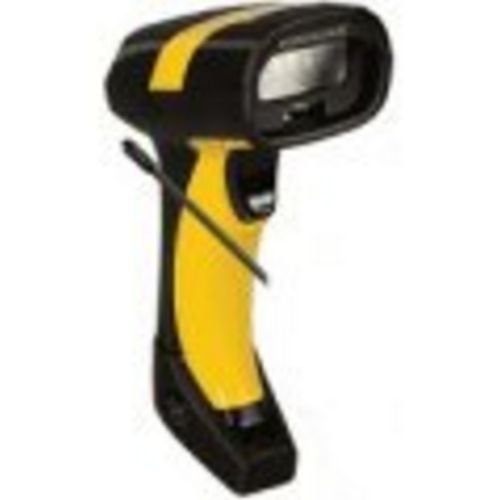
Obrázek 1: Datalogic PowerScan M8300 Handheld Laser Bar Code Reader. This image displays the front view of the scanner, highlighting its ergonomic design, scan window, and trigger button.
Klíčové komponenty:
- Okno skenování: Located at the front, where the laser beam exits to read barcodes.
- Spoušť: Activates the laser for scanning.
- Kontrolky: Provide feedback on scan status, battery level, and communication.
- Přihrádka na baterie: Located at the base of the handle, housing the removable battery.
- Komunikační rozhraní: For wireless data transmission via the 910MHz radio.
5. Nastavení
5.1. Instalace baterie
- Ujistěte se, že je skener vypnutý.
- Locate the battery compartment cover at the bottom of the handle.
- Otevřete kryt a vložte vyjímatelnou baterii a dbejte na správnou polaritu.
- Bezpečně zavřete kryt bateriového prostoru.
5.2. Nabíjení baterie
- Place the scanner into its charging cradle. Ensure the contacts on the scanner align with those on the cradle.
- Connect the power supply to the charging cradle and plug it into an electrical outlet.
- Kontrolka skeneru bude zobrazovat stav nabíjení (obvykle oranžová pro nabíjení, zelená pro plné nabití).
- Allow the battery to fully charge before first use (approximately 4 hours).
5.3. Connecting to a Host System
The PowerScan M8300 uses a 910MHz radio for wireless communication. It typically connects to a host system (e.g., PC, laptop) via a base station or cradle connected by a USB or serial cable.
- Connect the communication cable (USB or serial) from the charging/communication cradle to your host system.
- Connect the power supply to the cradle and plug it in.
- Place the scanner in the cradle. The scanner and cradle will automatically establish a wireless link.
- Install any necessary drivers or software on your host system as prompted or as instructed by Datalogic documentation for your specific cradle model.
6. Návod k obsluze
6.1. Zapnutí/vypnutí
- Zapnutí: The scanner typically powers on automatically when removed from the cradle or when the trigger is pressed.
- Vypnutí: The scanner will enter a low-power sleep mode after a period of inactivity. To fully power off, remove the battery.
6.2. Skenování čárových kódů
- Aim the scan window at the barcode you wish to read.
- Stiskněte a podržte spoušť. Objeví se laserová čára.
- Position the laser line across the entire barcode.
- Once the barcode is successfully read, the scanner will emit an audible beep and/or an indicator light will illuminate.
- Release the trigger. The scanned data will be transmitted to the connected host system.
6.3. Přenos dat
The PowerScan M8300 transmits scanned data wirelessly to its paired base station/cradle. Ensure the scanner is within range of its base station for successful data transfer. Out-of-range scanning capabilities may vary by configuration; refer to advanced programming guides for details.
7. Údržba
7.1. Čištění zařízení
- Použijte měkký, čistý hadřík dampvodou nebo jemným čisticím roztokem.
- Nepoužívejte abrazivní čisticí prostředky, rozpouštědla ani agresivní chemikálie.
- Jemně otřete skenovací okénko a vnější část skeneru.
- Zajistěte, aby se do otvorů zařízení nedostala žádná kapalina.
7.2. Péče o baterie
- Baterii pravidelně nabíjejte.
- Vyhněte se častému úplnému vybíjení baterie.
- Store the scanner and spare batteries in a cool, dry place when not in use.
7.3. Skladování
When storing the scanner for extended periods, ensure the battery is partially charged (around 50%) and remove it from the device if possible. Store in a temperature-controlled environment.
8. Řešení problémů
If you encounter issues with your PowerScan M8300, refer to the following common problems and solutions:
| Problém | Možná příčina | Řešení |
|---|---|---|
| Skener se nezapne. | Vybitá nebo nesprávně nainstalovaná baterie. | Check battery installation. Charge the battery. Replace battery if necessary. |
| Skener nečte čárové kódy. | Barcode damaged or poorly printed; scan window dirty; incorrect symbology enabled. | Try scanning a different barcode. Clean the scan window. Refer to the programming guide to enable/disable symbologies. |
| Do hostitele nebyla přenesena žádná data. | Scanner out of range; base station not connected; communication issue. | Move scanner closer to the base station. Verify base station connection to host. Check base station power. |
| Životnost baterie je krátká. | Battery nearing end of life; frequent use; improper charging. | Replace battery. Ensure full charges. Reduce backlight/power settings if configurable. |
If the problem persists, contact Datalogic technical support.
9. Specifikace
The following specifications apply to the Datalogic PowerScan M8300-AR910RB model:
- Číslo modelu: PM8300-AR910RB
- Rozměry produktu: 2.72 x 4.49 x 8.15 palce
- Hmotnost položky: 13.9 unce
- Výrobce: A/D převodník Datalogic
- Zdroj napájení: Napájení z baterie
- Technologie připojení: Wireless (910MHz)
- Kompatibilní zařízení: Stolní počítač, notebook
- UPC: 053926383351
10. Informace o záruce
Datalogic products are covered by a limited warranty against defects in materials and workmanship. The specific terms and duration of the warranty may vary by region and product. Please refer to the warranty card included with your product or visit the official Datalogic webpodrobné informace o záruce a postupech registrace naleznete na webu.
11. Podpora
For technical assistance, product inquiries, or to report issues, please contact Datalogic customer support:
- Webmísto: Visit the official Datalogic website for support resources, FAQs, and driver downloads.
- Kontakt: Refer to the 'Contact Us' section on the Datalogic webweb s telefonními čísly a e-mailovými adresami specifickými pro váš region.
When contacting support, please have your product model number (PM8300-AR910RB) and serial number ready.


