Zavedení
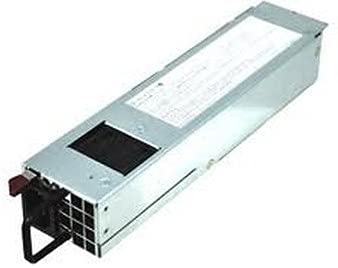
This manual provides essential information for the proper installation, operation, and maintenance of your Supermicro PWS-406P-1R 1U 400W Redundant Power Supply. The PWS-406P-1R is designed to provide reliable and efficient power to 1U server systems, featuring a redundant design for enhanced system uptime and stability. Please read this manual thoroughly before proceeding with installation or operation.
Bezpečnostní informace
Dodržujte následující bezpečnostní opatření, abyste předešli zranění a poškození zařízení:
- Always disconnect the power cord(s) from the AC outlet before installing or removing the power supply unit.
- Ensure proper grounding of the system chassis.
- Neotevírejte napájecí jednotku. Uvnitř nejsou žádné součásti, které by mohl uživatel opravit, a nebezpečné teplotages jsou přítomny.
- Nainstalujte napájecí zdroj v dobře větraném prostoru, aby nedošlo k jeho přehřátí.
- Use only specified power cables and connectors.
- Nevystavujte jednotku vlhkosti nebo extrémním teplotám.
Nastavení a instalace
1. Vybalování
Carefully remove the power supply unit from its packaging. Inspect the unit for any signs of physical damage. If damage is observed, contact your vendor immediately.
2. Fyzická instalace
The PWS-406P-1R is designed for installation in compatible 1U server chassis. Follow these steps:
- Ensure the server system is powered off and all power cords are disconnected.
- Locate the power supply bay in your 1U chassis. For redundant configurations, ensure both bays are clear.
- Slide the PWS-406P-1R unit into the designated bay until it is fully seated. Most 1U chassis use a tool-less design or require screws to secure the unit.
- If installing a second unit for redundancy, repeat the process for the second bay.
3. Připojení kabelů
Connect the necessary power cables from the power supply to the motherboard and other components within the server. Ensure all connections are firm and secure.
- Připojte hlavní 24pinový konektor napájení ATX k základní desce.
- Connect the 8-pin (or 4+4-pin) EPS12V CPU power connector to the motherboard.
- Connect any SATA, Molex, or PCIe power connectors as required by your system components.
- Once all internal connections are made, connect the AC power cord(s) to the power supply unit(s) and then to a grounded AC outlet.
Návod k obsluze
Zapnutí
After installation and cable connections are complete, power on your server system. The power supply unit(s) will initiate. Observe the status LEDs on the power supply unit(s) for normal operation.
Redundancy Features
The PWS-406P-1R is a redundant power supply. In a dual-unit configuration, if one power supply fails, the other unit automatically takes over the full load, ensuring continuous system operation. The failed unit can be hot-swapped (replaced while the system is running) without interrupting service, provided the chassis supports hot-swap functionality.
- Stavové LED diody: Each power supply unit typically features LEDs indicating its operational status (e.g., green for normal, amber for warning, red for fault). Refer to your server chassis manual for specific LED interpretations.
- Hot-Swap: To replace a failed unit, carefully unlatch and pull out the faulty power supply. Insert the new, identical power supply unit firmly into the bay until it clicks into place. The system should automatically recognize the new unit.
Údržba
Regular maintenance helps ensure the longevity and optimal performance of your power supply unit.
- Odstranění prachu: Periodically inspect the power supply's fan and vents for dust accumulation. Use compressed air to gently clean dust from the fan and heatsinks. Ensure the system is powered off and unplugged before cleaning.
- Kontrola kabelů: Check all power cables for signs of wear, fraying, or loose connections. Replace any damaged cables immediately.
- Podmínky prostředí: Ensure the server operates within recommended temperature and humidity ranges to prevent stress on the power supply components.
Odstraňování problémů
If you encounter issues with your Supermicro PWS-406P-1R, refer to the following common troubleshooting steps:
| Problém | Možná příčina | Řešení |
|---|---|---|
| Systém se nezapne. | Loose power cable, faulty power outlet, power supply failure. | Check AC power cord connections. Verify power outlet functionality. If in a redundant configuration, check status of other PSU. |
| Power supply status LED is amber or red. | Warning or fault condition (e.g., fan failure, over-temperature, voltage issue). | Consult your server chassis manual for specific LED codes. Ensure adequate ventilation. If fault persists, consider replacing the unit. |
| System unexpectedly shuts down. | Overload, overheating, intermittent power supply failure. | Check system load and ensure it's within PSU capacity. Verify cooling. If redundant, check if one PSU failed. |
If troubleshooting steps do not resolve the issue, contact Supermicro technical support or your vendor for further assistance.
Specifikace
| Funkce | Detail |
|---|---|
| Název modelu | PWS-406P-1R |
| Výstupní Wattage | 400 wattů |
| Form Factor | 1U Redundant (ATX compatible connectors) |
| Rozměry produktu (D x Š x V) | 12 x 6 x 5 palce |
| Hmotnost položky | 2.7 libry |
| Způsob chlazení | Vzduch |
| Typ konektoru | ATX |
| Kompatibilní zařízení | Personal Computer (Server/Workstation) |
Informace o záruce
Supermicro products are covered by a limited warranty. For detailed information regarding the warranty period, terms, and conditions applicable to the PWS-406P-1R, please refer to the official Supermicro webwebu nebo záruční kartu dodanou s vaším produktem. Uschovejte si doklad o koupi pro případ reklamace.
Podpora
For technical assistance, product inquiries, or to report issues, please contact Supermicro support through their official channels. You can typically find support contact information, FAQs, and driver downloads on the Supermicro webmísto:
- Oficiální web společnosti Supermicro Webmísto: www.supermicro.com
- Technická podpora: Refer to the support section on the Supermicro website for contact numbers and online support options.