Zavedení
The Zoom R8 is a versatile multi-track tabletop recorder, audio interface, and controller designed for musicians and producers. It features 2 XLR combo inputs, 8 tracks for simultaneous recording, a built-in stereo condenser microphone, a pad sampler, and a rhythm machine. This manual provides detailed instructions for setting up, operating, and maintaining your Zoom R8 to ensure optimal performance and longevity.

Obrázek 1: Nahoru view of the Zoom R8 Multi-Track Tabletop Recorder, showing the main controls, faders, and display screen.
Nastavení
1. Powering the R8
The Zoom R8 can be powered by four AA batteries or via a USB power adapter (not included). For extended use, a USB power adapter is recommended.
- Instalace baterie: Open the battery compartment on the bottom of the unit. Insert four AA batteries, ensuring correct polarity.
- Napájení USB: Connect a USB power adapter to the USB port on the side of the R8.

Obrázek 2: Underside of the Zoom R8, illustrating the battery compartment with four AA batteries installed.
2. Vložení SD karty
The R8 records directly to an SD or SDHC card (up to 32GB). Ensure the card is properly formatted before use.
- Locate the SD card slot on the right side of the R8.
- Insert the SD card with the contacts facing down until it clicks into place.
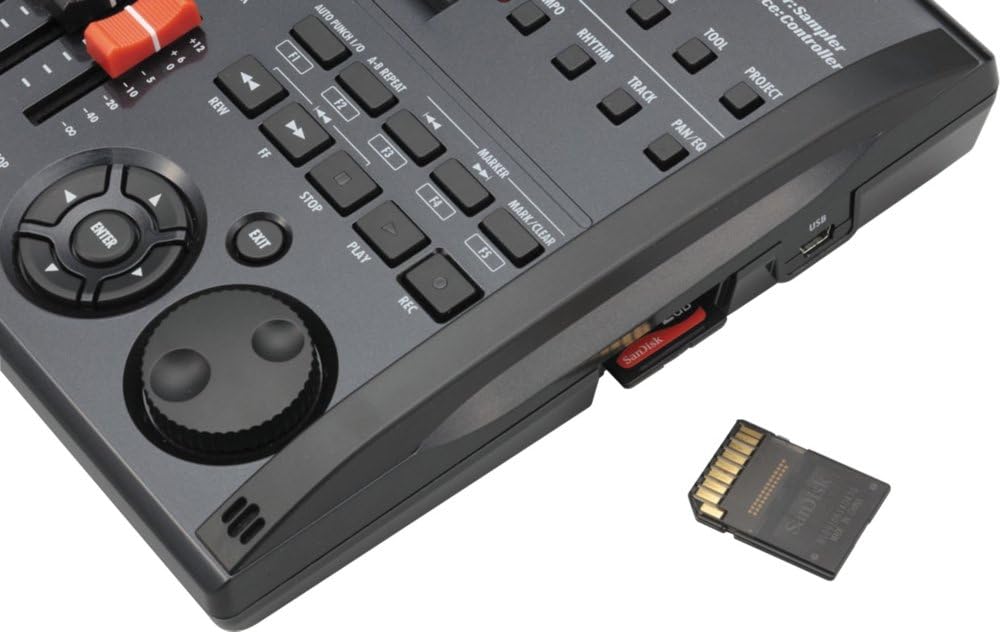
Obrázek 3: Detailní záběr view of the Zoom R8's side, showing the SD card slot with an SD card partially inserted.
3. Connecting Inputs and Outputs
The R8 features 2 XLR/TRS combo inputs, allowing connection of microphones, guitars, basses, and line-level devices. Outputs include a stereo line out and a headphone jack.
- Vstupy: Connect your microphones or instruments to INPUT 1 or INPUT 2 on the rear panel.
- výstupy: Connect your headphones to the PHONES jack or your monitors to the OUTPUT L/R jacks.
- Fantomová síla: For condenser microphones, activate the PHANTOM power switch located above INPUT 2.

Obrázek 4: Rear panel of the Zoom R8, displaying the power switch, control input, phones output, main outputs (L/R), and two XLR/TRS combo inputs.
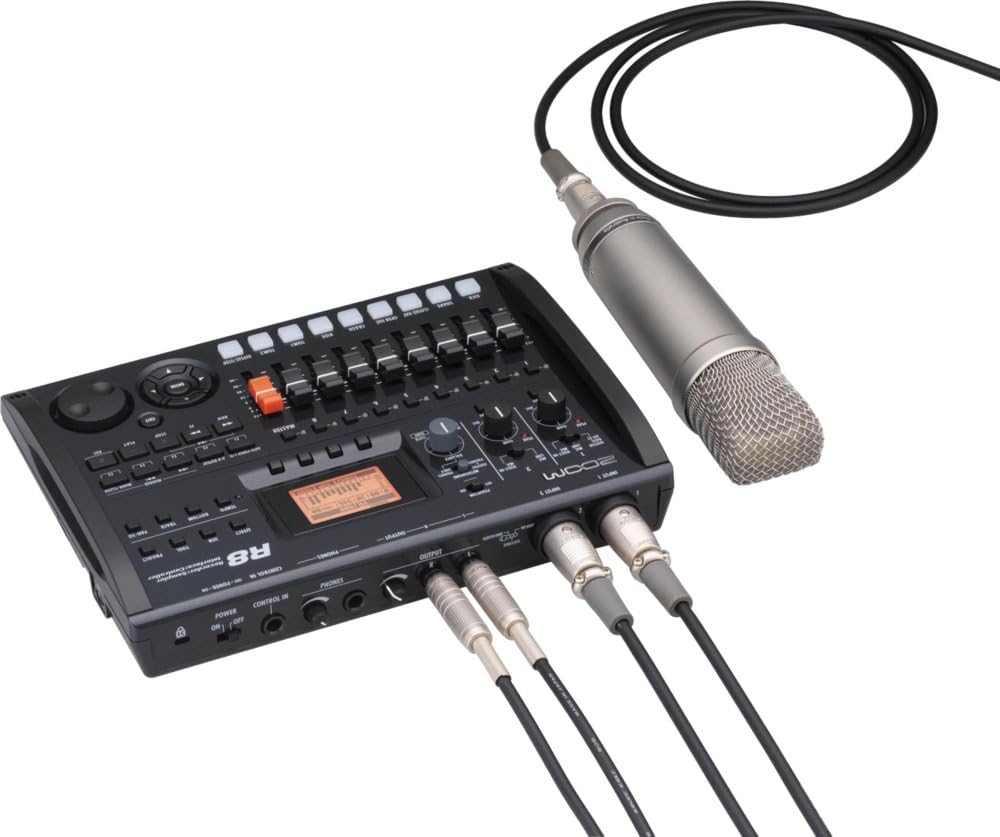
Obrázek 5: The Zoom R8 connected to an external condenser microphone via XLR and to studio monitors via TRS cables, demonstrating a typical recording setup.
Návod k obsluze
1. Základní nahrávání
The R8 allows for 8-track simultaneous recording and 16-track playback. Follow these steps for basic recording:
- Zapnutí: Přepněte vypínač POWER na zadním panelu do polohy ON.
- Vyberte zdroj vstupu: Use the INPUT 1/2 switches on the top panel to select between GUITAR/BASS (Hi-Z), MIC/LINE, or BUILT-IN MIC.
- Nastavení vstupního zesílení: Turn the GAIN knobs for INPUT 1 and INPUT 2 to set appropriate input levels. Monitor the PEAK indicators to avoid clipping.
- Paže: Press the REC (record) button for the desired track(s) (1-8) to arm them for recording. The track's LED will light red.
- Spustit nahrávání: Press the REC button (main transport control) followed by the PLAY button to begin recording.
- Zastavit nahrávání: Press the STOP button to end recording.
- Přehrávání: Press the PLAY button to listen to your recorded tracks.

Obrázek 6: Shora dolů view of the Zoom R8, highlighting the input controls, faders for each track, master fader, and transport controls for recording and playback.
2. Using the Built-in Stereo Microphones
The R8 features built-in stereo condenser microphones for quick and convenient recording of ambient sounds, rehearsals, or acoustic instruments.
- Set the INPUT 1/2 switch to BUILT-IN MIC.
- Arm tracks 1 and 2 for stereo recording.
- Adjust the GAIN for both inputs.
- Proceed with recording as described in the "Basic Recording" section.
3. Pad Sampler and Rhythm Machine
The R8 includes a pad sampler and a rhythm machine for creating beats and triggering samples.
- Pad Sampler: Stiskněte tlačítko S.AMPLER button to enter sampler mode. Use the 8 pads (KICK, SNARE, etc.) to trigger pre-loaded or user-recorded samples.
- Rhythm Machine: Press the RHYTHM button to access the rhythm machine. Select from various drum patterns and adjust tempo using the TEMPO knob.

Obrázek 7: The Zoom R8's LCD screen displaying a rhythm pattern grid, indicating the visual interface for the rhythm machine and samplerových funkcí.
4. Using as an Audio Interface/Controller
The R8 can function as a 2-in/2-out USB audio interface and a control surface for your Digital Audio Workstation (DAW).
- Audio rozhraní: Connect the R8 to your computer via USB. Select the R8 as your audio input/output device in your DAW settings.
- Ovládací plocha: Press the CONTROL IN button to activate controller mode. The R8's faders and transport controls can then be mapped to control your DAW.
Údržba
Proper maintenance ensures the longevity and optimal performance of your Zoom R8.
- Čištění: K čištění vnější strany jednotky používejte měkký, suchý hadřík. Nepoužívejte abrazivní čisticí prostředky ani rozpouštědla.
- Skladování: Store the R8 in a cool, dry place away from direct sunlight and extreme temperatures. If storing for an extended period, remove the batteries to prevent leakage.
- Péče o SD kartu: Always safely eject the SD card from the R8 before removing it. Regularly back up your data from the SD card to a computer.
Odstraňování problémů
| Problém | Možná příčina | Řešení |
|---|---|---|
| Žádná síla | Batteries drained or incorrectly inserted; USB power not connected or faulty. | Check battery polarity and charge/replace batteries. Ensure USB power adapter is working and connected securely. |
| Žádný zvuk z výstupů | Volume levels too low; incorrect input/output routing; headphones/monitors not connected or faulty. | Increase master volume and individual track faders. Verify input source selection and output connections. Test with different headphones/monitors. |
| Nelze nahrávat | Track not armed; SD card full or not inserted; input gain too low. | Press the REC button for the desired track. Insert/replace SD card. Adjust input gain. |
| Zkreslený zvuk | Input gain too high (clipping); incorrect input impedance (e.g., Hi-Z not selected for guitar). | Reduce input gain until PEAK indicator no longer lights. Ensure correct input type is selected (e.g., GUITAR/BASS for instruments). |
Specifikace
- Recording Tracks: 8 simultaneous recording tracks, 16 playback tracks
- Formát záznamu: 16/24-bit/44.1kHz linear PCM in WAV format
- Vstupy: 2 x XLR/TRS Combo Inputs (with phantom power on INPUT 2)
- Mikrofony: Built-in stereo condenser microphones
- Skladování: Podporuje SD/SDHC karty až do 32 GB
- Rozhraní: USB Audio Interface, Control Surface
- Moc: 4 x AA batteries (included) or USB power adapter
- Rozměry: 10.12 x 7.48 x 2.01 inches (Product Dimensions from specs)
- Hmotnost: 2.7 pounds (Item Weight from specs)
- Typ baterie: Alkaline (from specs)
- Jack pro sluchátka: 3.5 millimeters (from specs)
Záruka a podpora
For warranty information, product registration, and technical support, please visit the official Zoom webnebo se obraťte na jejich zákaznický servis. Uschovejte si doklad o koupi pro případ reklamace.
Oficiální Zoom Webmísto: www.zoom-na.com
For additional support, you may refer to the official user manual PDF available at: Zoom R8 User Manual (PDF)


