Zavedení
This manual provides essential information for the setup, operation, and maintenance of your Microsoft Xbox 360 Wired Controller. Designed for use with both Windows PCs and Xbox 360 consoles, this controller offers a reliable and responsive gaming experience.

Obrázek 1: Přední strana view of the Microsoft Xbox 360 Wired Controller.
The controller features an ergonomic design for comfortable extended play, precise thumb sticks, two pressure-point triggers, and an 8-way directional pad. It connects via a flexible nine-foot cable, providing a stable connection without the need for batteries during use.
Co je v krabici
Upon opening your product packaging, please ensure all the following items are present:
- Microsoft Xbox 360 Wired Controller
- 90-Day Limited Warranty Information

Figure 2: Product packaging for the Xbox 360 Wired Controller.
Klíčové vlastnosti
- Ergonomický design: A compact, ergonomic shape allows for comfortable gameplay for extended periods on both PC and Xbox 360.
- Vibrační zpětná vazba: Integrated vibration motors provide a more immersive and responsive gaming experience.
- Přesné ovládání: Features precise thumb sticks, two pressure-point triggers, and an 8-way directional pad for accurate input.
- Kabelové připojení: Connects via a powered USB port, ensuring a stable and lag-free connection.
- Flexibilní kabel: The thin, flexible nine-foot cord is designed to offer the sensation of wireless freedom with the consistent performance of a wired connection.
- Integrated Headset Port: Includes a port for connecting a headset, enabling Xbox LIVE® play and in-game communication.
Průvodce nastavením
Connecting to Xbox 360 Console:
- Locate an available USB port on your Xbox 360 console.
- Insert the USB connector of the controller's cable firmly into the USB port.
- The Xbox Guide button on the controller will illuminate, indicating a successful connection and that the controller is ready for use.
Connecting to Windows PC:
- Vyhledejte volný port USB na počítači se systémem Windows.
- Insert the USB connector of the controller's cable firmly into the USB port.
- Instalace ovladače:
- For most modern Windows operating systems (Windows 7, 8, 10, 11), drivers should install automatically upon connection.
- If automatic installation fails, use the provided driver disc (if included) or download the latest drivers from the official Microsoft support webmísto.
- Follow the on-screen prompts to complete the driver installation. A system restart may be required.
- Once drivers are installed, the Xbox Guide button on the controller will illuminate, indicating it is ready for use with your PC games.
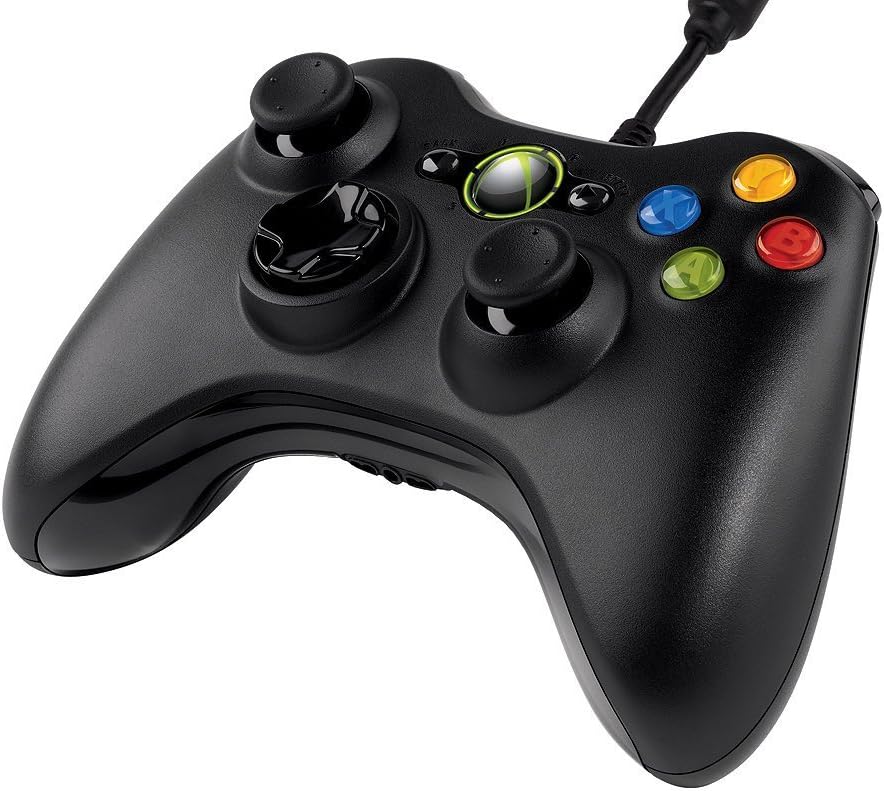
Obrázek 3: Shora nakloněný view of the controller, highlighting the cable connection point.
Návod k obsluze
The Xbox 360 Wired Controller provides intuitive controls for a wide range of games. Familiarize yourself with the button layout for optimal gameplay.
- Analogové páčky: Use the left and right analog sticks for movement, camera control, or other in-game actions.
- D-Pad: The directional pad is typically used for menu navigation or specific in-game commands.
- Tlačítka na obličeji (A, B, X, Y): These colored buttons are used for primary actions, interactions, or specific game functions.
- Ramenní tlačítka (LB, RB) a spouštěče (LT, RT): Located on the top of the controller, these are commonly used for secondary actions, aiming, or firing.
- Start & Back Buttons: Used for pausing games, accessing menus, or confirming selections.
- Tlačítko Průvodce Xboxem: Press the glowing Xbox Guide button in the center to access the Xbox Guide on your console or the Xbox Game Bar/overlay on PC.
Údržba
To ensure the longevity and optimal performance of your Xbox 360 Wired Controller, follow these maintenance guidelines:
- Čištění: Ovladač pravidelně otírejte měkkým, suchým hadříkem. V případě odolných nečistot použijte lehceamp Lze použít hadřík, ale dbejte na to, aby se do vnitřních součástí nedostala vlhkost. Nepoužívejte agresivní chemikálie ani abrazivní čisticí prostředky.
- Skladování: Store the controller in a clean, dry place away from extreme temperatures, direct sunlight, and excessive dust. Avoid wrapping the cable too tightly around the controller to prevent damage.
- Zacházení: Avoid dropping the controller or subjecting it to strong impacts, as this can damage internal circuitry or external components.
Odstraňování problémů
If you encounter issues with your Xbox 360 Wired Controller, try the following common troubleshooting steps:
- Ovladač nereaguje:
- Ujistěte se, že je kabel USB bezpečně zapojený do ovladače i konzole/počítače.
- Zkuste zapojit ovladač do jiného USB portu.
- Restart your Xbox 360 console or PC.
- Vibrace nefungují:
- Zkontrolujte nastavení ve hře, zda je zapnutá vibrační zpětná vazba.
- Verify that your console/PC drivers are up to date.
- Buttons/Sticks Not Functioning Correctly:
- Ujistěte se, že se kolem tlačítek nebo páček neusazují žádné nečistoty.
- Test the controller on another game or system to determine if the issue is specific to one application.
- On PC, check controller calibration settings in your operating system.
If problems persist, refer to the official Microsoft support resources or the full user guide linked in the Support section.
Specifikace
| Funkce | Detail |
|---|---|
| Značka | Microsoft |
| Název modelu | MICROSOFT CORP/LICENSING |
| Číslo modelu položky | 52A-00004 |
| Kompatibilní zařízení | PC, Xbox 360 Console (Windows Operating System) |
| Typ ovladače | Gamepad |
| Technologie připojení | USB (kabelové) |
| Hardwarová platforma | PC, Xbox 360 |
| Barva | Černý |
| Hmotnost položky | 12.5 unce (cca 354 gramů) |
| Rozměry produktu (DxŠxV) | 7.91 x 5.51 x 2.56 palců (přibližně 20.09 x 14.00 x 6.50 cm) |
| Zdroj napájení | Elektrický kabel (napájený přes USB) |
Záruka a podpora
Omezená záruka:
Your Microsoft Xbox 360 Wired Controller comes with a 90-Day Limited Warranty. Please refer to the warranty information included in your product packaging for full terms and conditions.
Další zdroje:
- Podrobnější uživatelskou příručku si můžete stáhnout v oficiálním PDF dokumentu: Uživatelská příručka (PDF)
- For further assistance, technical support, or to find updated drivers, please visit the official Microsoft Support webmísto.


