1. Úvod
This manual provides essential instructions for the safe and efficient installation, operation, and maintenance of your Rocketfish RF-500WPS2 500-Watt ATX CPU Power Supply. This power supply is designed to deliver stable and reliable power to your computer components, supporting most ATX 12V V2.3 motherboards, 2-way SLI, and multi-GPU VGA graphics cards. It features intelligent fan technology for quiet operation and active power factor correction for optimal efficiency.
2. Bezpečnostní informace
Please read and understand all safety instructions before installing or operating this product. Failure to follow these instructions may result in electric shock, fire, or damage to the product or other components.
- Elektrické nebezpečí: Neotevírejte napájecí jednotku. Vysoká hlasitosttagUvnitř se nacházejí žádné části, i když je jednotka odpojena od sítě. Uvnitř nejsou žádné součásti, které by mohl uživatel opravit.
- Správné uzemnění: Always ensure the power supply is properly grounded. Use only the power cord provided with the unit.
- Větrání: Ensure adequate airflow around the power supply. Do not block ventilation openings. Overheating can cause damage or fire.
- vlhkost: Nevystavujte napájecí zdroj vodě ani nadměrné vlhkosti.
- Statická elektřina: Always discharge static electricity from your body before handling internal computer components. Use an anti-static wrist strap if available.
- Vypnout: Always disconnect the power cord from the wall outlet before installing, removing, or servicing the power supply or any other computer components.
3. Nastavení a instalace
Follow these steps to install your Rocketfish RF-500WPS2 power supply into your computer system.
3.1 Obsah balení
Ověřte, zda váš balíček obsahuje následující položky:
- Rocketfish RF-500WPS2 500-Watt ATX CPU Power Supply
- Modular cables (various types for motherboard, CPU, PCIe, SATA, etc.)
- AC napájecí kabel
- Montážní šrouby
3.2 Fyzická instalace
- Připravte si systém: Turn off your computer and disconnect the power cord from the wall outlet. Open your computer case.
- Demontáž starého napájecího zdroje (pokud je k dispozici): Disconnect all cables from your old power supply to the motherboard and other components. Unscrew and remove the old power supply from the case.
- Instalace nového napájecího zdroje: Carefully slide the Rocketfish RF-500WPS2 into the power supply bay of your computer case. Ensure the fan is oriented correctly for optimal airflow (typically facing downwards or towards the inside of the case, depending on case design). Secure the power supply with the provided mounting screws.
- Připojení modulárních kabelů: This power supply features a modular design. Connect only the necessary cables to the power supply unit first, then route them to your components. This helps reduce cable clutter and improve airflow.
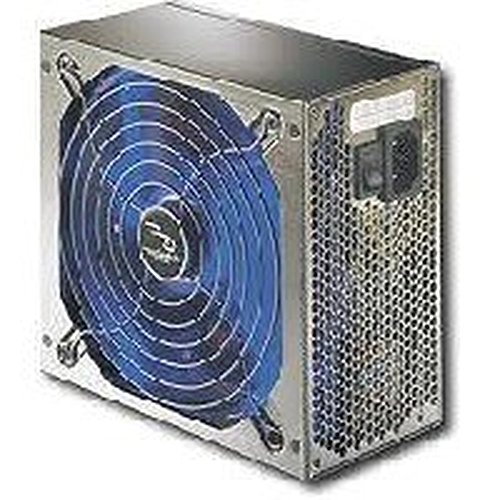
Obrázek 1: The Rocketfish RF-500WPS2 500-Watt ATX CPU Power Supply. This image shows the power supply unit, highlighting its compact design and the modular cable ports on one side, allowing for flexible cable management.
3.3 Připojení kabelů
Connect the appropriate cables to your computer components:
- 24pinový konektor základní desky ATX: Connect this main power connector to your motherboard.
- 4-pin or 8-pin CPU (EPS) Connector: Connect to the CPU power socket on your motherboard. Modern motherboards typically use an 8-pin connector.
- 6-pin or 8-pin PCI Express (PCIe) Connectors: Connect these to your graphics cards. This unit supports 2-way SLI and multi-GPU configurations.
- Napájecí konektory SATA: Připojení k pevným diskům SATA, SSD diskům a optickým jednotkám.
- 4-pin Peripheral (Molex) Connectors: Connect to older drives or case fans.
- 4-pin Floppy Connector: If required by legacy devices.
Ensure all connections are secure and properly seated. Close your computer case and reconnect the AC power cord to the wall outlet.
4. Provoz
Once installed, the Rocketfish RF-500WPS2 power supply operates automatically to provide power to your system. Turn on your computer as usual.
- Tichý provoz: The intelligent fan technology minimizes operational noise, providing a quieter computing environment. The 5.5-inch fan with blue LED light (if present) helps prevent components from overheating.
- Účinnost: Active Power Factor Correction (PFC) ensures optimal operation and energy efficiency.
- Ochranné obvody: Built-in protection circuits and line input fuse protection enhance reliability and safeguard your components.
5. Údržba
The Rocketfish RF-500WPS2 power supply is designed for reliable, long-term operation with minimal maintenance. However, periodic checks can help ensure its longevity and performance.
- Odstranění prachu: Over time, dust can accumulate inside the power supply and on its fan, potentially reducing cooling efficiency. Periodically, with the computer powered off and unplugged, use compressed air to gently clear dust from the fan and ventilation grilles. Do not open the power supply casing.
- Kontrola kabelu: Ensure all modular cables remain securely connected to both the power supply and your components. Loose connections can lead to instability.
- Podmínky prostředí: Operate the power supply in a well-ventilated area, away from direct heat sources and excessive moisture.
6. Řešení problémů
Pokud narazíte na problémy se zdrojem napájení, postupujte podle následujících běžných kroků pro řešení problémů:
- Systém není napájen:
- Ujistěte se, že je napájecí kabel bezpečně zapojený do zdroje napájení i do funkční zásuvky.
- Check that the power switch on the back of the power supply is in the "ON" (I) position.
- Verify all internal power cables (24-pin ATX, CPU, PCIe, SATA) are firmly connected to the motherboard and components.
- Otestujte zásuvku ve zdi pomocí jiného zařízení, abyste se ujistili, že je pod proudem.
- Nestabilita systému nebo náhodné vypínání:
- This could indicate insufficient power or a faulty component. Ensure your system's power requirements do not exceed the 500W capacity of the power supply.
- Check for overheating. Ensure the power supply fan is spinning and not obstructed.
- Ověřte, zda jsou všechna připojení bezpečná.
- Nadměrný hluk ventilátoru:
- While the intelligent fan is designed for quiet operation, excessive noise might indicate dust buildup. Refer to the Maintenance section for cleaning instructions.
- Ujistěte se, že žádné kabely nebrání lopatkám ventilátoru.
If problems persist after following these steps, contact Rocketfish customer support or a qualified technician.
7. Specifikace
| Funkce | Detail |
|---|---|
| Číslo modelu | RF-500WPS2 |
| Značka | Rocketfish |
| Výstupní Wattage | 500 wattů |
| Form Factor | ATX |
| Kompatibilní zařízení | Osobní počítač |
| Typ konektoru | ATX (24-pin), CPU (4/8-pin), PCIe (6/8-pin), SATA, Molex (4-pin), Floppy (4-pin) |
| Způsob chlazení | Air (1 x 5.5-inch fan) |
| Speciální funkce | Modular cables, Intelligent fan technology, Active Power Factor Correction (PFC), Built-in protection circuit, Line input fuse protection |
| Rozměry (D x Š x V) | Přibližně 11.2 x 9.9 x 4.3 cm (rozměry balení) |
| Hmotnost položky | 5.75 libry |
8. Záruka a podpora
8.1 Omezená záruka
Rocketfish products typically come with a limited warranty. For specific warranty terms and conditions, including duration and coverage, please refer to the warranty card included with your product or visit the official Rocketfish webUschovejte si účtenku jako doklad o koupi pro případ reklamace.
8.2 Zákaznická podpora
If you require technical assistance, have questions about your product, or need to initiate a warranty claim, please contact Rocketfish customer support. Contact information can usually be found on the Rocketfish webmístě nebo na obalu produktu.
Online podpora: Visit the official Rocketfish webweb s nejčastějšími dotazy, zdroji podpory a kontaktními údaji.


