Uživatelská příručka k domácímu kinu Sunstech XD TH-35 5.1 subwooferu
Model: TH-XD 35
1. Úvod
This manual provides essential information for the safe and efficient operation of your Sunstech XD TH-35 Home Cinema 5.1 Subwoofer System. Please read this manual thoroughly before using the product and retain it for future reference.
The Sunstech XD TH-35 is a 5.1 channel home cinema system designed to deliver an immersive audio experience for movies, music, and games. It includes a main unit (DVD/CD/DivX player), a subwoofer, and five satellite speakers.
2. Bezpečnostní informace
VAROVÁNÍ: Abyste snížili riziko úrazu elektrickým proudem, neodstraňujte kryt (nebo zadní část). Uvnitř nejsou žádné díly opravitelné uživatelem. Svěřte servis kvalifikovanému servisnímu personálu.
- Zdroj napájení: Zajistěte napájení objtage odpovídá štítku s výkonem na jednotce.
- Větrání: Nezakrývejte žádné větrací otvory. Nainstalujte v souladu s pokyny výrobce.
- Voda a vlhkost: Nevystavujte tento přístroj dešti ani vlhkosti. Nepokládejte na přístroj předměty naplněné tekutinami, například vázy.
- Teplo: Neinstalujte v blízkosti zdrojů tepla, jako jsou radiátory, tepelné regulátory, kamna nebo jiná zařízení (včetně amplifikátory), které produkují teplo.
- Čištění: Během bouřek nebo pokud jej nebudete delší dobu používat, odpojte toto zařízení ze zásuvky. Čistěte pouze suchým hadříkem.
- Servis: Veškeré opravy svěřte kvalifikovanému servisnímu personálu. Servis je nutný, pokud bylo zařízení jakýmkoli způsobem poškozeno, například je poškozen napájecí kabel nebo zástrčka, pokud do zařízení vnikla tekutina nebo do něj spadly předměty, zařízení bylo vystaveno dešti nebo vlhkosti, nefunguje normálně. , nebo byla vypuštěna.
3. Obsah balení
Zkontrolujte prosím, zda jsou ve vašem balení obsaženy všechny níže uvedené položky:
- Main Unit (DVD/CD/DivX Player)
- Subwoofer
- Front Left Satellite Speaker
- Front Right Satellite Speaker
- Center Satellite Speaker
- Rear Left Satellite Speaker
- Rear Right Satellite Speaker
- Dálkové ovládání
- Audio/Video kabely
- Uživatelská příručka (tento dokument)
4. Konec produktuview
The Sunstech XD TH-35 system comprises a central player unit, a powerful subwoofer, and five compact satellite speakers, along with a remote control for convenient operation.
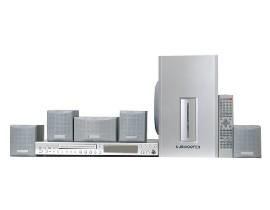
Obrázek 4.1: Nadview of the Sunstech XD TH-35 Home Cinema 5.1 Subwoofer System, showing the main unit, subwoofer, five satellite speakers, and remote control.
4.1 Main Unit (DVD/CD/DivX Player)
This unit serves as the central control hub, featuring disc playback capabilities for CD, DVD, and DivX formats. It includes various input/output ports for connecting to your television and other audio sources.
4.2 subwoofer
The subwoofer is responsible for reproducing low-frequency sounds, adding depth and impact to your audio experience. It connects directly to the main unit.
4.3 satelitní reproduktory
Five satellite speakers (Front Left, Front Right, Center, Rear Left, Rear Right) provide the surround sound experience, distributing audio across your listening area for immersive soundscapes.
4.4 Dálkové ovládání
The included remote control allows for convenient adjustment of volume, input selection, playback controls, and other system settings from a distance.
5. Nastavení
5.1 Umístění reproduktorů
Optimal speaker placement is crucial for achieving the best 5.1 surround sound experience.
- Středový reproduktor: Place directly above or below your television, centered.
- Přední levý/pravý reproduktor: Position these speakers equidistant from the television, forming an equilateral triangle with your primary listening position.
- Zadní levý/pravý reproduktor: Place these speakers to the sides or slightly behind your primary listening position, at ear level or slightly above.
- subwoofer: The subwoofer can be placed anywhere in the room, but typically performs well in a corner or near a wall to enhance bass response. Experiment with placement for best results.
5.2 Připojení reproduktorů
- Identify the speaker output terminals on the main unit and the corresponding input terminals on each speaker.
- Connect the Front Left speaker to the "FL" terminal, Front Right to "FR", Center to "CEN", Rear Left to "RL", and Rear Right to "RR".
- Connect the subwoofer to the dedicated "SUBWOOFER OUT" port on the main unit.
- Ensure all connections are secure and the correct polarity (+ to + and - to -) is observed for each speaker wire.
5.3 Connecting to a Television/Display
Use the provided audio/video cables to connect the main unit to your television. Common connection types include:
- Složené video: Connect the yellow video output from the main unit to the yellow video input on your TV.
- Stereo zvuk: Connect the red and white audio outputs from the main unit to the corresponding red and white audio inputs on your TV.
- (Note: Depending on your TV and the system's capabilities, other connections like S-Video or Component Video might be available for better picture quality. Refer to your TV's manual for input options.)
5.4 Připojení napájení
- Once all audio/video and speaker connections are made, plug the main unit's power cord into a wall outlet.
- Turn on the main unit using the power button on the front panel or the remote control.
6. Návod k obsluze
6.1 Základní přehrávání
- Zapnutí: Stiskněte tlačítko MOC tlačítko na hlavní jednotce nebo dálkovém ovladači.
- Vložit disk: Gently insert a CD, DVD, or DivX disc into the disc tray. The tray will automatically close, and playback should begin.
- Vyberte vstup: If the system does not automatically switch to disc playback, press the VSTUP or ZDROJ button on the remote to select the correct input.
- Ovládání hlasitosti: Použijte VOL+ a OBJEM - buttons on the remote to adjust the master volume.
- Ovládání přehrávání: Použití HRÁT, PAUZA, ZASTÁVKA, PŘESKOČITa RYCHLÝ VPŘED/ZPĚT buttons for disc navigation.
6.2 Nastavení zvuku
Access the system's on-screen menu (usually by pressing NASTAVENÍ or MENU on the remote) to adjust audio settings such as:
- Úrovně reproduktorů: Adjust the individual volume levels for each speaker (Front, Center, Rear, Subwoofer) to balance the sound.
- Nastavení zpoždění: Compensate for different distances of speakers from the listening position.
- Zvukové režimy: Select from various preset sound modes (e.g., Movie, Music, Game) or customize equalizer settings.
6.3 Funkce dálkového ovládání
The remote control provides full functionality for the system. Familiarize yourself with the button layout for easy operation.
(Note: A detailed diagram of the remote control with button descriptions would typically be included here in a physical manual.)
7. Údržba
7.1 Čištění jednotky
To maintain the appearance and performance of your system:
- Vnější: Vnější povrchy otřete měkkým, suchým hadříkem. Nepoužívejte abrazivní čisticí prostředky, vosky ani rozpouštědla.
- Zásobník disku: Keep the disc tray clean and free of dust. Avoid touching the lens inside the disc tray.
- Větrání: Ujistěte se, že větrací otvory jsou čisté od prachu a nečistot, aby nedošlo k přehřátí.
7.2 Péče o disk
Handle discs by their edges. Store discs in their cases when not in use to prevent scratches and dust accumulation. Clean discs with a soft, lint-free cloth, wiping from the center outwards.
7.3 Baterie do dálkového ovladače
If the remote control's range decreases or it becomes unresponsive, replace the batteries with new ones of the specified type (e.g., AAA). Ensure correct polarity when inserting new batteries.
8. Řešení problémů
If you encounter problems with your system, refer to the following table for common issues and solutions.
| Problém | Možná příčina | Řešení |
|---|---|---|
| Žádná síla | Napájecí kabel není připojen; Vadná zásuvka | Zkontrolujte připojení napájecího kabelu; zkuste jinou zásuvku |
| Žádný zvuk | Volume too low; Incorrect input selected; Speaker wires loose/incorrectly connected | Increase volume; Select correct input; Check all speaker connections and polarity |
| Žádný obrázek | Video cable loose/incorrectly connected; Incorrect TV input selected | Check video cable connections; Select correct input on TV |
| Disk se nepřehrává | Disc inserted incorrectly; Disc is dirty or scratched; Disc format not supported | Re-insert disc correctly; Clean or replace disc; Check disc compatibility (CD, DVD, DivX) |
| Dálkové ovládání nefunguje | Baterie jsou vybité nebo nesprávně vložené; Překážka mezi dálkovým ovladačem a zařízením | Replace batteries, check polarity; Remove obstructions; Ensure remote is pointed at the unit's sensor |
If the problem persists after trying these solutions, please contact Sunstech customer support or a qualified service technician.
9. Specifikace
| Funkce | Detail |
|---|---|
| Název modelu | TH-XD 35 |
| Značka | Sunstech |
| Konfigurace prostorového zvuku | 5.1 (5 Speakers + 1 Subwoofer) |
| Wattage | 170 wattů |
| Podporované typy médií | CD, DVD, DivX |
| ASIN | B0044ALAEM |
| První dostupný termín | 21. února 2020 |
10. Záruka a podpora
For warranty information and customer support, please refer to the warranty card included with your product or visit the official Sunstech webUschovejte si doklad o koupi pro případ reklamace.
Online podpora: www.sunstech.com/support (This is a placeholder link, please replace with the actual support URL Pokud je k dispozici)
Kontakt: Refer to your regional Sunstech contact information for service inquiries.


