Zavedení
The Cellularline Roller Clip Bluetooth Headset is designed for convenient, hands-free communication. Featuring a retractable cable and a wireless Bluetooth clip, this headset offers flexibility and ease of use. It supports simultaneous connection to two mobile phones, automatically activating when a call is received or made on either device. Its automatic cable winder ensures a tidy experience, making it ideal for users who prefer to wear the headset only during calls.
Konec produktuview
Familiarize yourself with the components and features of your Cellularline Roller Clip Bluetooth Headset.

Obrázek 1: Přední view of the Cellularline Roller Clip Bluetooth Headset, showing the main unit with the retractable earbud.
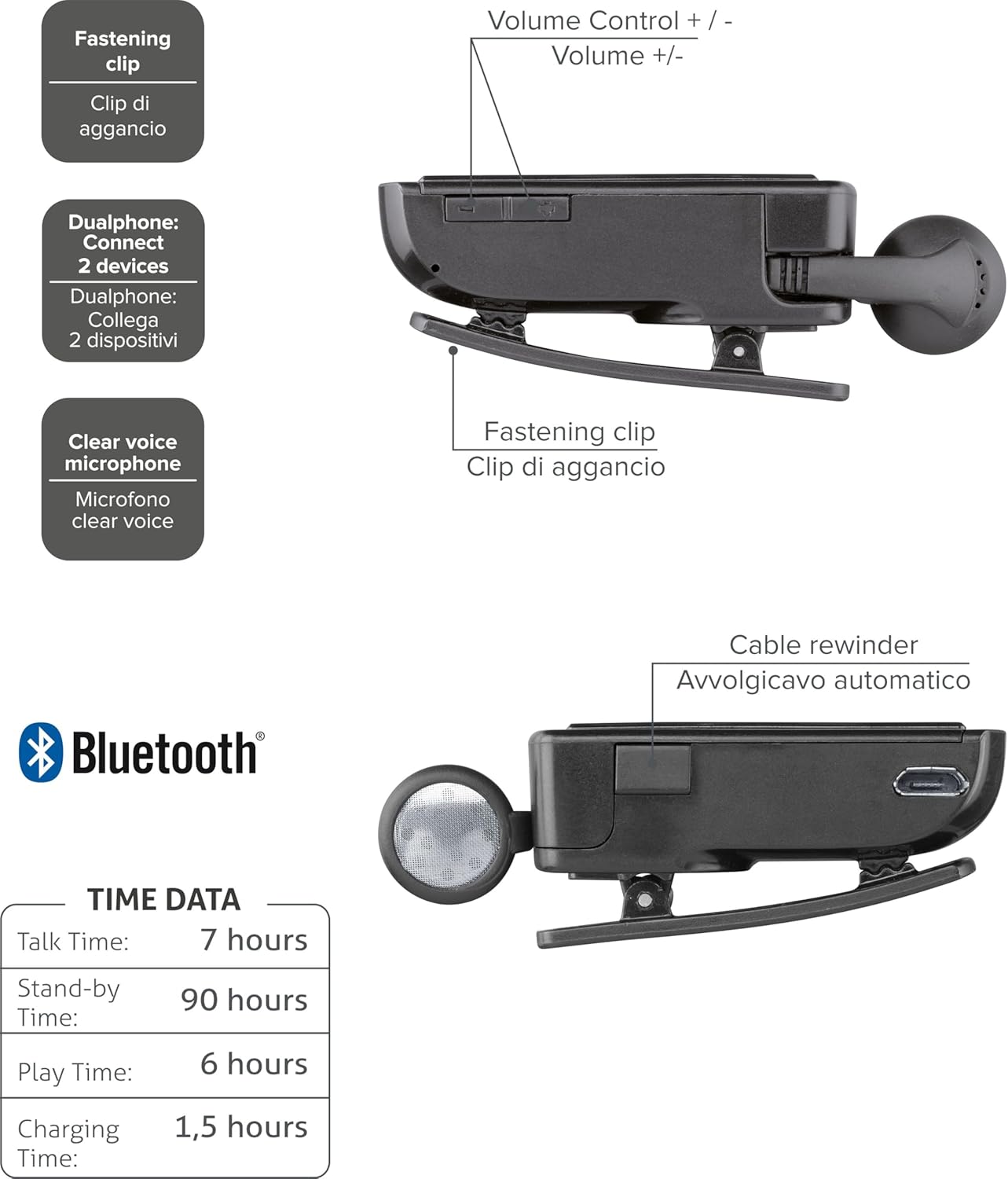
Obrázek 2: Diagram illustrating key features including the fastening clip, volume controls, dualphone connectivity, clear voice microphone, and cable rewinder.
- Retractable Earbud: The earbud cable automatically retracts into the main unit for compact storage.
- Bluetooth Clip: The main unit features a clip for attaching to clothing.
- Ovládání hlasitosti: Buttons located on the side for adjusting audio volume.
- Vícebodové připojení: Připojuje se ke dvěma mobilním telefonům současně.
- Clear Voice Microphone: Ensures clear audio transmission during calls.
- Micro-USB port: Pro nabíjení zařízení.
Nastavení
1. Nabíjení náhlavní soupravy
Before first use, fully charge the headset. Use the provided Micro-USB cable to connect the headset to a USB power source (e.g., computer USB port or wall adapter).
- Během nabíjení bude svítit kontrolka nabíjení.
- Plné nabití obvykle trvá přibližně 1.5 hodiny.
- Po dokončení nabíjení se kontrolka změní nebo zhasne.

Obrázek 3: Strana view of the headset showing the Micro-USB charging port.
2. Spárování s mobilním zařízením
To use the headset, it must be paired with your Bluetooth-enabled mobile phone or device.
- Zkontrolujte, zda je náhlavní souprava vypnutá.
- Press and hold the Multi-function button (usually the main power button) until the indicator light flashes blue and red alternately, indicating pairing mode.
- Na svém mobilním zařízení povolte Bluetooth a vyhledejte nová zařízení.
- Select "Cellularline Roller Clip" or a similar name from the list of available devices.
- Pokud se zobrazí výzva k zadání hesla, zadejte „0000“ (čtyři nuly).
- Once paired, the indicator light will typically flash blue slowly, and you may hear a confirmation tone.
3. Connecting to Two Devices (Multi-point)
The headset can be connected to two mobile phones simultaneously.
- Pair the headset with the first mobile device as described above.
- Vypněte Bluetooth na prvním zařízení.
- Put the headset back into pairing mode and pair it with the second mobile device.
- Once paired with the second device, re-enable Bluetooth on the first device.
- The headset should now be connected to both devices. It will automatically switch to the active call on either phone.
Návod k obsluze
Zapnutí/vypnutí
- Zapnutí: Press and hold the Multi-function button for approximately 3 seconds until the blue indicator light flashes.
- Vypnout: Press and hold the Multi-function button for approximately 3 seconds until the red indicator light flashes and then turns off.
Uskutečňování a přijímání hovorů
- Přijmout hovor: Při příchozím hovoru stiskněte jednou multifunkční tlačítko.
- Ukončit hovor: Během hovoru stiskněte jednou multifunkční tlačítko.
- Odmítnout hovor: Při příchozím hovoru stiskněte a podržte multifunkční tlačítko přibližně 2 sekundy.
- Znovu vytočit poslední číslo: Double-press the Multi-function button when the headset is idle.
- Hlasové vytáčení (pokud je telefonem podporováno): Press and hold the Multi-function button for approximately 1 second when the headset is idle.
Ovládání hlasitosti
Adjust the call or media volume using the dedicated volume buttons on the side of the headset.

Obrázek 4: Strana view of the headset showing the volume control buttons.
- Zvýšit hlasitost: Stiskněte tlačítko „+“.
- Snížit hlasitost: Stiskněte tlačítko „-“.
Zatahovací kabel
To extend the earbud, gently pull it out. To retract, press the cable winder button (if present) or gently pull the cable slightly further and release to activate the retraction mechanism.
Údržba
- Čištění: Otřete sluchátka s mikrofonem měkkým, suchým hadříkem. Nepoužívejte abrazivní čisticí prostředky ani rozpouštědla.
- Skladování: Sluchátka skladujte na chladném a suchém místě mimo dosah přímého slunečního záření a extrémních teplot.
- Péče o baterie: Chcete-li prodloužit životnost baterie, vyvarujte se častého úplného vybíjení. Pravidelně nabíjejte sluchátka, i když je delší dobu nepoužíváte.
- Péče o kabely: Avoid forcefully pulling the retractable cable. Allow the automatic winder to retract the cable smoothly.
Odstraňování problémů
| Problém | Možná příčina | Řešení |
|---|---|---|
| Sluchátka se nezapínají. | Slabá baterie. | Plně nabijte sluchátka. |
| Nelze spárovat sluchátka. | Sluchátka nejsou v režimu párování; Bluetooth na zařízení je vypnutý; zařízení je příliš daleko. | Ensure headset is in pairing mode (flashing red/blue). Enable Bluetooth on your device. Move headset closer to the device. |
| Žádný zvuk nebo špatná kvalita zvuku. | Hlasitost je příliš nízká; sluchátka nejsou připojena; rušení. | Increase volume on both headset and phone. Reconnect the headset. Move away from other electronic devices. |
| Zatahovací kabel nefunguje hladce. | Zablokování nebo poškození mechanismu. | Ensure no debris is obstructing the cable. Avoid forceful pulling. If damaged, contact support. |
| Cannot connect to two devices. | Nesprávné párovací pořadí. | Follow the multi-point pairing instructions carefully (pair first, disable Bluetooth, pair second, re-enable first). |
Specifikace
| Funkce | Detail |
|---|---|
| Číslo modelu | BTCLIPARDP |
| Značka | Buněčná linie |
| Barva | Black/Grey (Schwarz) |
| Umístění uší | V uchu |
| Form Factor | V uchu |
| Impedance | 32 Ohmy |
| Rozměry produktu | 9 x 2.4 x 11 cm; 50 g |
| Typ baterie | 1 lithium-iontová baterie |
| Doba hovoru | Až 7 hodin |
| Pohotovostní doba | Až 90 hodin |
| Čas přehrávání | Až 6 hodin |
| Doba nabíjení | Přibližně 1.5 hodiny |
Záruka a podpora
Informace o záruce a technickou podporu získáte od oficiálního zástupce společnosti Cellularline. webnebo se obraťte přímo na jejich zákaznický servis. Uschovejte si doklad o koupi pro případ reklamace.
Pro další pomoc můžete navštívit product page on Amazon.ae.


