1. Úvod
Děkuji za nákupasing the Atlanta 1669/19 Quartz Alarm Clock. This digital alarm clock features a silent movement, a light sensor for automatic display illumination, and a snooze function. This manual provides detailed instructions for setup, operation, and maintenance to ensure optimal performance and longevity of your device.
2. Bezpečnostní informace
- Udržujte zařízení mimo dosah vody a vysoké vlhkosti.
- Nevystavujte hodiny přímému slunečnímu záření nebo extrémním teplotám.
- Nepokoušejte se hodiny rozebírat ani opravovat sami. Obraťte se na kvalifikovaný servisní personál.
- Použité baterie zlikvidujte zodpovědně v souladu s místními předpisy.
- Nekombinujte staré a nové baterie ani různé typy baterií.
3. Obsah balení
- Atlanta 1669/19 Quartz Alarm Clock Unit
- Uživatelská příručka (tento dokument)
Poznámka: Baterie nejsou součástí balení a je nutné je zakoupit samostatně.
4. Konec produktuview
The Atlanta 1669/19 features a clear digital display, intuitive controls, and a light sensor for enhanced visibility in low-light conditions.
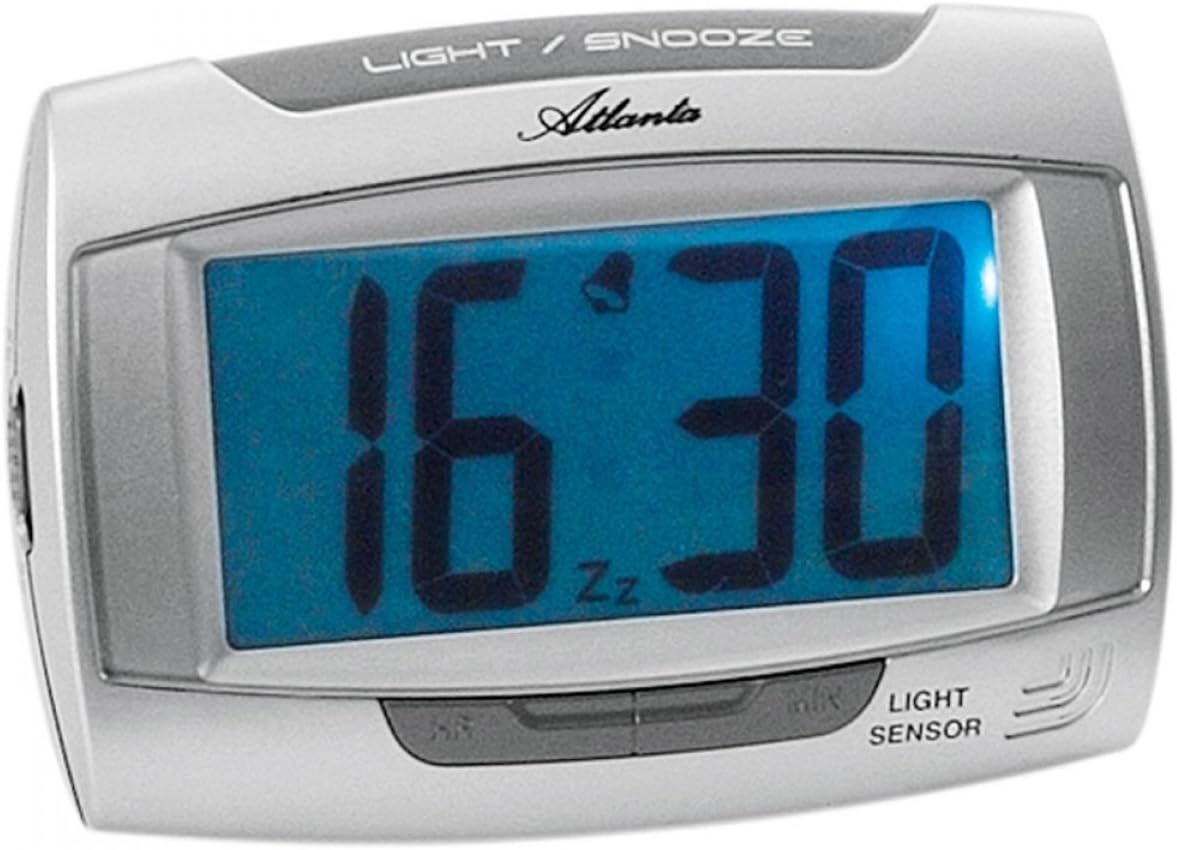
Obrázek 1: Přední view of the Atlanta 1669/19 Quartz Alarm Clock. The clock features a large digital display, a "LIGHT / SNOOZE" button at the top, and a "LIGHT SENSOR" indicator at the bottom right. The display shows the time 16:30, with an alarm bell icon and 'Zz' indicating snooze functionality.
Klíčové komponenty:
- Digitální displej: Zobrazuje čas a stav budíku.
- LIGHT / SNOOZE Button: Activates temporary backlight and snooze function.
- Světelný senzor: Automatically illuminates the display in dark environments.
- Control Buttons (Rear/Side): Pro nastavení času a budíku.
- Battery Compartment (Rear): Pojme potřebné baterie.
5. Nastavení
5.1. Instalace baterie
- Najděte krytku přihrádky na baterie na zadní straně budíku.
- Kryt sejměte jeho posunutím nebo zvednutím.
- Insert the required batteries (typically 1x AA, refer to compartment markings) ensuring correct polarity (+ and -).
- Bezpečně nasaďte kryt prostoru pro baterie.
5.2. Počáteční nastavení času
Upon battery installation, the display will typically show a default time. You will need to set the current time.
- Locate the time setting buttons, usually labeled "SET", "HOUR", and "MINUTE" or similar, on the back or side of the clock.
- Press the "SET" button (or equivalent) to enter time setting mode. The hour digits may start flashing.
- Use the "HOUR" button to adjust the hour.
- Press "SET" again to move to minute setting. The minute digits may start flashing.
- Pomocí tlačítka „MINUTA“ upravte minuty.
- Press "SET" one more time to confirm and exit time setting mode.
6. Návod k obsluze
6.1. Nastavení alarmu
- Locate the alarm setting buttons, typically labeled "ALARM SET", "ALARM HOUR", and "ALARM MINUTE" or similar.
- Press the "ALARM SET" button to enter alarm setting mode. The alarm hour digits may flash.
- Use the "ALARM HOUR" button to adjust the desired alarm hour.
- Press "ALARM SET" again to move to alarm minute setting. The alarm minute digits may flash.
- Use the "ALARM MINUTE" button to adjust the desired alarm minutes.
- Press "ALARM SET" one more time to confirm and exit alarm setting mode.
6.2. Aktivace/deaktivace alarmu
There is usually a switch or button to turn the alarm on or off. Look for a switch labeled "ALARM ON/OFF" or an alarm icon button. When the alarm is active, an alarm icon (e.g., a bell) will typically appear on the display.
6.3. Funkce odložení buzení
When the alarm sounds, press the large "LIGHT / SNOOZE" button located on the top of the clock. This will temporarily silence the alarm, and it will sound again after a few minutes (typically 5-9 minutes). The "Zz" icon on the display indicates that the snooze function is active.
6.4. Light Sensor and Display Backlight
- Automatic Backlight (Light Sensor): The clock is equipped with a light sensor. When enabled, the display will automatically illuminate with a soft, constant light in dark environments, making it easy to read the time at night without pressing any buttons. Look for a switch or button labeled "SENSOR ON/OFF" or similar to enable or disable this feature.
- Temporary Backlight: To briefly illuminate the display in any lighting condition, press the "LIGHT / SNOOZE" button on the top of the clock. The backlight will stay on for a few seconds and then turn off automatically.
7. Údržba
- Čištění: Wipe the clock with a soft, dry cloth. Do not use abrasive cleaners or solvents, as these may damage the casing nebo displej.
- Výměna baterie: When the display dims or the clock stops functioning correctly, it is time to replace the batteries. Follow the battery installation steps in Section 5.1.
- Skladování: If the clock will not be used for an extended period, remove the batteries to prevent leakage and damage.
8. Řešení problémů
| Problém | Možná příčina | Řešení |
|---|---|---|
| Displej hodin je prázdný nebo tmavý. | Slabé nebo vybité baterie; nesprávná instalace baterií. | Vyměňte baterie za nové, dbejte přitom na správnou polaritu. |
| Alarm se nespustí. | Alarm is not activated; alarm time is incorrect; low batteries. | Ensure alarm is switched ON (bell icon visible); verify alarm time setting; replace batteries. |
| Automatic backlight not working. | Light sensor feature is disabled; insufficient darkness. | Ensure the light sensor switch is ON; test in a completely dark room. |
| Čas je nesprávný. | Time was not set correctly; batteries were removed/replaced. | Reset the current time following Section 5.2. |
9. Specifikace
| Model | 1669/19 |
| Značka | Atlanta |
| Provozní režim | Digitální |
| Speciální funkce | Alarm, Lighting (Light Sensor) |
| Materiál | Plast |
| Materiál rámu | Plast |
| Typ montáže | Stolní deska |
| Barva | Blue (display), Silver-coloured (case) |
| Jsou vyžadovány baterie | Yes (Type not specified, typically AA or AAA for such clocks) |
| Baterie jsou součástí dodávky | Žádný |
| Rozměry (přibližně) | 11 x 7 cm |
10. Záruka a podpora
Informace o záruce nebo technickou podporu naleznete v dokumentaci dodané při nákupu nebo se obraťte na svého prodejce. Uschovejte si doklad o koupi pro případné reklamace.


