Zavedení
The LeapFrog My Own Leaptop is an interactive learning toy designed to introduce young children to letters, numbers, and basic computer literacy skills. Featuring a larger screen and four engaging learning modes, this device offers a fun and portable way for children to explore and learn.
Co je v krabici
- LeapFrog My Own Leaptop
- Rychlý průvodce
Nastavení
Instalace baterie
The Leaptop requires 3 AA batteries. Batteries are included for demonstration purposes only. For regular use, new batteries are recommended to ensure optimal performance.
- Locate the battery compartment on the underside of the Leaptop.
- Pomocí šroubováku otevřete kryt prostoru pro baterie.
- Vložte 3 nové baterie typu AA a dbejte na správnou polaritu (+/-).
- Nasaďte kryt prostoru pro baterie a utáhněte šroub.
Personalizace
To personalize the Leaptop with your child's name and custom content, connect the device to a computer and visit the LeapFrog Learning Path website. Follow the on-screen instructions to download songs and set up pretend emails.
Konec produktuview
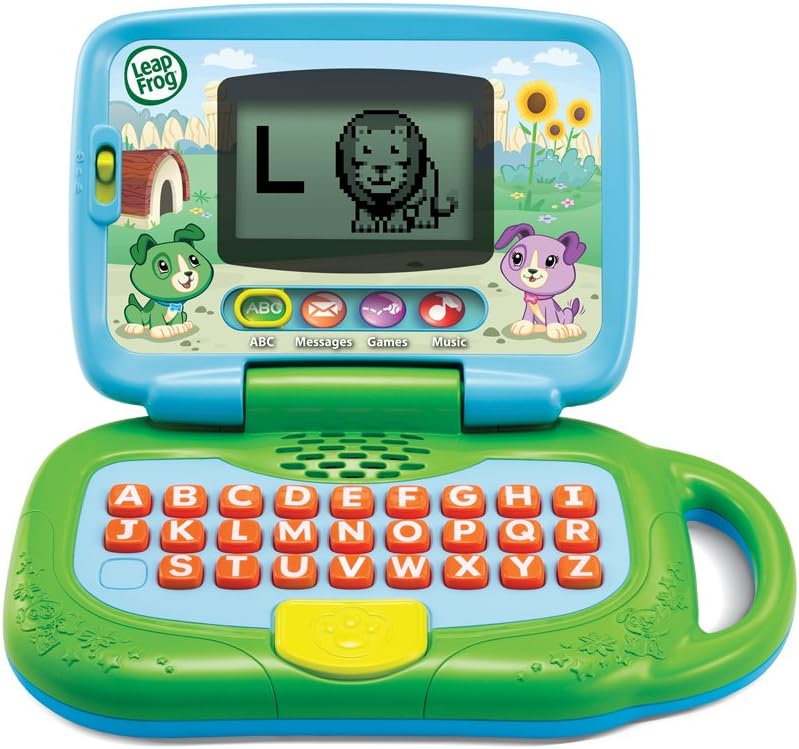
Obrázek 1: Přední strana view of the LeapFrog My Own Leaptop.
The Leaptop features a durable, child-friendly design with a large screen for engaging animations. The keyboard includes all letters of the alphabet, along with dedicated buttons for different learning modes. A convenient handle allows for easy portability.
Ovládací prvky a funkce
- Přepínač zapnutí/vypnutí/hlasitosti: Located on the side, this switch controls power and adjusts the sound level.
- Alphabet Keyboard: Features large, easy-to-press buttons for each letter.
- Tlačítka režimu: Dedicated buttons for ABCs, Messages, Games, and Music modes.
- Obrazovka: Displays letters, animations, and interactive content.
- Zacházet s: Integrované pro snadné přenášení.
Provozní režimy

Figure 2: Child engaging with the Leaptop in learning mode.
The Leaptop offers four interactive learning modes to keep children engaged:
- ABCs Mode: Press any letter button to hear the letter name, its sound, and a word that starts with that letter. The screen displays corresponding animal animations (26 in total).
- Messages Mode: Engage in pretend email exchanges with characters like Scout or Violet. This mode encourages imaginative role-play and early communication skills.
- Herní režim: Play fun animal trivia and letter games designed to reinforce learning.
- Hudební režim: Enjoy 16 songs and melodies. Children can bop along and explore musical sounds.

Figure 3: Child interacting with the Leaptop's keyboard.
Péče a údržba
- Keep the Leaptop clean by wiping it with a slightly damp tkanina. Neponořujte do vody.
- Nevystavujte zařízení extrémním teplotám nebo přímému slunečnímu záření.
- Pokud nebudete přístroj delší dobu používat, vyjměte baterie, abyste zabránili jejich vytečení.
Odstraňování problémů
If the Leaptop does not function as expected, please try the following:
- Ensure batteries are correctly installed and are not depleted. Replace with fresh batteries if necessary.
- Turn the unit off and then on again to reset it.
- If issues persist, refer to the LeapFrog support webstránky pro další pomoc.
Specifikace
| Specifikace | Hodnota |
|---|---|
| Rozměry produktu | 3.8 x 11.5 x 11.4 palce |
| Hmotnost položky | 1.56 libry |
| Číslo modelu položky | 80-19150E |
| Výrobcem doporučený věk | 24 měsíců - 4 roky |
| Baterie | Vyžadují se 3 baterie AA (součástí balení pro demonstraci) |
| Datum vydání | 1. května 2018 |
| Výrobce | VTech |
Záruka a podpora
For warranty information or technical support, please visit the official LeapFrog webnebo kontaktujte jejich zákaznický servis. Uschovejte si účtenku jako doklad o koupi.


