1. Úvod
This manual provides detailed instructions for the installation, operation, and maintenance of your Motorola SURFboard SB5101U DOCSIS 2.0 Cable Modem. The SB5101U is designed to provide high-speed internet access over your cable television network. It is compatible with major U.S. cable providers and offers reliable connectivity for your home or office network.
Please read this manual thoroughly before beginning the installation process to ensure proper setup and optimal performance.
2. Obsah balení
Upon opening the package, verify that all items are present and in good condition. The standard package for the Motorola SURFboard SB5101U Cable Modem typically includes:
- Motorola SURFboard SB5101U Cable Modem
- Napájecí adaptér
- Stručný průvodce (pokud je součástí dodávky)
Poznámka: Coaxial cables, Ethernet cables, or USB cables are typically not included with the modem and must be purchased separately if you do not already have them. A coaxial cable splitter may also be required if you intend to connect both a cable TV and the modem to the same wall jack.
3. Konec produktuview
3.1 Přední panel
The front panel of the SB5101U features several LED indicators that provide status information about the modem's operation. These LEDs help in monitoring the connection status and troubleshooting potential issues.
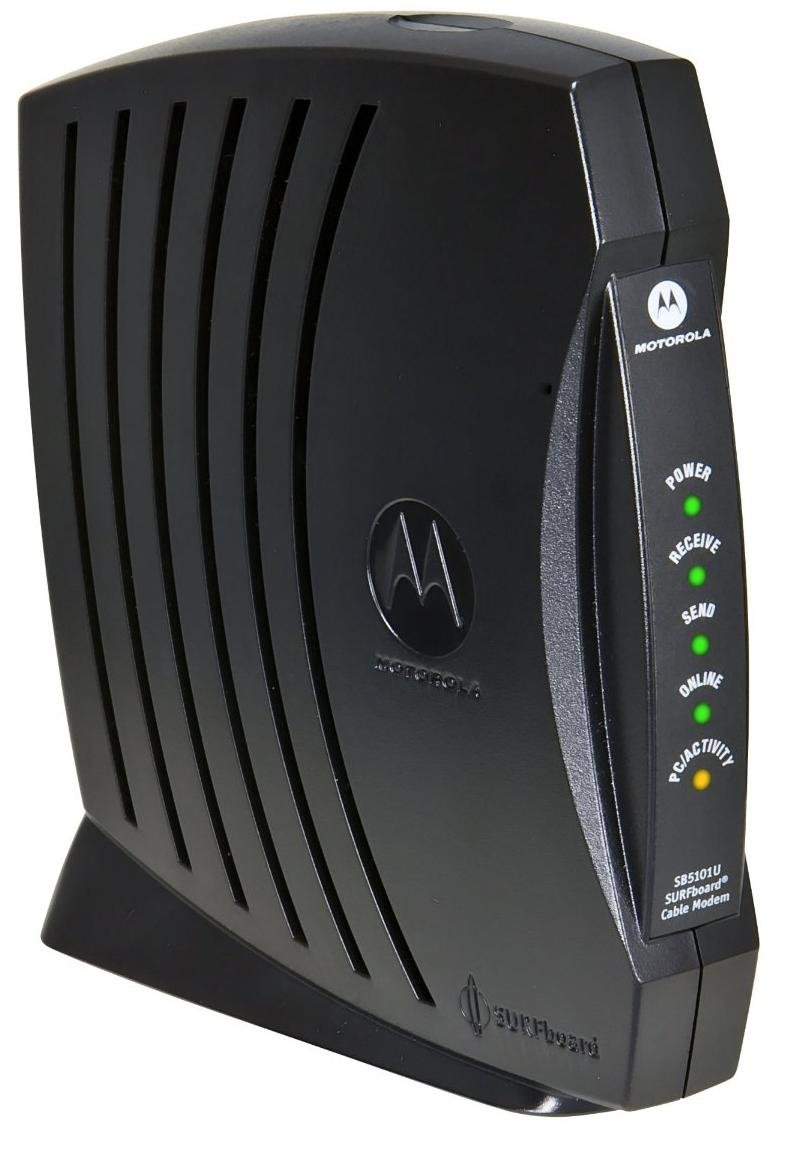
Obrázek 1: Přední view of the Motorola SURFboard SB5101U Cable Modem. This image shows the modem's sleek black casing with ventilation grilles and the Motorola logo, indicating its general appearance.
| Název LED | Postavení | Popis |
|---|---|---|
| Moc | Plně zelená | Modem je zapnutý. |
| Dostávat | Plně zelená | The modem is receiving data from the cable network. |
| Poslat | Plně zelená | The modem is sending data to the cable network. |
| Online | Plně zelená | The modem is successfully connected to the internet. |
| Odkaz | Plně zelená | Ethernetové zařízení je připojeno a aktivní. |
| Aktivita | Blikající zelená | Data is being transmitted or received over the Ethernet connection. |
3.2 Zadní panel
The rear panel of the SB5101U contains all the necessary ports for connecting the modem to your cable service and your computer or router.
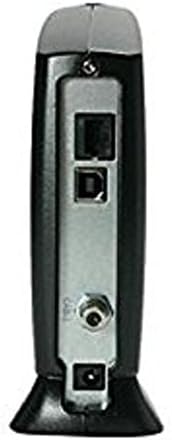
Obrázek 2: Zadní view of the Motorola SURFboard SB5101U Cable Modem. This image displays the various connection ports, including the coaxial cable input, Ethernet port, USB port, and power input.
- Cable (Coaxial) Port: Connects to your cable wall outlet via a coaxial cable.
- Ethernetový port (RJ-45): Connects to your computer or a wireless router using an Ethernet cable. Supports 10/100 Mbps speeds.
- USB port: An alternative connection option for a computer.
- Napájecí port: Připojuje se k dodanému napájecímu adaptéru.
- Resetovací tlačítko: Used to restore the modem to factory default settings. (Typically recessed and requires a paperclip to press).
4. Pokyny k nastavení
Follow these steps to properly install and activate your Motorola SURFboard SB5101U Cable Modem.
4.1 Connecting the Modem
- Připojení koaxiálního kabelu: Screw one end of a coaxial cable (not included) into the Cable port on the rear of the SB5101U and the other end into a cable wall outlet. Ensure the connection is finger-tight.
- Connect Ethernet/USB Cable:
- For a single computer: Connect one end of an Ethernet cable (not included) to the Ethernet port on the modem and the other end to the Ethernet port on your computer. Alternatively, you can use a USB cable (not included) to connect the modem to your computer's USB port.
- For a router: Connect one end of an Ethernet cable (not included) to the Ethernet port on the modem and the other end to the WAN/Internet port on your wireless router.
- Připojte napájecí adaptér: Plug the small end of the provided power adapter into the Power port on the rear of the modem. Then, plug the larger end into an electrical outlet.
- Zapnutí: The modem will automatically power on. Observe the front panel LEDs. The Power, Receive, Send, and Online LEDs should eventually turn solid green. This process may take several minutes.
4.2 Activating Your Internet Service
After connecting the modem, you will need to contact your Internet Service Provider (ISP) to activate your service. Have the following information ready:
- Your account information.
- The modem's MAC adresa (also known as HFC MAC ID or CM MAC). This is typically found on a sticker on the bottom or back of the modem.
- The modem's sériové číslo (S/N). This is also found on the same sticker.
Your ISP will guide you through the activation process. Once activated, your Online LED should remain solid green, indicating a successful internet connection.
5. Obsluha modemu
The Motorola SURFboard SB5101U operates automatically once connected and activated. The front panel LEDs provide a quick visual status of its operation.
5.1 Understanding LED Status
Refer to the table below for a detailed explanation of the LED indicators during normal operation and potential issues.
| Název LED | Postavení | Význam |
|---|---|---|
| Moc | Vypnuto | No power. Check power adapter and outlet. |
| Plně zelená | Modem je zapnutý. | |
| Dostávat | Vypnuto | No downstream signal detected. Check coaxial cable connection. |
| Blikající zelená | Scanning for downstream channel. | |
| Plně zelená | Downstream channel locked. | |
| Poslat | Vypnuto | No upstream signal detected. Check coaxial cable connection. |
| Blikající zelená | Scanning for upstream channel. | |
| Plně zelená | Upstream channel locked. | |
| Online | Vypnuto | Modem not registered with the cable network. |
| Blikající zelená | Modem is registering with the cable network. | |
| Plně zelená | Modem is online and connected to the internet. | |
| Odkaz | Vypnuto | No Ethernet or USB device connected, or device is off. |
| Plně zelená | Ethernet or USB device is connected and active. | |
| Aktivita | Blikající zelená | Data is being transmitted or received over the Ethernet/USB connection. |
6. Údržba
To ensure the longevity and optimal performance of your SB5101U cable modem, follow these simple maintenance guidelines:
- Udržujte to čisté: Periodically wipe the modem's exterior with a soft, dry cloth. Avoid using liquid cleaners or aerosols, which can damage the device.
- Zajistěte ventilaci: Place the modem in a location with adequate airflow to prevent overheating. Do not cover ventilation openings.
- Vyhněte se extrémním podmínkám: Keep the modem away from direct sunlight, excessive heat sources, moisture, and extreme cold.
- Zabezpečená připojení: Occasionally check that all cables (coaxial, Ethernet, power) are securely connected.
- Zapnutí a vypnutí (pokud je to nutné): If you experience connectivity issues, a simple power cycle (unplugging the power adapter for 10-15 seconds and then plugging it back in) can often resolve minor problems.
7. Řešení problémů
If you encounter issues with your Motorola SURFboard SB5101U, refer to the following common troubleshooting steps:
| Problém | Možná příčina | Řešení |
|---|---|---|
| Bez napájení (LED dioda napájení nesvítí) | Napájecí adaptér není připojen nebo je zásuvka vadná. | Ensure power adapter is securely plugged into the modem and a working electrical outlet. Try a different outlet. |
| No Internet Connection (Online LED Off/Flashing) | Coaxial cable issue, ISP service outage, or modem not activated. |
|
| Pomalá rychlost internetu | Network congestion, ISP issue, or outdated modem. |
|
| Ethernet/USB Connection Not Working (Link LED Off) | Cable issue, device off, or driver problem (for USB). |
|
Pokud problémy přetrvávají i po vyzkoušení těchto kroků, obraťte se na svého poskytovatele internetových služeb a požádejte ho o další pomoc.
8. Specifikace
| Číslo modelu | SB5101U |
| Verze DOCSIS | 2.0 |
| Technologie připojení | Ethernet, USB |
| Rychlost ethernetového portu | 10/100 Mbps |
| Rychlost stahování (max.) | Up to 38 Mbps (dependent on ISP service) |
| Rychlost odesílání (max.) | Up to 30 Mbps (dependent on ISP service) |
| Kompatibilní zařízení | Personal Computer, Routers |
| Kompatibilní poskytovatelé internetových služeb | Cox, Optimum, Spectrum, Xfinity (check with your specific provider) |
| Rozměry produktu (D x Š x V) | 6.88 x 2.68 x 10.5 palce |
| Hmotnost položky | 1.57 libry |
| Barva | Černý |
| Výrobce | Motorola |
9. Záruka a podpora
For specific warranty information regarding your Motorola SURFboard SB5101U Cable Modem, please refer to the warranty card included with your product or visit the official Motorola support website. Warranty terms and conditions can vary based on region and retailer.
For technical support, troubleshooting beyond this manual, or service-related inquiries, please contact your Internet Service Provider (ISP) directly. They are responsible for your internet service and modem activation.
You may also find additional support resources and FAQs on the Motorola support webmísto.