Zavedení
This manual provides detailed instructions for the installation, operation, and maintenance of your ASUS P7P55D Pro motherboard. The P7P55D Pro is designed to support LGA 1156 processors and features DDR3 2133 (O.C) memory support, a True 12 + 2 phase power design, and ASUS Xtreme Design technologies for enhanced stability and performance.
Mezi klíčové vlastnosti patří:
- Turbo V EVO: Real-time hardware overclocking utility.
- T.Probe: Patented power thermal controller for balanced phase power loading.
- Xtreme Phase: High-quality Voltage Regulator Module (VRM) for stability and extended lifespan.
- MemOK!: Visual diagnostic tool for memory issues during Power-On Self-Test (POST).
- Express Gate: Instant-on operating system for quick access to internet, photos, and Skype.
- EPU: Real-time auto-optimized power management.
- Q-Design: Features for easier installation and visual diagnostics.
Nastavení a instalace
Tato část vás provede fyzickou instalací základní desky a jejích součástí.
1. Základní deska přesview
Familiarize yourself with the layout of the ASUS P7P55D Pro motherboard before beginning installation.

Obrázek 1: Shora dolů view of the ASUS P7P55D Pro motherboard, showing the LGA 1156 CPU socket, four DDR3 DIMM slots, PCIe expansion slots, and various headers.
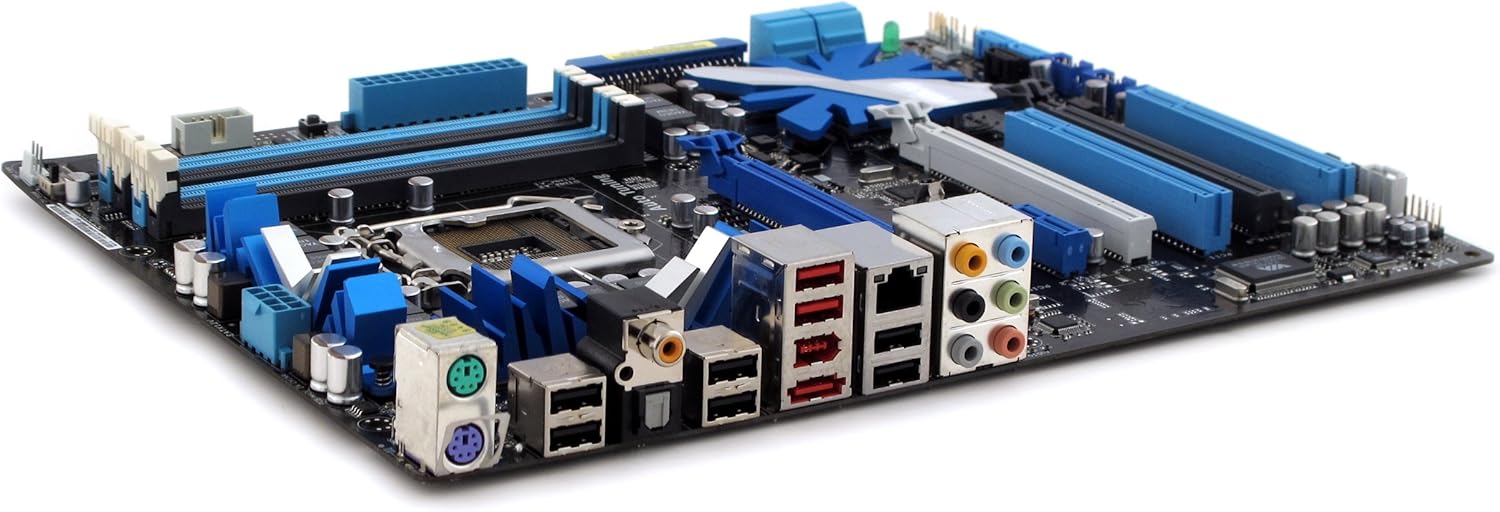
Obrázek 2: Úhlové view of the ASUS P7P55D Pro motherboard, highlighting the rear I/O panel with various ports and expansion slots.
2. Instalace procesoru (CPU)
- Carefully open the LGA 1156 CPU socket lever.
- Align the CPU with the socket, ensuring the notches on the CPU match the keys on the socket. Do not force the CPU into place.
- Opatrně vložte procesor do patice.
- Zavřete páčku patice, abyste zajistili procesor.
- Naneste teplovodivou pastu a nainstalujte chladič CPU podle pokynů výrobce.
3. Instalace paměti (RAM)
The motherboard supports up to 16 GB of DDR3 memory at speeds up to 2133 MHz (overclocked).
- Otevřete klipy na obou koncích slotů DIMM.
- Zarovnejte paměťový modul se slotem a ujistěte se, že zářez na modulu odpovídá výstupku ve slotu.
- Pevně zatlačte na oba konce paměťového modulu, dokud klipsy nezacvaknou na místo.
- For optimal performance, refer to the motherboard's full manual for recommended dual-channel configurations.
4. Instalace rozšiřující karty
Install graphics cards (supporting SLI and CrossfireX) and other PCI/PCIe expansion cards into the appropriate slots.
- Remove the metal bracket cover from the desired expansion slot on your computer case.
- Zarovnejte rozšiřující kartu se slotem a pevně ji zatlačte, dokud správně nezapadne.
- Secure the card with a screw or retention clip.
5. Připojení úložných zařízení
Connect SATA hard drives or SSDs to the SATA ports on the motherboard. Ensure proper cable routing for airflow.
6. Připojení napájení
Připojte 24pinový napájecí konektor ATX a 8pinový (nebo 4pinový) napájecí konektor CPU ze zdroje k základní desce.
7. Připojení předního panelu a zadních vstupů/výstupů
Connect the front panel headers (power button, reset button, LED indicators, USB, audio) and external devices to the rear I/O ports (USB, Ethernet, audio, PS/2).
Návod k obsluze
1. Nastavení systému BIOS
Upon initial boot, press the designated key (usually DEL or F2) to enter the BIOS setup utility. Here you can configure system settings, boot order, and enable/disable integrated peripherals.
2. ASUS Xtreme Design Features
- Turbo V EVO: Utilize this utility within the operating system to perform real-time overclocking of your CPU and memory.
- MemOK!: If your system fails to boot due to memory compatibility issues, press the MemOK! button on the motherboard to initiate memory compatibility tuning.
- Express Gate: This instant-on operating system allows quick access to web browsing and other basic functions without booting into the main OS.
- EPU: The Energy Processing Unit (EPU) automatically optimizes power consumption across various system components, enhancing energy efficiency.
Údržba
1. Čištění systému
Pravidelně čistěte prach ze skříně počítače a komponent základní desky pomocí stlačeného vzduchu. Před čištěním se ujistěte, že je systém vypnutý a odpojený od sítě.
2. Aktualizace BIOSu
Pravidelně kontrolujte podporu ASUS website for updated BIOS versions. BIOS updates can improve system stability, compatibility, and performance. Follow the instructions provided by ASUS carefully when performing a BIOS update.
3. Aktualizace ovladačů
Ensure all motherboard drivers (chipset, audio, LAN, etc.) are up-to-date. These can be downloaded from the official ASUS support webmísto.
Odstraňování problémů
- Bez napájení: Verify all power supply connections to the motherboard and components. Ensure the power supply unit (PSU) is switched on.
- Bez displeje: Check that the graphics card is properly seated and connected to the monitor. Ensure the monitor is powered on and set to the correct input.
- Systém se nepodaří spustit: Use the MemOK! feature if memory-related issues are suspected. Check CPU and RAM installation. Listen for POST beep codes, if available, and consult the motherboard's full manual for their meanings.
- Problémy s připojením k síti: Verify LAN cable connection. Check network adapter drivers in the operating system. If issues persist, consider testing with an alternative network adapter.
- Nestabilita/pády systému: Ensure all drivers are updated. Check CPU and GPU temperatures. If overclocking, revert to default settings to test stability.
Specifikace
| Funkce | Detail |
|---|---|
| Značka | ASUS |
| Název modelu | P7P55D Pro |
| Zásuvka CPU | LGA 1156 |
| Typ čipové sady | Intel P55 |
| Kompatibilní procesory | Intel Core i5-660, Intel Core i7-870, Intel Core i7-875K, Intel Core i7-920, Intel Core i7-930, Intel Core i7-950, Intel Core i7-960, Intel Core i7-975 Extreme Edition, Intel Core i7-980X Extreme Edition, Intel Core i7-990X Extreme Edition |
| Technologie paměti RAM | DDR3 2200 (O.C.) |
| Rychlost paměti | 2133 MHz (přetaktování) |
| Kapacita paměti | Až 16 GB |
| Kompatibilní zařízení | Osobní počítač |
| Platforma | Windows 10 (a starší kompatibilní verze) |
| Rozměry produktu | 13 x 10.5 x 3 palce |
| Hmotnost položky | 3.55 libry |
| Datum první dostupnosti | 8. září 2009 |
Záruka a podpora
Podrobné informace o záruce naleznete v záruční kartě dodané s vaším produktem nebo na oficiálních webových stránkách společnosti ASUS. webweb. Společnost ASUS poskytuje technickou podporu a zdroje pro své produkty.
Online podpora: Navštivte oficiální podporu ASUS website for drivers, BIOS updates, FAQs, and troubleshooting guides. You can typically find support by searching for your specific model number, P7P55D Pro.
Kontaktujte podporu: Contact information for technical assistance can be found on the ASUS support webstránky pro váš region.


