Zavedení
This manual provides instructions for the KODAK Easyshare C190 Digital Camera. Please read this manual thoroughly before using your camera to ensure proper operation and to maximize its features. Keep this manual for future reference.
Nastavení
1. Vybalení fotoaparátu
Opatrně vyjměte všechny součásti z obalu. Ujistěte se, že jsou přítomny následující položky:
- KODAK Easyshare C190 Digital Camera
- Pásek na zápěstí
- USB kabel
- Uživatelská příručka (tento dokument)
- Note: Batteries and SD/SDHC memory card are not included and must be purchased separately.
2. Instalace baterií
The KODAK Easyshare C190 uses AA batteries. Locate the battery compartment on the bottom or side of the camera. Open the compartment cover, insert two fresh AA batteries, ensuring correct polarity (+/-), then close the cover securely.
3. Vložení paměťové karty
The camera supports SD and SDHC memory cards. Open the memory card slot cover, typically located near the battery compartment. Insert the memory card with the metal contacts facing the correct direction (refer to the diagram inside the compartment). Push until it clicks into place. Close the cover.
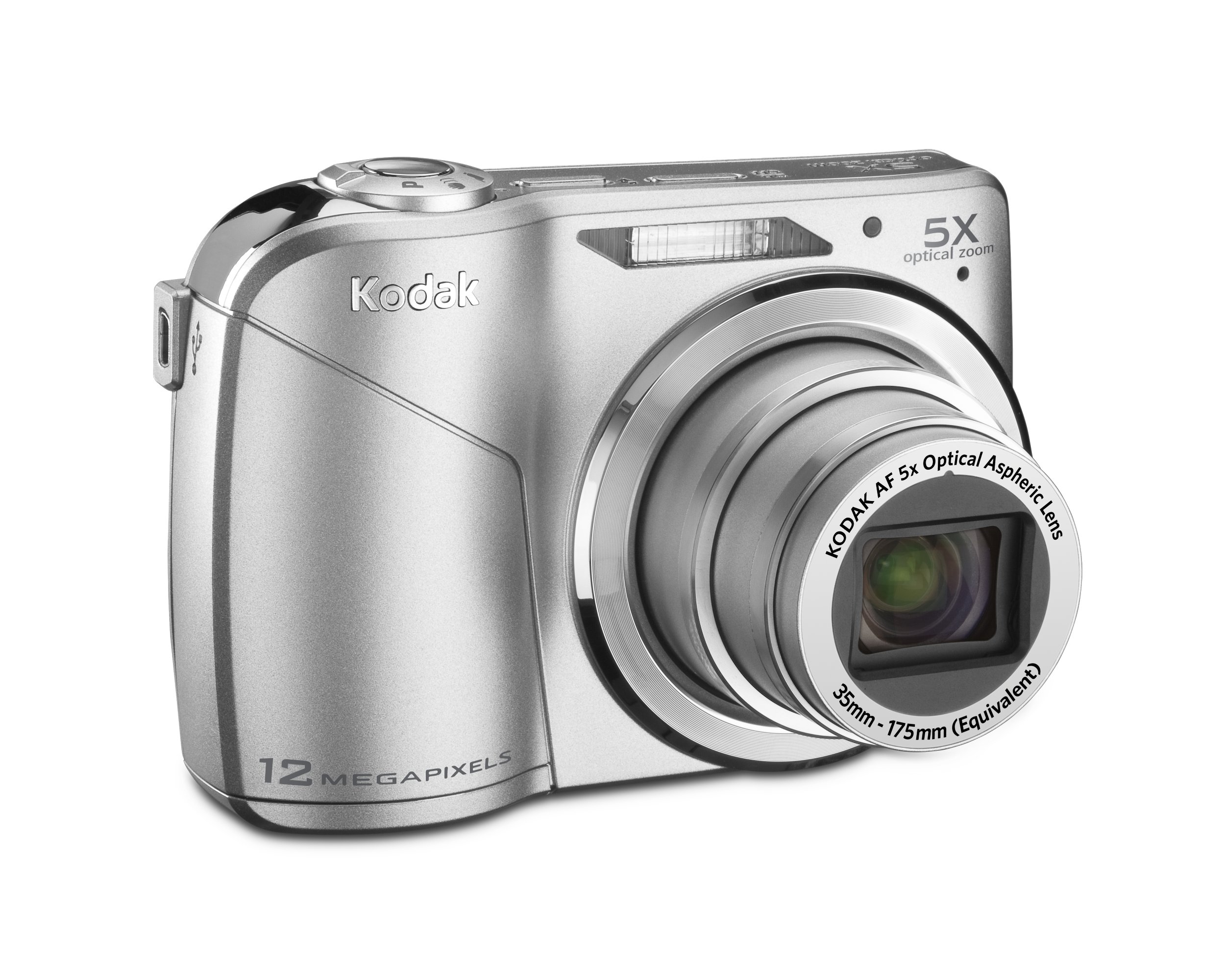
Image: KODAK Easyshare C190 Digital Camera. This image shows the overall design of the camera, including the lens and LCD screen.
Obsluha fotoaparátu
1. Zapnutí/vypnutí
Stiskněte tlačítko Moc button, usually located on the top of the camera, to turn it on. Press and hold the button again to turn it off.
2. Fotografování
- Vyberte režim: Use the mode dial (if present) or menu to select a shooting mode (e.g., Auto, Program, Scene). The camera features Smart Capture, which automatically identifies the scene and adjusts settings for optimal results.
- Zarámujte svůj záběr: Use the 2.7-inch LCD screen to compose your image.
- Lupa: Use the zoom lever/buttons to adjust the 5x optical zoom.
- Soustředit: Press the shutter button halfway down to allow the camera to focus. The camera will confirm focus, often with a green box or beep.
- Zachytit: Press the shutter button fully down to take the picture. The camera has a 12-megapixel resolution for detailed images.
3. Nahrávání videí
Switch the camera to video mode (if available via a dedicated button or mode dial). Press the shutter button to start recording and press it again to stop. Videos are recorded without sound during zoom operations.
4. Viewpořizování a správa fotografií/videí
Stiskněte tlačítko Review or Přehrávání tlačítko na view your captured images and videos on the 2.7-inch LCD screen. Use the directional pad to navigate through your media. Options for deleting, protecting, or sharing may be available through the menu.
5. Přenos Files k počítači
Connect the camera to your computer using the provided USB cable. The camera should appear as a removable drive. You can then copy photos and videos directly to your computer. KODAK Easyshare software may be available for enhanced management and sharing features.
Údržba
1. Čištění fotoaparátu
- Čočka: Use a soft, lint-free cloth specifically designed for camera lenses. Gently wipe in a circular motion. Avoid harsh chemicals.
- LCD obrazovka: Use a soft, dry cloth. For stubborn smudges, a specialized LCD screen cleaner can be used sparingly.
- Tělo fotoaparátu: Wipe with a soft, dry cloth. Do not use water or cleaning solutions directly on the camera.
2. Péče o baterie
Remove batteries when the camera will not be used for an extended period to prevent leakage. Store batteries in a cool, dry place. Dispose of used batteries according to local regulations.
3. Skladování
Store the camera in a dry, dust-free environment, away from extreme temperatures and direct sunlight. Use a camera case for protection during transport.
Odstraňování problémů
| Problém | Možná příčina / řešení |
|---|---|
| Fotoaparát se nezapne. |
|
| Zpráva „Chyba paměťové karty“. |
|
| Fotografie jsou rozmazané. |
|
| LCD screen is difficult to see in bright light. |
|
Specifikace
- Název modelu: KODAK Easyshare C190
- Rezoluce: 12 megapixely
- Optický zoom: 5x
- LCD obrazovka: 2.7-palcový
- Stabilizace obrazu: Digitální, Optické
- Technologie fotosenzoru: CCD
- Podporováno File Formát: JPEG
- Maximální ohnisková vzdálenost: 175 milimetrů
- Maximální velikost clony: 2.8 milimetrů
- Rozšířené minimum ISO: 64
- Měření: Vícenásobné, se zdůrazněným středem, bodové
- Podpora paměťových karet: SD/SDHC (not included)
- Rozměry produktu: 3.78 x 0.75 x 2.32 palce
- Hmotnost položky: 4.8 unce
- Výrobce: Kodak
- Číslo modelu položky: 8871840
Záruka a podpora
For warranty information and technical support, please refer to the documentation provided at the time of purchase or visit the official KODAK support webUschovejte si doklad o koupi pro případ reklamace.
Official KODAK Store: Obchod KODAK na Amazonu


