1. Úvod a konecview
The Mitel 5312 IP Phone is a versatile and user-friendly communication device designed for modern office environments. It features a full-duplex handsfree speakerphone, a multi-line backlit display, and programmable feature keys, providing intuitive access to advanced call handling and converged applications supported by Mitel's IP communication platforms.
This manual provides comprehensive instructions for setting up, operating, maintaining, and troubleshooting your Mitel 5312 IP Phone, ensuring optimal performance and user experience.
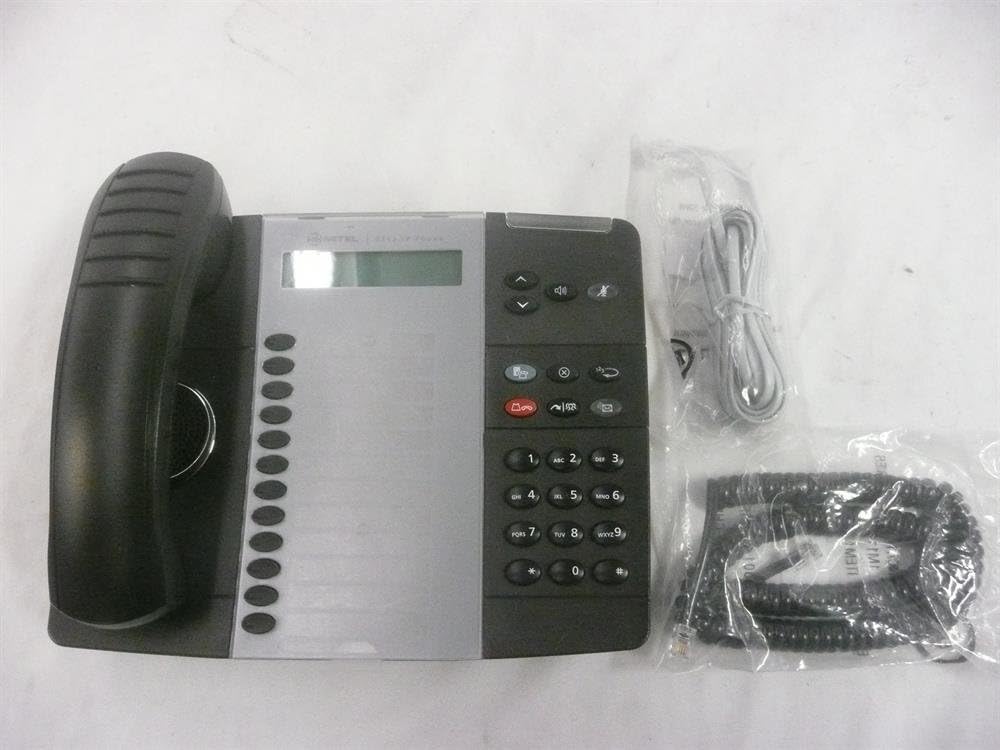
Figure 1: Mitel 5312 IP Phone with included accessories.
2. Klíčové vlastnosti
- Zobrazit: Two-line by 20-character white, backlit, graphics display with contrast control and auto-dimming.
- Programovatelné klávesy: Twelve multi-function keys with dual-color LED indicators for speed dialing, line appearances, and feature access.
- Funkční klávesy: Dedicated keys for Hold, Menu, Message, Speaker, Mute, Transfer/Conference, Redial, and Cancel.
- Hlasitý telefon: Full duplex handsfree speakerphone operation.
- Přizpůsobení: Browser-based desktop user tool programming for easy access to telephone system features.
3. Průvodce nastavením
3.1 Obsah balení
Než začnete, ujistěte se, že jsou přítomny všechny komponenty:
- IP telefonní jednotka Mitel 5312
- Sluchátko a spirálový kabel
- Ethernetový kabel
- Napájecí adaptér (pokud nepoužíváte napájení přes Ethernet – PoE)
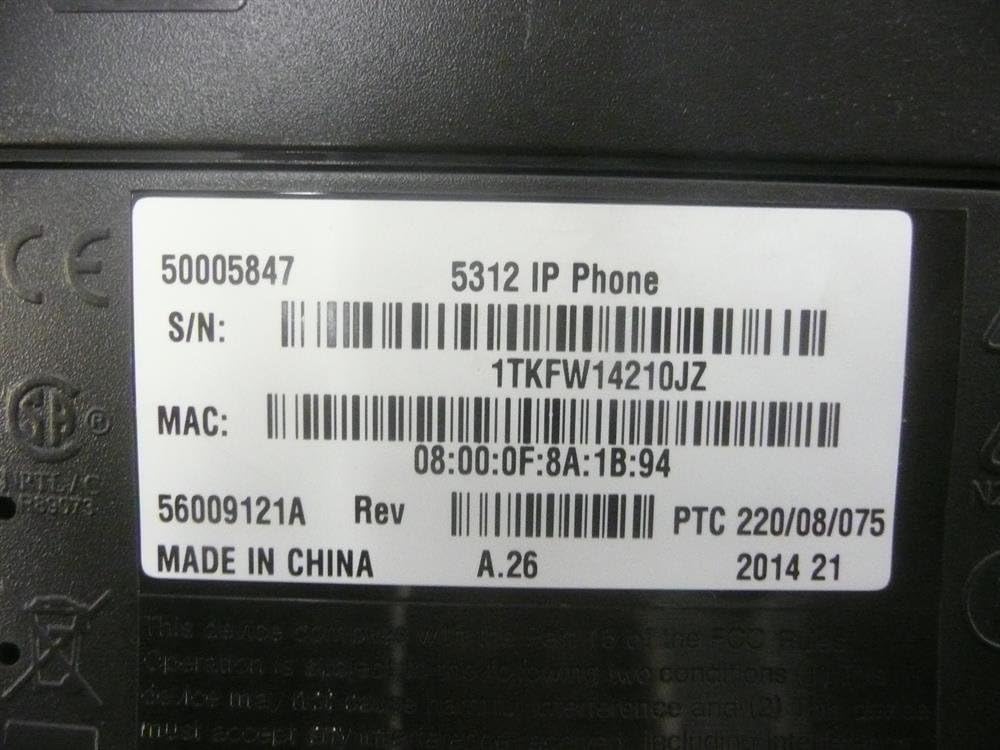
Figure 2: Mitel 5312 IP Phone and its primary accessories.
3.2 Připojení telefonu
- Připojení sluchátka: Zapojte jeden konec spirálového kabelu do sluchátka a druhý konec do portu pro sluchátko na základně telefonu.
- Připojit k síti:
- If using Power over Ethernet (PoE), connect one end of the Ethernet cable to the LAN port on the phone and the other end to a PoE-enabled network switch or router.
- If not using PoE, connect one end of the Ethernet cable to the LAN port on the phone and the other end to your network switch/router. Then, connect the power adapter to the phone's power port and plug it into a power outlet.
- Volitelné připojení k PC: Pokud chcete připojit počítač přes telefon, zapojte ethernetový kabel z počítače do portu PC na telefonu.
- Počáteční spuštění: The phone will power on and begin its boot-up sequence. This may take a few moments as it obtains network configuration and registers with your IP communications platform.
4. Návod k obsluze
4.1 Základní funkce volání
- Uskutečnění hovoru: Lift the handset, press a line key, or press the Speaker button. Dial the number.
- Přijetí hovoru: Lift the handset, press the flashing line key, or press the Speaker button.
- Ukončení hovoru: Replace the handset, or press the Speaker button if using speakerphone.
- Držet: Během hovoru stiskněte Držet key. To retrieve, press the flashing line key.
- Ztlumit: Stiskněte tlačítko Ztlumit key to mute your microphone during a call. Press again to unmute.
- Hlasitý telefon: Stiskněte tlačítko Reproduktor key to activate or deactivate the speakerphone.
4.2 Pokročilé funkce
- Převod: Během hovoru stiskněte Transfer/Conference key. Dial the transfer destination, then press Transfer/Conference again to complete (blind transfer) or wait for an answer and announce the call (supervised transfer).
- Konference: Během hovoru stiskněte Transfer/Conference key. Dial the number of the third party. Once connected, press Transfer/Conference znovu se připojit ke všem stranám.
- Opakovaná volba: Stiskněte tlačítko Redial key to call the last dialed number.
- Message Access: Stiskněte tlačítko Zpráva key to access your voicemail.
- Programovatelné klávesy: The twelve programmable keys can be configured for speed dialing, line appearances, or quick access to system features. Consult your system administrator for specific programming details.
5. Údržba
Proper care and maintenance will extend the life of your Mitel 5312 IP Phone.
- Čištění: Použijte měkký, mírně damp cloth to clean the phone's surface. Avoid abrasive cleaners, solvents, or strong chemicals. Do not spray liquids directly onto the phone.
- Prostředí: Keep the phone in a dry environment, away from direct sunlight, excessive heat, or extreme cold. Ensure proper ventilation.
- Zacházení: Handle the phone and its components with care. Avoid dropping the handset or pulling excessively on cords.
6. Řešení problémů
Tato část se zabývá běžnými problémy, se kterými se můžete setkat u svého IP telefonu Mitel 5312.
| Problém | Možná příčina | Řešení |
|---|---|---|
| No dial tone / Phone not registering | Network cable disconnected, no power (if not PoE), incorrect network configuration, server issue. | Check Ethernet cable connection. Ensure power adapter is plugged in (if applicable). Verify network settings with your IT administrator. Restart the phone by unplugging and replugging the power/Ethernet cable. |
| Displej je prázdný nebo nečitelný | No power, display settings, hardware fault. | Check power connection. Adjust display contrast (if available). If the issue persists, contact support. |
| Neslyším volajícího / Volající neslyší mě | Volume too low, Mute activated, faulty handset/speakerphone, network quality. | Adjust volume. Check if Mute is active. Try speakerphone or handset to isolate the issue. Check network connection quality. |
If you continue to experience issues, please contact your IT support or Mitel customer service. Be prepared to provide the model number and serial number of your device.
7. Specifikace
Detailed technical specifications for the Mitel 5312 IP Phone (Model: 50005847).
| Funkce | Detail |
|---|---|
| Číslo modelu | 50005847 |
| Značka | Mitel |
| Hmotnost položky | 3 libry |
| Barva | Černá, Stříbrná |
| Typ telefonu | Kabelové |
| Materiál | Plast |
| Zdroj napájení | Elektrický kabel |
| Typ vytáčení | Jedna klávesnice |
| Typ systému odpovědí | Digitální |
| Kompatibilní zařízení | Mitel's IP communications platforms, VoIP services, PSTN networks |
| Možnost konferenčního hovoru | Základní |
| První dostupný termín | 4. srpna 2009 |

Figure 3: Product label with identification details.
Extracted details from label:
sériové číslo: 1TKFW14210JZ, FSABV9236
MAC adresa: 08:00:0F:8A:1B:94, 08-00-0F-3B-E5-DA
Revize: A.26, A.2
8. Podpora a záruka
For technical assistance, troubleshooting beyond this manual, or warranty inquiries, please contact Mitel customer support or your authorized Mitel reseller.
When contacting support, please have your product model number (50005847) and serial number ready. The serial number can be found on the label at the bottom of your phone unit (refer to Figure 3).
Information regarding protection plans and return policies may be available from your point of purchase.


