Zavedení
This user manual provides detailed instructions for the Kodak Easyshare C913 9.2 MP Digital Camera. Please read this manual thoroughly before using your camera to ensure proper operation and to maximize its features. Keep this manual for future reference.
1. Nastavení
1.1 Unpacking the Camera
Ověřte, zda jsou v balení přítomny všechny položky:
- Digitální fotoaparát Kodak Easyshare C913
- Kodak alkaline AA batteries or equivalent
- USB kabel
- Pásek na zápěstí
- Getting started guide with Kodak EasyShare software
- Custom camera insert for optional Kodak EasyShare camera and printer docks
1.2 Instalace baterií
The Kodak Easyshare C913 requires two AA batteries. For optimal performance and longevity, it is recommended to use high-quality alkaline or rechargeable AA batteries.
- Locate the battery compartment door on the bottom of the camera.
- Posunutím západky otevřete přihrádku na baterii.
- Insert two AA batteries, ensuring correct polarity (+ and - terminals match the indicators inside the compartment).
- Dvířka přihrádky na baterie bezpečně zavřete, dokud nezacvaknou.
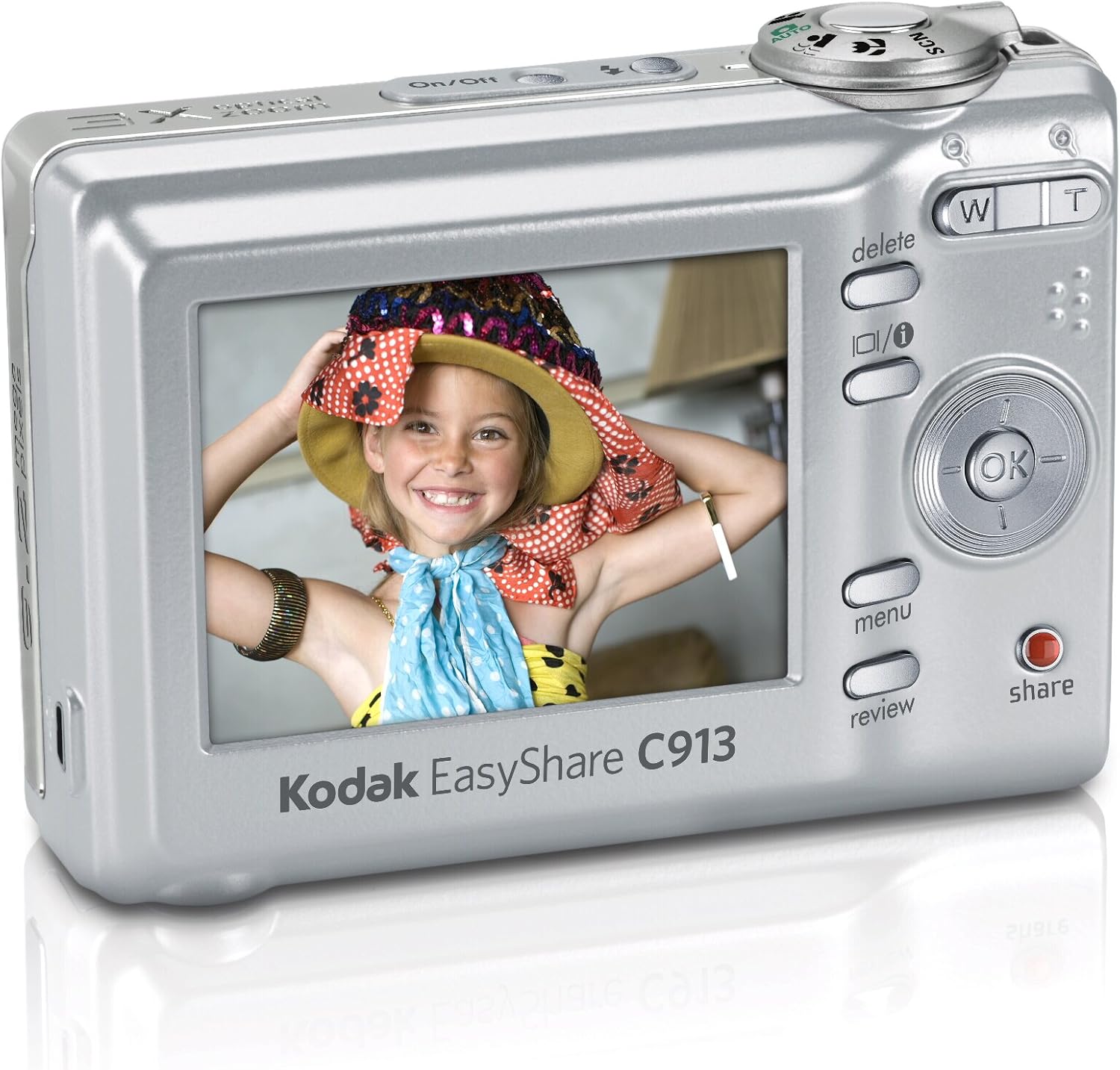
Obrázek 1: Zadní view of the Kodak Easyshare C913, displaying the LCD screen and various control buttons. The battery compartment is located on the bottom of the camera.
1.3 Vložení paměťové karty
The camera supports SD/SDHC memory cards (not included). A memory card is required to store a large number of photos and videos.
- Vyhledejte slot pro paměťovou kartu, obvykle poblíž prostoru pro baterii.
- Otevřete kryt slotu paměťové karty.
- Insert the SD/SDHC card with the metal contacts facing the front of the camera until it clicks into place.
- Zavřete kryt slotu paměťové karty.
Poznámka: The camera has 16 MB of internal memory for temporary storage if a memory card is full or not inserted.
1.4 Připevnění popruhu na zápěstí
Attach the wrist strap to the designated loop on the camera body to prevent accidental drops.
2. Ovládání fotoaparátu
2.1 Zapnutí/vypnutí
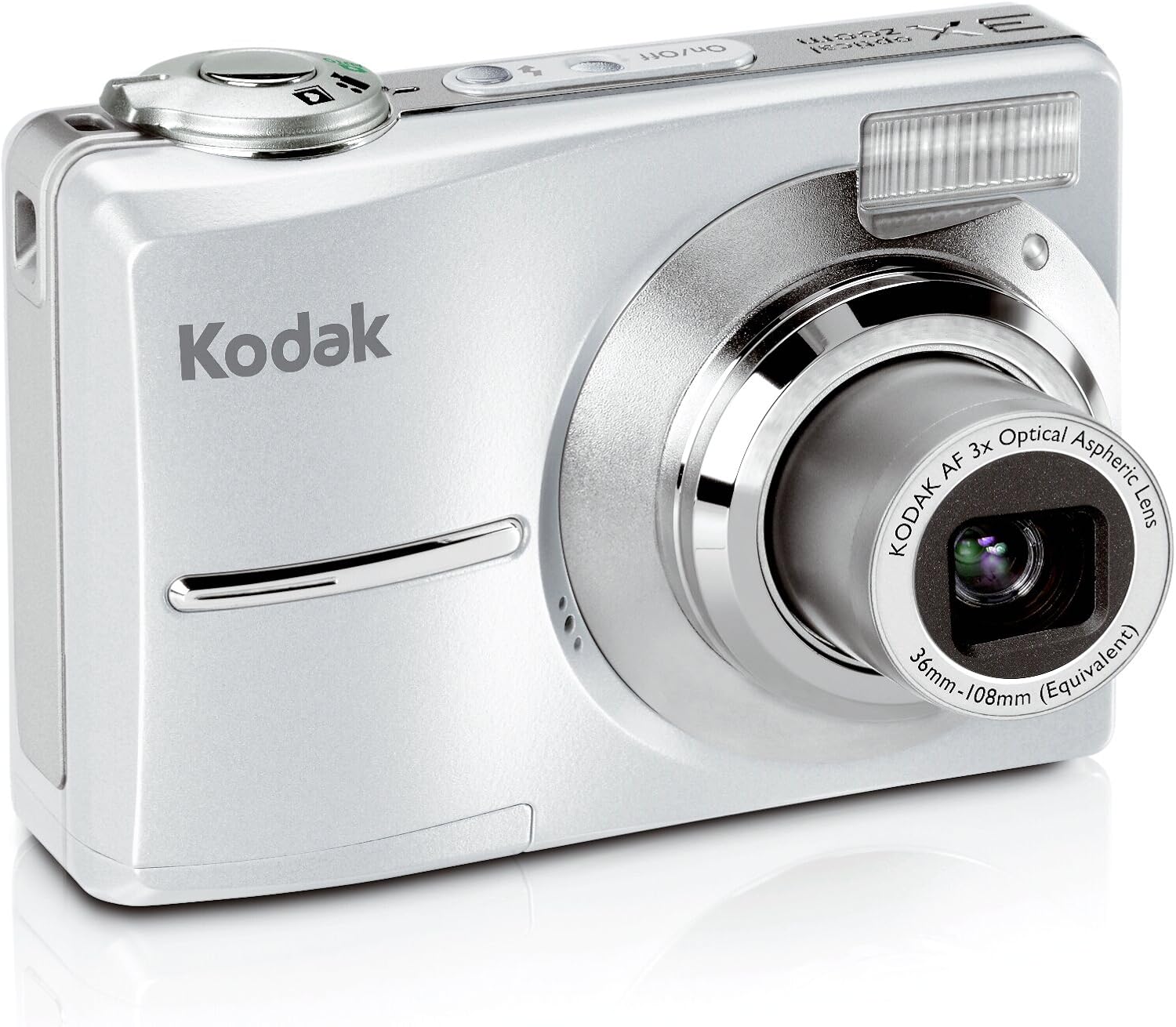
Stiskněte tlačítko Zapnuto/Vypnuto tlačítko na horní straně fotoaparátu pro jeho zapnutí nebo vypnutí. Objektiv se po zapnutí vysune.
Obrázek 2: Přední strana view of the Kodak Easyshare C913, showing the lens extended and the flash unit. The On/Off button is visible on the top panel.
2.2 Fotografování
- Zapněte fotoaparát.
- Frame your shot using the 2.4-inch color LCD display.
- Use the zoom buttons (W for Wide, T for Telephoto) to adjust the focal length. The camera features a 3x optical zoom and 5x digital zoom.
- Stiskněte tlačítko spouště do poloviny pro zaostření. Rozsvítí se indikátor zaostření.
- Úplným stisknutím tlačítka spouště pořiďte snímek.
2.3 scénické režimy
The camera offers various scene modes to optimize settings for different shooting conditions. Access these modes through the camera's menu system.
- Auto: Standardní režim pro běžné fotografování.
- Sport: For capturing fast-moving subjects.
- Portrét: Ideal for close-up shots of people, often blurring the background.
- Sněžení: Adjusts exposure for bright, reflective snow scenes.
- Ohňostroj: Optimizes settings for capturing fireworks displays.
- Podsvícení: Helps properly expose subjects that are backlit.
2.4 barevné režimy
Experiment with different color modes to achieve desired artistic effects:
- Barva: Standardní plnobarevná fotografie.
- Černá a bílá: Captures images in monochrome.
- Sépie: Aplikuje teplý, nahnědlý tón pro starožitný vzhled.
2.5 Nahrávání videa
The camera can capture VGA video with audio.
- Switch the camera to video mode (refer to the on-screen icons or mode dial).
- Stisknutím tlačítka spouště spusťte záznam.
- Dalším stisknutím tlačítka spouště nahrávání zastavíte.
On-camera editing features allow for basic video manipulation.
2.6 ReviewSdílení obrázků
Stiskněte tlačítko Review tlačítko na view captured photos and videos on the 2.4-inch LCD. Use the directional pad to navigate.
Oddaný Podíl tlačítko vám to umožní tag images for easy printing or emailing when connected to a computer with Kodak EasyShare software.
2.7 Speciální funkce
- Redukce rozmazání: This technology automatically minimizes camera shake or subject movement to produce clearer pictures.
- Vysoké ISO: The camera supports high ISO settings (up to 1000) for improved performance in low-light conditions and when capturing fast action.
- Technologie Kodak Perfect Touch: This feature enhances pictures by improving brightness and revealing details in dark shadows.
- Internal Memory Plus: If your memory card becomes full, the camera can temporarily store images in its 16 MB internal memory.
3. Údržba
3.1 Čištění fotoaparátu
- K čištění těla fotoaparátu použijte měkký hadřík, který nepouští vlákna.
- For the lens and LCD screen, use a specialized lens cleaning cloth and solution. Avoid harsh chemicals or abrasive materials.
- Gently blow away dust from the lens before wiping.
3.2 Péče o baterii
- Pokud fotoaparát nebudete delší dobu používat, vyjměte baterie.
- For frequent use, consider investing in high-quality rechargeable AA batteries and a charger to reduce waste and ensure consistent power.
3.3 Skladování
Store the camera in a cool, dry place away from direct sunlight, extreme temperatures, and high humidity. Use a camera case to protect it from dust and physical damage.
4. Řešení problémů
| Problém | Možná příčina | Řešení |
|---|---|---|
| Camera does not turn on or turns off immediately. |
|
|
| Obrázky jsou rozmazané. |
|
|
| Chyba „Paměť plná“. |
|
|
| Špatná životnost baterie. |
|
|
5. Specifikace
| Funkce | Detail |
|---|---|
| Model | Kodak Easyshare C913 |
| Obrazový snímač | 9.2 megapixelů |
| Optický zoom | 3x (36-108 mm equivalent) |
| Digitální zoom | 5x |
| Zobrazit | 2.4-inch Indoor/Outdoor Color LCD |
| Video Capture | VGA with audio |
| Paměťová média | SD/SDHC card slot, 16 MB internal memory |
| Baterie | 2 x AA baterie |
| Rozměry (Š x V x H) | 3.58 x 0.98 x 2.44 palce (přibližně) |
| Hmotnost | 4.8 unce (bez baterií) |
| Stabilizace obrazu | Digitální, Optické |
| Podporováno File Formát | MP4 (for video) |
| Poměr stran | 16:9, 3:2 |
6. Informace o záruce
For detailed warranty information regarding your Kodak Easyshare C913 Digital Camera, please refer to the warranty card included in your product packaging or visit the official Kodak support webZáruční podmínky se mohou lišit v závislosti na regionu a datu nákupu.
7. Zákaznická podpora
If you require further assistance or have questions not covered in this manual, please contact Kodak customer support. You can typically find contact information (phone numbers, email, or online chat) on the official Kodak webmísto.
Online zdroje: www.kodak.com/go/support


