Konec produktuview
The Fellowes Galaxy E Comb Binding Machine is designed for high-performance binding in large office environments. It offers electric operation for efficient punching and binding of documents. Key features include a high sheet punch capacity, large binding capacity, and user-friendly design elements to ensure professional results.
- Automatically punches up to 25 sheets of paper at a time with a single touch.
- Binds up to 500 sheets using a 2-inch comb.
- Features vertical document loading for accurate punch alignment.
- Includes a removable binding mechanism for increased productivity, allowing two users to work simultaneously.
- Equipped with releasable dies for various document sizes.
- Built-in comb storage tray and integrated document measurement device for convenience.
- Adjustable edge guide for precise document centering.
- Front-access waste tray for easy disposal of paper chips.
Pokyny pro nastavení
- Rozbalte stroj: Opatrně vyjměte vázací stroj z obalu. Ujistěte se, že jsou přítomny všechny součásti a příslušenství.
- Umístění: Place the machine on a stable, flat surface with adequate space around it for operation and paper handling.
- Připojení napájení: Plug the power cord into a grounded electrical outlet. Ensure the power switch is in the "off" position before plugging in.
- Waste Tray: Verify the front-access waste tray is properly inserted. This tray collects paper chips during punching.
- Removable Binding Mechanism (Optional): If utilizing the removable binding mechanism for dual operation, detach it from the main unit as needed. It can be reattached for integrated use.

Figure 1: The Fellowes Galaxy E Electric Comb Binding Machine in its closed, compact state.
Návod k obsluze
1. Punching Documents
- Připravte dokumenty: Ensure all pages are aligned and free from staples or paper clips. The machine can punch up to 25 sheets of 20lb paper at once.
- Adjust Edge Guide: Use the adjustable edge guide to center your documents for precise punching. This ensures consistent hole placement across all pages.
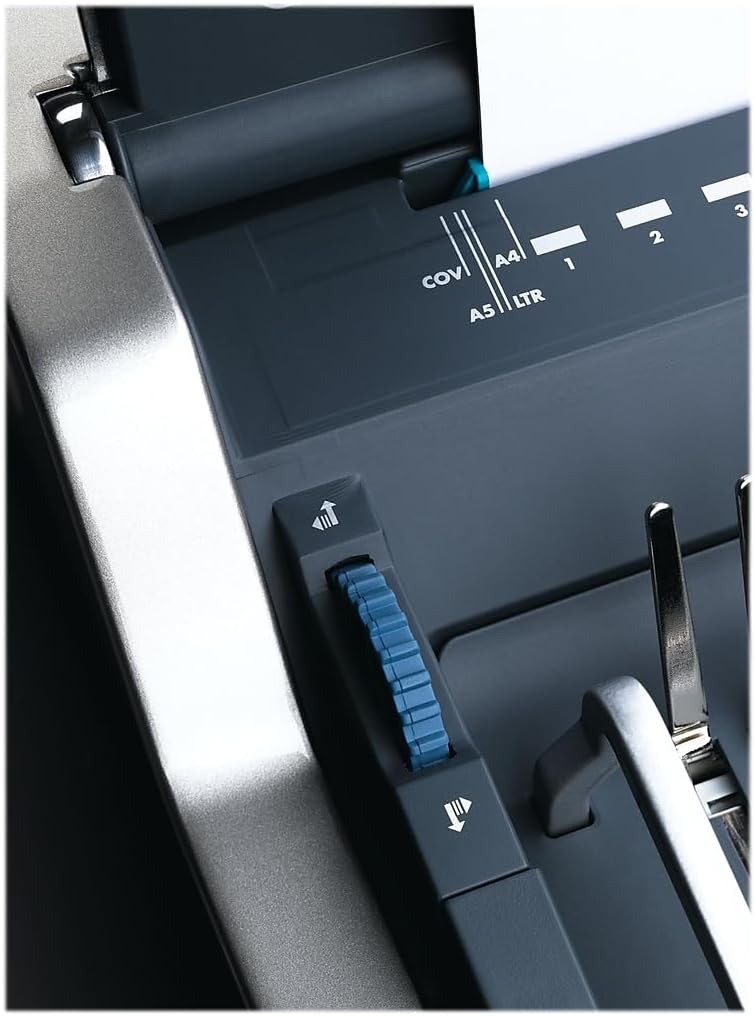
Figure 2: Adjusting the edge guide for accurate document alignment.
- Načíst dokumenty: Load your documents vertically into the punching slot. This vertical loading mechanism aids in accurate alignment.

Figure 3: Document loaded vertically into the punching slot.
- Punč: Press the electric punch button to create the holes. The machine will automatically punch the sheets.

Figure 4: The electric punch button for effortless operation.
- Opakovat: Repeat the punching process for all sections of your document.
2. Selecting and Preparing Binding Combs
- Measure Document Thickness: Use the integrated document measurement device located in the comb storage tray to determine the correct comb size for your document.
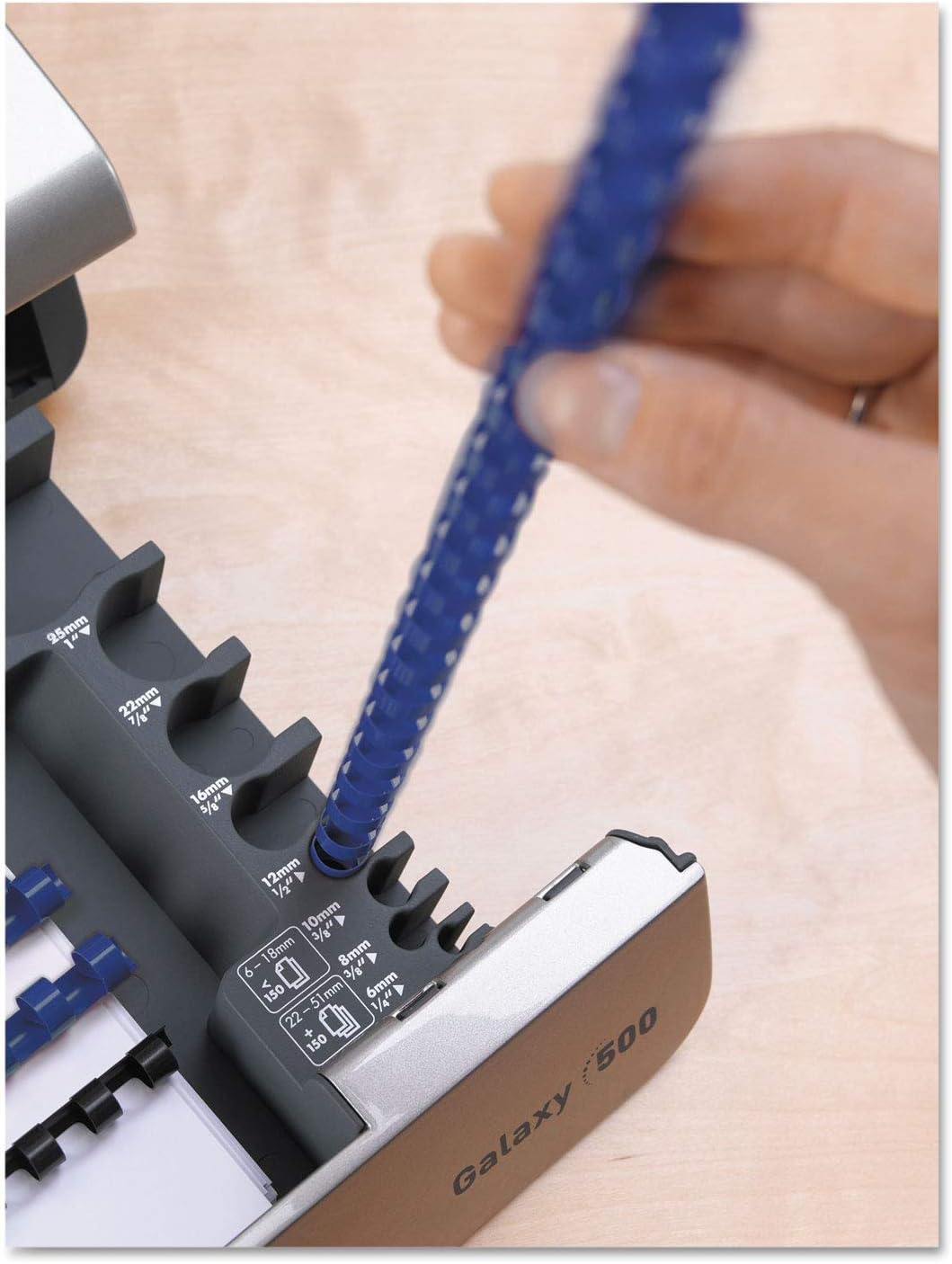
Figure 5: Using the integrated document measurement tool to select the appropriate comb size.
- Access Comb Storage: The machine features a built-in comb storage tray for convenient access to your binding combs.

Figure 6: The convenient built-in comb storage tray.
3. Binding Documents
- Open Comb: Place the selected binding comb onto the comb opener. Use the lever to open the comb rings.
- Načíst stránky: Carefully load the punched pages onto the open comb rings. Start with the back cover, then the main document pages, and finally the front cover.
- Close Comb: Once all pages are loaded, use the lever to close the comb rings securely.
- Odebrat dokument: Remove your bound document from the machine.
Ukázkové video produktu
Video 1: A demonstration of the Fellowes Galaxy E Electric Comb Binding System, showcasing its features and operation, including punching and binding processes. This video highlights the machine's efficiency and ease of use for office binding tasks.
Údržba
- Empty Waste Tray: Regularly check and empty the front-access waste tray to prevent paper chip buildup, which can affect punching performance.
- Čistý exteriér: Vnější povrch přístroje otřete měkkým, suchým hadříkem. Nepoužívejte abrazivní čisticí prostředky ani rozpouštědla.
- Die Maintenance: Periodically check the punching dies for any debris. The releasable dies allow for easier cleaning if necessary.
Odstraňování problémů
| Problém | Možná příčina | Řešení |
|---|---|---|
| Stroj se nezapne. | Power cord not securely plugged in; power switch is off; no power from outlet. | Ensure power cord is fully inserted into the machine and a working electrical outlet. Check if the power switch is in the "on" position. Test the outlet with another device. |
| Pages are not punched cleanly. | Too many sheets loaded; dull dies; paper chips obstructing dies. | Reduce the number of sheets per punch (do not exceed 25 sheets). Empty the waste tray. Inspect dies for obstructions and clean if necessary. |
| Pages are not aligned correctly after punching. | Edge guide not properly set; pages not loaded vertically. | Adjust the edge guide to firmly hold documents in place. Ensure documents are loaded vertically and pushed completely into the punching slot. |
| Binding comb does not close properly. | Incorrect comb size for document thickness; comb not properly seated on opener. | Verify the comb size matches the document thickness using the measurement tool. Ensure the comb is correctly placed on the comb opener before closing. |
Specifikace
- Model: Fellowes Galaxy E (5218301)
- Kapacita děrovače: Up to 25 sheets (20lb paper)
- Kapacita vazby: Up to 500 sheets (with 2-inch comb)
- Operace: Elektrický
- Rozměry: 19.75 x 8.31 x 23 palce (D x Š x V)
- Hmotnost: 32 libry
- Barva: Metallic Silver/Black
- Vlastnosti: Vertical document loading, adjustable edge guide, removable binding mechanism, comb storage tray, document measurement tool, front-access waste tray.
Záruka a podpora
For warranty information, technical support, or to purchase replacement parts and accessories, please visit the official Fellowes webnebo se obraťte na jejich zákaznický servis. Uschovejte si doklad o koupi pro případ reklamace.
Online podpora: www.fellowes.com/support
Služby zákazníkům: Refer to your product packaging or the official Fellowes webstránky s regionálními kontaktními informacemi.


