1. Úvod
The Mitsubishi HC1500 is a high-definition 720p DLP home theater projector designed to deliver clear and vibrant images. This manual provides essential information for the proper setup, operation, and maintenance of your projector, ensuring optimal performance and longevity.
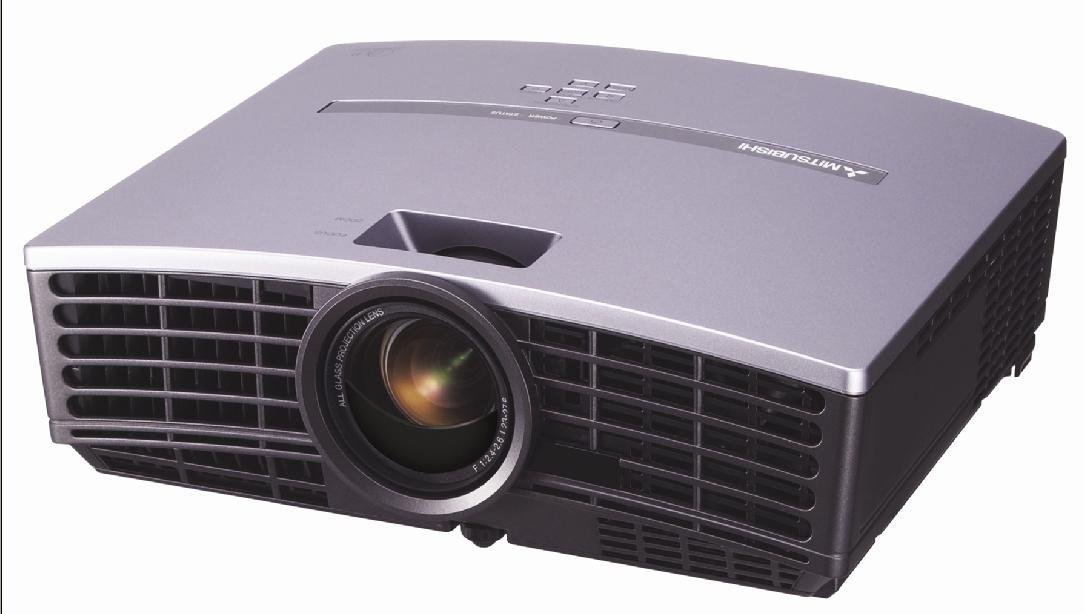
Obrázek 1: Přední view of the Mitsubishi HC1500 projector. This image displays the projector's front panel, featuring the central projection lens and the prominent ventilation grilles on both sides, designed for efficient heat dissipation.
2. Bezpečnostní informace
Please read all safety instructions before operating the projector. Failure to follow these instructions may result in electric shock, fire, or damage to the projector.
- Neblokujte větrací otvory. Zajistěte dostatečný prostor kolem projektoru pro správné proudění vzduchu.
- Nedívejte se přímo do objektivu projektoru, když je zapnutýamp je zapnutý, protože jasné světlo může způsobit poškození očí.
- Neumisťujte projektor na nestabilní vozík, stojan nebo stůl.
- Před čištěním nebo pokud projektor delší dobu nepoužíváte, odpojte jej ze zásuvky.
- Veškeré opravy svěřte kvalifikovanému servisnímu personálu.
3. Co je v krabici
Ověřte, zda jsou v balení obsaženy všechny níže uvedené položky:
- Mitsubishi HC1500 Projector
- Síťový napájecí kabel
- RGB kabel
- Kabel RS-232C
- Remote Unit with Battery
- Light Shade Cover
- Karta rychlého startu
- Uživatelská příručka (tento dokument)
- Bezpečnostní příručka
4. Nastavení
4.1 Umístění
Position the projector on a stable surface or mount it to the ceiling. Ensure the projector is placed at an appropriate distance from the screen to achieve the desired image size. The HC1500 can project an image from 40 inches to 275 inches diagonally. Maintain clear space around the projector for ventilation.
4.2 Připojení
Připojte zdroje videa k projektoru pomocí vhodných kabelů.
- HDMI: For high-definition digital video and audio signals. Use an HDMI 1.2 compatible cable for optimal performance.
- Komponent: For high-definition analog video signals.
- RS-232C: Pro ovládání projektoru pomocí počítače nebo řídicího systému.
- 12voltový spouštěč: To control a compatible motorized screen.
4.3 Zapnutí/vypnutí
- Connect the AC power cable to the projector and a power outlet.
- Press the power button on the projector or the remote control to turn on the unit. The power indicator light will illuminate.
- To turn off the projector, press the power button again. Confirm shutdown if prompted. The projector will enter a cooling cycle before fully powering down.
5. Ovládání projektoru
5.1 Dálkové ovládání
The included remote control allows for convenient operation of all projector functions, including power, input selection, menu navigation, and image adjustments. The remote features backlit buttons for use in dark environments.
5.2 Výběr vstupu
Press the 'Input' or 'Source' button on the remote control or projector control panel to cycle through available input sources (e.g., HDMI, Component, RGB). Select the input corresponding to your connected device.
5.3 Úprava obrazu
- Zaostřovací kroužek: Rotate the focus ring on the projector lens to sharpen the image.
- Zoom Ring: Otočením kroužku zoomu můžete změnit velikost obrazu bez nutnosti pohybu projektoru.
- Korekce lichoběžníkového zkreslení: Use the digital keystone correction feature (vertical and horizontal) via the on-screen menu to correct trapezoidal image distortion if the projector is not perfectly perpendicular to the screen.
5.4 lamp Režimy
The projector offers different lamp modes to balance brightness and lamp život:
- Jasný režim: Provides maximum brightness (1600 ANSI lumens) for well-lit environments. Lamp life is approximately 2000 hours.
- Nízký režim: Reduces brightness for darker environments, extending lamp life to approximately 3000 hours and reducing fan noise (25dBA).
6. Údržba
6.1 lamp Nahrazení
The projector features a convenient side-loading lamp design for easy replacement. When the lamp life is nearing its end, a warning message will appear on the screen. Always use a genuine Mitsubishi replacement lamp. Refer to the detailed instructions in the full user manual for the lamp postup výměny.
6.2 Čištění
- Vnější: Otřete projektor casinměkkým, suchým hadříkem. Na odolnou špínu použijte lehceamp hadříkem s jemným čisticím prostředkem a poté otřete dosucha.
- Čočka: Use a lens cleaning cloth and lens cleaning solution specifically designed for optical surfaces. Do not use abrasive cleaners.
- Větrání: Ensure the ventilation grilles are free from dust and obstructions. Use a soft brush or compressed air to gently clean the grilles.
7. Řešení problémů
Pokud se s projektorem setkáte s problémy, podívejte se na následující běžné problémy a jejich řešení:
| Problém | Možná příčina | Řešení |
|---|---|---|
| Není zobrazen žádný obrázek | Power cable disconnected; incorrect input source selected; source device not powered on. | Zkontrolujte připojení napájení; vyberte správný vstupní zdroj; ujistěte se, že je zdrojové zařízení zapnuté. |
| Obraz je rozmazaný | Objektiv rozostřený; projektor je příliš blízko/daleko od promítací plochy. | Adjust the focus ring on the lens; reposition the projector or adjust the zoom. |
| Obrázek je lichoběžníkový | Projektor není kolmý k promítací ploše. | Use keystone correction in the projector menu or adjust projector angle. |
| Žádný zvuk | No internal speaker; external audio system not connected or muted. | The HC1500 does not have an internal speaker. Connect an external audio system to your source device. |
| Projektor se přehřívá nebo vypíná | Blocked ventilation; high ambient temperature. | Ensure ventilation openings are clear; operate in a well-ventilated area. |
8. Specifikace
- Model: HC1500
- Technologie displeje: DLP (Digital Light Processing)
- Nativní rozlišení: 1280 x 720 (720p)
- Jas: 1600 ANSI Lumens
- Kontrastní poměr: 2500:1
- Lamp Život: Up to 3000 hours (Low Mode), 2000 hours (Bright Mode)
- Hladina hluku: 25dBA (Low Mode)
- Konektivita: HDMI, Component, RS-232C, 12-Volt Trigger
- Velikost projekce: 40 až 275 palců (úhlopříčka)
- Korekce lichoběžníkového zkreslení: Vertical and Horizontal Digital
- Rozměry: Přibližně 16.3 x 13.9 x 14 palce
- Hmotnost: Přibližně 6.39 libry
9. Záruka a podpora
9.1 Informace o záruce
The Mitsubishi HC1500 projector is backed by a 1letá omezená záruka na díly a práci. The projector lamp is covered by a separate 90-day lamp zárukaUschovejte si prosím doklad o koupi pro případ reklamace.
9.2 Zákaznická podpora
For technical assistance, troubleshooting beyond this manual, or warranty service, please contact Mitsubishi customer support. Refer to the official Mitsubishi website or the quick start guide for current contact information.


