1. Úvod
The Plantronics Vista M22 Audio Processor is designed to enhance sound quality and provide acoustic protection for telephone users, especially with telephones that do not allow direct headset connection. It incorporates advanced technologies to ensure clear, consistent, and comfortable communication.
Mezi klíčové vlastnosti patří:
- Acoustic Protection: SoundGuard Plus technology reduces loud tones to comfortable levels while maintaining natural voice clarity.
- Jasnost hovoru: Electronic signal processing minimizes phone noise and maintains consistent volume levels.
- Kompatibilita headsetu: Enables headset use with telephones not designed for direct headset connection.
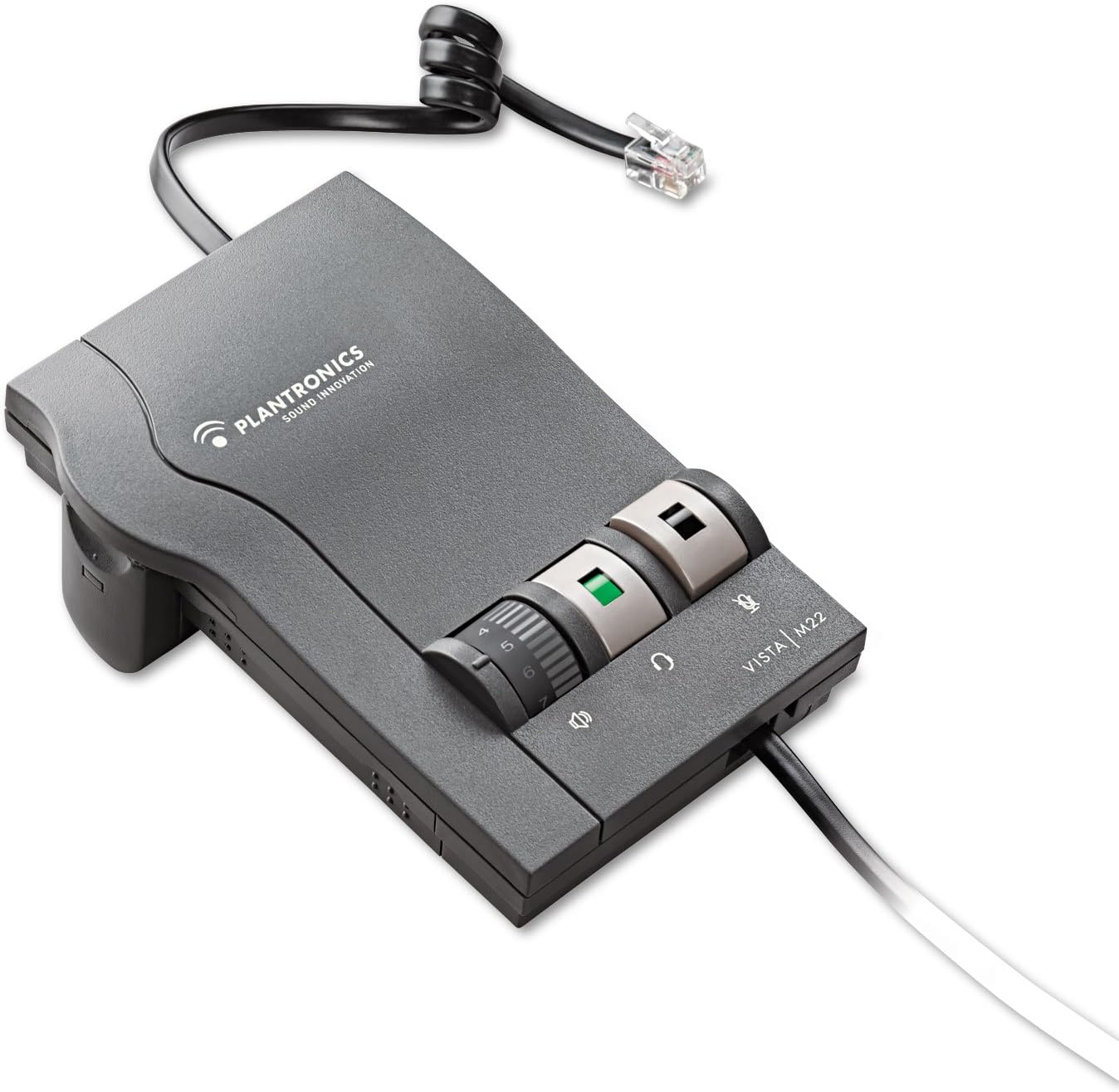
Figure 1: Plantronics Vista M22 Audio Processor. This image shows the compact, gray audio processor with its coiled cord and control dials.
2. Bezpečnostní informace
- Před použitím si pečlivě přečtěte všechny pokyny.
- Udržujte zařízení mimo dosah vody a vlhkosti.
- Nepokoušejte se zařízení sami otevírat ani opravovat. Obraťte se na kvalifikovaný servisní personál.
- Use only specified power sources (2 AA batteries or compatible AC adapter, sold separately).
- Nevystavujte zařízení extrémním teplotám.
- Zajistěte správné větrání, aby nedošlo k přehřátí.
3. Obsah balení
The Plantronics Vista M22 Audio Processor package includes:
- 1 x Plantronics Vista M22 Headset Ampdoživotní
- 2 x AA baterie (součástí balení)
- Necessary connection cables (headset connection cable, telephone connection cable)
4. Pokyny k nastavení
Follow these steps to set up your Plantronics Vista M22 Audio Processor:
- Nainstalujte baterie: Open the battery compartment on the side of the M22 unit and insert the two AA batteries. Close the compartment securely. Alternatively, connect an optional AC power adapter (not included) to the power port on the back.
- Připojení headsetu: Plug your Plantronics headset's Quick Disconnect (QD) cable into the corresponding port on the front of the M22 ampživější.
- Connect to Telephone:
- Disconnect the coiled handset cord from the base of your telephone.
- Plug the telephone connection cable (typically a short, coiled cord with RJ9 connectors) from the M22 amplifier into the handset port on your telephone base.
- Plug your telephone's handset into the handset port on the M22 ampživější.
- Adjust Compatibility Switch: On the side of the M22 unit, there is a compatibility switch (labeled 1-6 or 1-7). Adjust this switch until you hear a clear dial tone in your headset. Setting 5 is a common starting point.
- Nastavení hlasitosti mikrofonu: On the bottom of the M22 unit, there is a small dial for microphone volume. Use the provided tool (or a small screwdriver) to adjust this dial if your voice is too quiet or too loud for the listener. Rotate clockwise to increase volume, counter-clockwise to decrease.

Figure 2: The Plantronics Vista M22 features Clearline audio technology for superior voice clarity and reduces background noise for clear communication.
5. Návod k obsluze
Once set up, operating the M22 is straightforward:
- Headset/Handset Switch: Press the button with the headset icon to switch audio to your headset. Press the button with the handset icon to switch audio back to your telephone's handset.
- Ovládání hlasitosti: Use the large rotary dial on the front of the M22 to adjust the listening volume in your headset.
- Tlačítko ztlumení: Press the button with the microphone icon to mute your headset microphone. Press it again to unmute.
- Uskutečňování/přijímání hovorů:
- To make a call: Press the headset button on the M22, lift your telephone's handset, dial the number, and then place the handset back on the cradle once the call connects.
- To answer a call: Press the headset button on the M22, then lift your telephone's handset.
- To end a call: Place your telephone's handset back on the cradle, then press the headset button on the M22 to switch back to handset mode (or simply leave it in headset mode if preferred).
6. Údržba
- Čištění: Otřete přístroj měkkým, suchým hadříkem. Nepoužívejte tekuté čisticí prostředky ani aerosoly.
- Výměna baterie: Replace AA batteries when the power indicator light dims or the unit stops functioning.
- Skladování: Store the M22 in a cool, dry place when not in use for extended periods.
7. Řešení problémů
| Problém | Řešení |
|---|---|
| No dial tone or poor audio quality. |
|
| Caller cannot hear me or my voice is too quiet/loud. |
|
| Humming or static noise. |
|
| Headset volume is too low/high. |
|
8. Specifikace
| Funkce | Detail |
|---|---|
| Číslo modelu | 43596-64 |
| Rozměry produktu | 0.03 x 0.03 x 0.03 palce |
| Hmotnost položky | 0.48 unce (0.03 libry) |
| Zdroj napájení | Battery Powered (2 AA batteries included) / Optional AC Adapter (not included) |
| Materiál | Plast |
| Barva | Černý |
| Kompatibilita | Telephones that do not allow direct connection of headsets |
| Speciální funkce | SoundGuard Plus, Call Clarity Technology |
9. Záruka a podpora
Právní prohlášení: Warranty does not cover misuse of the product.
For further assistance, please refer to the official Plantronics webwebu nebo kontaktujte jejich zákaznickou podporu. Uschovejte si doklad o koupi pro případ reklamace.


