1. Úvod
This manual provides instructions for the setup, operation, and maintenance of your Polycom SoundPoint IP 430 phone. The SoundPoint IP 430 is a two-line desktop IP phone designed for clear voice communication, featuring a full-duplex speakerphone with Polycom Acoustic Clarity Technology.
2. Nastavení
2.1 Vybalení
Opatrně vyjměte všechny součásti z obalu. Ujistěte se, že jsou přítomny následující položky:
- Polycom SoundPoint IP 430 Phone Unit
- Sluchátko
- Kabel sluchátka
- Ethernetový kabel
- Stojan na telefon
- (Note: Power supply is not included with this specific product offering and must be acquired separately if Power over Ethernet (PoE) is not available.)
2.2 Připojení telefonu
- Připevnění stojanu na telefon: Align the stand with the slots on the back of the phone unit and snap it into place.
- Připojení sluchátka: Zapojte jeden konec spirálového kabelu sluchátka do sluchátka a druhý konec do portu pro sluchátko na telefonní jednotce (obvykle označeného ikonou sluchátka).
- Připojit k síti: Plug one end of the Ethernet cable into the LAN port on the phone (marked with a network icon) and the other end into an active network port (e.g., a wall jack or network switch).
- Připojení napájení (pokud nepoužíváte PoE): If your network does not provide Power over Ethernet (PoE), connect an appropriate external power adapter (not included) to the power port on the phone unit and then to a power outlet.
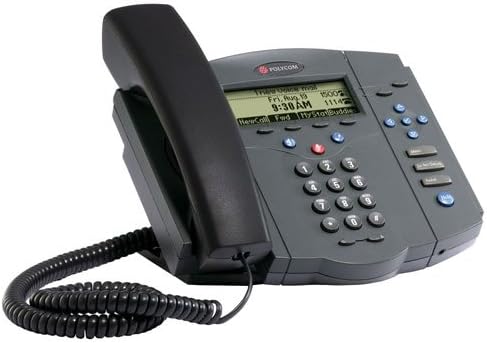
Figure 1: Polycom SoundPoint IP 430 Phone. This image displays the complete phone unit, including the main body, handset, and coiled handset cord. The phone features a monochrome LCD display, a numeric keypad, and various function buttons for call management.
Once connected, the phone will power on and begin its boot-up sequence. This may take a few moments as it connects to the network and registers with your VoIP system.
3. Návod k obsluze
3.1 Základní funkce volání
- Uskutečnění hovoru:
- Pick up the handset, press the Speaker button, or press a Line button.
- Vytočte požadované číslo pomocí klávesnice.
- Press the "Dial" soft key or wait for the call to connect automatically.
- Přijetí hovoru:
- Pick up the handset, press the Speaker button, or press the flashing Line button.
- Ukončení hovoru:
- Hang up the handset, press the Speaker button again, or press the "End Call" soft key.
3.2 Hlasitý odposlech a ztlumení zvuku
- Pomocí hlasitého odposlechu: Stiskněte tlačítko Reproduktor button to toggle speakerphone mode on or off.
- Vypnutí mikrofonu: Během hovoru stiskněte Ztlumit button to mute your microphone. The button will illuminate when active. Press again to unmute.
3.3 Ovládání hlasitosti
Použijte Objem buttons (located below the display) to adjust the volume of the handset, speakerphone, or ringer, depending on the phone's current state.
3.4 Hold and Transfer
- Přidržení hovoru: Během aktivního hovoru stiskněte Držet soft key. To resume the call, press the flashing Line button or the "Resume" soft key.
- Přepojení hovoru:
- Během aktivního hovoru stiskněte Převod soft key. The current call will be placed on hold.
- Vytočte číslo strany, na kterou chcete hovor přesměrovat.
- Once the second party answers, you can announce the call (consulted transfer) or press the Převod soft key again to complete the transfer (blind transfer).
3.5 Voicemail Access
Stiskněte tlačítko Zprávy button (envelope icon) to access your voicemail. Follow the audio prompts to retrieve your messages.
4. Údržba
4.1 Čištění telefonu
- Použijte měkký, mírně damp, lint-free cloth to clean the phone's exterior.
- Nepoužívejte abrazivní čisticí prostředky, vosky ani rozpouštědla.
- Nestříkejte tekutiny přímo na telefon.
- Ensure the phone is disconnected from power before cleaning.
4.2 Obecná péče
- Keep the phone away from excessive heat sources, direct sunlight, and moisture.
- Zabraňte pádu telefonu na zem nebo jeho vystavování silným nárazům.
5. Řešení problémů
This section addresses common issues you might encounter with your Polycom SoundPoint IP 430 phone.
| Problém | Možná příčina | Řešení |
|---|---|---|
| Telefon se nezapne. | Chybí napájení nebo je vadné připojení. |
|
| Žádný oznamovací tón. | Problém s připojením k síti nebo telefon není zaregistrován. |
|
| Neslyším volajícího / Volající neslyší mě. | Volume settings, mute active, or faulty handset/speaker. |
|
6. Specifikace
Key technical specifications for the Polycom SoundPoint IP 430 phone:
| Funkce | Detail |
|---|---|
| Rozměry produktu | 14 x 12.5 x 6 palce |
| Hmotnost položky | 3.55 libry |
| Číslo modelu | IP 430 |
| Značka | Polycom |
| Barva | Šedá |
| Typ telefonu | Kabelové |
| Zdroj napájení | Corded Electric (PoE compatible, external adapter not included) |
| Typ vytáčení | Jedna klávesnice |
| Typ systému odpovědí | Digitální |
| Možnost konferenčního hovoru | 2-cestný |
| Výrobce | Společnost Polycom Inc. |
7. Záruka a podpora
7.1 Informace o záruce
For specific warranty details regarding your Polycom SoundPoint IP 430 phone, please refer to the warranty documentation provided at the time of purchase or visit the official Polycom (now Poly) webZáruční podmínky se obvykle vztahují na výrobní vady po stanovenou dobu.
7.2 Technická podpora
If you require technical assistance beyond the scope of this manual, please contact your VoIP service provider or IT department. For direct manufacturer support, visit the Poly (formerly Polycom) support website for resources, FAQs, and contact information.


