Zavedení
The TRENDnet TC-CT68 Professional Crimping Tool is designed for efficient and reliable termination of Ethernet and telephone cables. This all-steel device combines crimping, cutting, and stripping functions for 8-position (RJ-45) and 6-position (RJ-12, RJ-11) modular plugs. Its robust construction and integrated features provide a convenient solution for various networking needs.
Nastavení a konecview
Before beginning any cable termination, familiarize yourself with the tool's components and functions.
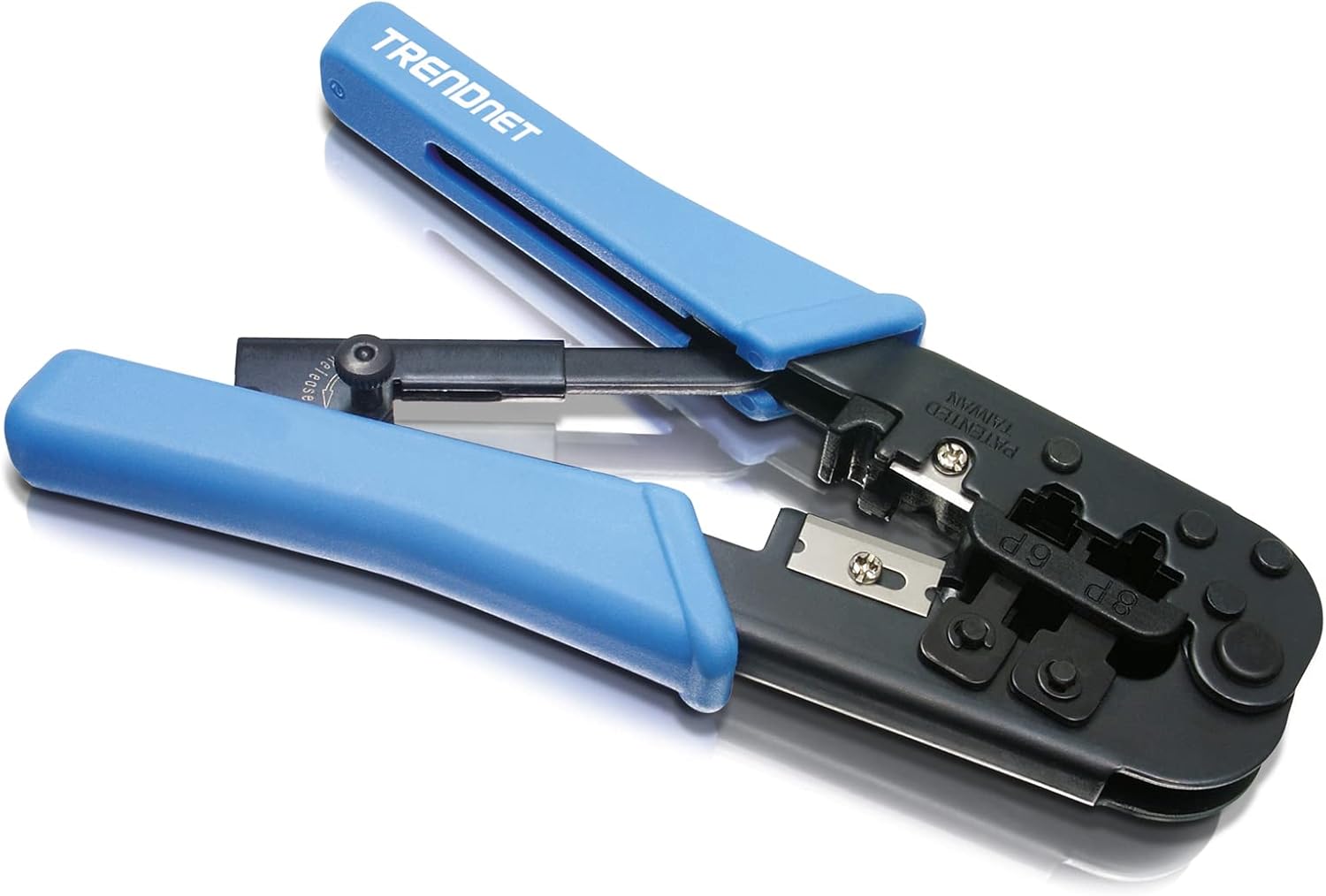
Obrázek 1: The TRENDnet TC-CT68 Professional Crimping Tool. This image shows the overall design of the tool with its blue handles and black metal body, highlighting its robust construction.
Klíčové vlastnosti:
- Celoocelová konstrukce: Ensures long-term durability and reliable performance.
- Integrovaný řezák: A sharp blade for precise cable cutting.
- Integrated Stripper: Designed to strip the outer jacket of flat cables.
- Crimping Cavities: Dedicated slots for 8P/RJ-45 (12mm) and 6P/RJ-12/RJ-11 (6mm) modular plugs.
- Ráčnakový mechanismus: Keeps the tool closed when not in use for safe storage.

Obrázek 2: Detailní záběr view of the crimping tool, indicating the 8-pin RJ-45 and 6-pin RJ-12/RJ-11 crimping cavities. This image helps identify the different functional parts of the tool.

Obrázek 3: The crimping tool shown alongside an Ethernet cable and a telephone cable, illustrating its compatibility with both types of modular plugs.
1 video: Konec produktuview Video. This video provides a brief demonstration of the TRENDnet TC-CT68 crimping tool's main functions: crimping, cutting, and stripping, highlighting its versatility for Ethernet and telephone cables.
Návod k obsluze
Follow these steps to properly cut, strip, and crimp Ethernet or telephone cables.
1. Preparing the Cable (Stripping and Cutting)
- Opatření: Determine the desired length of the cable.
- Strip the Outer Jacket:
- Open the crimping tool and locate the stripping blade (typically on the reverse side or a dedicated slot).
- Insert the cable into the stripping slot, ensuring only the outer jacket is aligned with the blade.
- Gently squeeze the handles and rotate the cable to score the jacket. Avoid cutting into the inner wires.
- Remove the stripped jacket to expose the twisted pairs of wires.
- Untwist and Arrange Wires: Carefully untwist the individual wire pairs. Straighten the wires and arrange them according to the desired wiring standard (e.g., T568A or T568B for Ethernet, or specific telephone wiring).
- Ořezové dráty: Once arranged, use the cutting blade of the tool to trim the wires to a uniform length, typically about 1/2 inch (1.25 cm) from the edge of the outer jacket. This ensures all wires reach the pins inside the connector.

Obrázek 4: A close-up of the crimping tool's stripping function, showing a cable being stripped to expose the inner wires. This demonstrates the integrated stripping capability.
2 video: HOW TO: Broken Telephone RJ11 Connector. This video demonstrates the process of stripping a telephone cable, arranging the wires, and preparing them for insertion into an RJ11 connector.
2. Inserting Wires into the Connector
- Vyberte konektor: Choose the appropriate modular plug (RJ-45 for 8 wires, RJ-11/RJ-12 for 4 or 6 wires).
- Vložte dráty: Carefully push the arranged wires into the connector, ensuring each wire slides into its designated channel. The cable jacket should extend slightly into the connector body for strain relief.
- Verify Order: Visually inspect the wires through the clear connector body to confirm they are in the correct sequence and fully seated against the front pins.

Obrázek 5: Demonstrates the correct way to insert the prepared wires into an RJ-45 connector, ensuring proper alignment and seating before crimping.
3. Crimping the Connector
- Konektor pozice: Insert the prepared connector into the corresponding crimping cavity on the tool (8P for RJ-45, 6P for RJ-11/RJ-12). Ensure the connector is fully seated.
- Krimpování: Squeeze the handles of the tool firmly and completely until the ratchet mechanism releases. This action pushes the pins into the wires and secures the cable jacket.
- Kontrolovat: Remove the crimped connector and visually inspect it. The pins should be evenly pressed into the wires, and the cable jacket should be securely held by the connector's strain relief.

Obrázek 6: Shows the crimping tool in action, securing an RJ-45 connector onto an Ethernet cable. The image highlights the proper placement of the connector within the tool's cavity and the final crimping action.
Údržba
To ensure the longevity and optimal performance of your TRENDnet TC-CT68 crimping tool, follow these maintenance guidelines:
- Čištění: Regularly wipe down the tool with a clean, dry cloth to remove dust, dirt, and cable debris.
- Mazání: Apply a small amount of light machine oil to the pivot points and moving parts periodically to ensure smooth operation.
- Kontrola čepele: Check the cutting and stripping blades for sharpness and damage. Replace if dull or chipped to prevent improper cable preparation.
- Skladování: Store the tool in a dry environment. Utilize the ratchet mechanism to keep the handles closed, preventing accidental injury and protecting the blades.
Odstraňování problémů
If you encounter issues while using your crimping tool, consider the following common problems and solutions:
- Poor Crimp/Loose Connection:
- Ensure the connector is fully seated in the correct crimping cavity.
- Apply firm and complete pressure until the ratchet mechanism cycles.
- Verify that the wires are fully inserted into the connector and make contact with the pins before crimping.
- Damaged Wires During Stripping:
- The stripping blade may be set too deep or you may be applying too much pressure. Adjust the cable position or use less force.
- Ensure the cable is rotated evenly during stripping to avoid uneven cuts.
- Cable Not Cutting Cleanly:
- The cutting blade may be dull. Inspect and replace if necessary.
- Ensure the cable is positioned correctly in the cutting slot.
- Wires Not Fitting into Connector:
- Ensure the wires are straightened and trimmed to the correct length.
- Verify you are using the correct size connector for the cable type (e.g., RJ-45 for 8 wires).
Specifikace
| Funkce | Detail |
|---|---|
| Značka | TRENDnet |
| Číslo modelu | TC-CT68 |
| Materiál | Legovaná ocel |
| Barva | Modrá/Černá |
| Hmotnost položky | 11.2 unce |
| Rozměry produktu | 10 x 4.25 x 1.5 palce |
| Kompatibilní zástrčky | 8P/RJ-45, 6P/RJ-12, RJ-11 |
| Funkce | Crimp, Cut, Strip |
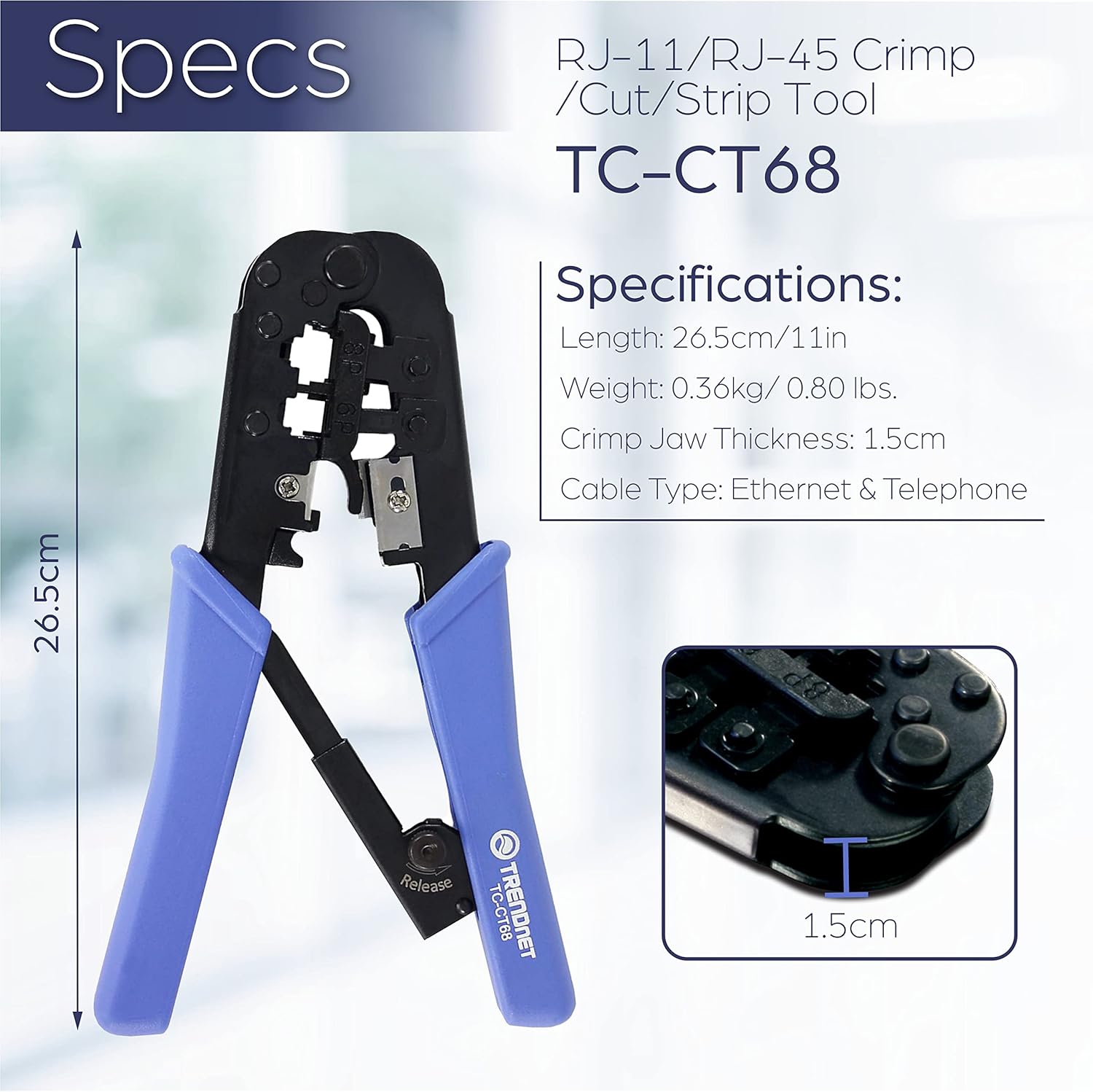
Obrázek 7: A visual representation of the TRENDnet TC-CT68 crimping tool's specifications, including its length, weight, crimp jaw thickness, and compatible cable types.
Záruka a podpora
TRENDnet stands by the quality of its products.
- Manufacturer Protection: The TC-CT68 RJ-11/RJ-45 Crimp/Cut/Strip Tool is backed with a 1-year TRENDnet Manufacturer Protection.
- Technická podpora: Toll-Free technical support is available during normal business hours. Contact information can be found on the official TRENDnet webmísto nebo obal produktu.


