Zavedení
Děkuji za nákupasing the GPX C3960 Personal CD/MP3 Player. This manual provides detailed instructions for the proper setup, operation, and maintenance of your device. Please read this manual thoroughly before use and retain it for future reference.
Obsah balení
Ujistěte se, že v balení jsou přítomny všechny položky:
- GPX C3960 Personal CD/MP3 Player
- Stereo sluchátka
- Uživatelská příručka (tento dokument)
Konec produktuview
Familiarize yourself with the components and features of your GPX C3960 player.
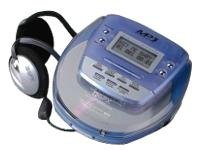
Image: The GPX C3960 Personal CD/MP3 Player, shown in a translucent blue casing, with a pair of silver over-ear headphones connected. The player features a small LCD screen and control buttons on its top surface.
Klíčové vlastnosti:
- CD-R/RW and MP3 disc playback compatibility
- Anti-skip protection: 45 seconds for audio CDs, 120 seconds for MP3 CDs
- Dynamic Bass Boost (DBB) for enhanced audio output
- 24-track programmable memory
- Low battery alert indicator
- Funguje na 2 AA baterie
Nastavení
1. Instalace baterie
- Locate the battery compartment on the bottom of the player.
- Otevřete kryt bateriového prostoru.
- Vložte dvě (2) baterie typu AA a dbejte na správnou polaritu (+ a -) vyznačenou uvnitř přihrádky.
- Bezpečně zavřete kryt bateriového prostoru.
- Poznámka: Replace batteries when the low battery indicator appears on the display or when playback performance degrades.
2. Připojení sluchátek
- Plug the stereo earbuds or your preferred headphones into the TELEFONY jack located on the side of the player.
Návod k obsluze
1. Zapnutí/vypnutí
- Pro zapnutí stiskněte PŘEHRÁT/PAUZA (►/‖‖) tlačítko.
- Pro vypnutí stiskněte tlačítko STOP (■) button twice, or wait for the auto-power off feature to activate after a period of inactivity.
2. Loading a CD/MP3 Disc
- Stiskněte tlačítko OTEVŘENO button to open the disc compartment lid.
- Carefully place a CD or MP3 disc onto the center spindle with the label side facing up.
- Jemně zatlačte disk dolů, dokud nezacvakne na místo.
- Close the disc compartment lid firmly until it latches.
3. Základní přehrávání
- Přehrát/pozastavit: Stiskněte PŘEHRÁT/PAUZA (►/‖‖) pro spuštění nebo pozastavení přehrávání.
- Stop: Stiskněte STOP (■) pro zastavení přehrávání.
- Přeskočit skladby: Stiskněte PŘESKOČIT VPŘED (►►) or SKIP BACKWARD (◄◄) to move to the next or previous track.
- Vyhledávání: Stiskněte a podržte PŘESKOČIT VPŘED (►►) or SKIP BACKWARD (◄◄) during playback to fast-forward or rewind within a track.
4. Ovládání hlasitosti
- Upravte OBJEM dial located on the side of the player to increase or decrease the audio output level.
5. Dynamic Bass Boost (DBB)
- Stiskněte tlačítko DBB button to activate or deactivate the dynamic bass boost feature, which enhances low-frequency sounds.
6. Ochrana proti přeskakování
The GPX C3960 features electronic anti-skip protection to prevent audio interruptions during movement. This provides approximately 45 seconds of protection for standard audio CDs and 120 seconds for MP3 CDs.
7. Programování stop
- With the player stopped, press the PROG tlačítko. Kontrolka programu bude blikat.
- Použijte PŘESKOČIT VPŘED (►►) or SKIP BACKWARD (◄◄) tlačítka pro výběr požadované stopy.
- Stiskněte PROG again to add the selected track to the program memory.
- Repeat steps 2 and 3 for up to 24 tracks.
- Stiskněte PŘEHRÁT/PAUZA (►/‖‖) to start playback of the programmed sequence.
- To clear the program, open the disc compartment or press STOP (■) dvakrát.
Údržba
Čištění jednotky
- Wipe the exterior of the player with a soft, slightly damp tkanina. Nepoužívejte abrazivní čisticí prostředky nebo rozpouštědla.
- Never open the disc compartment while the player is operating.
- Keep the lens clean. If the lens becomes dirty, use a soft camera lens brush to gently remove dust.
Péče o baterie
- Pokud nebudete přístroj delší dobu používat, vyjměte baterie, abyste zabránili jejich vytečení.
- Nekombinujte staré a nové baterie ani různé typy baterií.
Manipulace s diskem
- Disky manipulujte za hrany, abyste zabránili otiskům prstů a poškrábání.
- Pokud disky nepoužíváte, uchovávejte je v jejich obalech.
- Disky čistěte měkkým hadříkem, který nepouští vlákna, a otírejte je od středu směrem ven.
Odstraňování problémů
| Problém | Možná příčina | Řešení |
|---|---|---|
| Žádná síla | Baterie jsou vybité nebo nesprávně vložené. | Vyměňte baterie za nové, dbejte přitom na správnou polaritu. |
| Disk se nepřehrává / chyba „ŽÁDNÝ DISK“ | Disk je znečištěný, poškrábaný nebo nesprávně vložený. | Clean the disc. Reinsert the disc with the label side up. Try a different disc. |
| Zvuk přeskakuje nebo je zkreslený | Disc is dirty, scratched, or player is subjected to excessive vibration. | Clean the disc. Ensure the player is on a stable surface or reduce movement. |
| Žádný zvuk ze sluchátek | Headphones not properly connected or volume too low. | Ujistěte se, že jsou sluchátka správně zapojena. Zvyšte hlasitost. Vyzkoušejte s jinými sluchátky. |
Specifikace
- Značka: GPX
- Model: C3960
- Podporovaná média: CD, CD-R, CD-RW, MP3-CD
- Ochrana proti přeskakování: 45 seconds (CD), 120 seconds (MP3-CD)
- Zdroj napájení: 2 x AA baterie
- Speciální funkce: Přenosný
- Hmotnost položky: Přibližně 726 g
- Rozměry: Approximately 40.64 x 38.1 x 30.48 cm (Package Dimensions)
Záruka a podpora
For warranty information or technical support, please refer to the documentation included with your purchase or visit the official GPX webUschovejte si doklad o koupi pro případ reklamace.


